[Issue]: 10.8.0 Error in ffprobe? #3889

Closed
opened 2026-02-07 00:04:03 +03:00 by OVERLORD · 7 comments
Owner

Originally created by @lue30499 on GitHub (Jun 11, 2022).

Please describe your bug

Jellyfin 10.8.0

I upgraded to 10.8.0 and now media wont play when it did before
I get the attached errors when trying to play anything in the web client.

Jellyfin is installed through the apt repo.

Jellyfin Version

10.8.0

if other:

No response

Environment

- OS:Debian 11
- Virtualization: Proxmox LXC

Proxmox LXC conf:

arch: amd64
cores: 4
features: mount=nfs,nesting=1
hostname: jellyfin
memory: 2048
net0: name=eth0,bridge=vmbr0,hwaddr=xx:xx:xx:xx:xx:xx,ip=dhcp,tag=20,type=veth
onboot: 0
ostype: debian
rootfs: local-lvm:vm-114-disk-1,size=12G
swap: 512
lxc.mount.entry: /dev/dri/card0 dev/dri/card0 none bind,optional,create=file
lxc.mount.entry: /dev/dri/renderD128 dev/dri/renderD128 none bind,optional,create=file
lxc.cgroup2.devices.allow: c 226:* rwm
lxc.autodev: 1

- Clients: Web
- Browser: Chrome 
- FFmpeg Version: jellyfin-ffmpeg5 (5.0.1-5-bullseye), No standard ffmpeg
- Playback Method: Not Sure, Errors straight away.
- Hardware Acceleration: VAAPI
- Plugins: none
- Reverse Proxy: none
- Networking: Proxmox Bridge
- Storage: NFS

Jellyfin logs

[2022-06-11 15:02:21.355 +10:00] [ERR] Error in "ffprobe"
System.Text.Json.JsonException: The JSON value could not be converted to System.Int32. Path: $.chapters[0].id | LineNumber: 278 | BytePositionInLine: 38.
 ---> System.FormatException: Either the JSON value is not in a supported format, or is out of bounds for an Int32.
   at System.Text.Json.Utf8JsonReader.GetInt32()
   at System.Text.Json.Serialization.JsonConverter`1.TryRead(Utf8JsonReader& reader, Type typeToConvert, JsonSerializerOptions options, ReadStack& state, T& value)
   at System.Text.Json.JsonPropertyInfo`1.ReadJsonAndSetMember(Object obj, ReadStack& state, Utf8JsonReader& reader)
   at System.Text.Json.Serialization.Converters.ObjectDefaultConverter`1.OnTryRead(Utf8JsonReader& reader, Type typeToConvert, JsonSerializerOptions options, ReadStack& state, T& value)
   at System.Text.Json.Serialization.JsonConverter`1.TryRead(Utf8JsonReader& reader, Type typeToConvert, JsonSerializerOptions options, ReadStack& state, T& value)
   at System.Text.Json.Serialization.Converters.IEnumerableDefaultConverter`2.OnTryRead(Utf8JsonReader& reader, Type typeToConvert, JsonSerializerOptions options, ReadStack& state, TCollection& value)
   at System.Text.Json.Serialization.JsonConverter`1.TryRead(Utf8JsonReader& reader, Type typeToConvert, JsonSerializerOptions options, ReadStack& state, T& value)
   at System.Text.Json.JsonPropertyInfo`1.ReadJsonAndSetMember(Object obj, ReadStack& state, Utf8JsonReader& reader)
   at System.Text.Json.Serialization.Converters.ObjectDefaultConverter`1.OnTryRead(Utf8JsonReader& reader, Type typeToConvert, JsonSerializerOptions options, ReadStack& state, T& value)
   at System.Text.Json.Serialization.JsonConverter`1.TryRead(Utf8JsonReader& reader, Type typeToConvert, JsonSerializerOptions options, ReadStack& state, T& value)
   at System.Text.Json.Serialization.JsonConverter`1.ReadCore(Utf8JsonReader& reader, JsonSerializerOptions options, ReadStack& state)
   --- End of inner exception stack trace ---
   at System.Text.Json.ThrowHelper.ReThrowWithPath(ReadStack& state, Utf8JsonReader& reader, Exception ex)
   at System.Text.Json.Serialization.JsonConverter`1.ReadCore(Utf8JsonReader& reader, JsonSerializerOptions options, ReadStack& state)
   at System.Text.Json.JsonSerializer.ReadCore[TValue](JsonReaderState& readerState, Boolean isFinalBlock, ReadOnlySpan`1 buffer, JsonSerializerOptions options, ReadStack& state, JsonConverter converterBase)
   at System.Text.Json.JsonSerializer.ReadAsync[TValue](Stream utf8Json, Type returnType, JsonSerializerOptions options, CancellationToken cancellationToken)
   at MediaBrowser.MediaEncoding.Encoder.MediaEncoder.GetMediaInfoInternal(String inputPath, String primaryPath, MediaProtocol protocol, Boolean extractChapters, String probeSizeArgument, Boolean isAudio, Nullable`1 videoType, Boolean forceEnableLogging, CancellationToken cancellationToken)
   at MediaBrowser.Providers.MediaInfo.FFProbeVideoInfo.ProbeVideo[T](T item, MetadataRefreshOptions options, CancellationToken cancellationToken)
   at MediaBrowser.Providers.Manager.MetadataService`2.RunCustomProvider(ICustomMetadataProvider`1 provider, TItemType item, String logName, MetadataRefreshOptions options, RefreshResult refreshResult, CancellationToken cancellationToken)

FFmpeg logs

No response

Please attach any browser or client logs here

173186537-e275ef45-fcbb-46e6-a873-ab3122548f2a

Please attach any screenshots here

Screenshot from 2022-06-11 21-33-39
Screenshot from 2022-06-11 21-32-57

Code of Conduct

  • I agree to follow this project's Code of Conduct
Originally created by @lue30499 on GitHub (Jun 11, 2022). ### Please describe your bug Jellyfin 10.8.0 I upgraded to 10.8.0 and now media wont play when it did before I get the attached errors when trying to play anything in the web client. Jellyfin is installed through the apt repo. ### Jellyfin Version 10.8.0 ### if other: _No response_ ### Environment ```markdown - OS:Debian 11 - Virtualization: Proxmox LXC Proxmox LXC conf: arch: amd64 cores: 4 features: mount=nfs,nesting=1 hostname: jellyfin memory: 2048 net0: name=eth0,bridge=vmbr0,hwaddr=xx:xx:xx:xx:xx:xx,ip=dhcp,tag=20,type=veth onboot: 0 ostype: debian rootfs: local-lvm:vm-114-disk-1,size=12G swap: 512 lxc.mount.entry: /dev/dri/card0 dev/dri/card0 none bind,optional,create=file lxc.mount.entry: /dev/dri/renderD128 dev/dri/renderD128 none bind,optional,create=file lxc.cgroup2.devices.allow: c 226:* rwm lxc.autodev: 1 - Clients: Web - Browser: Chrome - FFmpeg Version: jellyfin-ffmpeg5 (5.0.1-5-bullseye), No standard ffmpeg - Playback Method: Not Sure, Errors straight away. - Hardware Acceleration: VAAPI - Plugins: none - Reverse Proxy: none - Networking: Proxmox Bridge - Storage: NFS ``` ### Jellyfin logs ```shell [2022-06-11 15:02:21.355 +10:00] [ERR] Error in "ffprobe" System.Text.Json.JsonException: The JSON value could not be converted to System.Int32. Path: $.chapters[0].id | LineNumber: 278 | BytePositionInLine: 38. ---> System.FormatException: Either the JSON value is not in a supported format, or is out of bounds for an Int32. at System.Text.Json.Utf8JsonReader.GetInt32() at System.Text.Json.Serialization.JsonConverter`1.TryRead(Utf8JsonReader& reader, Type typeToConvert, JsonSerializerOptions options, ReadStack& state, T& value) at System.Text.Json.JsonPropertyInfo`1.ReadJsonAndSetMember(Object obj, ReadStack& state, Utf8JsonReader& reader) at System.Text.Json.Serialization.Converters.ObjectDefaultConverter`1.OnTryRead(Utf8JsonReader& reader, Type typeToConvert, JsonSerializerOptions options, ReadStack& state, T& value) at System.Text.Json.Serialization.JsonConverter`1.TryRead(Utf8JsonReader& reader, Type typeToConvert, JsonSerializerOptions options, ReadStack& state, T& value) at System.Text.Json.Serialization.Converters.IEnumerableDefaultConverter`2.OnTryRead(Utf8JsonReader& reader, Type typeToConvert, JsonSerializerOptions options, ReadStack& state, TCollection& value) at System.Text.Json.Serialization.JsonConverter`1.TryRead(Utf8JsonReader& reader, Type typeToConvert, JsonSerializerOptions options, ReadStack& state, T& value) at System.Text.Json.JsonPropertyInfo`1.ReadJsonAndSetMember(Object obj, ReadStack& state, Utf8JsonReader& reader) at System.Text.Json.Serialization.Converters.ObjectDefaultConverter`1.OnTryRead(Utf8JsonReader& reader, Type typeToConvert, JsonSerializerOptions options, ReadStack& state, T& value) at System.Text.Json.Serialization.JsonConverter`1.TryRead(Utf8JsonReader& reader, Type typeToConvert, JsonSerializerOptions options, ReadStack& state, T& value) at System.Text.Json.Serialization.JsonConverter`1.ReadCore(Utf8JsonReader& reader, JsonSerializerOptions options, ReadStack& state) --- End of inner exception stack trace --- at System.Text.Json.ThrowHelper.ReThrowWithPath(ReadStack& state, Utf8JsonReader& reader, Exception ex) at System.Text.Json.Serialization.JsonConverter`1.ReadCore(Utf8JsonReader& reader, JsonSerializerOptions options, ReadStack& state) at System.Text.Json.JsonSerializer.ReadCore[TValue](JsonReaderState& readerState, Boolean isFinalBlock, ReadOnlySpan`1 buffer, JsonSerializerOptions options, ReadStack& state, JsonConverter converterBase) at System.Text.Json.JsonSerializer.ReadAsync[TValue](Stream utf8Json, Type returnType, JsonSerializerOptions options, CancellationToken cancellationToken) at MediaBrowser.MediaEncoding.Encoder.MediaEncoder.GetMediaInfoInternal(String inputPath, String primaryPath, MediaProtocol protocol, Boolean extractChapters, String probeSizeArgument, Boolean isAudio, Nullable`1 videoType, Boolean forceEnableLogging, CancellationToken cancellationToken) at MediaBrowser.Providers.MediaInfo.FFProbeVideoInfo.ProbeVideo[T](T item, MetadataRefreshOptions options, CancellationToken cancellationToken) at MediaBrowser.Providers.Manager.MetadataService`2.RunCustomProvider(ICustomMetadataProvider`1 provider, TItemType item, String logName, MetadataRefreshOptions options, RefreshResult refreshResult, CancellationToken cancellationToken) ``` ### FFmpeg logs _No response_ ### Please attach any browser or client logs here ![173186537-e275ef45-fcbb-46e6-a873-ab3122548f2a](https://user-images.githubusercontent.com/63104612/173186684-ef8c36dd-fc23-4f60-b8eb-d2369db1e970.png) ### Please attach any screenshots here ![Screenshot from 2022-06-11 21-33-39](https://user-images.githubusercontent.com/63104612/173186349-e3ca7e88-d412-452f-abbb-0daa9d2a51ce.png) ![Screenshot from 2022-06-11 21-32-57](https://user-images.githubusercontent.com/63104612/173186353-9038683d-badc-4111-a70d-36a18aacb92a.png) ### Code of Conduct - [X] I agree to follow this project's Code of Conduct
OVERLORD added the bug label 2026-02-07 00:04:03 +03:00
Author
Owner

@nyanmisaka commented on GitHub (Jun 11, 2022):

Are you sure it's 10.8.0 release?
AFAIK this issue has been fixed in https://github.com/jellyfin/jellyfin/pull/7363

@nyanmisaka commented on GitHub (Jun 11, 2022): Are you sure it's 10.8.0 release? AFAIK this issue has been fixed in https://github.com/jellyfin/jellyfin/pull/7363
Author
Owner

@lue30499 commented on GitHub (Jun 11, 2022):

As far as I know yes. All I did was run apt update && apt upgrade and the jellyfin packages were downloaded/upgraded.

The UI says it is as well:
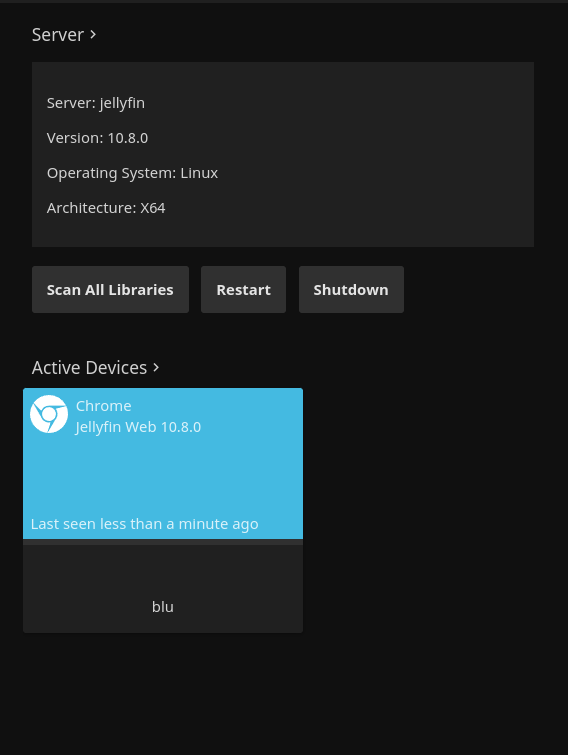
image

@lue30499 commented on GitHub (Jun 11, 2022): As far as I know yes. All I did was run apt update && apt upgrade and the jellyfin packages were downloaded/upgraded. The UI says it is as well: ![image](https://user-images.githubusercontent.com/63104612/173187001-42778f9d-164e-4fe0-8094-61e0de414b20.png)
Author
Owner

@Stampede10343 commented on GitHub (Jun 11, 2022):

I'm getting a similar error message, although the log points to not having a path to ffmpeg..
[2022-06-11 17:17:12.263 +00:00] [ERR] [87] Jellyfin.Server.Middleware.ExceptionMiddleware: Error processing request. URL "GET" "/videos/39622bc9-2b68-62c7-1743-75334f89efba/hls1/main/0.ts". System.ArgumentException: FFmpeg path not set.

Just upgraded to 10.8 in Docker on Linux

EDIT:
I was able to fix it by setting the path in Playback settings to:
/usr/lib/jellyfin-ffmpeg/ffmpeg

@Stampede10343 commented on GitHub (Jun 11, 2022): I'm getting a similar error message, although the log points to not having a path to ffmpeg.. ` [2022-06-11 17:17:12.263 +00:00] [ERR] [87] Jellyfin.Server.Middleware.ExceptionMiddleware: Error processing request. URL "GET" "/videos/39622bc9-2b68-62c7-1743-75334f89efba/hls1/main/0.ts". System.ArgumentException: FFmpeg path not set. ` Just upgraded to 10.8 in Docker on Linux EDIT: I was able to fix it by setting the path in Playback settings to: `/usr/lib/jellyfin-ffmpeg/ffmpeg`
Author
Owner

@Nazar78 commented on GitHub (Jun 12, 2022):

Yes, for 10.8.0 reverting back to /usr/lib/jellyfin-ffmpeg/ffmpeg fixed it. I also had issues with Debian 11 main stream ffmpeg, with hardware accelerations enabled, the conversion rate dropped from 70fps to <5fps which made the client waited took too long for playback to start.

@Nazar78 commented on GitHub (Jun 12, 2022): Yes, for 10.8.0 reverting back to /usr/lib/jellyfin-ffmpeg/ffmpeg fixed it. I also had issues with Debian 11 main stream ffmpeg, with hardware accelerations enabled, the conversion rate dropped from 70fps to <5fps which made the client waited took too long for playback to start.
Author
Owner

@AnonymousWebHacker commented on GitHub (Nov 29, 2022):

some error Jellyfin Server V: 10.8.7, Ubuntu Server

Nov 29 14:49:42 mediax-server jellyfin[640]: [14:49:42] [ERR] Error in ffprobe
Nov 29 14:49:42 mediax-server jellyfin[640]: System.InvalidOperationException: Cannot start process because a file name has not been provided.
Nov 29 14:49:42 mediax-server jellyfin[640]:    at System.Diagnostics.Process.Start()
Nov 29 14:49:42 mediax-server jellyfin[640]:    at MediaBrowser.MediaEncoding.Encoder.MediaEncoder.StartProcess(ProcessWrapper process)
Nov 29 14:49:42 mediax-server jellyfin[640]:    at MediaBrowser.MediaEncoding.Encoder.MediaEncoder.GetMediaInfoInternal(String inputPath, String primaryPath, MediaProtocol protocol, Boolean extractChapters, String probeSizeArgument, Boolean isAudio, Nullable`1 videoType, Boolean forceEnableLogging, CancellationToken cancellationToken)
Nov 29 14:49:42 mediax-server jellyfin[640]:    at MediaBrowser.Providers.MediaInfo.FFProbeVideoInfo.ProbeVideo[T](T item, MetadataRefreshOptions options, CancellationToken cancellationToken)
Nov 29 14:49:42 mediax-server jellyfin[640]:    at MediaBrowser.Providers.Manager.MetadataService`2.RunCustomProvider(ICustomMetadataProvider`1 provider, TItemType item, String logName, MetadataRefreshOptions options, RefreshResult refreshResult, CancellationToken cancellationToken)

@AnonymousWebHacker commented on GitHub (Nov 29, 2022): some error Jellyfin Server V: 10.8.7, Ubuntu Server ``` Nov 29 14:49:42 mediax-server jellyfin[640]: [14:49:42] [ERR] Error in ffprobe Nov 29 14:49:42 mediax-server jellyfin[640]: System.InvalidOperationException: Cannot start process because a file name has not been provided. Nov 29 14:49:42 mediax-server jellyfin[640]: at System.Diagnostics.Process.Start() Nov 29 14:49:42 mediax-server jellyfin[640]: at MediaBrowser.MediaEncoding.Encoder.MediaEncoder.StartProcess(ProcessWrapper process) Nov 29 14:49:42 mediax-server jellyfin[640]: at MediaBrowser.MediaEncoding.Encoder.MediaEncoder.GetMediaInfoInternal(String inputPath, String primaryPath, MediaProtocol protocol, Boolean extractChapters, String probeSizeArgument, Boolean isAudio, Nullable`1 videoType, Boolean forceEnableLogging, CancellationToken cancellationToken) Nov 29 14:49:42 mediax-server jellyfin[640]: at MediaBrowser.MediaEncoding.Encoder.MediaEncoder.GetMediaInfoInternal(String inputPath, String primaryPath, MediaProtocol protocol, Boolean extractChapters, String probeSizeArgument, Boolean isAudio, Nullable`1 videoType, Boolean forceEnableLogging, CancellationToken cancellationToken) Nov 29 14:49:42 mediax-server jellyfin[640]: at MediaBrowser.Providers.MediaInfo.FFProbeVideoInfo.ProbeVideo[T](T item, MetadataRefreshOptions options, CancellationToken cancellationToken) Nov 29 14:49:42 mediax-server jellyfin[640]: at MediaBrowser.Providers.Manager.MetadataService`2.RunCustomProvider(ICustomMetadataProvider`1 provider, TItemType item, String logName, MetadataRefreshOptions options, RefreshResult refreshResult, CancellationToken cancellationToken) ```
Author
Owner

@AnonymousWebHacker commented on GitHub (Nov 29, 2022):

Fixed:

It is only to specify in Settings / Playback, the path of the ffmpeg binaries (for transcoding), and that of ffprobe (test the videos, and extract extension, format, time of the video ..etc)

/usr/bin/ <--- This is ok

@AnonymousWebHacker commented on GitHub (Nov 29, 2022): Fixed: It is only to specify in Settings / Playback, the path of the ffmpeg binaries (for transcoding), and that of ffprobe (test the videos, and extract extension, format, time of the video ..etc) /usr/bin/ <--- This is ok
Author
Owner

@Bond-009 commented on GitHub (Dec 7, 2022):

Looks like setting the ffmpeg path should fix it, if not please comment or open a new issue.

@Bond-009 commented on GitHub (Dec 7, 2022): Looks like setting the ffmpeg path should fix it, if not please comment or open a new issue.
Sign in to join this conversation.
1 Participants
Notifications
Due Date
No due date set.
Dependencies

No dependencies set.

Reference: starred/jellyfin#3889