send: "current access count" not updating in web vault #999

Closed
opened 2026-02-04 23:35:29 +03:00 by OVERLORD · 3 comments
Owner

Originally created by @fbartels on GitHub (Mar 29, 2021).

Subject of the issue

The send feature allow to expire items once it has been requested a given amount of times. This in itself also word (e.g. saying a link should have a "maximum access count" of two, no longer works when visiting it for the third time. However the gui also has a field "current access count" which looks like it should show how often an item has been requested already, but this seems to be stuck a "0".

Deployment environment

  • bitwarden_rs version: 1.20.0
  • Install method: using bitwardenrs/server:1.20.0
  • Clients used: bundled web vailt
  • Reverse proxy and version: Apache
  • MySQL/MariaDB or PostgreSQL version: sqlite
  • Other relevant details: none

Steps to reproduce

  • go to https://domain/#/sends and create a new send
  • expand "options" and set "maximum access count to e.g. "2"
  • click save and visit the link

Expected behaviour

  • after visiting the link the "current access" should have increased from "0" to "1"

Actual behaviour

  • the counter stays at "0"

Troubleshooting data

Originally created by @fbartels on GitHub (Mar 29, 2021). ### Subject of the issue The send feature allow to expire items once it has been requested a given amount of times. This in itself also word (e.g. saying a link should have a "maximum access count" of two, no longer works when visiting it for the third time. However the gui also has a field "current access count" which looks like it should show how often an item has been requested already, but this seems to be stuck a "0". ### Deployment environment * bitwarden_rs version: 1.20.0 * Install method: using bitwardenrs/server:1.20.0 * Clients used: bundled web vailt * Reverse proxy and version: Apache * MySQL/MariaDB or PostgreSQL version: sqlite * Other relevant details: none ### Steps to reproduce - go to `https://domain/#/sends` and create a new send - expand "options" and set "maximum access count to e.g. "2" - click save and visit the link ### Expected behaviour - after visiting the link the "current access" should have increased from "0" to "1" ### Actual behaviour - the counter stays at "0" ### Troubleshooting data <!-- Share any log files, screenshots, or other relevant troubleshooting data -->
Author
Owner

@fbartels commented on GitHub (Mar 29, 2021):

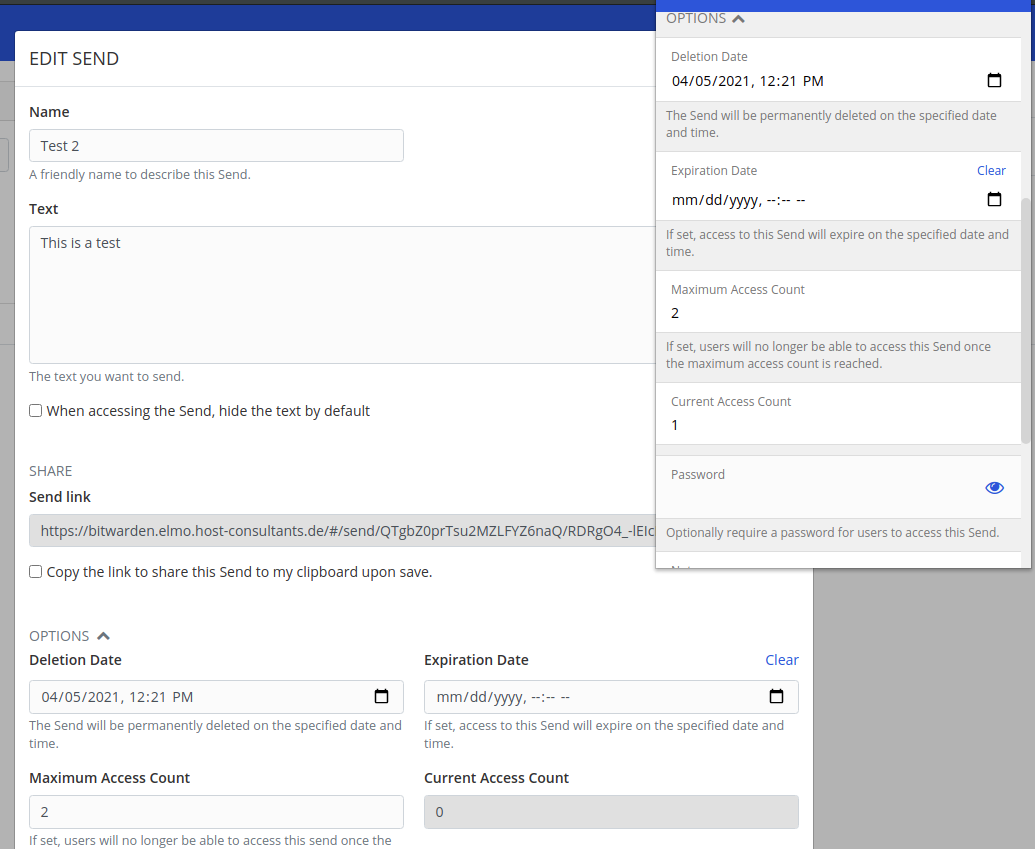
After opening this issue I went to the Chrome extension to see how this is displayed there and there the counter was successfully increased. Curiously after opening the element again in the web vault also there it now showed the correct amount of requests. I did make sure to reload the web vault before, but its counter stayed at zero.

Screenshot showing the web vault and the browser extension side by side:
image

@fbartels commented on GitHub (Mar 29, 2021): After opening this issue I went to the Chrome extension to see how this is displayed there and there the counter was successfully increased. Curiously after opening the element again in the web vault also there it now showed the correct amount of requests. I did make sure to reload the web vault before, but its counter stayed at zero. Screenshot showing the web vault and the browser extension side by side: ![image](https://user-images.githubusercontent.com/1257835/112823672-de558d00-9089-11eb-9130-e8c91bf08a1f.png)
Author
Owner

@Panja0 commented on GitHub (Mar 29, 2021):

Having the same problem on my side.
Refreshing (F5 or shift F5) does not change the status of the Current Access Count.

Logging out and logging back in to the web vault does change the Current Access Count though.

@Panja0 commented on GitHub (Mar 29, 2021): Having the same problem on my side. Refreshing (F5 or shift F5) does not change the status of the Current Access Count. Logging out and logging back in to the web vault **_does_** change the Current Access Count though.
Author
Owner

@BlackDex commented on GitHub (Mar 30, 2021):

If you switch to the My Vault page and back to Send it will update also.
We can not fix this, this also happens on upstream vault.bitwarden.com.

Duplicate of: #1554

@BlackDex commented on GitHub (Mar 30, 2021): If you switch to the `My Vault` page and back to `Send` it will update also. We can not fix this, this also happens on upstream vault.bitwarden.com. Duplicate of: #1554
Sign in to join this conversation.
1 Participants
Notifications
Due Date
No due date set.
Dependencies

No dependencies set.

Reference: starred/vaultwarden#999