mirror of
https://github.com/dani-garcia/vaultwarden.git
synced 2026-02-05 00:29:40 +03:00
2FA not working #975

Reference in New Issue
Block a user
Delete Branch "%!s()"
Deleting a branch is permanent. Although the deleted branch may continue to exist for a short time before it actually gets removed, it CANNOT be undone in most cases. Continue?
Originally created by @philw95 on GitHub (Mar 15, 2021).
Subject of the issue
2FA not working.

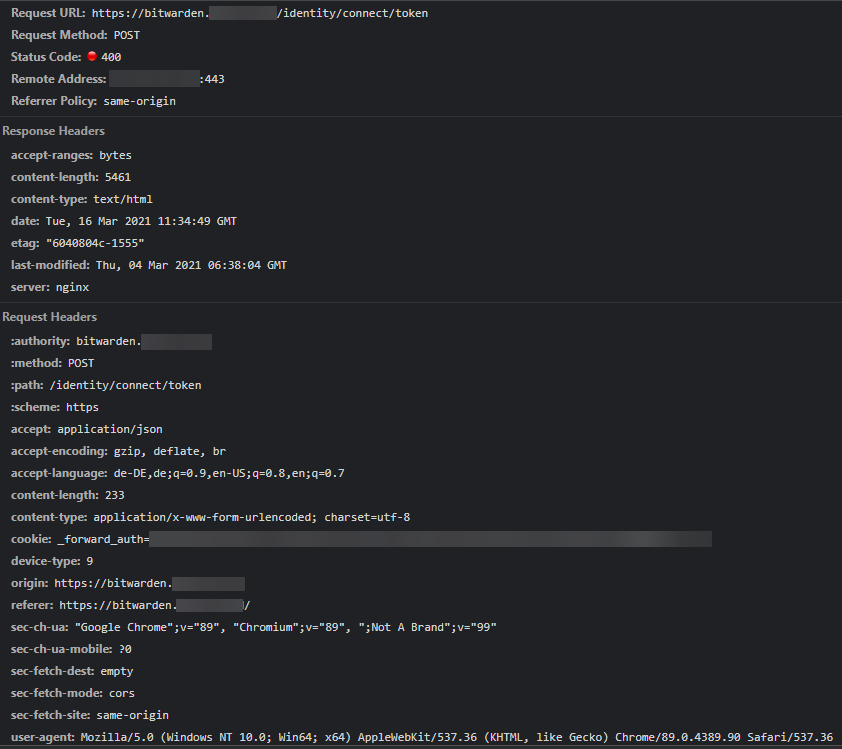
After login with email and password comes this error message:
I do not even get the possibility to enter the 2FA code
I have tested it with:
Google Authenticator
E-Mail
Everything works, just not 2FA
i use Traefik as Reverse Proxy
Deployment environment
Your environment (Generated via diagnostics page)
Config (Generated via diagnostics page)
bitwarden_rs version: v1.19.0
Install method: Docker image
Clients used: web vault, desktop, Android
Reverse proxy and version: Traefik 2.4.7
MySQL/MariaDB or PostgreSQL version: none
Other relevant details:
Steps to reproduce
Expected behaviour
Actual behaviour
Troubleshooting data
[2021-03-14 23:22:17.849][request][INFO] POST /api/accounts/prelogin
[2021-03-14 23:22:17.851][response][INFO] POST /api/accounts/prelogin (prelogin) => 200 OK
[2021-03-14 23:22:17.936][request][INFO] POST /identity/connect/token
[2021-03-14 23:22:17.996][error][ERROR] 2FA token not provided
[2021-03-14 23:22:17.996][response][INFO] POST /identity/connect/token (login) => 400 Bad Request
Traefik compose:
Traefik toml:
default.toml
Bitwarden compose:
@philw95 commented on GitHub (Mar 16, 2021):
Doesn't anyone have an idea?
Is this a general bug?
Or only in my case with Traefik?
I have already tried a few things, but I can't get it to work.
Here from Chrome:
@BlackDex commented on GitHub (Mar 16, 2021):
I think it is configuration. Please try the example from the wiki 'Traefik v2 (docker-compose example by hwwilliams)' https://github.com/dani-garcia/bitwarden_rs/wiki/Proxy-examples