importing failure - possibly too big file #972

Closed
opened 2025-10-09 16:58:54 +03:00 by OVERLORD · 8 comments
Owner

Originally created by @eleaner on GitHub.

Subject of the issue

The import of a bigger file fails but works perfectly on vault.bitwarden.com
Smaller files do work.

Is it possible that traefik (or something) has a default setting that limits sie of the request?

Deployment environment

Steps to reproduce

hard, possibly trying to import a bigger file
I tried bitwarden json ~600kb and dashlane CSV ~1500kb
import of smaller files works

Expected behaviour

the data is imported into database

Actual behaviour

the server reports

<!DOCTYPE HTML PUBLIC "-//IETF//DTD HTML 2.0//EN">
<html><head>
<title>400 Bad Request</title>
</head><body>
<h1>Bad Request</h1>
<p>Your browser sent a request that this server could not understand.<br />
</p>
</body></html>

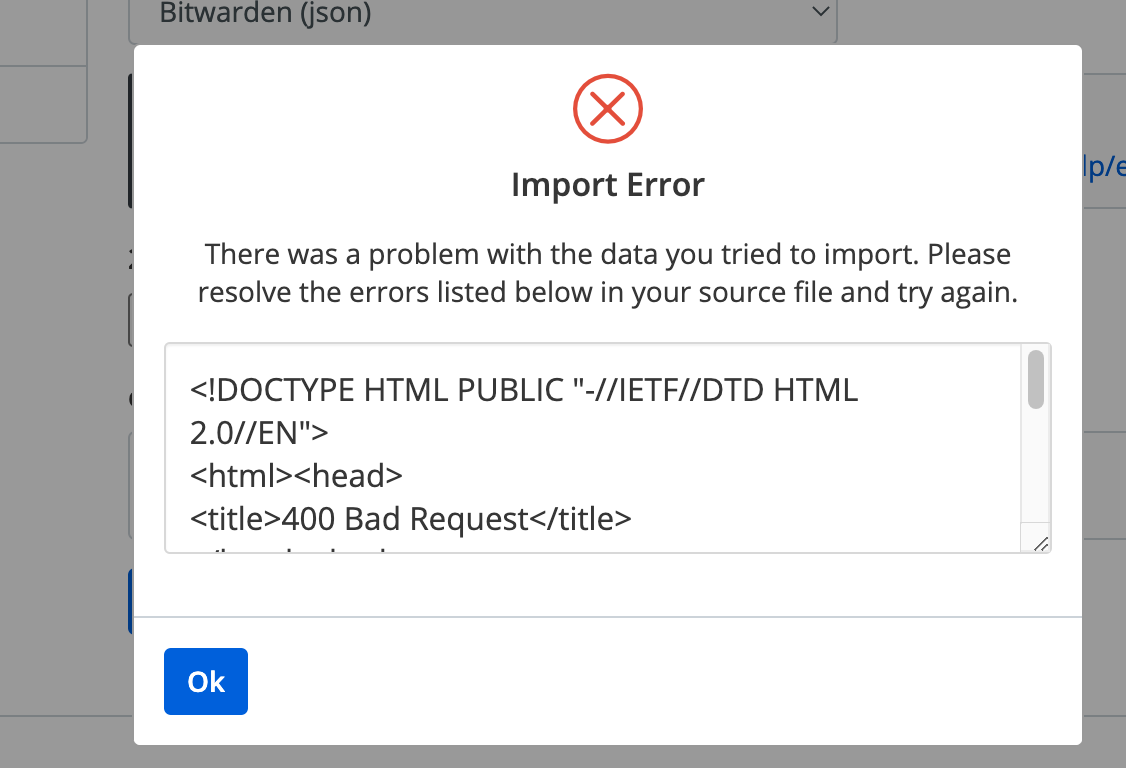
on web-ui
image

Troubleshooting data

Originally created by @eleaner on GitHub. ### Subject of the issue The import of a bigger file fails but works perfectly on vault.bitwarden.com Smaller files do work. Is it possible that traefik (or something) has a default setting that limits sie of the request? ### Deployment environment * Install method: docker-compose using this https://github.com/dani-garcia/vaultwarden/wiki/Docker---Traefik---ModSecurity-Setup * Clients used: web-ui/cli * Reverse proxy and version: traefik:latest * MySQL/MariaDB or PostgreSQL version: n/a * Other relevant details: ### Steps to reproduce hard, possibly trying to import a bigger file I tried bitwarden json ~600kb and dashlane CSV ~1500kb import of smaller files works ### Expected behaviour the data is imported into database ### Actual behaviour the server reports ``` <!DOCTYPE HTML PUBLIC "-//IETF//DTD HTML 2.0//EN"> <html><head> <title>400 Bad Request</title> </head><body> <h1>Bad Request</h1> <p>Your browser sent a request that this server could not understand.<br /> </p> </body></html> ``` on web-ui <img width="563" alt="image" src="https://user-images.githubusercontent.com/5169203/208974064-b88ce500-acfc-493d-984b-c272d5a637bf.png"> ### Troubleshooting data <!-- Share any log files, screenshots, or other relevant troubleshooting data -->
Author
Owner

@BlackDex commented on GitHub:

Maybe this can help?
https://doc.traefik.io/traefik/middlewares/http/buffering/#maxrequestbodybytes

I have never used it my self, so no clue actually.

@BlackDex commented on GitHub: Maybe this can help? https://doc.traefik.io/traefik/middlewares/http/buffering/#maxrequestbodybytes I have never used it my self, so no clue actually.
Author
Owner

@eleaner commented on GitHub:

The default configuration of ModSecurity seems to be set to:

# Maximum request body size we will accept for buffering. If you support
# file uploads then the value given on the first line has to be as large
# as the largest file you are willing to accept. The second value refers
# to the size of data, with files excluded. You want to keep that value as
# low as practical.
#
SecRequestBodyLimit 13107200
SecRequestBodyNoFilesLimit 131072

it should be plenty-enough

@eleaner commented on GitHub: The default configuration of ModSecurity seems to be set to: ``` # Maximum request body size we will accept for buffering. If you support # file uploads then the value given on the first line has to be as large # as the largest file you are willing to accept. The second value refers # to the size of data, with files excluded. You want to keep that value as # low as practical. # SecRequestBodyLimit 13107200 SecRequestBodyNoFilesLimit 131072 ``` it should be plenty-enough
Author
Owner

@eleaner commented on GitHub:

oh my
I am simply following the recipe without really understanding what might break
I see what you say, but I am not even sure where to check the things you mentioned

@eleaner commented on GitHub: oh my I am simply following the recipe without really understanding what might break I see what you say, but I am not even sure where to check the things you mentioned
Author
Owner

@BlackDex commented on GitHub:

Check the limits of your reverse proxy. All of this is done client side, encrypted, and then send. Some reverse proxies just cut off the request and send it further, if that happens here, the incoming json is invalid. I have successfully imported files of several MB's large without issues.

Also, check the modsecurity settings, those sometimes break the communication between client and server.

@BlackDex commented on GitHub: Check the limits of your reverse proxy. All of this is done client side, encrypted, and then send. Some reverse proxies just cut off the request and send it further, if that happens here, the incoming json is invalid. I have successfully imported files of several MB's large without issues. Also, check the modsecurity settings, those sometimes break the communication between client and server.
Author
Owner

@eleaner commented on GitHub:

Thank you for the hint, but unfortunately, that does not look like a solution

  1. I tried it, and it did not help
  2. the traefik default is zero, meaning that the request size is not limited. The option is there to define the max size if required and would return 413 when exceeded

I kind of suspect modsecurity now, but I am not even sure how to approach it.

@eleaner commented on GitHub: Thank you for the hint, but unfortunately, that does not look like a solution 1. I tried it, and it did not help 2. the traefik default is zero, meaning that the request size is not limited. The option is there to define the max size if required and would return 413 when exceeded I kind of suspect modsecurity now, but I am not even sure how to approach it.
Author
Owner

@BlackDex commented on GitHub:

If this values are bytes, then it's just 1MB for
the NoFilesLimit which is probably the cause of your issue here.

@BlackDex commented on GitHub: If this values are bytes, then it's just 1MB for the NoFilesLimit which is probably the cause of your issue here.
Author
Owner

@eleaner commented on GitHub:

@BlackDex looks like you were right
I found the error reported in the ModSecurioty logs
"Request body no files data length is larger than the configured limit (131072)."

adding EVN variable
MODSEC_REQ_BODY_NOFILES_LIMIT: 13107200
solved this problem

but subsequent load triggered a mass of errors reported by /etc/modsecurity.d/owasp-crs/rules/
combined with fail2ban I am now locked from my vw :(

I wonder if I need all this paranoia; maybe simple vw+traefik would be enough

time for bed

@eleaner commented on GitHub: @BlackDex looks like you were right I found the error reported in the ModSecurioty logs "Request body no files data length is larger than the configured limit (131072)." adding EVN variable `MODSEC_REQ_BODY_NOFILES_LIMIT: 13107200 ` solved this problem but subsequent load triggered a mass of errors reported by /etc/modsecurity.d/owasp-crs/rules/ combined with fail2ban I am now locked from my vw :( I wonder if I need all this paranoia; maybe simple vw+traefik would be enough time for bed
Author
Owner

@BlackDex commented on GitHub:

Also, check the logs of traefik, or increase the log level.

@BlackDex commented on GitHub: Also, check the logs of traefik, or increase the log level.
Sign in to join this conversation.
1 Participants
Notifications
Due Date
No due date set.
Dependencies

No dependencies set.

Reference: starred/vaultwarden#972