mirror of
https://github.com/dani-garcia/vaultwarden.git
synced 2026-03-01 11:19:52 +03:00
Performance Issues #962

Reference in New Issue
Block a user
Delete Branch "%!s()"
Deleting a branch is permanent. Although the deleted branch may continue to exist for a short time before it actually gets removed, it CANNOT be undone in most cases. Continue?
Originally created by @ncodee on GitHub (Mar 1, 2021).
Describe the Bug
When removing/adding entry on the web Vault, everything because super laggy, and unresponsive.
I have had the page completely freeze with a white screen, the only way to access the page again was to refresh it, which cancels out the current actions.
Steps To Reproduce
Delete/edit any item on the web Vault.
Expected Result
Be responsive, and not freezes the page.
Actual Result
Becomes unresponsive, and freezes.
Environment
Config (Generated via diagnostics page)
@BlackDex commented on GitHub (Mar 1, 2021):
Please supply more information preferably by using the
Generate Support Stringfrom the/admin/diagnosticspage.Also provide which database you are using, how many vault items you have etc...
@ncodee commented on GitHub (Mar 1, 2021):
Updated with more info thanks, unfortuantly the button didn't generate anything.
@BlackDex commented on GitHub (Mar 1, 2021):
Im still missing some logs, amount of ciphers etc.. we can't do anything with this. There is nothing we can use as a point of reference.
As a side note, what was the error when trying to generate the support string?
@ncodee commented on GitHub (Mar 1, 2021):
The button didn't function for some reason, with no error. I'm not sure what the issue was, but I've now managed to generate the support string. Please have a look at the OP, thanks.
@BlackDex commented on GitHub (Mar 1, 2021):
Well it all looks ok. Also don't think the amount of vault items it's very much.
Could you provide some logs when performing the actions which takes a lot of time?
docker logs 'bitwarden-container-name'Or the bitwarden.log
@ncodee commented on GitHub (Mar 1, 2021):
I've monitored the logs, and there's nothing unsual showing. It's weird, because the task occurs, and the page loads after a very long period of time, however the interface just becomes unresponsive/shows blank screen when you bulk delete/add entries.
I'm not sure if this is intended behaviour, but it takes an awfully long time.
The only thing the log shows is:
no .env file found. [2021-03-01 20:52:44.727][response][INFO] GET /icons/<domain>/icon.png (icon) => 404 Not Found@BlackDex commented on GitHub (Mar 2, 2021):
I do not see log lines regarding deletion here.
But, what do you see in the developer console of the browser (F12) when executing this? At the network tab it should show you some kind of timeline or loading time.
@ncodee commented on GitHub (Mar 2, 2021):
Here's a screenshot, however I didn't manage to capture the freeze as it happens on random occassions.
With this test, I've deleted around 66 passwords from the vault.
https://i.imgur.com/HM2H0ai.png
I will try to monitor when it does hang, and will update you with the results.
Thanks
@BlackDex commented on GitHub (Mar 2, 2021):
That image is not readable so i can't determine where to start looking.
I see something is taking long, but not what or which request.
Also these requests should be visible in the bitwarden.log and that should also help together with a readable screenshot.
@ncodee commented on GitHub (Mar 2, 2021):
You should be able to view the screenshot clearly by zooming in, or do you mean it doesn't provide much info?
I'm using bitwarden_rs as an Home Assistant addon on Ubuntu, and the logs in portainer/docker/addon do not record any data to show this info. Also, I'm not able to find the
bitwarden.logfile, once I do I will surely attach it here.@jjlin commented on GitHub (Mar 3, 2021):
This seems unlikely to be a bitwarden_rs issue. More likely it's something about your reverse proxy or networking configuration, or the way your addon has configured that. I'd suggest you take this issue to https://github.com/hassio-addons/addon-bitwarden.
@bit-bat commented on GitHub (Mar 14, 2021):
Hello, I am having some performance issues as well. Here is a small chunk of logs showing the issue #
If you look at the request that started at
22:10:46, you will notice that it took about 7 seconds. This was a delete request. Sometimes update or create requests take much longer (about 20 seconds). Is this normal?Support String:
Your environment (Generated via diagnostics page)
Config (Generated via diagnostics page)
@yverry commented on GitHub (Mar 18, 2021):
SQLite DB is not the best on performance side, do you reproduce on mysql/postgresql?
@bit-bat commented on GitHub (Mar 18, 2021):
I will have to figure out how to switch to postgres. I have a postgres instance running already with other schemas, would that be a security risk, given items in Bitwarden are end to end encrypted?
@jjlin commented on GitHub (Mar 18, 2021):
As password managers aren't write-intensive workloads, SQLite will likely perform better than MySQL/PostgreSQL for most users.
BTW, this is not clearly a bitwarden_rs issue, so you should take this to the forums.
@kmahyyg commented on GitHub (Aug 13, 2021):
Another performance problem here, I met now. Cloudflare continously give me 524 error after importing hundreds of password from 1p.
After check the discussion here: https://github.com/dani-garcia/bitwarden_rs/discussions/1470
I think things are not that clear.
I changed the worker number via ENV when running with docker, the workers are limited to 4 concurrently.
However, the log reveals that The web page were trying to downloading all the favicon of the items recorded in my account, since today my server network is under a heavy load, it becomes slow, Then finally
/icons/<domain>/icon.pngrequest goes to DDoS the server.I personally recommend two solution for my situation, either should be good:
I personally like the second one.
@jjlin @BlackDex
BTW, I'll increase the worker number and have a try.
@BlackDex commented on GitHub (Aug 13, 2021):
@kmahyyg, well the first option is something you should request at upstream bitwarden since that is a client item
And the second is already built into all the clients. You can disable icon downloading per client in your user settings.
You can also disable icon downloading on the server side, but that does not prevent the client from downloading.
@lanceliao commented on GitHub (Oct 26, 2021):
I've met a similar issue: after editing an item, there is a chance to trigger batch update of icons, which will freeze the server.
To resolve the issue I configured nginx to use CDN for icon downloading:
@triqster commented on GitHub (Nov 9, 2021):
For those running Vaultwarden on Kubernetes this ingress example solved the crashes for me (using ingress-nginx). Thanks @lanceliao
This rewrites all requests to
/iconstohttps://icons.bitwarden.net@elvismercado commented on GitHub (Dec 27, 2021):
I have also experienced this after switching from the old bitwarden_rs container to the vaultwarden container.
Adding the rewrite as @lanceliao mentioned fixed it for me.
@kmahyyg commented on GitHub (Dec 27, 2021):
Hi, I almost forget this issue here. First, I switched to MySQL when deploying to the production environment. Second, I disabled favicon auto-fetching on both client and server. Since I hate nginx, disabling favicon is the best option I have. (And I really do not need any favicon since all my login items are well organized)
@jjlin commented on GitHub (Dec 27, 2021):
People having issues with icon requests preventing Rocket from servicing other API requests can consider setting an external icon service (#2158). This is similar to redirecting icon requests via reverse proxy, but implemented within Vaultwarden.
This feature is currently only available in the
testingimages though.@RealOrangeOne commented on GitHub (Dec 28, 2021):
Since https://github.com/dani-garcia/vaultwarden/pull/1545 (which I wrote to solve a very similar issue), the browser should be caching icons like this, for a very long time, meaning no requests should be hitting the server at all. It appears it's actually the browser causing the issue. When loading the vault after logging in, the browser makes all the icon requests for all entries. If you wait for those to complete, switch to the "Send" tab and then come back, the images are correctly cached and no extra requests are made. Which is odd!
Unfortunately, throwing a bunch of requests at a thread-based server will cause it to lock up. Once the port to Rocket's async implementation comes in, that will absolutely help with all this. In the mean time using an external service should work, although personally I'd really rather not do that. Alternatively, cranking the number of rocket worker should help, or putting a cache in nginx instead, as that's more suited to handling this many concurrent requests.
It's possible using some different caching methods, along with actually lazy-loading the images will make a huge difference. I'll have a play around this afternoon, see what comes out...
@RealOrangeOne commented on GitHub (Dec 28, 2021):
I've opened a change upstream which should help with that influx of icon requests. On the one hand it's great to improve the application performance, and cache the responses, but not making said requests in the first place will likely help out even more! https://github.com/bitwarden/jslib/pull/591
@salixh5 commented on GitHub (Feb 27, 2022):
If you wonder how to do this with Caddy reverse proxy, adding this to my server config seems to work just fine for me:
The
handle_pathdirective automatically removes/iconsfrom the path which means a simpleredircan be used.@BlackDex commented on GitHub (Feb 27, 2022):
That isn't needed at all anymore since this is already a build-in option.
You can select between the default
internal,google,duckduckgoandbitwarden, other options needed in any reverse proxy.@salixh5 commented on GitHub (Feb 27, 2022):
Thanks, didn't know this already landed in a release.
@perkons commented on GitHub (Mar 25, 2022):
Vault Items: 921
Vaultwarden version: 1.24.0
Web-vault version: 2.25.1
Running within Kubernetes: true
Database type: PostgreSQL 13
I have done some testing with different kind of data. Tested with url fields and without. I do not think that the performance issues are related to the icon loading.
Tested the web vault loading with:
50 items: load time ~5sec
100-300 items: load time ~10sec
921 items: load time ~22sec
I think you can see where this is going. To more ciphers there will be the slower the web vault will become.
@perkons commented on GitHub (Apr 13, 2022):
now we have
1209 items: load time ~31sec
@BlackDex commented on GitHub (Apr 13, 2022):
What is load time exactly btw?
The transfer from vaultwarden, the loading of the page it self? Or a combination?
If it is a combination, what is the actual transfer time from vaultwarden to the browser, and then what is the time after that for loading the content on screen?
@perkons commented on GitHub (Apr 14, 2022):
So to add some more details. The PostgreSQL database host is hosted in the same data center (latency <1ms). We did enable slow query logging. We saw that all the DB queries happen very fast.
We also looked inside the pod, the load with top is idle.
With the load time I mean when you login to Vaultwarden, refresh the page or go to settings and then back to the organization. I have the developer tools open, network tab and there you can see "/api sync?excludeDomains=true" takes ~32s. It is the same when we use the python module. It is the same for the official Bitwarden client, once you logout and login again, it will take the 32s to load. If you close the client or lock, it will load instantly. For the official client it seems that it clears the cache once you logout.
@karlism commented on GitHub (Apr 14, 2022):
@BlackDex, hi, I'm colleague of @perkons so will answer questions on his behalf and provide more details.
Logging in into the Vaultwarden web-ui happens quickly, almost instantly, but then it stays like this for about 30 seconds before the list of our passwords appear:
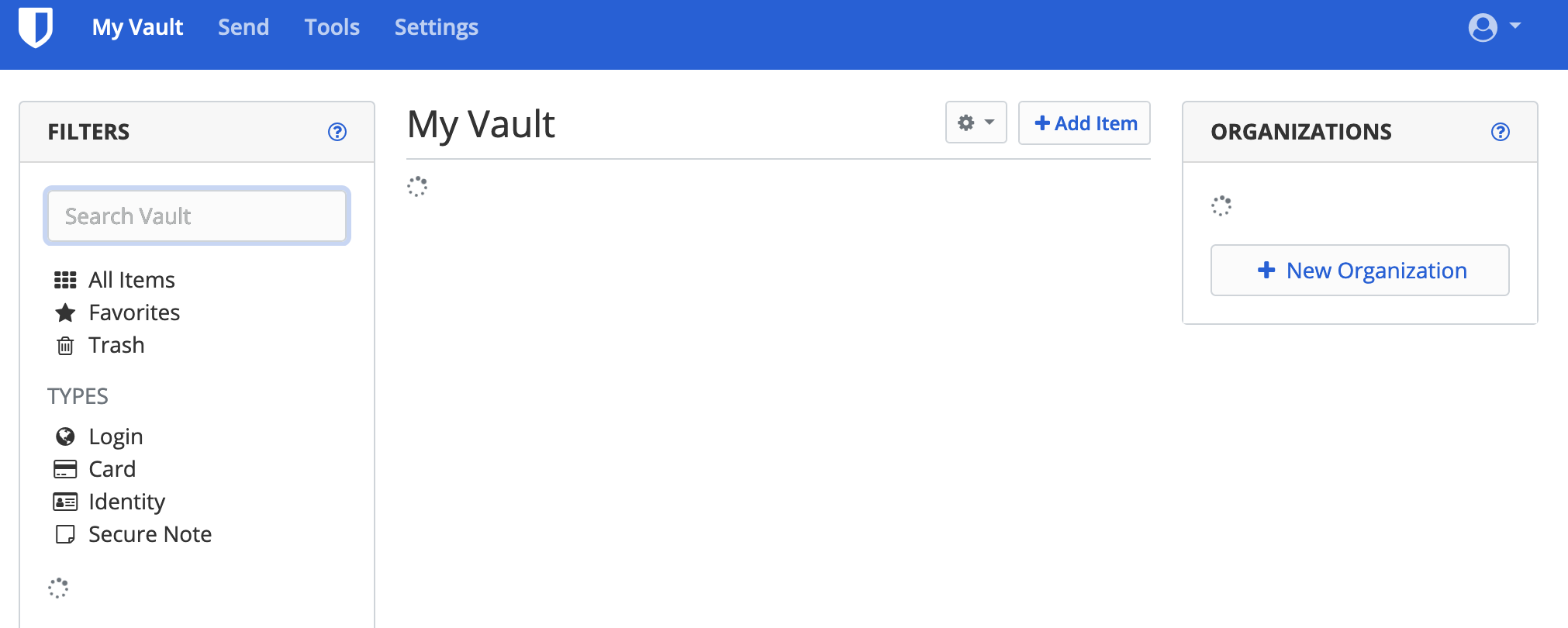
By looking at at the browsers developer tools, I can see that it takes this long to open

/api/sync?excludeDomains=trueendpoint:Other than loading initial list of passwords vaultwarden interface responses are quick and there are no issues. RTT between my laptop with browser to vaultwarden is about 7ms.
We have also some scripts that are using python bitwardentools module to add and retrieve passwords and they are also experiencing same performance issues while doing the sync, to show you an example:
Also, we enabled SQL query performance logging on our PostgreSQL server and can see that all vaultwarden SQL queries are executed very quickly, maximum time for the SQL query execution that we've seen was around 10ms, so we can exclude an issue with SQL backend performance.
@BlackDex commented on GitHub (Apr 14, 2022):
I'm not sure which version of Vaultwarden you are running. But it would like to know if running the latest
testingtagged version if not used currently does make a difference or not.I do suggest to create a backup of the database (Or maybe even clone it and run a different container).
@perkons commented on GitHub (Apr 14, 2022):
Vaultwarden version: 1.24.0
Web-vault version: 2.25.1
Running within Kubernetes: true
Database type: PostgreSQL 13
@karlism commented on GitHub (Apr 14, 2022):
@BlackDex, we're running 1.24.0-alpine image, I will update our dev environment to testing to see if that helps
And I also forgot to previously mention, that we've tried enabling debug logging for vaultwarden, but that didn't produce any useful logs about this issue.
@BlackDex commented on GitHub (Apr 14, 2022):
@karlism Nice. A few notes on the testing image and why it could be helpful with speed.
@karlism commented on GitHub (Apr 14, 2022):
@BlackDex, thanks for your help!
I've updated it to latest testing image:
Unfortunately I do not see any difference as
syncoperation still takes around 30 seconds to complete:This is output of the
topcommand from within the container during thesyncoperation, as you can see it's basically idle:@BlackDex commented on GitHub (Apr 14, 2022):
Well, the main thing is loading those entries and converting them to json.
To try and improve that it will take a while i think.
The strange thing is, on my test environment i have a lot more items, but it loads a lot faster.
Also, the size of the transfer is on my test environment is like +1MB larger and thus it looks like it has more data to process.
But it is much quicker in loading, it only takes about 1s to load, while on your environment it looks like it takes about +30s.
Also running that test script i get the following result:
I do use sqlite here, i would need to test a postgresql an other time
@karlism commented on GitHub (Apr 14, 2022):
@BlackDex, can you please share items from your test enviroment so we can try it out here? Or we can just try generating CSV list of 2,000 passwords like these ourselves:
Just to exclude the possibility that it's something related to our passwords.
@BlackDex commented on GitHub (Apr 14, 2022):
bitwarden_org_export_test-data.csv.zip
Attached is a list i have loaded into my test vault (With a bunch of other items not listed there).
Those are 1500 login items and 1500 note items.
It does take a long time for them to be imported. It may even happen that it reports a gateway timeout, but those items will still be loaded into the database, but again that could take a few minutes maybe.
I still need to create a good json file for this to really test all the separate features and items. But until now not really needed. Might do that this weekend maybe
@jjlin commented on GitHub (Apr 14, 2022):
@perkons @karlism
MySQL/PostgreSQL performance issues are more likely related to network latency, as in #1402. You mention you have less than 1 ms latency, which may not sound like much, but since Vaultwarden uses a lot of small queries, this can really add up. This model is something an in-process database like SQLite excels at (unless its database file is placed on network storage). If you try running a PostgreSQL server on the same machine as Vaultwarden, I expect you would see much better performance.
N.B. Upstream Bitwarden uses a lot of stored procedures to address performance issues like this, but it has its own drawbacks, like a lot more maintenance burden.
@BlackDex commented on GitHub (Apr 15, 2022):
Regarding this issue and #1402 i just did some logging of all the queries done during a sync. I definitely think there is room for improvement. During the query logging i saw that some queries which are exactly the same are run as much times as there are items within an organization. We might be able to cache those for like 30s or i would even like to prevent them from running multiple times at all. Ill see if i have some time to take a better look at it.
But it could take some time, since this is not very easy i think with all the dependencies of all functions and conversion from/to json etc..
@karlism commented on GitHub (Apr 20, 2022):
Sorry, but I've previously misled you, after further testing I noticed that database and pod, where Vaultwarden is running, were in different datacenters (with 6-7ms latency in between them). After moving pod to the same datacenter, where database is running (and latency is below 1ms), the problem resolved and 921 password load time dropped from 22 seconds to below 1 second. @jjlin was spot on regarding database latency impact on Vaultwarden performance.
@BlackDex commented on GitHub (Apr 20, 2022):
Nice to see that it solved that issue.
But, i still think that we can improve. Running a lot of queries because of the N+1 issue we currently do.
I am working on this already, i have fixed a lot already by just using a single query for most items.
Still need to do some performance testing if that actually is faster or not, but still i think it's better then having a N+1 issue.
@BlackDex commented on GitHub (May 11, 2022):
Solved via #2429