mirror of
https://github.com/dani-garcia/vaultwarden.git
synced 2026-02-05 00:29:40 +03:00
Unable to login with newer Bitwarden Android app version (There is a problem connecting to the server) #465

Reference in New Issue
Block a user
Delete Branch "%!s()"
Deleting a branch is permanent. Although the deleted branch may continue to exist for a short time before it actually gets removed, it CANNOT be undone in most cases. Continue?
Originally created by @haecker-felix on GitHub (Oct 27, 2019).
I'm hosting my bitwardenrs instance on a raspberry pi 4 using the docker image.
I create the docker container as following:
I can access the webpage, and the Firefox Extension / Electron App is working fine. Only the Android app refuses to connect. When I try to log in, I can see this in the container output:
But Android app just says:
There is a problem connecting to the serverIn the app itself I try to connect to the server with: https://rpi01.haeckerfelix.de:7070
I'm using a LetsEncrypt wildcard certificate. The certificate chain is set correctly (I've tested it with several tools, there's no problem). The server itself is only reachable in my LAN. I already tried to debug the app using logcat, but wasn't able to find any helpful information.
I'm using the port 7070 because 443 is already being used by a other application. Regardless of that I tried it with 443, and it didn't work either.
I'm using a OnePlus 6 with Android 10 (OxygenOS).
EDIT: Using the older 2.2.2 version fixes the login issue. You can get the APK from here:
https://github.com/bitwarden/mobile/releases/download/v2.2.2/com.x8bit.bitwarden.apk
After the login you can update to a newer version using the Play Store.
@zipsonic commented on GitHub (Oct 29, 2019):
I'm seeing the same on Android 10 (Pixel 3a).
Server is running on Intel. Docker Container running on CentOS.
Using let's encrypt wildcard certificate.
Using custom port (not 443).
Works using desktop and web browser. Even works using Android Chrome. Just not with the app.
A number of posts referring to this issue talk about certificate problems being the culprit on Android. Digikey reports all green showing full chain trust.
@zoickx commented on GitHub (Oct 29, 2019):
Can report the exact same problem.
Will be happy to provide more technical info, just tell me what's useful
@zipsonic commented on GitHub (Oct 29, 2019):
I downloaded a prior version of the Android APK (v2.0.4) and it works. So I've disabled updates on the app.
@zipsonic commented on GitHub (Oct 29, 2019):
Update: if you login with an earlier version of the app, then update to the current version, everything will work. The problem only exists with new installations of the current version of the app, then logging in for the first time.
@haecker-felix commented on GitHub (Oct 29, 2019):
I can confirm installing version 2.0.4 fixes the login issue!
https://github.com/bitwarden/mobile/releases/download/v2.2.2/com.x8bit.bitwarden.apk
Updating to a newer version after login doesn't matter, it keeps working. Thanks for the workaround @zipsonic !
@zoickx commented on GitHub (Oct 29, 2019):
Indeed installing an older version, logging in and then updating works.
Thanks for the workaround, @zipsonic!
Though there is no need to go as far back as 2.0.4, 2.2.2 was sufficient for me.
Also, I would suggest using the official release from here as opposed to any unofficial mirrors.
@BlackDex commented on GitHub (Nov 1, 2019):
So, version 2.2.6 is having issues then? Did one of you also had any other version between 2.2.2 and the current latest version?
@zipsonic commented on GitHub (Nov 1, 2019):
There weren't any other versions between 2.2.2 and 2.2.6.
@BlackDex commented on GitHub (Nov 1, 2019):
Ok, i just installed a virtual android device, started Bitwarden v2.2.6 and connected to my server without any issue at all, Now i use nginx as a reverse proxy and no other ports. Can you please post the following. @zoickx, @haecker-felix, @zipsonic.
Which bitwarden_rs version (See /admin top right) :
Using Docker or self-compiled:
Which platform (linux/rpi/etc..):
Which reverse proxy (if any):
Which port:
Self signed cert or not:
Which Android version:
@haecker-felix commented on GitHub (Nov 1, 2019):
Using Docker or self-compiled: Docker image: bitwardenrs/server:raspberry (2f3f93a9e1f2)
Which platform (linux/rpi/etc..): Raspian on Raspberry Pi 4
Which reverse proxy (if any): /
Which port: 7070
Self signed cert or not: Let's encrypt wildcard certificate
Which Android version: OnePlus 6 Android 10 OpenBeta 30
@BlackDex commented on GitHub (Nov 1, 2019):
@haecker-felix I tried to mimic the setup, but i have no issues.
The only thing i can think of is the certificate for now.
Please use these online tools to check the validity of the certificate:
https://comodosslstore.com/ssltools/ssl-checker.php
and/or
https://www.sslshopper.com/ssl-checker.html
and/or
https://sectigostore.com/ssl-tools/ssl-checker.php
Make sure the server and chain are both ok.
@haecker-felix commented on GitHub (Nov 1, 2019):
I checked the ssl setup with the tools, everything is fine. The certificate chain is okay.
I wonder why it doesn't work with 2.2.6, but with 2.2.2.
@zipsonic commented on GitHub (Nov 1, 2019):
Every answer except explicitly stating the server version number was given
in my original post.
*Which bitwarden_rs version (See /admin top right) : *1.11.0-77b78f09
*Using Docker or self-compiled: *Docker Image bitwardenrs/server:latest
***Which platform (linux/rpi/etc..): *Centos 7.7 Intel
*Which reverse proxy (if any): *Only forwarding into the container
*Which port: *Non-Standard - this shouldn't matter but 5443
*Self signed cert or not: *Let's Encrypt Wildcard
I tested the theory that it was a certificate chain problem but digikey
reports no errors.
@BlackDex commented on GitHub (Nov 1, 2019):
@zoickx, @haecker-felix, @zipsonic.
Ok, i have found the issue:
In the docker run command at the DOMAIN environment variable remove the port.
Only set https://vault.domain.com, NOT https://vault.domain.com:7070.
This should fix the issue.
@zipsonic commented on GitHub (Nov 1, 2019):
@BlackDex That resolves the issue. Good work!
Not that it really matters at this point, but does that break older
versions of the android app?
@zoickx commented on GitHub (Nov 2, 2019):
Sorry for the late response. I am no expert in the networking side of stuff, mostly just following the wiki:
Which bitwarden_rs version (See /admin top right) : 1.9.1-8be2ed62
Using Docker or self-compiled: Docker
Which platform (linux/rpi/etc..): Arch Linux on a VPS
Which reverse proxy (if any): -
Which port: 443
Self signed cert or not: not self-signed (Let's Encrypt)
Which Android version: 10 and 8.1.0 (LineageOS 15.1)
All certificate tests pass.
Docker is run with the following:
Tried adding DOMAIN with no port, made no difference.
@Bloopps commented on GitHub (Nov 3, 2019):
Same problem for me. When I use the old apk 2.2.2 I always get the same error message
Which bitwarden_rs version (See /admin top right) : 1.11.0-95a7ffdf
Using Docker or self-compiled: Docker
Which platform (linux/rpi/etc..): Synology
Which reverse proxy (if any): Reverse proxy integrated with synology
Which port: 11443
Self signed cert or not: Let's Encrypt
Which Android version: 9
@zipsonic commented on GitHub (Nov 3, 2019):
There is no need to add to the diagnostic responses. The issue has been
found. @BlackDex reported the fix a couple of days ago.
In the docker configuration remove the port from the DOMAIN environment
variable. Redeploy the container after the change. Problem resolved.
@L2-bit commented on GitHub (Nov 4, 2019):
Tested the DOMAIN environment fix still having the same error. Even omitting it from the docker run produces the same error. Can create a new user from the current android app but can not login to that newly created user from the android app. I am however able to login to same newly created user via the web vault interface.
@BlackDex commented on GitHub (Nov 4, 2019):
@L2-bit have you tried a second time to press the login also? I had that to sometimes. So first time gave me te message, second time logged me in.
@Bloopps commented on GitHub (Nov 4, 2019):
Same problem as @L2-bit
@L2-bit commented on GitHub (Nov 4, 2019):
@BlackDex just tried that and even pressing login 5-7 times I get the same error.
@BlackDex commented on GitHub (Nov 4, 2019):
Ok, i did some more testing, and if i use the bitwarden app without any (altering)proxy in between, like Traefik, Nginx or HAProxy as offloader so simply a "direct" connection to the bitwarden app/rocket interface i get this error. If i put anything in between which does some stuff in between, like haproxy (mode http) or nginx, both with or without ssl offloading, this does not happen.
So i'm guessing there is something in rocket or one of it's dependancies which could cause this.
Not done yet with testing.
@BlackDex commented on GitHub (Nov 4, 2019):
The (potential) fix has been merged, it could take about up to 8 hours or so before all the docker images are build on the docker hub.
Check https://hub.docker.com/r/bitwardenrs/server/builds to see if there are newer builds available.
Install the build, and please test if this solves the issue for you.
@Kidswiss commented on GitHub (Nov 5, 2019):
@BlackDex I tested your new patch and found that it doesn't only hang when trying to login from any app, but when trying to login from the a clean browser session, too (e.g. private or icognito mode).
But if you try to login from a browser where you previously logged in everything works. It only happens for first logins no matter what client.
I tried to go back to tag 1.11.0 but then I found I wasn't able to login at all... The admin panel didn't show any users at all! So I'm currently stuck on you :latest build.
I'm using the mysql version.
@BlackDex commented on GitHub (Nov 5, 2019):
I just tested it again, but no issues at all.
Created a new user, logedin via an incognito of a browser i also never used before. Seems to work.
But you say you use mysql, these builds use sqlite and not mysql, so that could explain why you do not see any users.
@Kidswiss commented on GitHub (Nov 5, 2019):
I used the latest server-mysql build. Do those not contain your fixes?
Also you said you created a new user, maybe the issue arises if there's a migration from 1.11.0 to latest?
@BlackDex commented on GitHub (Nov 5, 2019):
@Kidswiss i think you maybe have the same issue as here #642 . Please check that one.
@Kidswiss commented on GitHub (Nov 5, 2019):
@BlackDex I don't think so, all my data is still there. Connecting with an mysql client shows that there are still tables with data in them. I can use already logged in clients. But I'm completely unable to login with any new client that hasn't logged in before (private browser session, clean installed desktop app, etc). It's really weird.
It just hangs with exactly the same log messages as @haecker-felix has posted:
Chrome shows this and won't continue:
I'll try to spin up completely new instances with sqlite and mysql and try to get to the bottom of this...
@Kidswiss commented on GitHub (Nov 5, 2019):
Okay some more testing done:
Case 1: latest tag with sqlite completely new, created new user: works perfectly
Case 2: latest tag with mysql completely new, created new user: works perfectly
Case 3: using my existing instance, created new user: stuck exactly as stated above
I get the feeling that this isn't strictly related to the same issues the other people here have, but maybe something broken in my database? Is it possible to get some more debug logs from bitwarden_rs @BlackDex?
@BlackDex commented on GitHub (Nov 5, 2019):
@Kidswiss you can enable extended logging and log level of debug or even trace. See the .env file for more details. These values can be given via the -e option of docker run.
@Kidswiss commented on GitHub (Nov 5, 2019):
@BlackDex Thanks, that helped a lot!
The debug log helped me find the culprit. When logging in Bitwarden_rs wants to connect to my smtp host to probably send
an 2FA E-mail (even though not enabled for my accountthe new device mail and just gets stuck. It would probably make sense to set some sensible timeouts for the bitwarden_rs smtp client.Disabling smtp completely solved the issue! I'll dig into the smtp problem some more. So false alert here :)
@BlackDex commented on GitHub (Nov 5, 2019):
@Kidswiss Ah, that explains the delay. I do have some notion about that this is mentioned somewhere else. That was on the matrix chat. Could you please create an issue about this? So that we can take a look at it. And also mention that the 18th of October on the chat there was a discussion about it please.
@BlackDex commented on GitHub (Nov 5, 2019):
@Kidswiss, So, with that fixed, is the other issue regarding this topic fixed then? That is what it actually wonder if that is fixed now :).
@Kidswiss commented on GitHub (Nov 5, 2019):
@BlackDex Sure will open a new issue about the smtp timeout. Thanks again for the help! :)
I just checked the mobile app:
Version 2.2.6 login works! At least for me.
@kspearrin commented on GitHub (Nov 5, 2019):
Hey guys. Kyle here from Bitwarden. Version 2.2.6 of the Android app updated from Android SDK 28 to SDK 29. I am not sure why that would have caused issues for you all. I am having a hard time following this thread. Is this still an open issue? Happy to try and debug the app if the problem is on our end somewhere.
@BlackDex commented on GitHub (Nov 6, 2019):
Hello @kspearrin.
Well this issue is fixed by using an earlier version/commit of the web-server library Rocket.
It does not explain why this issue exists and only was seen on v2.2.6 and not v2.2.2. Debugging this is difficult since it only happens using tls and direct connection to the bitwarden server without anything in between like a proxy (except for haproxy using tcp mode which just sends the traffic over 1:1).
I don't have enough knowledge about android development. But what i think i need is a way to see what http traffic was send/received by the app. Without encryption. And i need to do this also on the server side section so that i can compare.
@Bloopps commented on GitHub (Nov 6, 2019):
I deployed the latest bitwarden_rs update 1.11.0-9a0fe6f6
and no change for me, always the same issue.
I try with v2.2.2 and old 2.0.4 , same issue.
@NotLikely38 commented on GitHub (Nov 6, 2019):
I'm seeing similar issues to @Bloopps.
Also, on Android App v2.2.2 I don't see any icons but they appear in the Windows Desktop app and Firefox Add-on.
bitwarden_rs 1.11.0-9a0fe6f6
docker on rpi 3B
self-signed cert
@kspearrin commented on GitHub (Nov 6, 2019):
Could you guys try the latest beta version on the play store, build 2117?
@NotLikely38 commented on GitHub (Nov 6, 2019):
For me, build 2117 (clean install) also gives "There is a problem connecting to the server".
@kspearrin commented on GitHub (Nov 6, 2019):
If you guys can give me a public endpoint to a Bitwarden_rs server to try, I can debug further into what the real exception is from the Android SDK.
@Bloopps commented on GitHub (Nov 6, 2019):
@kspearrin i send you a private email on your website for my bitwarden server
@BlackDex commented on GitHub (Nov 6, 2019):
@kspearrin I have sent you an invite (on your gmail) to a server which has the issue.
I have not yet tested the beta version of the app on it yet, will try that later this day when i have time.
@BlackDex commented on GitHub (Nov 6, 2019):
@kspearrin, i did a quick test, it seems that the beta channel version is working without any issue.
So it does seem to be something with http1.1 maybe? Very strange.
@kspearrin commented on GitHub (Nov 6, 2019):
@Bloopps I tested your server. This is what I received with build 2117 of the Android app:
@BlackDex commented on GitHub (Nov 6, 2019):
@kspearrin / @Bloopps : Looks like that server has a non valid certificate.
@kspearrin commented on GitHub (Nov 6, 2019):
@BlackDex I tried your connecting to your server with and without the Http 1.0 change and it worked without issue.
@BlackDex commented on GitHub (Nov 6, 2019):
@kspearrin I tried it to just a few seconds ago. And i do not get it al the time for some reason.
I have to 'force stop' clear the cache/data and try it again.
Sometimes i have to de-authorize the devices, which just did for you.
Also, you have to create a valid account with login. Else this error will not happen.
Just trying an invalid username/password doesn't trigger this.
@kspearrin commented on GitHub (Nov 6, 2019):
@BlackDex I registered an account. I removed the Http 1.0 change and here is the error I get. It logs in fine, but this error happens on
/sync.@kspearrin commented on GitHub (Nov 6, 2019):
I added back the change to use Http 1.0 and it didn't seem to make a difference. I still get the same exception above from time to time.
@BlackDex commented on GitHub (Nov 6, 2019):
@kspearrin Hmm that strange. I will have to look into this a bit further.
I'm fixing some bugs and updated some other dependencies. Maybe some of those are related to this strange issue using the latest http server library.
I will try to updated my test environment using the latest http library patch a.s.a.p.
@BlackDex commented on GitHub (Nov 7, 2019):
@kspearrin I now have reverted the test environment to a version before the reports are coming in.
And with version v2.2.6 i keep getting the issue, with v2.2.2 no issue at all.
So i'm kinda at a loss here on the server side.
@BlackDex commented on GitHub (Nov 7, 2019):
Ok, it has something to do with the ciphers that are used:
And apparently something goes wrong with the v2.2.6 ciphers that are used.
I have to try and see if i can mimic this same behavior with a proxy only allowing those same ciphers. If not, it is probably a bug in the http library or its dependancies, else something in the android sdk maybe?
v2.2.2: [rustls::server::hs][DEBUG] decided upon suite SupportedCipherSuite { suite: TLS13_AES_128_GCM_SHA256, kx: BulkOnly, bulk: AES_128_GCM, hash: SHA256, sign: Anonymous, enc_key_len: 16, fixed_iv_len: 12, explicit_nonce_len: 0 }
v2.2.6: [rustls::server::hs][DEBUG] decided upon suite SupportedCipherSuite { suite: TLS_ECDHE_RSA_WITH_AES_128_GCM_SHA256, kx: ECDHE, bulk: AES_128_GCM, hash: SHA256, sign: RSA, enc_key_len: 16, fixed_iv_len: 4, explicit_nonce_len: 8 }
@NotLikely38 commented on GitHub (Nov 7, 2019):
I enabled debug logging level and get the following when v2.2.6 tries to communicate with the server:
[rustls::msgs::handshake][WARN] Illegal SNI hostname received [...]
The [...] contains a comma-separated list of ascii values for my server's private IP4 address.
I assume this means I have an invalid self-signed certificate. However, the message does not occur with android v2.2.2, bitwarden desktop or the brower add-on.
@BlackDex commented on GitHub (Nov 7, 2019):
@NotLikely38 Could you post a more detailed output of the log? And change the private stuff like IP's from a global IP like 8.8.8.8 to something like 127.0.0.8, and the domain stuff to something like my.domain.com without losing any special char. Maybe there is something special we can see.
Also, do you see the same WARN, about the SNI using v2.2.2?
@NotLikely38 commented on GitHub (Nov 7, 2019):
The WARN about SNI does not occur with v2.2.2. It also does not occur with Bitwarden desktop or the browser add-on.
A more detailed output is provided below, captured after a clean install of v2.2.6. The WARN occurred when I tried to log in and was accompanied by the dialog "There is a problem connecting to the server".
Bitwarden_rs is running on my home network only (no domain or external access).
@BlackDex commented on GitHub (Nov 7, 2019):
@NotLikely38: The Illegal SNI is indeed because of an invalid self-signed certificate.
It probably does not have a correct CN. CN (Common Names) can be added as IP or DNS, and adding an IP as DNS does not work. So that is probably the reason.
The reason it does or does not happen is probably because of some TLS/Suite selection which causes this error to appear. Or if SNI is triggered or not. I don't know the internal working about that.
@NotLikely38 commented on GitHub (Nov 7, 2019):
@BlackDex: Thanks for confirming - I will look at this in more detail and try to fix.
@NotLikely38 commented on GitHub (Nov 9, 2019):
@BlackDex: A quick follow up as v2.2.6 is now working for me.
In the android app I had to specify the Bitwarden_rs "Server URL" as "https://DNS_name:Port" rather than "https://IP_address:Port". The latter works with v2.2.2 but not v2.2.6 (at least for me).
@BlackDex commented on GitHub (Nov 9, 2019):
The issue is triggered using no proxy and because the v2.2.6 is using tlsv12 and the webserver/tls library we use triggers an error for some reason. If you put any proxy in front of bitwarden_rs it will fix this issue since the server will not directly responded unless using tls and the proxy requests the same protocol which triggers the error.
@Bloopps commented on GitHub (Nov 9, 2019):
@BlackDex
I checked the certificate with https://www.sslshopper.com/ssl-checker.html and it's okapparently
image
What do I need to do to fix the problem?
@BlackDex commented on GitHub (Nov 9, 2019):
I Was discussing this with the web-framework/rustls developers ( https://github.com/SergioBenitez/Rocket/issues/1167 ), and it could be a number of issues. In the end it seems bitwarden_rs returns all the data, but something is causing the client/browser to not load it.
The main difference between the v2.2.2 android version and the v2.2.6 is that the latest version is using TLSv1.2 instead of TLSv1.3 which causing this to trigger.
The only way to solve this right a way is to put any reverse proxy in front of bitwarden_rs, see: https://github.com/dani-garcia/bitwarden_rs/wiki/Proxy-examples
Any other way to fix this on a short term i do not have.
@dani-garcia commented on GitHub (Nov 10, 2019):
If anyone wants to test, I build two new branches of the image in docker hub,
bitwarden_rs/test-async(for x86 computers) andbitwarden_rs/test-async-raspberry(for ARMv7), using the latest async branch from rocket, this is experimental so I heavily recommend that you make a backup or create a separate test instance to test it, but according to @BlackDex's tests it seems to solve the issue. Note that at the moment it doesn't support attachment uploads and other stuff might be broken as well.@kenthinson commented on GitHub (Nov 12, 2019):
I would like to add this issue is happen for my on the iOS app. So it's not isolated to just android. Also on iOS I have no way to install a older version.
@kenthinson commented on GitHub (Nov 12, 2019):
@BlackDex That's interesting. I am already running a reverse proxy in front of the server. However I'm still gettin this error. Do you think it's a cypher issue?
@BlackDex commented on GitHub (Nov 12, 2019):
@kenthinson What kind of reverse proxy are you using?
And if you can share the settings of that that would be cool.
Also on which platform and platform version are you running this?
And, could you try the test-async version @dani-garcia created ( https://github.com/dani-garcia/bitwarden_rs/issues/687#issuecomment-552196919 ) to see if that solves the issue?
@kenthinson commented on GitHub (Nov 13, 2019):
@BlackDex Sorry Have been busy. I got some more time to try things today and I'll report back.
I am running bitwardenrs/server:aarch64 on Raspberry pi 4 using ubuntu.
It's behind a reverse Pound Proxy. I have not changed any of the default SSL settings and am wondering if that's a issue?
I will try the build by dani-garcia but it's not stable right? I was hoping for something stable to use for my family even if it's less feature complete. Also attachment uploads is kinda important for me at least. Not for the rest of the family.
@kenthinson commented on GitHub (Nov 13, 2019):
@BlackDex Ok I checked with the x86 version latest. I am able to log in using iOS if I log in directly to the server ip behind the proxy on local network http. As Soon as I use the proxy HTTPS I loose ability to log in with iOS. Desktop still works fine over HTTPS.
@BlackDex commented on GitHub (Nov 13, 2019):
@kenthinson Well i never heard of Pound Proxy before, and there also i no example in the wiki here (So if you can provide one that would be nice).
First, do you have bitwarden_rs running on http or https. If the latter, then this issue could be your problem. If it is just HTTP, and Pound handles the HTTPS, then it could be that Pound does something similar as the library bitwarden_rs uses.
So, who is doing SSL/TLS:
And what ciphers are used and what tls version.
@kenthinson commented on GitHub (Nov 13, 2019):
@BlackDex
Currently
HTTPS(Pound) -> HTTP(bitwarden_rs)
Do you think I need to make it like this?
HTTPS(Pound) -> HTTPS(bitwarden_rs)
I'm currently trying to change the Ciphers. I checked with SSL lab and the default was only a B.
EDIT:
I'm taking a look at the examples in the Wiki. I missed them before thanks. I'll try to translate them to Pound.
@BlackDex commented on GitHub (Nov 13, 2019):
@kenthinson i think in your case Pound is filtering some http headers which are needed for macOS/iOS apps. Try to use the developer tools of the browser to check for differences in the returned headers. This has nothing to do with the ssl issues i think. And keeping it HTTPS > HTTP is fine.
@kenthinson commented on GitHub (Nov 13, 2019):
@BlackDex
I switched over to Nginx and it's all working. Thanks for the help. And sorry for injecting this problem into the Android thread. It seemed like the same problem but was not.
@Extarys commented on GitHub (Nov 14, 2019):
I'm running it in a docker container on port 81 and I cannot make the android app work also. (No SSL, local only)
@BlackDex commented on GitHub (Nov 14, 2019):
@Extarys the android app (and ios i think) needs ssl, without it it will not connect.
@NotLikely38 commented on GitHub (Nov 15, 2019):
I tested the test-async-raspberry version and it does not solve the android connection issue for me.
Specifying the Bitwarden_rs server address as "https://IP_address:Port" in the android app gives the same "Illegal SNI" error reported above.
Specifying the server address as "https://DNS_name:Port" now also triggers "There is a problem connecting to the server" with the following debug log:
Bitwarden desktop and the browser add-on work fine with test-async-raspberry.
@Extarys commented on GitHub (Nov 16, 2019):
I'm sure it used to work, because I cannot SSL at home, ISP blocks almost everything and I hate dealing with self signed.
I'll try to generate one and implement it in my current setup to confirm. Thanks for the heads up!
@NotLikely38 commented on GitHub (Nov 16, 2019):
@Extarys: If I don't use SSL, the android app fails to connect with v2.2.6 build 2112 from Play Store. However, the beta version (build 2118) connects OK.
@Bloopps commented on GitHub (Nov 21, 2019):
Hi,
No change with the new version 1.12.0 on Synology docker
Here is my reverse proxy configuration on Synology =>
image
image
With bitwarden_rs version 1.12.0 =>
Bitwarden_web / OK
Bitwarden_desktop / OK
App Iphone 2.2.5 / OK
App Android 2.2.2 and 2.2.6 / HS
Thanks for help
@kspearrin commented on GitHub (Nov 21, 2019):
Can you guys try the latest Android beta version, build 2025? I made some changes that other users are reporting solved their problems.
@NotLikely38 commented on GitHub (Nov 21, 2019):
@kspearrin: Thanks for your help. I tried Android build 2125 and it has fixed my issue with "Problem connecting to the server". I can now connect using either IP address or DNS name.
However, there is one difference - icons only appear if I connect using DNS name; no icons appear using IP address.
@Bloopps commented on GitHub (Nov 21, 2019):
@kspearrin Yes where i find this Android beta version thanks ?
@kspearrin commented on GitHub (Nov 21, 2019):
@NotLikely38 Can you try build 2126 to see if the icons are now working? It should be available in beta on the Play Store.
@NotLikely38 commented on GitHub (Nov 21, 2019):
@kspearrin Build 2126 still gives no icons if I connect using IP address. The log shows "[WARN] Illegal SNI hostname received" when the icons are fetched. The WARN message does not occur if I connect using DNS name and the icons work.
@kspearrin commented on GitHub (Nov 21, 2019):
Where does this warning message come from? Android device logs or on your server?
@NotLikely38 commented on GitHub (Nov 21, 2019):
@kspearrin It's from the server log. Prior to build 2125 the same WARN message also used to occur during login and was accompanied by the app dialog "There is a problem connecting to the server". Since build 2125 I can login successfully and the WARN message only occurs when the icons are fetched.
@kspearrin commented on GitHub (Nov 22, 2019):
Are you able to proxy the traffic through MITM and see if the requests are any different, other than the hostname?
@NotLikely38 commented on GitHub (Nov 23, 2019):
@kspearrin: Without SSL, http requests are the same when routed through mitmproxy and icons work OK with either IP address or DNS name. However, with SSL, mitmproxy did not capture any https requests from Bitwarden android and the app displayed "An error has occurred". I'm not sure what's going on as mitmproxy does capture https requests from Firefox android which works OK. I need to check this in more detail later but will be away for the next 3 weeks.
@Gorvaine commented on GitHub (Nov 23, 2019):
Same here. Tested with 2.2.2 version, Doesn't work either. I just applied to the android beta program.
Firefox, chrome, and Ipad, works.
I'm using custom port 8091 since I have a different web server on the 80, with the docker image.
@Bloopps commented on GitHub (Nov 23, 2019):
I try last Android beta build and it doesn't work. The error message is different =>
Exception message: java.security.cert.CertPathValidatorException: Trust anchor for certification path not found.@Gorvaine commented on GitHub (Nov 23, 2019):
Same. Tested on nexus 7 and OP6T
@Gorvaine commented on GitHub (Nov 23, 2019):
I found something else scanning my domain through https://www.sslshopper.com/ssl-checker.html.
Something failed if i point to my :8091 , where bitwarden is.
https://imgur.com/a/aRfLG2W
I have another web server on :8080 , and the certificates are good:
https://imgur.com/a/aERmeV4
Is it possible that nginx was not using the intermediate certificate ca.cert properly and android is the only OS that detects this?
@apop880 commented on GitHub (Nov 26, 2019):
I had the same problem, latest beta seems to have solved it for me.
@Bloopps commented on GitHub (Dec 2, 2019):
Hi,
The problem continues for me, I can see this message in the debug level logs.
[2019-12-02 00:47:11][rustls::server::hs][DEBUG] decided upon suite SupportedCipherSuite { suite: TLS_ECDHE_RSA_WITH_AES_128_GCM_SHA256, kx: ECDHE, bulk: AES_128_GCM, hash: SHA256, sign: RSA, enc_key_len: 16, fixed_iv_len: 4, explicit_nonce_len: 8 }If anyone has any ideas ?
@rubenzori86 commented on GitHub (Dec 3, 2019):
Same here, I have trust certificate on my domain and I publish my docker like this:
docker run -d --name='bitwarden' --restart always -e 'SIGNUPS_ALLOWED'='true' -e 'DOMAIN'='https://it.mydomain.com/' -e ROCKET_TLS='{certs="/ssl/it.mydomain.com_ssl_certificate.cer",key="/ssl/it.mydomain.com_private_key.key"}' -p 3380:80/tcp -p 3012:3012/tcp -v /root/docker/bitwarden/certs:/ssl/ -v /root/docker/bitwarden/data:/data/:rw bitwardenrs/server:latestAnd I can log in fine from all browsers and windows extension & apps but on mobile (ios and android) I got this on log:
docker run -d --name='bitwarden' --restart always -e 'SIGNUPS_ALLOWED'='true' -e 'DOMAIN'='https://it.mydomain.com/' -e ROCKET_TLS='{certs="/ssl/it.mydomain.com_ssl_certificate.cer",key="/ssl/it.mydomain.com_private_key.key"}' -p 3380:80/tcp -p 3012:3012/tcp -v /root/docker/bitwarden/certs:/ssl/ -v /root/docker/bitwarden/data:/data/:rw bitwardenrs/server:latest@Bloopps commented on GitHub (Dec 3, 2019):
With debug level log, what do you have ?
@rubenzori86 commented on GitHub (Dec 3, 2019):
I use this:
docker run -d --name='bitwarden' --restart always -e 'SIGNUPS_ALLOWED'='true' -e 'DOMAIN'='https://it.mydomain.com/' -e ROCKET_TLS='{certs="/ssl/it.mydomain.com_ssl_certificate.cer",key="/ssl/it.mydomain.com_private_key.key"}' -p 3380:80/tcp -p 3012:3012/tcp -v /root/docker/bitwarden/certs:/ssl/ -v /root/docker/bitwarden/data:/data/:rw -e LOG_FILE=/data/bitwarden.log -e LOG_LEVEL=debug -e EXTENDED_LOGGING=true bitwardenrs/server:latest@Bloopps commented on GitHub (Dec 3, 2019):
I meant to talk about the error output in the log.
Is it exactly the same as me?
@rubenzori86 commented on GitHub (Dec 3, 2019):
[2019-12-03 14:33:43][rustls::server::hs][DEBUG] decided upon suite SupportedCipherSuite { suite: TLS_ECDHE_RSA_WITH_AES_128_GCM_SHA256, kx: ECDHE, bulk: AES_128_GCM, hash: SHA256, sign: RSA, enc_key_len: 16, fixed_iv_len: 4, explicit_nonce_len: 8 }
@tomuta commented on GitHub (Dec 4, 2019):
Just wanted to chime in that I also use version v2.2.6 build 2112 without issues. I am however using apache with ssl, which reverse-proxies bitwarden over http only. Sounds like it may have not presented the entire intermediate chain (on apache I do this with
SSLCertificateChainFile), which means that some clients may have them and work fine, while others may miss some and fail.@Bloopps commented on GitHub (Dec 4, 2019):
@rubenzori86 which reverse proxy do you use?
@rubenzori86 commented on GitHub (Dec 4, 2019):
I don't use any reverse proxy, I can't use this without reverse proxy?
@BlackDex commented on GitHub (Dec 5, 2019):
Hello all. Because this topic is getting a little bit out of hand, and multiple unrelated issues are reported here i created a new "pinned" issue: #760 .
Please check this pinned issue first, and if nothing matches and you have checked all the boxes which need to be checked, please report a new separate issue.
@CaerphillyMediaLtd commented on GitHub (Dec 20, 2019):
I used bitwarden and LetsEncrypt and had this issue on Android only. To fix it I changed the following in
bwdata/nginx/default.conf:To:
So that instead of just serving up the websites cert, it also serves the intermediary cert.
@tomuta commented on GitHub (Dec 20, 2019):
That's precisely what apache's
SSLCertificateChainFilewould do. If you don't present the entire chain, then some clients that may not have all intermediate certificates are unable to properly authenticate the certificate itself.@rubenzori86 commented on GitHub (Dec 24, 2019):
Where I can find this on docker container image?? bitwardenrs/server:latest
@9ngol commented on GitHub (Feb 14, 2020):
This one helped me added SSLCertificateChainFile to my apache
@Skaronator commented on GitHub (Apr 24, 2020):
I had this same issue after switching my reverse proxy from Nginx to Caddy. After an hour of troubleshooting I found the issue.
When scanning my domain I saw that the certificate chain was not complete. As you can see here:
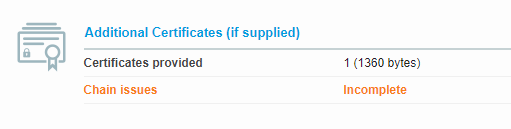
After pointing to the correct certificate in Caddy the cert chain was fixed.
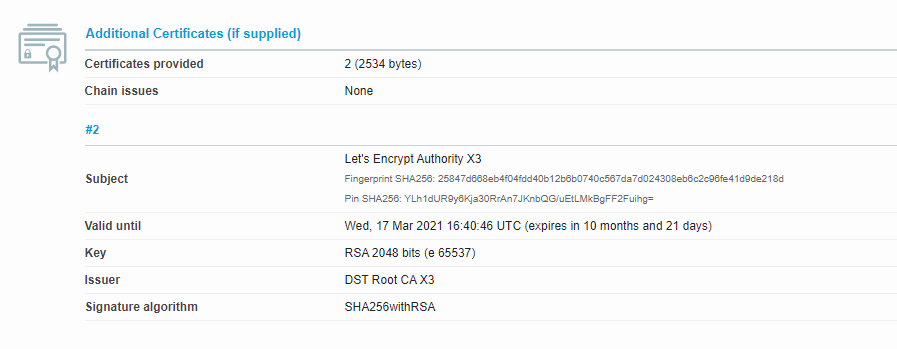
You can test your Site here: https://www.ssllabs.com/ssltest/index.html
This was my change in my Caddyfile
After fixing the certificate chain the Bitwarden App works again! 💯
@GeorgeRT commented on GitHub (Apr 30, 2020):
This somewhat happens on a fresh install of Firefox on the desktop as well. In the same vein as Skoranator's solution, my vanilla bw/LE setup, I have this in my install-cert LE configuration:
Le_RealFullChainPath='/opt/bitwarden/bwdata/ssl/bitwarden.xx.org/certificate.crt'
Le_RealCACertPath='/opt/bitwarden/bwdata/ssl/bitwarden.xx.org/ca.crt'
Le_RealKeyPath='/opt/bitwarden/bwdata/ssl/bitwarden.xx.org/private.key'
which installs fullchain.cer as the certificate.crt
@deponian commented on GitHub (May 5, 2020):
My issue with Bitwarden Android app was the error "Handshake failed". It turned out that I had misconfigured nginx. I have two servers with different domains on one IP: domain.com and bw.domain.com for Bitwarden. I have
ssl_protocols TLSv1.2 TLSv1.3in config for bw.domain.com, but in config for domain.comssl_protocolsset to onlyTLSv1.3and it is default_server. I turned out that you can't userssl_protocolsper server, only per IP:PORT pair in yourlistendirective and if you use more then onessl_protocolsdirective then only the first one will be used. See link for more details.@yulasinio commented on GitHub (May 16, 2020):
Same issue here, not being able to login to Bitwarden using Android app. I can access the server on Chrome browser (both laptop and android) and iOS app. My Bitwardenrs is installed on Qnap with https enabled using LE certs.
Using 2.3.1 Android app I get the following error:
Exception message: java.security.cert.CertPathValidatorException: Trust anchor for certification path not foundUsing version 2.2.2 that's linked above I get error:
There is a problem connection to the serverAny pointers on what to do next to try and get it to work?
@Link009 commented on GitHub (Jun 3, 2020):
Any news on this ? Same for me with Android app (version 2.3.1), I can't login anymore.
@BlackDex commented on GitHub (Jun 3, 2020):
This is not something we can fix.
You need to check if the fullchain is being used or not. Android and iPhone will not work correctly without the fullchain. Google Chrome does work because it has the chain built in.
Please check the wiki about ssl/https for more information.
@yulasinio commented on GitHub (Jun 3, 2020):
Thanks for you reply BlackDex. The iOS app is working only the Android is trowing errors. Just checked the ssl and the full chain is included...
@Link009 commented on GitHub (Jun 3, 2020):
I don't know what to put in alt_names section for bitwarden.ext file:
[alt_names]
DNS.1 = bitwarden.local
DNS.2 = www.bitwarden.local
@yulasinio commented on GitHub (Jun 8, 2020):
Right, looks like I solved my problem. I used https://www.digicert.com/help/ to check my cert and it could see the server server but no intermediate/root. So what I did is opened my server .crt certificate in Notepad and pasted my intermediate .crt content in it. Saved it and restarted bitwarden.
I can now login using the Android app.
@mitaka8 commented on GitHub (Jun 14, 2020):
I had the same problem as the comment above me. Firefox and Chrome trusted my cert, but the android app did not. Luckily it's an easy fix. When using a Let's Encrypt certificate, make sure to use
fullchain.peminstead ofcertificate.pem.@bobberb commented on GitHub (Jun 23, 2020):
Swapping the positions of TLSv1.3 and TLSv1.2 to the reverse, preferring 1.2 first, in nginx allows my android app to work again.
@mynameisroy commented on GitHub (Jul 3, 2020):
My setup looks something like this: Domain => CloudFlare => NGINX Proxy Manager => Bitwarden_rs. I was getting the "Handshake failed" error every time I tried to log in on the Android App version 2.5.0. The fix was changing CloudFlare's "Minimum TLS Version" setting under the "Edge Certificates" tab in the "SSL/TLS" options from "TLS 1.3" to "TLS 1.2". This worked almost instantly, but is somewhat unfortunate because I'd prefer to use only TLS 1.3.
@mitaka8 commented on GitHub (Jul 3, 2020):
@mynameisroy You probably shouldn't run CloudFlare as you are handing off all your traffic in plaintext to their servers. They say that they don't look at logs and content of packets, but they fall under US jurisdiction and have to hand off everything they receive. All in all not very privacy friendly.
@AlexKalopsia commented on GitHub (Aug 17, 2020):
Experiencing the same issue just on one phone :( Any clue how to fix this? I changed "Minimum TLS Version" to 1.2 (was 1.3) but that didn't fix it
@BlackDex commented on GitHub (Sep 22, 2020):
Please make sure your certificate is valid, this is the most important part regarding the mobile clients. Anything wrong with the certificate or the certificate-chain and your mobile client will not work.
Please also see: https://github.com/dani-garcia/bitwarden_rs/issues/760 for some more information on how to troubleshoot.
@briceparmentier commented on GitHub (Sep 25, 2020):
Hello @BlackDex ,
I also have the same issue, my Bitwarden_RS self-hosted on RPI is working just fine by accessing it through a browser (even on the mobile), but the Android application reports an error (Trust anchor for certification path not found). I'm running 2.6.0 version.
I followed this https://github.com/dani-garcia/bitwarden_rs/wiki/Enabling-HTTPS and the child page https://github.com/dani-garcia/bitwarden_rs/wiki/Private-CA-and-self-signed-certs-that-work-with-Chrome to generate my certificates and keys, so how would I check if my certificates are valid?
I tried to use some tools mentionned in this post to check for the certification, both are reporting that certificates can't be found, or certificates not present, etc...
My Bitwarden_rs is running under docker with the following:
docker run -p 8005:80 -e ROCKET_TLS='{certs="/ssl/bitwarden.crt",key="/ssl/bitwarden.key"}' \ -e ADMIN_TOKEN=blablabla \ -v bitwarden:/config \ -v /ssl/:/ssl/ \ -p 443:80 \ --name bitwarden \ --restart always \ bitwardenrs/server:raspberryThanks for your help.
@iguy0 commented on GitHub (Oct 2, 2020):
I was able to resolve the issue with the new app by exporting the certificate from the browser and importing into the Android certificate store. If you are using Chrome, right click on "Not Valid" or on the "lock"(valid certificate, but missing from the Android CA Store), go to the details tab, and export it to file.
The default selections will work. Copy the certificate file to your device. Follow these/similar steps:
https://support.google.com/pixelphone/answer/2844832?hl=en
No need to install older version apps.
Good luck.
@BlackDex commented on GitHub (Oct 5, 2020):
Also, make sure that if you create a self-signed certificate you do add the CA Cert into the cert you use to serve to the client.
If that be bitwarden_rs it self or any reverse-proxy, make sure the whole certificate chain is within the
certfile.@BlackDex commented on GitHub (Oct 9, 2020):
Also, the SSL handling of rocket (http engine used) has some issues sometimes with some certs, clients ssl versions etc.. therefore we always recommend to use a reverse proxy which handles the SSL part. You can still choose to have the proxy connect with ssl to bitwardenrs to have the whole chain encrypted, but then at least it's being accessed by just one tool using the same encryption every time. And the reverse proxy handles the hard stuff.
@Link009 commented on GitHub (Oct 9, 2020):
A tutorial on how to use Bitwarden on HTTPS connection: How to Allow BitWarden to Work Over an HTTPS Connection
@k3tan172 commented on GitHub (Oct 13, 2020):
Could you please update the contents of https://github.com/dani-garcia/bitwarden_rs/wiki/Private-CA-and-self-signed-certs-that-work-with-Chrome to reflect the commands to do this?
Currently, I'm able to import the self-signed-ca-cert.crt into my android device, but unable to import bitwarden.crt. Is there something I'm missing?
@jjlin commented on GitHub (Oct 20, 2020):
Most users would be much better off using Let's Encrypt certs instead of attempting to set up a private CA. Here's a new wiki page on how to do that: https://github.com/dani-garcia/bitwarden_rs/wiki/Running-a-private-bitwarden_rs-instance-with-Let%27s-Encrypt-certs
@wysird commented on GitHub (Oct 27, 2020):
So I had this same issue when I switched to using Let's Encrypt certificates. It turns out, that at some point Android applications started using a different trust store or something? I don't quite know what the change was, but my solution was:
Download ALL of the CA files onto the phone or other Android device you're trying to use the bitwarden app from
Then, open each of them and install the certificate using the 'Certificate Installer':
This should allow you to connect to the server again, using the latest version of the application, with any updates from Android.
@BlackDex commented on GitHub (Dec 12, 2020):
Going to close this issue since this is not something bitwarden_rs specific.
And i think a discussion regarding this topic has a better place on the forum :).
Please continue this over there if needed: https://bitwardenrs.discourse.group/
@Parlendir commented on GitHub (Feb 24, 2021):
Thanks, works like a charm with the fullchain given as cert in the environment parameters of the container.