mirror of
https://github.com/dani-garcia/vaultwarden.git
synced 2026-02-05 00:29:40 +03:00
Unable to download attachments when ran from behind reverse proxy #37

Reference in New Issue
Block a user
Delete Branch "%!s()"
Deleting a branch is permanent. Although the deleted branch may continue to exist for a short time before it actually gets removed, it CANNOT be undone in most cases. Continue?
Originally created by @shauder on GitHub (Jul 12, 2018).
I am having issues with downloading attachments and in some cases uploaded them from my bitwarden_rs behind an nginx reverse proxy. I am not seeing anything in the docker logs or the nginx logs that seems to be pointing me to any specific issue. Has anyone else ran into this? Attachments seem to be working fine if I upload them or download them from the machine running the docker container.
nginx config
EDIT: If I don't redirect the reverse proxy to HTTPS then I am able to download them as expected.
I tried running the docker container enabling https internally to see if that would help but it does not seem to work even locally.
docker run -dit --restart unless-stopped -d --name bitwarden -e 'ROCKET_TLS={certs="/ProgramData/letsencrypt-win-simple/httpsacme-v01.api.letsencrypt.org/domain.com-chain.pem",key="/ProgramData/letsencrypt-win-simple/httpsacme-v01.api.letsencrypt.org/domain.com-key.pem"}' -v c:/bw-data/:/data/ -p 7080:443 mprasil/bitwarden:latest
I am guessing this may end up having more to do with rocket and not so much the server.
@dani-garcia commented on GitHub (Jul 13, 2018):
Yeah, the problem is the web server has to generate the URLS for the attachments, so the server has to 'guess' the correct URL to access them.
In the U2F branch (https://github.com/dani-garcia/bitwarden_rs/tree/u2f), I improved the detection algorithm a bit, hopefully that solves your problems.
Otherwise, the new branch accepts a
DOMAINenvironment variable, that should override the detection logic. Simply setDOMAIN=vault.domain.com(or whatever you use to access the server through the proxy).@shauder commented on GitHub (Jul 13, 2018):
Thanks, I may build it from source and give it a try this weekend if I get some time. Thanks for the info.
@mprasil commented on GitHub (Jul 13, 2018):
@dani-garcia I think we should use X-Forwarded-Host and X-Forwarded-Proto headers if they are available. It's de facto industry standard to provide the original domain and protocol requested to the service behind the proxy. Proxy servers often set it by default or these can be set easily and it would make for nice "just works" setup.
Perhaps we could use DOMAIN if provided, then try X-Forwarded-Host as fallback. Note that for attachments we should also use proper protocol, which is where we can use X-Forwarded-Proto and maybe fallback to "http"?
@mprasil commented on GitHub (Jul 13, 2018):
To expand on the previous comment attachments do work for me behind proxy. Said proxy sets the proper X-Forwarded-Host and X-Forwarded-Proto. I need to check sources a bit closer, but I have the impression, that rocket might already take X-Forwarded-Host into consideration?
It's still not 100% correct as bitwarden generates the URLs with good domain but wrong protocol. (http instead of https - I have ssl terminated on the proxy which is probably why) This means that the request is blocked by browser if I'm trying to download from Vault (can't fetch insecure resource on secure page) but it works in Android for example that doesn't have such limitation. (and apparently follows webserver redirects to https)
@dani-garcia commented on GitHub (Jul 13, 2018):
I'm actually using X-Forwarded-Proto with the new revision, but forgot about X-Forwarded-Host and used the normal Host instead. I'll change that now.
Now the order of choice, from first to last, is:
Hopefully that handles all the cases. The last changes are in the U2F branch.
@shauder commented on GitHub (Jul 13, 2018):
Thanks guys. @mprasil you are correct if I don't use ssl and the reverse proxy then they work. I'll try and test the new branch out. Is there an easy way to deploy dock from the new git branch? I don't use docker much. Otherwise I will try from source when I can.
@mprasil commented on GitHub (Jul 13, 2018):
Hi, I've triggered build, once complete (will take about an hour) you can download and try the
mprasil/bitwarden:u2fimage. Note that I probably won't keep it around for too long after the changes are merged, so only use it to test the changes.@shauder commented on GitHub (Jul 13, 2018):
I am able to download attachments now =D. I cannot upload them through the iOS app but I can through the browser so I am going to assume its more an issue with the iOS app. I can download them through the app though!
For extra info, this is the run command I am using: docker run -dit --restart unless-stopped -d --name bitwarden -v c:/bw-data/:/data/ -p 7080:80 mprasil/bitwarden:u2f
@BobWs commented on GitHub (Apr 17, 2019):
I also can't download my attachments uploading works fine but not able to download through desktop app, web interface or extensions. I've tried through https, http and IP adres non are working.
I'm running Bitwarden docker behind reverse proxy on a Synology NAS
Any suggestions how to fix this?
@dani-garcia commented on GitHub (Apr 17, 2019):
Did you try setting the DOMAIN env variable to the full address you use to access the service? (Include protocol and the port if not using 80 or 443)
So if your service is available in
https://vault.domain.com, set@BobWs commented on GitHub (Apr 17, 2019):
I have but still not working and I get a warning in my log (see attachments)
@BobWs commented on GitHub (Apr 17, 2019):
This is my reverse proxy setup (see attachment)
@dani-garcia commented on GitHub (Apr 17, 2019):
If you ever modified the config file from the admin panel, then you need to make the changes there, as the admin panel overrides the env variables.
Just set
ADMIN_TOKENto a random password and go tohttps://vault.domain.com/admin, from there you can modify the domain or just reset the config to defaults, that way the env variable would apply again.@mprasil commented on GitHub (Apr 17, 2019):
When you try to download through Vault interface, turn on developer tools, switch to network tab and see how the download request fails. That can shed some light on what's going on.
@BobWs commented on GitHub (Apr 17, 2019):
Do you mean this?
@dani-garcia commented on GitHub (Apr 17, 2019):
Yep, that's the place, change it there and click save, or click the reset button to delete the config and rely only on the environment variables.
@BobWs commented on GitHub (Apr 17, 2019):
@BobWs commented on GitHub (Apr 17, 2019):
Okay it is working I can download the attachments from all the browsers and desktop apps.
But I still see an error in the console (see attachment)
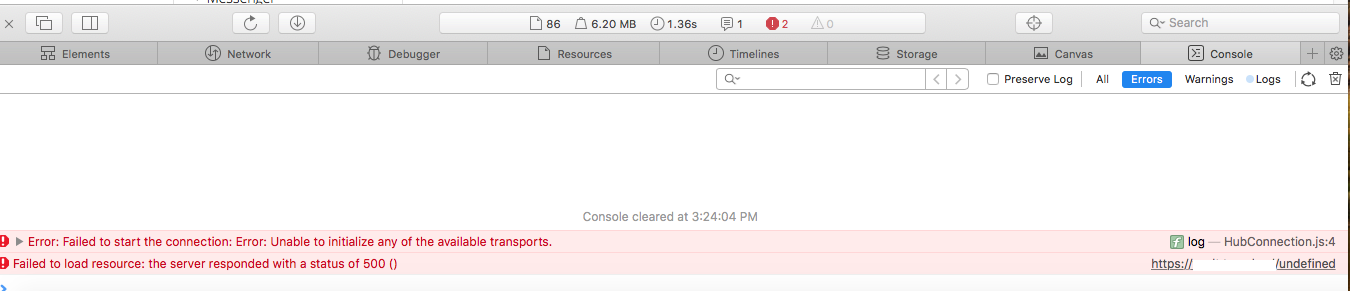
@dani-garcia commented on GitHub (Apr 17, 2019):
The first error is caused because you have websocket notifications enabled, but not configured correctly, which I believe can't be done with the Synology interface. You can disable it with the
Websocket enabledfrom the admin panel, unchecking it.The second error happens sometimes, i'm not sure what causes it, but it's harmless.
@BobWs commented on GitHub (Apr 17, 2019):
The websocket was disabled (see attachment) I cannot change anything because it is read only
@dani-garcia commented on GitHub (Apr 17, 2019):
Ah, okay. Then it should be fine to ignore both errors!
@BobWs commented on GitHub (Apr 17, 2019):
okay thanks for your support!
@mprasil commented on GitHub (Apr 17, 2019):
@BobWs if you have a minute, add your device to the table here. Might help other Synology users to pick the correct image.
@BobWs commented on GitHub (Apr 17, 2019):
Okay so I added my Synology to the table but it isn't showing?!
added this:
| Synology | DSM (DSM 6.2.1-23824 Update 6) | Docker-x64-17.05.0-0367 |
mprasil/bitwarden:latest| OK ||
@dani-garcia commented on GitHub (Apr 17, 2019):
Should be fixed now, it was missing a new line.
@skug67 commented on GitHub (May 6, 2019):
Hmmm. Having the same problems. Almost certainly because I'm not only using a reverse proxy, I'm also running at a suburl instead of a subdomain (see https://github.com/dani-garcia/bitwarden_rs/issues/241). Any idea where I'd look to patch the code which generates the link for the attachments so that I can add the suburl there as well?
Thanks in advance.
@dani-garcia commented on GitHub (May 7, 2019):
The link for the attachments is generated from the DOMAIN env variable.
Are you configuring the DOMAIN variable correctly? In your case it should probably be something like
http://www.domain.com/suburl.Any errors in the browsers console or the network tab?
@skug67 commented on GitHub (May 7, 2019):
Wow. That was easy. Thanks for the quick response!