User Vaults Lost #322

Closed
opened 2026-02-04 19:36:07 +03:00 by OVERLORD · 3 comments
Owner

Originally created by @spaerk on GitHub (Jun 15, 2019).

So in the last few days, the Bitwarden android app has been updated, and it immediately conflicted with my Bitwarden host - It just kept giving an error about not being able to connect to the server. I ended up uninstalling the newest version and installing the version from February (1.22) and that seemed to connect fine, and let me access my vault.

Today, my mom mentions that she can't log into her vault, and I assume it was the same issue. So I did the same version downgrade, before we get hard stopped at her master password. I assume she forgot it, which sucks, but we can recover her few passwords. So I go to /#/recover-delete and enter her email, but get an error. So I try logging into my vault. I know my password. Username/Password not recognized. Enabled, and then connected to the admin panel and find there are no vaults. At all. After 2 months of using Bitwarden, my whole vault is just gone. I even tested by creating a new user with the email I've been using the whole time, and now I see a registered user in the Admin panel.

I'm very likely to have just screwed up - bad. I assume I rebooted the container badly, or did something. I'm hoping I didn't wipe my vault, I just misplaced it or something. I don't really know where to start looking to see if I even still have the old Vault.
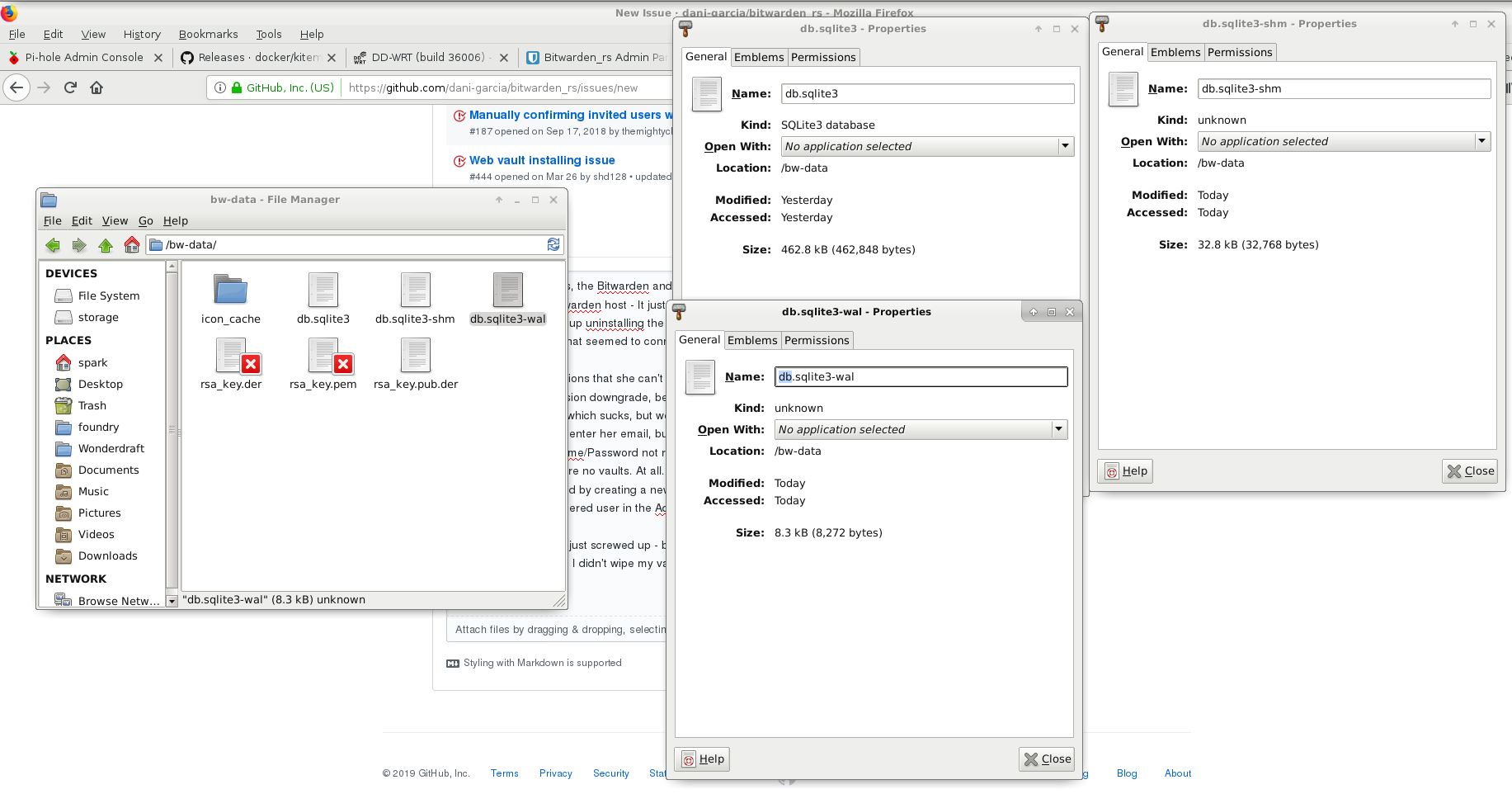
Screenshot from 2019-06-15 11-57-11

Originally created by @spaerk on GitHub (Jun 15, 2019). So in the last few days, the Bitwarden android app has been updated, and it immediately conflicted with my Bitwarden host - It just kept giving an error about not being able to connect to the server. I ended up uninstalling the newest version and installing the version from February (1.22) and that seemed to connect fine, and let me access my vault. Today, my mom mentions that she can't log into her vault, and I assume it was the same issue. So I did the same version downgrade, before we get hard stopped at her master password. I assume she forgot it, which sucks, but we can recover her few passwords. So I go to /#/recover-delete and enter her email, but get an error. So I try logging into my vault. I _know_ my password. Username/Password not recognized. Enabled, and then connected to the admin panel and find there are no vaults. At all. After 2 months of using Bitwarden, my whole vault is just gone. I even tested by creating a new user with the email I've been using the whole time, and now I see a registered user in the Admin panel. I'm very likely to have just screwed up - bad. I assume I rebooted the container badly, or did something. I'm hoping I didn't wipe my vault, I just misplaced it or something. I don't really know where to start looking to see if I even still have the old Vault. ![Screenshot from 2019-06-15 11-57-11](https://user-images.githubusercontent.com/51862689/59555274-c9ffd900-8f64-11e9-9266-9214009d02e2.png)
Author
Owner

@dani-garcia commented on GitHub (Jun 15, 2019):

The recover delete endoint isn't implemented so that explains the error (I don't even know how to get there without changing the URL by hand). I don't think that could be the cause of the error, because it's just gonna return a 404 and do nothing more.

Just to get a clearer picture, you:

  1. Updated android app, didn't work, so you downgraded and it worked without problems.
  2. Same with your mom, but you couldn't log in again so tried the unimplemented recover.
  3. You tried your own account but couldn't log in, enabled the admin page and there where no users there.

If nothing else happened, I have no idea what could be the cause of the problems, the database should be able to resist a reboot without problems.

I'd try to open the db.sqlite3 file with something like DB Browser and check if there are contents in the Users table and the Ciphers table.

I'd also try to check if you have any other client logged in, make sure the device is offline and try to access your vault from there, you'll have to export the passwords by hand but it's something I guess.

I'd also check if you have any docker volumes created, maybe you used a volume before but when rebooting to enable the admin page you switched to mounting the local file system directly?

@dani-garcia commented on GitHub (Jun 15, 2019): The recover delete endoint isn't implemented so that explains the error (I don't even know how to get there without changing the URL by hand). I don't think that could be the cause of the error, because it's just gonna return a 404 and do nothing more. Just to get a clearer picture, you: 1. Updated android app, didn't work, so you downgraded and it worked without problems. 2. Same with your mom, but you couldn't log in again so tried the unimplemented recover. 3. You tried your own account but couldn't log in, enabled the admin page and there where no users there. If nothing else happened, I have no idea what could be the cause of the problems, the database should be able to resist a reboot without problems. I'd try to open the db.sqlite3 file with something like [DB Browser](https://sqlitebrowser.org/) and check if there are contents in the Users table and the Ciphers table. I'd also try to check if you have any other client logged in, make sure the device is offline and try to access your vault from there, you'll have to export the passwords by hand but it's something I guess. I'd also check if you have any docker volumes created, maybe you used a volume before but when rebooting to enable the admin page you switched to mounting the local file system directly?
Author
Owner

@spaerk commented on GitHub (Jun 15, 2019):

DB Browser gives me an Invalid File Format error when opening the db.sqlite3 file. Which doesn't give me much hope.

After the initial install, I started mostly using Kitematic to check on/reboot/manage the container, and used it to enable the admin panel, would this have any relevance?
Screenshot from 2019-06-15 12-39-30

@spaerk commented on GitHub (Jun 15, 2019): DB Browser gives me an Invalid File Format error when opening the db.sqlite3 file. Which doesn't give me much hope. After the initial install, I started mostly using Kitematic to check on/reboot/manage the container, and used it to enable the admin panel, would this have any relevance? ![Screenshot from 2019-06-15 12-39-30](https://user-images.githubusercontent.com/51862689/59555671-e9016980-8f6a-11e9-8c78-e563c1cc94da.png)
Author
Owner

@spaerk commented on GitHub (Jun 15, 2019):

Solved it! You nailed it with the Volume idea. I somehow changed it in Kitematic, and didn't even realize it. Set it back to /bw-data/ and we're good to go!
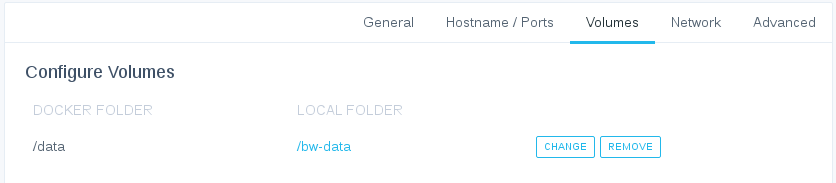
Screenshot from 2019-06-15 13-01-16
Both our vaults now show from the admin panel, any all my devices log in and show my vault. Now I can remove her vault and start a fresh user with a better Master password.

@spaerk commented on GitHub (Jun 15, 2019): Solved it! You nailed it with the Volume idea. I somehow changed it in Kitematic, and didn't even realize it. Set it back to /bw-data/ and we're good to go! ![Screenshot from 2019-06-15 13-01-16](https://user-images.githubusercontent.com/51862689/59555833-fb30d700-8f6d-11e9-8a99-67bd57d4fc52.png) Both our vaults now show from the admin panel, any all my devices log in and show my vault. Now I can remove her vault and start a fresh user with a better Master password.
Sign in to join this conversation.
1 Participants
Notifications
Due Date
No due date set.
Dependencies

No dependencies set.

Reference: starred/vaultwarden#322