mirror of
https://github.com/dani-garcia/vaultwarden.git
synced 2026-02-05 00:29:40 +03:00
U2F support should be implemented #32

Reference in New Issue
Block a user
Delete Branch "%!s()"
Deleting a branch is permanent. Although the deleted branch may continue to exist for a short time before it actually gets removed, it CANNOT be undone in most cases. Continue?
Originally created by @ChrisMacNaughton on GitHub (Jul 11, 2018).
When one attempts to enable U2F, they get an error in the web UI, as well as a log error from the app:
I'll take a look at working on adding support for U2F as it's a mandatory feature for me!
@mprasil commented on GitHub (Jul 11, 2018):
Is that the Yubikey based auth? Is there some way to test this without the actual HW key?
@ChrisMacNaughton commented on GitHub (Jul 11, 2018):
I'm hoping to use it with a Yubikey U2F device, but it looks like Google has made a test device: https://github.com/google/u2f-ref-code
@dani-garcia commented on GitHub (Jul 11, 2018):
Hmm, the reason I hadn't implemented this before was that I didn't have the hardware to test on, and I didn't think to look for software devices, I'll have to check it out!
@ChrisMacNaughton commented on GitHub (Jul 12, 2018):
It looks like there's already a crate that does u2f as well, which may be worth looking at: https://github.com/wisespace-io/u2f-rs
@dani-garcia commented on GitHub (Jul 12, 2018):
Looking at that crate, it seems to be a reasonably simple implementation, i'll see what I can do.
@shauder commented on GitHub (Jul 12, 2018):
I also get an error when attempting to enable Duo. Is this something that has been looked at?
@dani-garcia commented on GitHub (Jul 12, 2018):
At the moment only TOTP is available. I'm currently implementing U2F based on Google's spec and the crate mentioned before.
I don't know much about Duo, but after I finish with U2F, if there is interest for it, I'll investigate some.
@shauder commented on GitHub (Jul 12, 2018):
Thanks, appreciate the work you and others have put into this. I only just found it and got it running but it is very fast and seems like a great alternative.
@dani-garcia commented on GitHub (Jul 12, 2018):
@ChrisMacNaughton
I've implemented U2F support in the
u2fbranch (https://github.com/dani-garcia/bitwarden_rs/tree/u2f). I'd appreciate if you would be able to test it before merging it. It works for me on a virtual device on MacOS Chrome, but I lack a real device to test it on.Note: You need to be using HTTPS and you need to set the
DOMAINenvironment variable to wherebitwarden_rsis accessed from. For exampleAlso, if you have any important data saved, backup first!
@mprasil commented on GitHub (Jul 13, 2018):
Hi, I've triggered build, once complete (will take about an hour) you can download and try the
mprasil/bitwarden:u2fimage. Note that I probably won't keep it around for too long after the changes are merged, so only use it to test the changes.@ChrisMacNaughton commented on GitHub (Jul 13, 2018):
I get a couple of errors going through it, will attach screenshots in the UI in a moment, but here are the server logs:
@ChrisMacNaughton commented on GitHub (Jul 13, 2018):
On initial load of the u2f tab, after putting in my master password:
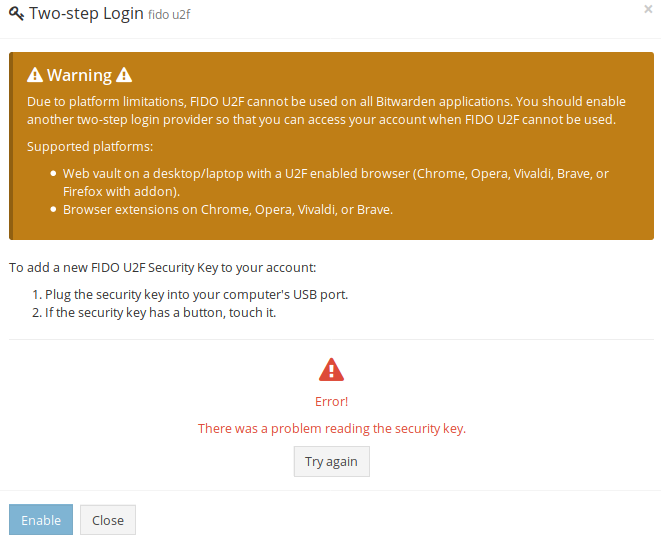
After clicking "Try Again," it progresses correctly to wait for my key. After I tap my key, I correctly get:
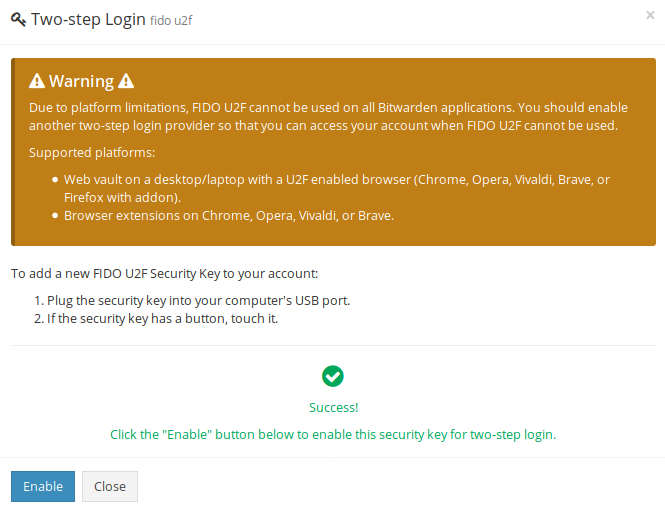
When I click "Enable", I get an error:
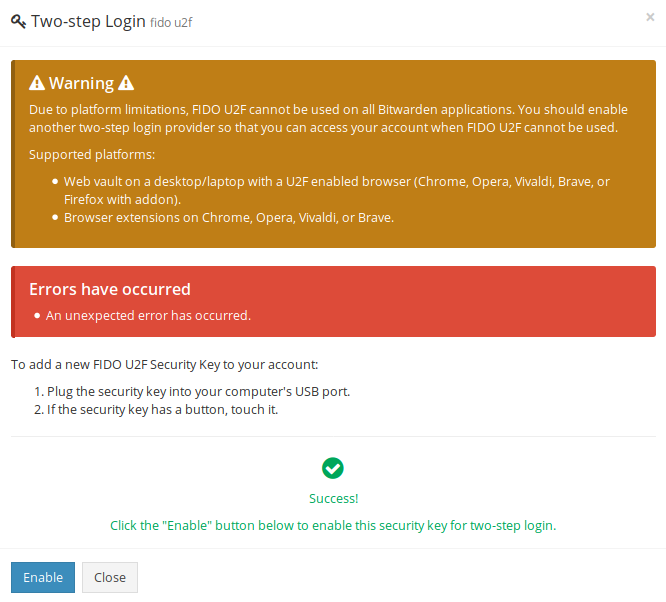
If I click "Enable" again, I get another error:

@ChrisMacNaughton commented on GitHub (Jul 13, 2018):
For reference, this is pulled down from your branch and built, not run in a container
@dani-garcia commented on GitHub (Jul 13, 2018):
It seems for some reason your browser is not sending the
challengefield, hopefully it's something simple, like the browser sending theChallengefield instead.In the latest version of the U2F branch I added some debug prints, to check what the server is receiving.
When everything is working correctly, this is what I see in the logs:
When registering the device
When login
I'd appreciate if you checked to make sure all the keys are present and using same casing.
@ChrisMacNaughton commented on GitHub (Jul 13, 2018):
Well, couldn't be easy, could it:
The information sent from the browser is:
It looks like the "masterPasswordHash" is sent from the server on the
/api/two-factor/get-u2frequest and returned on the POST to/api/two-factor/u2fThis is in Firefox 60.0.1, by the way
@dani-garcia commented on GitHub (Jul 13, 2018):
Alright, that's a bit strange, it must be different between browsers, because I tested on Chrome. I just updated the branch so the challenge parameter is ignored, we already have it in the database. With that it should work now (at least that part).
@ChrisMacNaughton commented on GitHub (Jul 13, 2018):
With the latest changes, I can register my yubikey, as well as login with it as the 2nd factor on firefox; however, in Chrome I get an interesting issue, my key isn't detected after entering my password, the server logs show:
and chrome's logs show a 400 on the above request
@dani-garcia commented on GitHub (Jul 13, 2018):
That sounds more like a client problem, that request is the user and password login one, that returns 400 and that error to indicate to the client the need for two-factor auth.
At that point the browser should show the U2F auth page, which should detect the key.
Is there any message in Chromes console?
It should print something like:
And after that, it may print an error number.
Does this U2F demo work in Chrome for you?
@ChrisMacNaughton commented on GitHub (Jul 13, 2018):
In Chrome's console, I see:
The linked Yubikey demo works fine for in Chrome using the same U2F device
@dani-garcia commented on GitHub (Jul 13, 2018):
According to https://developers.yubico.com/U2F/Libraries/Client_error_codes.html, that's probably an AppId error.
Do you have the DOMAIN env variable set?
If you go to
https://<domain>/app-id.json, the first id should be equal tohttps://<domain>@ChrisMacNaughton commented on GitHub (Jul 13, 2018):
DOMAIN=https://localhost:8000 ROCKET_TLS={certs="/home/chris/code/certs/cert.pem",key="/home/chris/code/certs/key.pem"} cargo runis my invocation; if I set DOMAIN to not include the https, firefox doesn't work either (and Chrome still won't)@dani-garcia commented on GitHub (Jul 13, 2018):
Well, after some searching I found this (https://stackoverflow.com/questions/33610042/u2f-integration-with-multiple-facetids-without-chrome-extension-but-u2f-api-js).
According to that, U2F Facets shouldn't work in self signed certificates, and I was trying with a Let's Encrypt certificate, no wonder we were getting different results!
I could create an option to set the AppID to be a single URL, but then the mobile apps would stop working.
Is there any chance you have an actual domain to test it on?
@ChrisMacNaughton commented on GitHub (Jul 13, 2018):
I do, will get back to you in a bit
@ChrisMacNaughton commented on GitHub (Jul 13, 2018):
Good stuff; chrome and firefox handle it correctly when you use a real certificate! I guess chrome treats the self signed differently since you "accept" the self-signed cert in firefox but don't in chrome
@dani-garcia commented on GitHub (Jul 13, 2018):
Great! Good to know! If it's all fixed I'll merge the branch into master and close this. If any other problem appears, simply reopen this issue or create a new one.