mirror of
https://github.com/dani-garcia/vaultwarden.git
synced 2025-12-10 17:23:04 +03:00
Website icons won't show. (Only the fallback icon does) #2393

Reference in New Issue
Block a user
Delete Branch "%!s()"
Deleting a branch is permanent. Although the deleted branch may continue to exist for a short time before it actually gets removed, it CANNOT be undone in most cases. Continue?
Originally created by @Ryonez on GitHub.
Been testing a little still, and have noticed that items don't show a icon related the the site saved in it.
Looking at the dev console shows:

I think there's a deeper issue though as navigating to the link that's meant to be to the image doesn't display anything:

This issue appears in the web vault, desktop and chrome browser clients.
@dani-garcia commented on GitHub:
Strange, I did some testing and if I create an entry with a URL of
www.google.comthe icon loads, but if I usegoogle.cominstead, the web vault simply refuses to make the request at all (both in chrome and in firefox), I'll have to investigate some more. On the other side, the chrome extension works for me in my example, and so does making the request manually (openinghttp://localhost/icons/google.com/icon.pngin the browser).About your issue, does
www.google.comwork for you? By default we act as a proxy cache for the official icons service (aticons.bitwarden.com), so we don't do anything special.@mprasil commented on GitHub:
That's weird, the icons show just fine for me:
Anything relevant in the logs? Do you see any files in the
icon_cachefolder? (this folder should be besides the DB file by default)@mprasil commented on GitHub:
Both google.com and www.google.com works for me.
Could there be some throttling somewhere, possibly on the icons.bitwarden.com side? I'd imagine if you import some sizable password library, the first time it loads, there's gonna be hundreds of requests created.
@dani-garcia commented on GitHub:
Well it's trying to download the icons for
google.comanddiscord.com, so if theicons_cachefolder doesn't exist is because either the download failed or the saving to file failed.I've modified the code to print the error in case the download failed, which I imagine is probably the cause. If with the new version there aren't still any error messages, I guess the other posibility is a permissions problem.
@mprasil Yeah, that was very weird, so it's probably a problem with my browser cache.
@Ryonez commented on GitHub:
The log shows this:
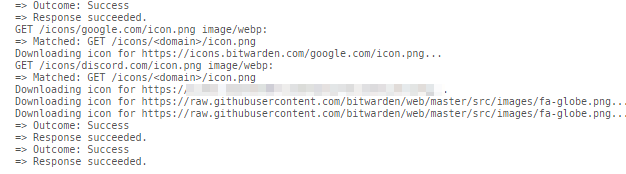
But the data folder is rather sparse. I only have this:
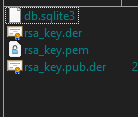
@Ryonez commented on GitHub:
Sorry @dani-garcia, I only just noticed your post.
I changed it to
www.google.com, there's been no changes.Is there meant to be a icon folder in the data dir? If so I don't have one.
To help further, I'm using the docker service.
Edit, seems the page wasn't loading my end. >.<
@mprasil commented on GitHub:
@dani-garcia also a possibility, that creating the directory fails due to some FS permission issues, which then panics the call here before serving the icon to the client.
@dani-garcia commented on GitHub:
Okay, i tried in Docker and there seems to be a problem with the HTTPS connections, I'll see what I can do.
@dani-garcia commented on GitHub:
I think I solved this, you should rebuild the docker container with the new changes.
If this works for you, please let me now!
@Ryonez commented on GitHub:
Rebuild, or update? I use the docker image you make.
@mprasil commented on GitHub:
@dani-garcia this actually explains why it was working some time ago for me. I remember I had the same issue but it was first and foremost due to blocking any outgoing connections from bitwarden. Then I fixed that and it still didn't work, so I
docker exec-ed into the container and installedcurlto try the requests manually. As you'd probably figured out already, this installed certs as dependency and everything worked fine. (so I couldn't reproduce the issue) Bitwarden populated my icon cache and I haven't noticed it's not working since the cache was already there. 😄 What a tricky little bug.@Ryonez commented on GitHub:
Of course, the repo has your name.
I'm probably way more tired than I feel.
I'll update once I see it come though.
@Ryonez commented on GitHub:
Alright, updated the docker, and the icons are now present. Thank you very much for sorting this out!
Resolved by
dfb348d630@mprasil commented on GitHub:
@Ryonez You're actually using my image. The build is scheduled, but takes about 1h to finish on slow Docker servers.
@mprasil commented on GitHub:
You can follow the build status here.