mirror of
https://github.com/dani-garcia/vaultwarden.git
synced 2025-12-10 17:23:04 +03:00
Very slow performance - app is almost unusable #2336

Reference in New Issue
Block a user
Delete Branch "%!s()"
Deleting a branch is permanent. Although the deleted branch may continue to exist for a short time before it actually gets removed, it CANNOT be undone in most cases. Continue?
Originally created by @ghost on GitHub.
My setup:
Docker container, inspect command: https://pastebin.com/raw/1RbG7dGj
I use Firefox addon, web vault and mobile app on IOS.
Almost everytime I can't login at first time, can see that any request does not show in container log after click on login button.
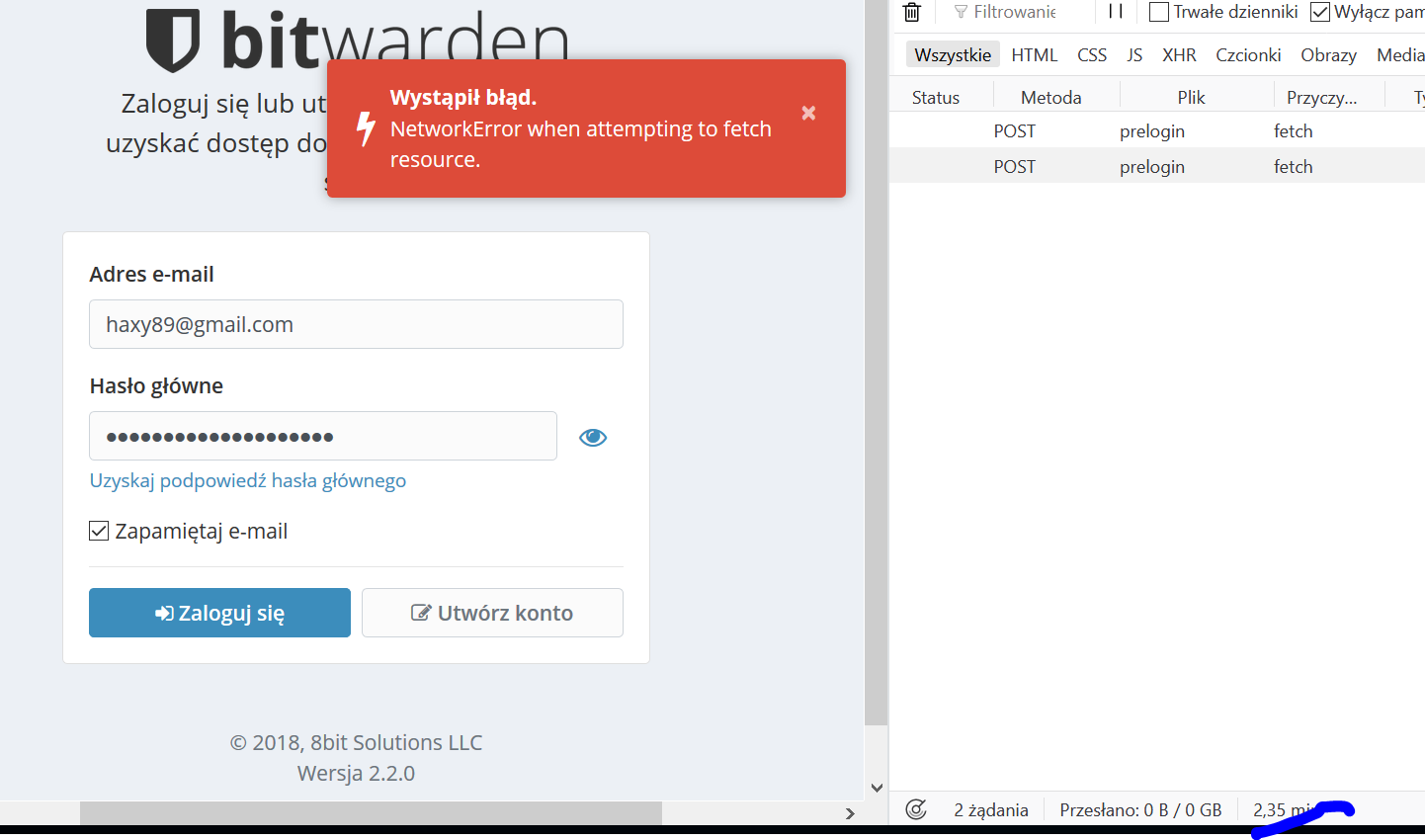
It took over 2 minutes for this request after page refresh and get error:
Synchronization between Firefox addon and server in local network take 1 minute!
The same with mobile IOS app, sometimes synchronization show connection error, i think because timeouts. The same with saving changes in secure note on mobile, can sync because of error.
No additional info in container log when errors appear in apps: https://pastebin.com/raw/FKa4tMpm
Tested using chrome and the same. it is not related to docker host or local network performance. My docker host is my very fast Qnap Nas and other containers on this host work very fast.
Feel free to ask for more info
@mprasil commented on GitHub:
Is it possible that Qnap puts some proxy in front of the service? Is the request served fast once it hits bitwarden_rs?
@mprasil commented on GitHub:
I don't think that should matter really. Any port should work just fine. Is it only the API calls, that are slow or is slow also when loading static Vault files?
@ghost commented on GitHub:
@mprasil
I did monitoring live logs and 9 out of 10 requests does not reach server. So you are right something delaying request before it hit the server.
I use ublock in firefox but bitwarden web app is whitelisted and problem occurs also on IOS so it is not the cause.
@ghost commented on GitHub:
Absolutely not, you can see detailed setting in attached docker inspect command in first post.
It is just clear docker app on NAS.
I have other containers installed and worked without any problems.
If the request hit the server it is served and returned fast without any delay.
Maybe the problem is that i am using other port than 80?
@mprasil commented on GitHub:
That is indeed super slow. So I understand that the API calls take a while to respond. What I would suggest to do is to monitor the container logs live, click "log in" in Vault and see if you can see the container logs showing the request instantly. It will also show when the response is done. You should see whether the slowness is on bitwarden_rs side, or there is something else delaying the request before it hits the server.
Are there any proxies or anything like that in your setup?
@ghost commented on GitHub:
Give me a path to example static file please.
@ghost commented on GitHub:
It also affect static files likes images etc.
@mprasil commented on GitHub:
Can you try and do a
curl -vrequest to one of the static files? Preferably both on your PC and also on the Qnap directly. See if there's any difference.@mprasil commented on GitHub:
Actually just `curl -v 'http://10.0.3.3:8123/' should do. This should load index.html
@ghost commented on GitHub:
Curl from PC in local network:
First try: https://pastebin.com/raw/vRjbRWpm (Connection reset by peer)
Second try: https://pastebin.com/raw/AUuRCvxc
Curl from Raspberrypi in local network:
First try: https://pastebin.com/raw/SmXz3EK6 (Connection reset by peer)
Second try: the same error (Connection reset by peer)
Third try: the same error (Connection reset by peer)
Fourth try: https://pastebin.com/raw/uBVpiBrz
Curl from Qnap Nas (docker host) in local network:
First try: https://pastebin.com/raw/xdNFYimj
Second try: https://pastebin.com/raw/Ne0QWdqp (Connection reset by peer)
As you can see something is wrong with the bitwarden server, it refuse a connection sometimes.
@ghost commented on GitHub:
There is no reason that 10.0.3.3 should be accessible on docker host.
My docker host is Qnap Nas (192.168.0.5), on this Nas works docker and it create network for containers with gateway 10.0.3.1 and 10.0.3.3 for Bitwarden container
Calling 192.168.0.5:8123 calls 10.0.3.3:80 according to container inspect command
@ghost commented on GitHub:
@mprasil commented on GitHub:
I'm not sure how it's set up in Qnap, but default docker configuration will spin up a bridged network where the Gateway IP is assigned to the bridge interface on the host side. This means that host also has direct access to the docker network.
On top of that docker also spins up
docker-proxyprocess for each forwarded port. This is what forwards connection from host port to docker port. I was trying to rule out some issue with docker-proxy or something along that path with basically hitting the bitwarden_rs directly.Now your setup looks different. The fact that you don't have direct access from Qnap itself to the docker container kinda suggests that there might be something else somehow forwarding the connection. My money is on that component miss-behaving for some reason. Maybe the port is actually used and there is some conflict, maybe there's some routing issue, I don't know. We really need to rule that out, because so far I suspect we're seeing some issue with how Qnap is set up.
@mprasil commented on GitHub:
Can you try the same directly from Qnap, but try to access directly
http://10.0.3.3:80?@mprasil commented on GitHub:
Okay, something doesn't add up here. According to docker inspect you shared before, the container should be running on
10.0.3.3unless you restarted it in the meantime. Any way, just get the current IP:docker inspect --format='{{.NetworkSettings.Networks.bridge.IPAddress}}' Bitwardenand use the IP with port80to try curl. Also make sure you do it directly from the Qnap.Oneliner:
@ghost commented on GitHub:
I changed rocket listening port inside the container from default 80 to 8882 and did forwarding with -p 8123:8882 but without help. Still get connection refused or no route to host on 9 out of 10 requests
@mprasil commented on GitHub:
Also try changing the 8123 port to something else just in case.
@ghost commented on GitHub:
Ok, after did 10 times curl, there is connection from Qnap to 10.0.3.3:80:
But most of the times I get:
So server sometimes respond sometimes does not. I will try to change port with -e ROCKET_PORT
to see if it helps
Edit: Changing rocket port did help
@mprasil commented on GitHub:
Is there any chance that there's something else using the 10.0.3.3 IP? Check the routing table. It sure sounds like networking issue.
@mprasil commented on GitHub:
Just for the record, which port did you change? Can we resolve it?
@mprasil commented on GitHub:
I suspect there were some weird routing issues. Spotty "host unreachable" kinda suggests an IP conflict maybe? Macvlan will expose the container directly at the interface under separate IP and MAC address, so makes sense this would resolve said conflict.
Anyway I don't think this was an actual issue in bitwarden_rs. You've essentially ran pretty standard configuration otherwise and it should be well tested and supported. I'm going to resolve this with the assumption that the issues were caused by some unrelated problem.
Feel free to reopen if you have good reason to think it's actually a problem in the bitwarden_rs code.
@ghost commented on GitHub:
Changing network type from nat to bridge helps. Do know whyFrom bridge to macvlan