Problems on a Raspberry Pi 3 Model B+ #2332

Closed
opened 2025-10-09 17:59:32 +03:00 by OVERLORD · 18 comments
Owner

Originally created by @xMate420x on GitHub.

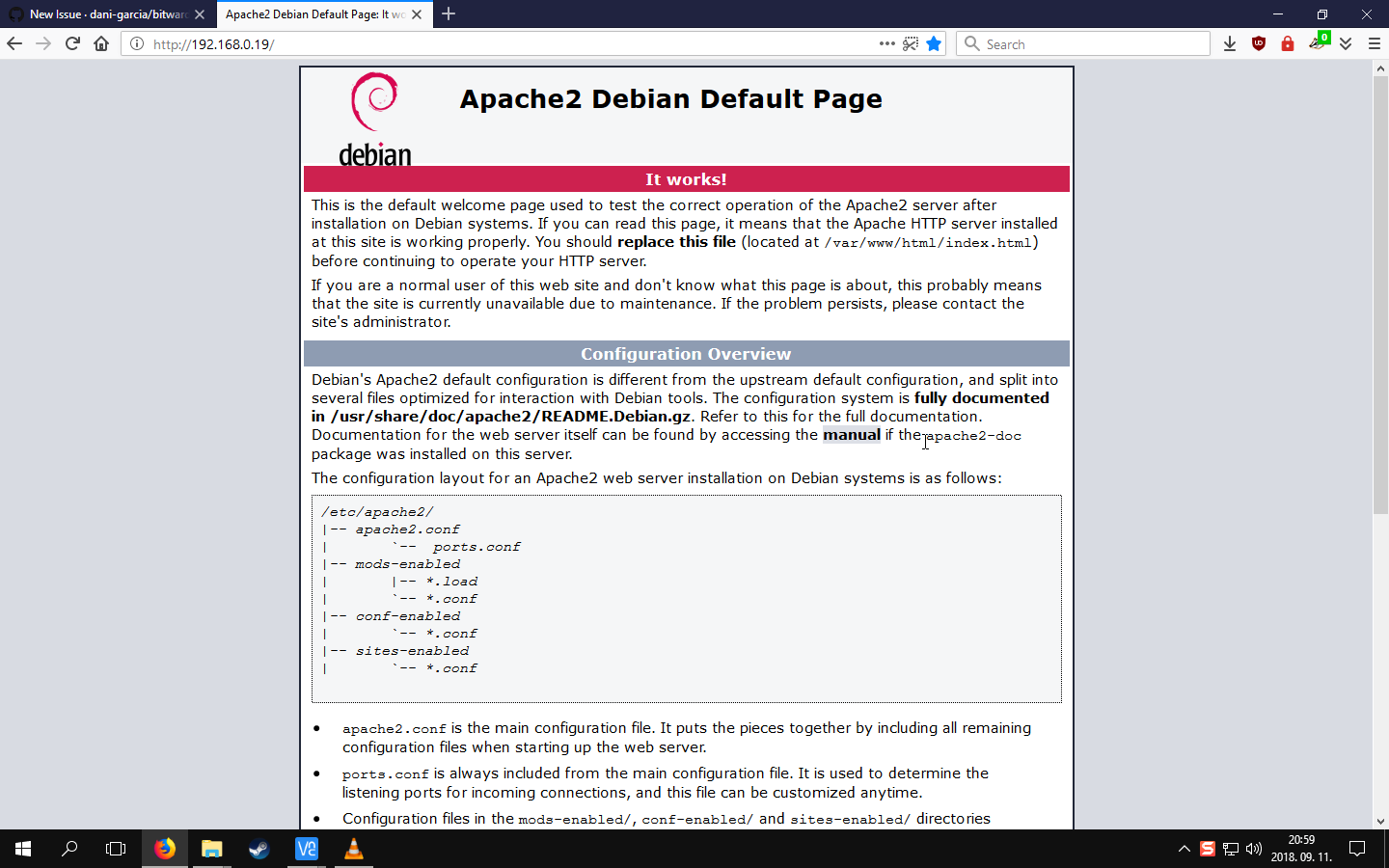
After installing the program as its specified in the readme to 2 Raspberry Pi 3 Model B+ devices, the only thing that shows up after going to the site is the Apache2 Debian Default Page , both devices have stock Raspbian, the only thing that was installed by me on them is Docker
Picture

Originally created by @xMate420x on GitHub. After installing the program as its specified in the readme to 2 Raspberry Pi 3 Model B+ devices, the only thing that shows up after going to the site is the _Apache2 Debian Default Page_ , both devices have stock Raspbian, the only thing that was installed by me on them is Docker ![Picture](https://user-images.githubusercontent.com/29177144/45381489-b7d3c180-b605-11e8-8cc9-1842303c803a.png)
OVERLORD added the questiontroubleshooting labels 2025-10-09 17:59:32 +03:00
Author
Owner

@mprasil commented on GitHub:

Hi, did you compile it yourself? As for the default Apache page, this looks like Apache misconfiguration. There's nothing in Bitwarden that would generate such page.

@mprasil commented on GitHub: Hi, did you compile it yourself? As for the default Apache page, this looks like Apache misconfiguration. There's nothing in Bitwarden that would generate such page.
Author
Owner

@mprasil commented on GitHub:

Ah right. Yeah unfortunately that won't work on raspberry as the image is x86-64 only. I have some WIP effort to make raspberry image, but so far fail to compile it on Docker hub properly.

@mprasil commented on GitHub: Ah right. Yeah unfortunately that won't work on raspberry as the image is x86-64 only. I have some WIP effort to make raspberry image, but so far fail to compile it on Docker hub properly.
Author
Owner

@xMate420x commented on GitHub:

I used the docker image with the commands that were the first thing in the readme

@xMate420x commented on GitHub: I used the docker image with the commands that were the first thing in the readme
Author
Owner

@mprasil commented on GitHub:

@dobunzli, thanks for update. Makes sense that would work as it's basically building the binary on raspberry. Still cool to hear that people are really running this on such relatively low power HW.

@mprasil commented on GitHub: @dobunzli, thanks for update. Makes sense that would work as it's basically building the binary on raspberry. Still cool to hear that people are really running this on such relatively low power HW.
Author
Owner

@dobunzli commented on GitHub:

Hello,

Just in case, I have it installed on a raspberry pi 3b+ running Arch Linux, but without docker.

I used these packages https://aur.archlinux.org/packages/bitwarden_rs/ and https://aur.archlinux.org/packages/bitwarden_rs-vault/ and was able to make it work locally for now.

I am still configuring the serveur so I can access from the outside world... and progress are made !

Hope this helps.

@dobunzli commented on GitHub: Hello, Just in case, I have it installed on a raspberry pi 3b+ running Arch Linux, but without docker. I used these packages https://aur.archlinux.org/packages/bitwarden_rs/ and https://aur.archlinux.org/packages/bitwarden_rs-vault/ and was able to make it work locally for now. I am still configuring the serveur so I can access from the outside world... and progress are made ! Hope this helps.
Author
Owner

@xMate420x commented on GitHub:

Any versions for Raspbian? That is what i need for most projects so i cannot switch to Arch Linux

@xMate420x commented on GitHub: Any versions for Raspbian? That is what i need for most projects so i cannot switch to Arch Linux
Author
Owner

@mprasil commented on GitHub:

Guys, if you have raspberry, can you give it a try with mprasil/bitwarden:beta-raspberry image? I have no hardware to test it on and it's using cross-compiling for everything, so a test on real raspberry would be appreciated.

@mprasil commented on GitHub: Guys, if you have raspberry, can you give it a try with `mprasil/bitwarden:beta-raspberry` image? I have no hardware to test it on and it's using cross-compiling for everything, so a test on real raspberry would be appreciated.
Author
Owner

@mqus commented on GitHub:

And if you need, I also threw a .service file for systemd together here but you may have to change the paths to match your binary, .env file and working directory (the directory where web-vault/ is in). The modified bitwarden_rs.service file then goes into /etc/systemd/system and can be enabled/started like all the other systemd services.

@mqus commented on GitHub: And if you need, I also threw a .service file for systemd together [here](https://aur.archlinux.org/cgit/aur.git/tree/bitwarden_rs.service?h=bitwarden_rs) but you may have to change the paths to match your binary, .env file and working directory (the directory where `web-vault/` is in). The modified `bitwarden_rs.service` file then goes into `/etc/systemd/system` and can be enabled/started like all the other systemd services.
Author
Owner

@mqus commented on GitHub:

You could build it from scratch yourself by following the instructions. Just one thing: for building the web-vault you may need to enable swapping because the build process takes huge amounts of RAM.

@mqus commented on GitHub: You could build it from scratch yourself by following the [instructions](https://github.com/dani-garcia/bitwarden_rs/blob/master/BUILD.md). Just one thing: for building the web-vault you may need to enable swapping because the build process takes huge amounts of RAM.
Author
Owner

@mprasil commented on GitHub:

Yeah for now you have to build it yourself. You can actually download the docker image you were trying to use and copy the web-vault folder out of there instead of building the Vault part yourself.

@mprasil commented on GitHub: Yeah for now you have to build it yourself. You can actually download the docker image you were trying to use and copy the web-vault folder out of there instead of building the Vault part yourself.
Author
Owner

@dobunzli commented on GitHub:

Hello,

I can confirm that this image launches correctly on a raspberry 3 b+ with raspbian desktop june 2018 after installing docker and docker-compose.
I only tested from the local network for now, but everything looks good !

Thanks for the work !

Le 12 sept. 2018 à 16:34, mprasil notifications@github.com a écrit :

Guys, if you have raspberry, can you give it a try with mprasil/bitwarden:beta-raspberry image? I have no hardware to test it on and it's using cross-compiling for everything, so a test on real raspberry would be appreciated.


You are receiving this because you were mentioned.
Reply to this email directly, view it on GitHub https://github.com/dani-garcia/bitwarden_rs/issues/174#issuecomment-420670925, or mute the thread https://github.com/notifications/unsubscribe-auth/AbTYwhTVrWLGKDVjE2q2j9uWcPGxYZBSks5uaRuQgaJpZM4Wj_e7.

@dobunzli commented on GitHub: Hello, I can confirm that this image launches correctly on a raspberry 3 b+ with raspbian desktop june 2018 after installing docker and docker-compose. I only tested from the local network for now, but everything looks good ! Thanks for the work ! > Le 12 sept. 2018 à 16:34, mprasil <notifications@github.com> a écrit : > > Guys, if you have raspberry, can you give it a try with mprasil/bitwarden:beta-raspberry image? I have no hardware to test it on and it's using cross-compiling for everything, so a test on real raspberry would be appreciated. > > — > You are receiving this because you were mentioned. > Reply to this email directly, view it on GitHub <https://github.com/dani-garcia/bitwarden_rs/issues/174#issuecomment-420670925>, or mute the thread <https://github.com/notifications/unsubscribe-auth/AbTYwhTVrWLGKDVjE2q2j9uWcPGxYZBSks5uaRuQgaJpZM4Wj_e7>. >
Author
Owner

@xMate420x commented on GitHub:

Just a question, how do i install it? I tried the docker install didn't work, i tried compiling it but i cannot get the OpenSSL 1.0.2 version anywhere

@xMate420x commented on GitHub: Just a question, how do i install it? I tried the docker install didn't work, i tried compiling it but i cannot get the OpenSSL 1.0.2 version anywhere
Author
Owner

@mprasil commented on GitHub:

Just use the normal docker run commands as you see in the readme, but instead of mprasil/bitwarden:latest image, use mprasil/bitwarden:beta-raspberry. That should be the only difference.

@mprasil commented on GitHub: Just use the normal docker run commands as you see in the readme, but instead of `mprasil/bitwarden:latest` image, use `mprasil/bitwarden:beta-raspberry`. That should be the only difference.
Author
Owner

@dobunzli commented on GitHub:

Hello,

Hope this helps:

Docker installation

curl -fsSL https://get.docker.com -o get-docker.sh

sudo sh get-docker.sh

Docker-compose installation

curl -L https://github.com/docker/compose/releases/download/1.22.0/docker-compose-uname -s-uname -m -o /usr/local/bin/docker-compose

sudo chmod +x /usr/local/bin/docker-compose

Bitwarden_rs raspberry installation

sudo docker pull mprasil/bitwarden:beta-raspberry

Launch

sudo docker run -d --name bitwarden -v /bw-data/:/data/ -p 80:80 mprasil/bitwarden:beta-raspberry

Try

Launch a browser and use http://localhost:80

Le 12 sept. 2018 à 23:38, mprasil notifications@github.com a écrit :

Just use the normal docker run commands as you see in the readme, but instead of mprasil/bitwarden:latest image, use mprasil/bitwarden:beta-raspberry. That should be the only difference.


You are receiving this because you were mentioned.
Reply to this email directly, view it on GitHub https://github.com/dani-garcia/bitwarden_rs/issues/174#issuecomment-420806827, or mute the thread https://github.com/notifications/unsubscribe-auth/AbTYwg55ZYK50A_Srkf9DS3Pd-jm95v0ks5uaX7rgaJpZM4Wj_e7.

@dobunzli commented on GitHub: Hello, Hope this helps: Docker installation ------------------- curl -fsSL https://get.docker.com -o get-docker.sh sudo sh get-docker.sh Docker-compose installation ----------------------------- curl -L https://github.com/docker/compose/releases/download/1.22.0/docker-compose-`uname -s`-`uname -m` -o /usr/local/bin/docker-compose sudo chmod +x /usr/local/bin/docker-compose Bitwarden_rs raspberry installation -------------------------------- sudo docker pull mprasil/bitwarden:beta-raspberry Launch -------- sudo docker run -d --name bitwarden -v /bw-data/:/data/ -p 80:80 mprasil/bitwarden:beta-raspberry Try ------- Launch a browser and use http://localhost:80 > Le 12 sept. 2018 à 23:38, mprasil <notifications@github.com> a écrit : > > Just use the normal docker run commands as you see in the readme, but instead of mprasil/bitwarden:latest image, use mprasil/bitwarden:beta-raspberry. That should be the only difference. > > — > You are receiving this because you were mentioned. > Reply to this email directly, view it on GitHub <https://github.com/dani-garcia/bitwarden_rs/issues/174#issuecomment-420806827>, or mute the thread <https://github.com/notifications/unsubscribe-auth/AbTYwg55ZYK50A_Srkf9DS3Pd-jm95v0ks5uaX7rgaJpZM4Wj_e7>. >
Author
Owner

@mprasil commented on GitHub:

Thanks for testing! @xMateMCPE give it a go, it should hopefully work on your raspbian. It's current master version just compiled for ARMv7, so it should be just the same as mprasil/bitwarden:latest functionally.

@mprasil commented on GitHub: Thanks for testing! @xMateMCPE give it a go, it should hopefully work on your raspbian. It's current master version just compiled for ARMv7, so it should be just the same as `mprasil/bitwarden:latest` functionally.
Author
Owner

@xMate420x commented on GitHub:

It works! Thanks. :)
Edit after 1 days: Still no problem, works nicely

@xMate420x commented on GitHub: It works! Thanks. :) Edit after 1 days: Still no problem, works nicely
Author
Owner

@mprasil commented on GitHub:

Perfect! I'll resolve this, we now have the raspberry Dockerfile merged, so hopefully the non-beta raspberry image should appear soon. (just in the build pipe, but will take couple hours to build)

@mprasil commented on GitHub: Perfect! I'll resolve this, we now have the raspberry Dockerfile merged, so hopefully the non-beta raspberry image should appear soon. (just in the build pipe, but will take couple hours to build)
Author
Owner

@mprasil commented on GitHub:

Update: the image is ready, please use mprasil/bitwarden:raspberry image on raspberry pi.

@mprasil commented on GitHub: Update: the image is ready, please use `mprasil/bitwarden:raspberry` image on raspberry pi.
Sign in to join this conversation.
1 Participants
Notifications
Due Date
No due date set.
Dependencies

No dependencies set.

Reference: starred/vaultwarden#2332