Invite to Organization works incomplete #1755

Closed
opened 2025-10-09 17:28:35 +03:00 by OVERLORD · 5 comments
Owner

Originally created by @paradeiser on GitHub.

Subject of the issue

When inviting a new user to an Organization, invite works. But after setting up the new user, the organizer doesnt get a status update. User tag stays "invited" and can not be added to oranization.

Your environment

  • Bitwarden_rs version: Version: 1.14.1-ccf6ee79
  • Install method: Synology Docker

Steps to reproduce

Invite new user to organization
New user signs up, gets verification email and logs in the first time.
Vault is empty; no organization assigned

Expected behaviour

Usually the organizer gets an email, telling that the invitee signed up and is awaiting the confirmation of the organizer.
After confirming the new user, he gets access to the organization vault.

Actual behaviour

Organizer doesnt get notification about due confirmation.
Management page on the website still states "invited" tag instead of "accepted" tag.
New user doesnt get access to organization vault.

Work around

A workaround is to go back to the first invitation email after setting up the account, and follow again the link "Join Organization Now". But now - as you already have an account set up - cklick "Login" instead of "create account"
I believe this step was not necesary before and doesnt follow a logic workflow (going back to the first mail, you already clicked).

Originally created by @paradeiser on GitHub. ### Subject of the issue When inviting a new user to an Organization, invite works. But after setting up the new user, the organizer doesnt get a status update. User tag stays "invited" and can not be added to oranization. ### Your environment * Bitwarden_rs version: Version: 1.14.1-ccf6ee79 * Install method: Synology Docker ### Steps to reproduce Invite new user to organization New user signs up, gets verification email and logs in the first time. Vault is empty; no organization assigned ### Expected behaviour Usually the organizer gets an email, telling that the invitee signed up and is awaiting the confirmation of the organizer. After confirming the new user, he gets access to the organization vault. ### Actual behaviour Organizer doesnt get notification about due confirmation. Management page on the website still states "invited" tag instead of "accepted" tag. New user doesnt get access to organization vault. ### Work around A workaround is to go back to the first invitation email after setting up the account, and follow again the link "Join Organization Now". But now - as you already have an account set up - cklick "Login" instead of "create account" I believe this step was not necesary before and doesnt follow a logic workflow (going back to the first mail, you already clicked).
Author
Owner

@BlackDex commented on GitHub:

It would be strange that that option has something to do with it, since it only is checked during login of the user.
The not refreshing also happens on the official bitwarden version if i'm correct, so that is not something we can fix.

Also, there have been a lot of changes been done between the last ticket message and now including a lot of email fixes.

Therefore, closing this ticket because of inactivity.
Feel free to re-open if the issue isn't resolved using the testing/master version.

@BlackDex commented on GitHub: It would be strange that that option has something to do with it, since it only is checked during login of the user. The not refreshing also happens on the official bitwarden version if i'm correct, so that is not something we can fix. Also, there have been a lot of changes been done between the last ticket message and now including a lot of email fixes. Therefore, closing this ticket because of inactivity. Feel free to re-open if the issue isn't resolved using the `testing`/`master` version.
Author
Owner

@tkurt commented on GitHub:

Had same problem, to fix it you need to disable the "Require email verification on signups....." option in General tab in Admin panel.
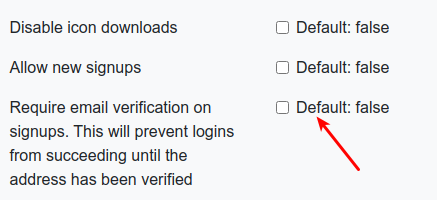
image

@tkurt commented on GitHub: Had same problem, to fix it you need to disable the "Require email verification on signups....." option in General tab in Admin panel. ![image](https://user-images.githubusercontent.com/3866555/84990877-72371780-b14e-11ea-9051-32f08c0924e8.png)
Author
Owner

@paradeiser commented on GitHub:

It's definitely not just the refresh:

  • I (organization manager) did log out and back in
  • Bitwarden usually sends instantly an email to notify the manager about the waiting confirmation, which it didn't
    As invitee you have to go back to the fist invitation-email a second time to activate the invitation.

In vault.bitwarden.com you get a welcome message on your first login:

Bildschirmfoto 2020-03-27 um 09 14 24

And the manager sees the "accepted" tag (and a message about the process of user confirmation).

@paradeiser commented on GitHub: It's definitely not just the refresh: - I (organization manager) did log out and back in - Bitwarden usually sends instantly an email to notify the manager about the waiting confirmation, which it didn't As invitee you have to go back to the fist invitation-email a second time to activate the invitation. In vault.bitwarden.com you get a welcome message on your first login: ![Bildschirmfoto 2020-03-27 um 09 14 24](https://user-images.githubusercontent.com/43011936/77735825-7fd77800-700b-11ea-8125-e339bdac0ee8.png) And the manager sees the "accepted" tag (and a message about the process of user confirmation).
Author
Owner

@toddpfaff commented on GitHub:

I'm a year late to the party but reporting that I just encountered this problem, or something very much like it, and it was due to the fact that I was joining an organization that was requiring two-step login, but since two-step login is not enabled for the user account when it is first created, that user account can not join the organization. The solution is to login to the newly created account, enabled two-step login, logout, follow the invitation Join Organization Now link again, select Login instead of Create, and then the join process works as expected.
I'm wondering if there should be some sort of deferred join feature in a users account so that they can join an organization but not access anything until they've enabled two-step.

@toddpfaff commented on GitHub: I'm a year late to the party but reporting that I just encountered this problem, or something very much like it, and it was due to the fact that I was joining an organization that was requiring two-step login, but since two-step login is not enabled for the user account when it is first created, that user account can not join the organization. The solution is to login to the newly created account, enabled two-step login, logout, follow the invitation Join Organization Now link again, select Login instead of Create, and then the join process works as expected. I'm wondering if there should be some sort of deferred join feature in a users account so that they can join an organization but not access anything until they've enabled two-step.
Author
Owner

@jjlin commented on GitHub:

I can't reproduce this, except for the part about the management page still showing "invited" instead of "accepted" when the org admin doesn't refresh the org management view. I think this is just because the org management view isn't aware of when the user accepts, and doesn't know to update itself. I'm pretty sure this limitation comes from upstream. The workaround would just be to click over to a different view (e.g., "Tools" or "Settings") and then back to "Manage", at which point it should refresh the invitation status of each user.

@jjlin commented on GitHub: I can't reproduce this, except for the part about the management page still showing "invited" instead of "accepted" when the org admin doesn't refresh the org management view. I think this is just because the org management view isn't aware of when the user accepts, and doesn't know to update itself. I'm pretty sure this limitation comes from upstream. The workaround would just be to click over to a different view (e.g., "Tools" or "Settings") and then back to "Manage", at which point it should refresh the invitation status of each user.
Sign in to join this conversation.
1 Participants
Notifications
Due Date
No due date set.
Dependencies

No dependencies set.

Reference: starred/vaultwarden#1755