Docker Container doesn't start after update to 1.25.2 #1338

Closed
opened 2026-02-05 00:39:23 +03:00 by OVERLORD · 4 comments
Owner

Originally created by @esackbauer on GitHub (Jul 28, 2022).

Subject of the issue

Deployment environment

  • vaultwarden version:
  • Install method:
    Docker / Portainer 2.14

  • Clients used:

  • Reverse proxy and version:

  • MySQL/MariaDB or PostgreSQL version:

  • Other relevant details:

Steps to reproduce

Starting the container after update to VaultWarden 1.25.2 it says there is no persistent volume. But the volume is actually mounted:
[INFO] No .env file found.

[DEPRECATED]: SMTP_SSL or SMTP_EXPLICIT_TLS is set. Please use SMTP_SECURITY instead.

[2022-07-28 08:17:09.244][vaultwarden][ERROR] No persistent volume!

########################################################################################

It looks like you did not configure a persistent volume!

This will result in permanent data loss when the container is removed or updated!

If you really want to use volatile storage set I_REALLY_WANT_VOLATILE_STORAGE=true

#######################################################################################

Expected behaviour

Actual behaviour

Troubleshooting data

Contents of dockers volume:
}root@app03:/var/lib/docker/volumes/1d24e6fe4517c3abe615941fdc2ec436a14900fed768d6ebdb3397a1cc0a1926/_data# ls -la
total 2808
drwxr-xr-x 6 root root 4096 Jul 17 13:22 .
drwxr-xr-x 3 root root 4096 Jan 30 2020 ..
drwxr-xr-x 5 root root 4096 Feb 10 2020 attachments
-rw-r--r-- 1 root root 109 Jan 31 2020 config.json
-rw-r--r-- 1 root root 1392640 Jul 17 13:22 db.sqlite3
-rw-r--r-- 1 root root 32768 Jul 28 09:43 db.sqlite3-shm
-rw-r--r-- 1 root root 1376112 Jul 28 09:43 db.sqlite3-wal
drwxr-xr-x 2 root root 20480 Jul 28 09:37 icon_cache
-rw------- 1 root root 1192 Jan 30 2020 rsa_key.der
-rw------- 1 root root 1679 Jan 30 2020 rsa_key.pem
-rw-r--r-- 1 root root 270 Jan 30 2020 rsa_key.pub.der
-rw-r--r-- 1 root root 451 Jun 28 2021 rsa_key.pub.pem
drwxr-xr-x 2 root root 4096 May 24 18:50 sends
drwxr-xr-x 2 root root 4096 May 24 18:50 tmp

Originally created by @esackbauer on GitHub (Jul 28, 2022). <!-- # ### NOTE: Please update to the latest version of vaultwarden before reporting an issue! This saves you and us a lot of time and troubleshooting. See: * https://github.com/dani-garcia/vaultwarden/issues/1180 * https://github.com/dani-garcia/vaultwarden/wiki/Updating-the-vaultwarden-image # ### --> <!-- Please fill out the following template to make solving your problem easier and faster for us. This is only a guideline. If you think that parts are unnecessary for your issue, feel free to remove them. Remember to hide/redact personal or confidential information, such as passwords, IP addresses, and DNS names as appropriate. --> ### Subject of the issue <!-- Describe your issue here. --> ### Deployment environment <!-- ========================================================================================= Preferably, use the `Generate Support String` button on the admin page's Diagnostics tab. That will auto-generate most of the info requested in this section. ========================================================================================= --> <!-- The version number, obtained from the logs (at startup) or the admin diagnostics page --> <!-- This is NOT the version number shown on the web vault, which is versioned separately from vaultwarden --> <!-- Remember to check if your issue exists on the latest version first! --> * vaultwarden version: <!-- How the server was installed: Docker image, OS package, built from source, etc. --> * Install method: Docker / Portainer 2.14 * Clients used: <!-- web vault, desktop, Android, iOS, etc. (if applicable) --> * Reverse proxy and version: <!-- if applicable --> * MySQL/MariaDB or PostgreSQL version: <!-- if applicable --> * Other relevant details: ### Steps to reproduce <!-- Tell us how to reproduce this issue. What parameters did you set (differently from the defaults) and how did you start vaultwarden? --> Starting the container after update to VaultWarden 1.25.2 it says there is no persistent volume. But the volume is actually mounted: [INFO] No .env file found. [DEPRECATED]: `SMTP_SSL` or `SMTP_EXPLICIT_TLS` is set. Please use `SMTP_SECURITY` instead. [2022-07-28 08:17:09.244][vaultwarden][ERROR] No persistent volume! ######################################################################################## # It looks like you did not configure a persistent volume! # # This will result in permanent data loss when the container is removed or updated! # # If you really want to use volatile storage set `I_REALLY_WANT_VOLATILE_STORAGE=true` # ####################################################################################### ### Expected behaviour <!-- Tell us what you expected to happen --> ### Actual behaviour <!-- Tell us what actually happened --> ### Troubleshooting data <!-- Share any log files, screenshotss, or other relevant troubleshooting data --> Contents of dockers volume: }root@app03:/var/lib/docker/volumes/1d24e6fe4517c3abe615941fdc2ec436a14900fed768d6ebdb3397a1cc0a1926/_data# ls -la total 2808 drwxr-xr-x 6 root root 4096 Jul 17 13:22 . drwxr-xr-x 3 root root 4096 Jan 30 2020 .. drwxr-xr-x 5 root root 4096 Feb 10 2020 attachments -rw-r--r-- 1 root root 109 Jan 31 2020 config.json -rw-r--r-- 1 root root 1392640 Jul 17 13:22 db.sqlite3 -rw-r--r-- 1 root root 32768 Jul 28 09:43 db.sqlite3-shm -rw-r--r-- 1 root root 1376112 Jul 28 09:43 db.sqlite3-wal drwxr-xr-x 2 root root 20480 Jul 28 09:37 icon_cache -rw------- 1 root root 1192 Jan 30 2020 rsa_key.der -rw------- 1 root root 1679 Jan 30 2020 rsa_key.pem -rw-r--r-- 1 root root 270 Jan 30 2020 rsa_key.pub.der -rw-r--r-- 1 root root 451 Jun 28 2021 rsa_key.pub.pem drwxr-xr-x 2 root root 4096 May 24 18:50 sends drwxr-xr-x 2 root root 4096 May 24 18:50 tmp
Author
Owner

@esackbauer commented on GitHub (Jul 28, 2022):

Switching back to previous image version 1.25.1 and the container starts and works.

@esackbauer commented on GitHub (Jul 28, 2022): Switching back to previous image version 1.25.1 and the container starts and works.
Author
Owner

@BlackDex commented on GitHub (Jul 28, 2022):

Yes, but it looks like that isn't a persistent volume.
A persistent volume has a different path.

What that means, is that if you now remove this container, docker will also remove that volume, since it is not persistent.
If you would create a volume, and link that then docker will not remove that volume, because it is defined separately.

So, either create a volume or bind-mount a host directory and copy all those files, or life on the edge and configure that variable.

@BlackDex commented on GitHub (Jul 28, 2022): Yes, but it looks like that isn't a persistent volume. A persistent volume has a different path. What that means, is that if you now remove this container, docker will also remove that volume, since it is not persistent. If you would create a volume, and link that then docker will not remove that volume, because it is defined separately. So, either create a volume or bind-mount a host directory and copy all those files, or life on the edge and configure that variable.
Author
Owner

@esackbauer commented on GitHub (Jul 28, 2022):

It is a persistent volume. It is not removed when I remove the container. I am using Portainer, so it might look like its not a persistent volume, but it is.
When I downgraded to version 1.25.1, all data was instantly available, with that same volume.

@esackbauer commented on GitHub (Jul 28, 2022): It is a persistent volume. It is not removed when I remove the container. I am using Portainer, so it might look like its not a persistent volume, but it is. When I downgraded to version 1.25.1, all data was instantly available, with that same volume.
Author
Owner

@BlackDex commented on GitHub (Jul 28, 2022):

I'm afraid it isn't an actual persistent volume.

A persistent volume is configured like this:
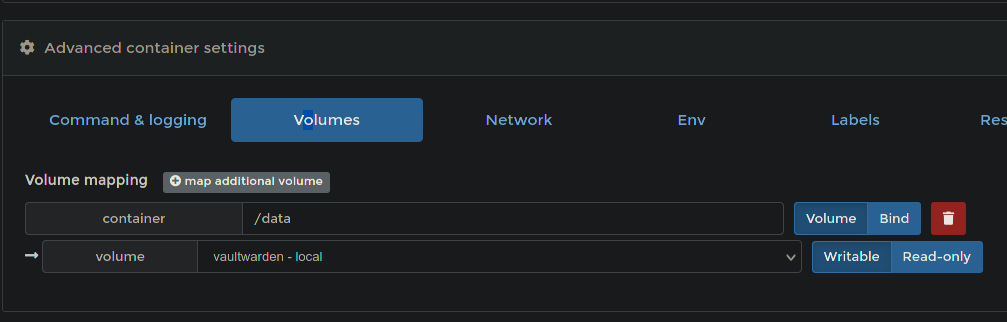
image

If i remove a non-persistent vaultwared, i do receive this message:
image

While portainer seems to give you an option, and also seems to have it disabled by default, it technically is a non-persistent volume. Because, if i enable that option it removes that volume of the non-persistent container. If i enable that same option on the persistent container, the volume is still there.

So, this is not a persistent volume, but an ephemeral/non-persistent one.

@BlackDex commented on GitHub (Jul 28, 2022): I'm afraid it isn't an actual persistent volume. A persistent volume is configured like this: ![image](https://user-images.githubusercontent.com/610450/181500865-963acd0d-5093-44c2-a3ff-b532ad29585d.png) If i remove a non-persistent vaultwared, i do receive this message: ![image](https://user-images.githubusercontent.com/610450/181501233-8a174584-00a5-48fb-bef6-04087e422e0a.png) While portainer seems to give you an option, and also seems to have it disabled by default, it technically is a non-persistent volume. Because, if i enable that option it removes that volume of the non-persistent container. If i enable that same option on the persistent container, the volume is still there. So, this is not a persistent volume, but an ephemeral/non-persistent one.
Sign in to join this conversation.
1 Participants
Notifications
Due Date
No due date set.
Dependencies

No dependencies set.

Reference: starred/vaultwarden#1338