New browser extention update not compatible #1218

Closed
opened 2026-02-05 00:18:24 +03:00 by OVERLORD · 8 comments
Owner

Originally created by @kearfy on GitHub (Feb 11, 2022).

Fix, at least for now

Uninstalling and reinstalling the extension seems to fix the issue.

Subject of the issue

New update of the (chrome) browser extension does not work with vaultwarden anymore.

Deployment environment

  • vaultwarden version: 1.24.0
  • Install method: docker

  • Clients used:

  • web vault

  • Reverse proxy and version:

  • nginx reverse proxy

  • MySQL/MariaDB or PostgreSQL version:

  • mysql (i guess)

  • Other relevant details:

Steps to reproduce

update browser extension to latest version

Expected behaviour

can sign in and use extension

Actual behaviour

it completely breaks, cannot decrypt, cannot find field 'keys', etc

Troubleshooting data

Originally created by @kearfy on GitHub (Feb 11, 2022). <!-- # ### NOTE: Please update to the latest version of vaultwarden before reporting an issue! This saves you and us a lot of time and troubleshooting. See: * https://github.com/dani-garcia/vaultwarden/issues/1180 * https://github.com/dani-garcia/vaultwarden/wiki/Updating-the-vaultwarden-image # ### --> <!-- Please fill out the following template to make solving your problem easier and faster for us. This is only a guideline. If you think that parts are unnecessary for your issue, feel free to remove them. Remember to hide/redact personal or confidential information, such as passwords, IP addresses, and DNS names as appropriate. --> # Fix, at least for now Uninstalling and reinstalling the extension seems to fix the issue. ### Subject of the issue New update of the (chrome) browser extension does not work with vaultwarden anymore. ### Deployment environment <!-- ========================================================================================= Preferably, use the `Generate Support String` button on the admin page's Diagnostics tab. That will auto-generate most of the info requested in this section. ========================================================================================= --> <!-- The version number, obtained from the logs (at startup) or the admin diagnostics page --> <!-- This is NOT the version number shown on the web vault, which is versioned separately from vaultwarden --> <!-- Remember to check if your issue exists on the latest version first! --> * vaultwarden version: 1.24.0 <!-- How the server was installed: Docker image, OS package, built from source, etc. --> * Install method: docker * Clients used: <!-- web vault, desktop, Android, iOS, etc. (if applicable) --> * web vault * Reverse proxy and version: <!-- if applicable --> * nginx reverse proxy * MySQL/MariaDB or PostgreSQL version: <!-- if applicable --> * mysql (i guess) * Other relevant details: ### Steps to reproduce <!-- Tell us how to reproduce this issue. What parameters did you set (differently from the defaults) and how did you start vaultwarden? --> update browser extension to latest version ### Expected behaviour <!-- Tell us what you expected to happen --> can sign in and use extension ### Actual behaviour <!-- Tell us what actually happened --> it completely breaks, cannot decrypt, cannot find field 'keys', etc ### Troubleshooting data <!-- Share any log files, screenshots, or other relevant troubleshooting data -->
Author
Owner

@rakeshdas1 commented on GitHub (Feb 11, 2022):

Just faced this issue as well - simple fix is to log in and out of the browser extension.

Facing this issue with the Bitwarden browser extension version: 1.56.0

@rakeshdas1 commented on GitHub (Feb 11, 2022): Just faced this issue as well - simple fix is to log in and out of the browser extension. Facing this issue with the Bitwarden browser extension version: 1.56.0
Author
Owner

@kearfy commented on GitHub (Feb 11, 2022):

Did that earlier today, now happens to me again but the fix doesnt work this time...

@kearfy commented on GitHub (Feb 11, 2022): Did that earlier today, now happens to me again but the fix doesnt work this time...
Author
Owner

@taylorcoffelt commented on GitHub (Feb 11, 2022):

Getting this as well on Vaultwarden version 1.24.0, extension version 1.56.1

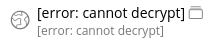
All entries are showing as error: cannot decrypt:

image
image
In extension search doesn't work.

If I log out, and attempt to log back in, I'm getting intermittently the cannot find field 'keys' toast error message.


I just tried logging in and out one more time and now all the entries are showing, and search is now working.
I have the extension installed in another Chrome profile, and that one is still showing the broken behavior. Both Chrome profiles are on the same extension version.

@taylorcoffelt commented on GitHub (Feb 11, 2022): Getting this as well on Vaultwarden version 1.24.0, extension version 1.56.1 All entries are showing as `error: cannot decrypt`: ![image](https://user-images.githubusercontent.com/690213/153634011-5e6ce4db-c88d-4de1-af02-91f5da2cea22.png) ![image](https://user-images.githubusercontent.com/690213/153634168-d0a33ac7-e45e-4d68-8c7d-b8719c8c4817.png) In extension search doesn't work. If I log out, and attempt to log back in, I'm getting intermittently the `cannot find field 'keys'` toast error message. --- I just tried logging in and out one more time and now all the entries are showing, and search is now working. I have the extension installed in another Chrome profile, and that one is still showing the broken behavior. Both Chrome profiles are on the same extension version.
Author
Owner

@viyh commented on GitHub (Feb 11, 2022):

I'm also getting this on two separate laptops that use two separate Vaultwarden servers.

@viyh commented on GitHub (Feb 11, 2022): I'm also getting this on two separate laptops that use two separate Vaultwarden servers.
Author
Owner

@mka142 commented on GitHub (Feb 11, 2022):

It crashes there:
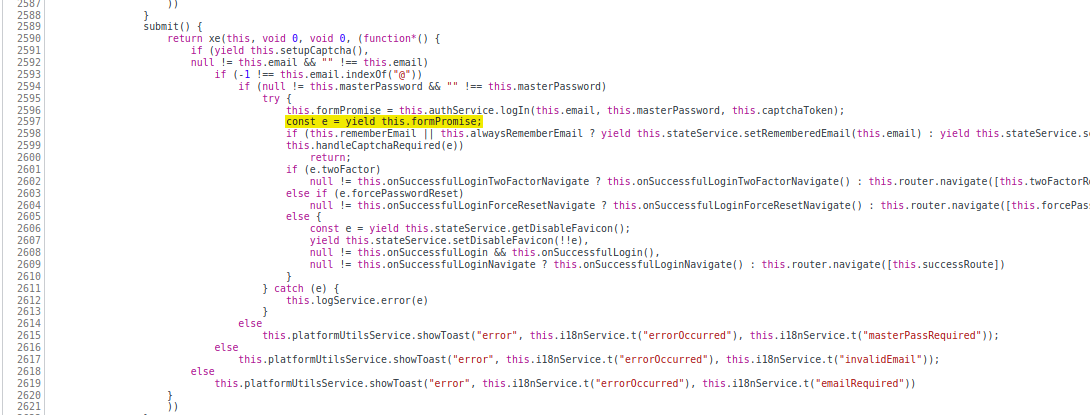
Screenshot from 2022-02-11 18-25-55

But it makes no sense couse file with thath code was updated 11 days ago
https://github.com/bitwarden/jslib/blob/master/angular/src/components/login.component.ts#L107

@mka142 commented on GitHub (Feb 11, 2022): It crashes there: ![Screenshot from 2022-02-11 18-25-55](https://user-images.githubusercontent.com/69858959/153639485-3d53c01c-a037-435d-a134-f68d08e072a4.png) But it makes no sense couse file with thath code was updated 11 days ago https://github.com/bitwarden/jslib/blob/master/angular/src/components/login.component.ts#L107
Author
Owner

@mka142 commented on GitHub (Feb 11, 2022):

Try to turn off and on in chromium extension settings
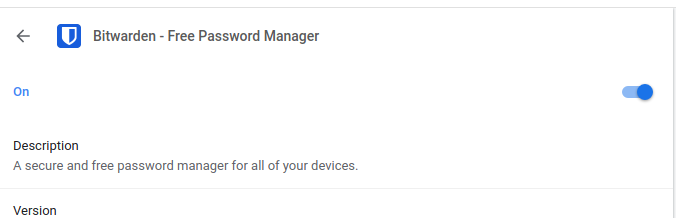
Screenshot from 2022-02-11 18-43-55

@mka142 commented on GitHub (Feb 11, 2022): Try to turn off and on in chromium extension settings ![Screenshot from 2022-02-11 18-43-55](https://user-images.githubusercontent.com/69858959/153642062-9baffc59-0d3f-4037-87ce-d1698c98e589.png)
Author
Owner

@MaxRubbel commented on GitHub (Feb 11, 2022):

Uninstall and Install the Extensions helps me.

@MaxRubbel commented on GitHub (Feb 11, 2022): Uninstall and Install the Extensions helps me.
Author
Owner

@kearfy commented on GitHub (Feb 11, 2022):

Uninstall and Install the Extensions helps me.

I can confirm that this works for me. I will close the issue for now.

@kearfy commented on GitHub (Feb 11, 2022): > Uninstall and Install the Extensions helps me. I can confirm that this works for me. I will close the issue for now.
Sign in to join this conversation.
1 Participants
Notifications
Due Date
No due date set.
Dependencies

No dependencies set.

Reference: starred/vaultwarden#1218