mirror of
https://github.com/dani-garcia/vaultwarden.git
synced 2026-02-05 00:29:40 +03:00
Mail fails for emergency contacts (and emergency contacts only) #1184

Reference in New Issue
Block a user
Delete Branch "%!s()"
Deleting a branch is permanent. Although the deleted branch may continue to exist for a short time before it actually gets removed, it CANNOT be undone in most cases. Continue?
Originally created by @juriansluiman on GitHub (Jan 6, 2022).
Mail sending fails for emergency contacts only
Mail in vaultwarden works. However every mail related to emergency contacts (invite + resend) gives me an SMTP error. This is odd since e.g. a password hint mail is successfully sent.
Deployment environment
I can't find the generate support string button ❓ Here's a short description:
Steps to reproduce
Expected behaviour
At step 4: successfully created an emergency contact
Actual behaviour
At step 4: error message and no emergency contact is created
Troubleshooting data
Mail does work, sending a password hint:
The logging data of this password hint mail:
The error message after creating an emergency contact:
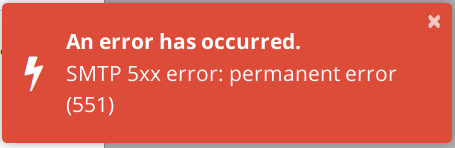
The logging data:
Eventually the contact is in the vaultwarden database:

But a reminder mail gets the same result:
Mail SMTP info:
Fastmail config:
I can't generate more logging afaik, my docker container has already max log level (SMTP debug and env vars below):
@BlackDex commented on GitHub (Jan 7, 2022):
It doesn't look like the SMTP_DEBUG is really enabled, else you would have received more logging.
Could you please post the
Support Stringwhich you can generate via the /admin/diagnostics page.@juriansluiman commented on GitHub (Jan 7, 2022):
Ah I found out via the wiki how to enable the admin 🤦♂️
This is the support string:
Your environment (Generated via diagnostics page)
Config (Generated via diagnostics page)
Show Running Config
Environment settings which are overridden: DOMAIN, SIGNUPS_ALLOWED, SIGNUPS_DOMAINS_WHITELIST, SHOW_PASSWORD_HINT, ADMIN_TOKEN, SMTP_HOST, SMTP_SSL, SMTP_PORT, SMTP_FROM, SMTP_USERNAME, SMTP_PASSWORD
My 2cts: now I found the admin page, I also tried to send a test mail from there, this worked too ✔️
Secondly, the support string does contain
smtp_debug: truebut I don't see any additional logging either.@BlackDex commented on GitHub (Jan 7, 2022):
It indeed looks like all is configured ok.
The thing is, if e-mail works for the rest of the items, then there must be something on the server side which blocks this.
A 5XX error is not something generated by the application or library, it's just what is returned by the SMTP Server.
Sometimes some mail server tend to block some mails because of some content which they mark as spam/fraudulent and return 5XX errors.
I don't know how you started the container, with either docker-compose or just docker, but in both cases i would recommend to remove the container, do a pull to make sure you have the latest version and create the container again to make sure all the current settings are loaded in case something is weird there.
With docker-compose this would be enough:
With docker (and i use bitwarden here since you seem to have the container named that way):
Also, could you try to use the
testingtagged versionvaultwarden/server:testing-alpineand see if that solves some issues?@juriansluiman commented on GitHub (Jan 12, 2022):
A switch to testing did not help this issue. Everything is provisioned via Ansible so things will update smoothly 😄
However, I found out something else. This does not happen because of emergency access. This does happen with a single user in my account (!). I get the same SMTP errors when I send the user an invite, for example. I verified this when SMTP test mails in the admin panel.
Example: mail on example.com with user1 and user2. I also have aliases alias1 -> user1 and alias2 -> user2 and alias12 -> user1 and user2 get the mail. Below tests from admin panel:
This behavior occurs only with Vaultwarden, any other apps I use SMTP with, do just work fine as expected. Because of the errors alias2@example.com I expect this is an err on the side of Fastmail. I opened a ticket to get their support. When they confirm I can close this one.
One more thing: I do have the ENV set for SMTP_DEBUG but I don't get any SMTP logging in my stdout. The flag is set when inspecting the container with
docker inspect. Why does SMTP_DEBUG not trigger SMTP logging? For the fastmail ticket they require the bounce message and without SMTP_DEBUG enabled I'm afraid I can't get the debugging message out?@juriansluiman commented on GitHub (Jan 12, 2022):
It was indeed a configuration issue at Fastmail's side 😄
@BlackDex commented on GitHub (Jan 12, 2022):
@juriansluiman Glad you have found the issue.
Though, regarding the
SMTP_DEBUG, when you restart Vaultwarden you should see the following message:Do you see that message at all?
If not, then it doesn't seem to be enabled at all.
@juriansluiman commented on GitHub (Jan 12, 2022):
Yup, in the log:
/edit:
"smtp_debug": trueis also in my support string from the admin page@BlackDex commented on GitHub (Jan 12, 2022):
That is really strange it should provide you some log-lines which start with/looks like the following: