Vaultwarden page takes me back to login after reload #1123

Closed
opened 2025-10-09 17:04:25 +03:00 by OVERLORD · 10 comments
Owner

Originally created by @danfmihai on GitHub.

Subject of the issue

Vaultwarden page takes me back to login after reload

Deployment environment

deployed as statefulset in K8s 1.23.7
using a pfsense with HAProxy frontend https -> backend ingress that points to /notifications/hub -> service 3012 and / that points to service 8080

Your environment (Generated via diagnostics page)

  • Vaultwarden version: v1.25.0
  • Web-vault version: v2.28.1
  • Running within Docker: false (Base: Debian)
  • Environment settings overridden: false
  • Uses a reverse proxy: true
  • IP Header check: true (X-Real-IP)
  • Internet access: true
  • Internet access via a proxy: false
  • DNS Check: true
  • Time Check: true
  • Domain Configuration Check: false
  • HTTPS Check: false
  • Database type: SQLite
  • Database version: 3.35.4
  • Clients used:
  • Reverse proxy and version: HAProxy - pfsense 0.61_3
  • Other relevant information: Kubernetes 1.23.7

Config (Generated via diagnostics page)

Show Running Config

Environment settings which are overridden:

{
  "_duo_akey": null,
  "_enable_duo": false,
  "_enable_email_2fa": true,
  "_enable_smtp": true,
  "_enable_yubico": true,
  "_ip_header_enabled": true,
  "admin_ratelimit_max_burst": 3,
  "admin_ratelimit_seconds": 300,
  "admin_token": "***",
  "allowed_iframe_ancestors": "",
  "attachments_folder": "/data/attachments",
  "authenticator_disable_time_drift": false,
  "data_folder": "/data",
  "database_conn_init": "",
  "database_max_conns": 10,
  "database_timeout": 30,
  "database_url": "/****/**.*******",
  "db_connection_retries": 15,
  "disable_2fa_remember": false,
  "disable_admin_token": false,
  "disable_icon_download": false,
  "domain": "****://*****.*******.***",
  "domain_origin": "****://*****.*******.***",
  "domain_path": "",
  "domain_set": true,
  "duo_host": null,
  "duo_ikey": null,
  "duo_skey": null,
  "email_attempts_limit": 3,
  "email_expiration_time": 600,
  "email_token_size": 6,
  "emergency_access_allowed": true,
  "emergency_notification_reminder_schedule": "0 5 * * * *",
  "emergency_request_timeout_schedule": "0 5 * * * *",
  "enable_db_wal": true,
  "extended_logging": true,
  "helo_name": null,
  "hibp_api_key": null,
  "icon_blacklist_non_global_ips": true,
  "icon_blacklist_regex": null,
  "icon_cache_folder": "/data/icon_cache",
  "icon_cache_negttl": 259200,
  "icon_cache_ttl": 2592000,
  "icon_download_timeout": 10,
  "icon_redirect_code": 302,
  "icon_service": "internal",
  "incomplete_2fa_schedule": "30 * * * * *",
  "incomplete_2fa_time_limit": 3,
  "invitation_org_name": "Vaultwarden",
  "invitations_allowed": true,
  "ip_header": "X-Real-IP",
  "job_poll_interval_ms": 30000,
  "log_file": "/data/vaultwarden.log",
  "log_level": "Info",
  "log_timestamp_format": "%Y-%m-%d %H:%M:%S.%3f",
  "login_ratelimit_max_burst": 10,
  "login_ratelimit_seconds": 60,
  "org_attachment_limit": null,
  "org_creation_users": "",
  "password_iterations": 100000,
  "reload_templates": false,
  "require_device_email": false,
  "rsa_key_filename": "/data/rsa_key",
  "send_purge_schedule": "0 5 * * * *",
  "sends_allowed": true,
  "sends_folder": "/data/sends",
  "show_password_hint": false,
  "signups_allowed": true,
  "signups_domains_whitelist": "",
  "signups_verify": false,
  "signups_verify_resend_limit": 6,
  "signups_verify_resend_time": 3600,
  "smtp_accept_invalid_certs": false,
  "smtp_accept_invalid_hostnames": false,
  "smtp_auth_mechanism": null,
  "smtp_debug": false,
  "smtp_explicit_tls": null,
  "smtp_from": "********@*****.*******.***",
  "smtp_from_name": "Vaultwarden",
  "smtp_host": "****.*****.***",
  "smtp_password": "***",
  "smtp_port": 587,
  "smtp_security": "starttls",
  "smtp_ssl": null,
  "smtp_timeout": 15,
  "smtp_username": "********@*****.***\n",
  "templates_folder": "/data/templates",
  "tmp_folder": "/data/tmp",
  "trash_auto_delete_days": null,
  "trash_purge_schedule": "0 5 0 * * *",
  "use_syslog": false,
  "user_attachment_limit": null,
  "web_vault_enabled": true,
  "web_vault_folder": "web-vault/",
  "websocket_address": "0.0.0.0",
  "websocket_enabled": true,
  "websocket_port": 3012,
  "yubico_client_id": null,
  "yubico_secret_key": null,
  "yubico_server": null
}
logs:
  • vaultwarden version:
  • Install method:
    docker image
  • Clients used:
    desktop, Android
  • Reverse proxy and version:
    HAPROXY 0.61 as above
  • MySQL/MariaDB or PostgreSQL version:
    N/A
  • Other relevant details:
    Logs:
/--------------------------------------------------------------------\
|                        Starting Vaultwarden                        |
|                           Version 1.25.0                           |
|--------------------------------------------------------------------|
| This is an *unofficial* Bitwarden implementation, DO NOT use the   |
| official channels to report bugs/features, regardless of client.   |
| Send usage/configuration questions or feature requests to:         |
|   https://vaultwarden.discourse.group/                             |
| Report suspected bugs/issues in the software itself at:            |
|   https://github.com/dani-garcia/vaultwarden/issues/new            |
\--------------------------------------------------------------------/

[INFO] No .env file found.

[2022-06-06 19:00:44.439][vaultwarden][INFO] Private key created correctly.
[2022-06-06 19:00:44.452][vaultwarden][INFO] Public key created correctly.
Running migration 20180114171611
Running migration 20180217205753
Running migration 20180427155151
Running migration 20180508161616
Running migration 20180525232323
Running migration 20180601112529
Running migration 20180711181453
Running migration 20180827172114
Running migration 20180910111213
Running migration 20180919144557
Running migration 20181127152651
Running migration 20190526216651
Running migration 20191010083032
Running migration 20191117011009
Running migration 20200313205045
Running migration 20200409235005
Running migration 20200701214531
Running migration 20200802025025
Running migration 20201130224000
Running migration 20201209173101
Running migration 20210311190243
Running migration 20210315163412
Running migration 20210430233251
Running migration 20210511205202
Running migration 20210701203140
Running migration 20210830193501
Running migration 20211024164321
Running migration 20220117234911
Running migration 20220302210038
[2022-06-06 19:00:45.798][start][INFO] Rocket has launched from http://0.0.0.0:8080
[2022-06-06 19:00:45.798][parity_ws][INFO] Listening for new connections on 0.0.0.0:3012.
[2022-06-06 19:05:33.095][request][INFO] GET /admin
[2022-06-06 19:05:33.095][response][INFO] (admin_login) GET /admin/ [2] => 200 OK
[2022-06-06 19:06:17.364][request][INFO] POST /admin
[2022-06-06 19:06:17.365][response][INFO] (post_admin_login) POST /admin/ => 303 See Other
[2022-06-06 19:06:17.375][request][INFO] GET /admin
[2022-06-06 19:06:17.376][response][INFO] (admin_page) GET /admin/ => 200 OK
[2022-06-06 19:06:35.433][request][INFO] GET /admin/diagnostics
[2022-06-06 19:06:36.713][response][INFO] (diagnostics) GET /admin/diagnostics => 200 OK
[2022-06-06 19:06:39.338][request][INFO] GET /admin/diagnostics/config
[2022-06-06 19:06:39.338][response][INFO] (get_diagnostics_config) GET /admin/diagnostics/config => 200 OK
[2022-06-06 19:14:19.384][request][INFO] POST /api/accounts/prelogin
[2022-06-06 19:14:19.386][response][INFO] (prelogin) POST /api/accounts/prelogin => 200 OK
[2022-06-06 19:14:19.464][request][INFO] POST /identity/connect/token
[2022-06-06 19:15:25.618][request][INFO] POST /api/accounts/register
[2022-06-06 19:15:29.158][response][INFO] (register) POST /api/accounts/register => 200 OK
[2022-06-06 19:15:33.805][request][INFO] POST /api/accounts/prelogin
[2022-06-06 19:15:33.831][response][INFO] (prelogin) POST /api/accounts/prelogin => 200 OK
[2022-06-06 19:15:33.924][request][INFO] POST /identity/connect/token
[2022-06-06 19:15:36.955][vaultwarden::api::identity][INFO] User redacted@email.com logged in successfully. IP: 192.168.102.71
[2022-06-06 19:15:36.955][response][INFO] (login) POST /identity/connect/token => 200 OK
[2022-06-06 19:15:37.062][parity_ws::io][INFO] Accepted a new tcp connection from 10.233.92.4:36460.
[2022-06-06 19:15:37.092][request][INFO] POST /identity/connect/token
[2022-06-06 19:15:37.173][response][INFO] (login) POST /identity/connect/token => 200 OK
[2022-06-06 19:15:37.185][request][INFO] GET /api/sync?excludeDomains=true
[2022-06-06 19:15:37.204][response][INFO] (sync) GET /api/sync?<data..> => 200 OK
[2022-06-06 19:17:47.828][parity_ws::io][INFO] Accepted a new tcp connection from 10.233.92.4:37074.
[2022-06-06 19:17:47.856][request][INFO] POST /identity/connect/token
[2022-06-06 19:17:47.895][response][INFO] (login) POST /identity/connect/token => 200 OK
[2022-06-06 19:17:47.912][request][INFO] GET /api/sync?excludeDomains=true
[2022-06-06 19:17:47.935][response][INFO] (sync) GET /api/sync?<data..> => 200 OK

Steps to reproduce

installed statefulset before and had no issues with timing out

Expected behaviour

After I login and refresh the page I want to still be on the same page

Actual behaviour

it's redirecting to login page after refresh of the page

Troubleshooting data

vault1
vault2

Originally created by @danfmihai on GitHub. <!-- # ### NOTE: Please update to the latest version of vaultwarden before reporting an issue! This saves you and us a lot of time and troubleshooting. See: * https://github.com/dani-garcia/vaultwarden/issues/1180 * https://github.com/dani-garcia/vaultwarden/wiki/Updating-the-vaultwarden-image # ### --> <!-- Please fill out the following template to make solving your problem easier and faster for us. This is only a guideline. If you think that parts are unnecessary for your issue, feel free to remove them. Remember to hide/redact personal or confidential information, such as passwords, IP addresses, and DNS names as appropriate. --> ### Subject of the issue <!-- Describe your issue here. --> Vaultwarden page takes me back to login after reload ### Deployment environment deployed as statefulset in K8s 1.23.7 using a pfsense with HAProxy frontend https -> backend ingress that points to /notifications/hub -> service 3012 and / that points to service 8080 <!-- ========================================================================================= Preferably, use the `Generate Support String` button on the admin page's Diagnostics tab. That will auto-generate most of the info requested in this section. ========================================================================================= --> ### Your environment (Generated via diagnostics page) * Vaultwarden version: v1.25.0 * Web-vault version: v2.28.1 * Running within Docker: false (Base: Debian) * Environment settings overridden: false * Uses a reverse proxy: true * IP Header check: true (X-Real-IP) * Internet access: true * Internet access via a proxy: false * DNS Check: true * Time Check: true * Domain Configuration Check: false * HTTPS Check: false * Database type: SQLite * Database version: 3.35.4 * Clients used: * Reverse proxy and version: [HAProxy - pfsense 0.61_3](https://github.com/pfsense/FreeBSD-ports/commits/devel/net/pfSense-pkg-haproxy) * Other relevant information: Kubernetes 1.23.7 ### Config (Generated via diagnostics page) <details><summary>Show Running Config</summary> **Environment settings which are overridden:** ```json { "_duo_akey": null, "_enable_duo": false, "_enable_email_2fa": true, "_enable_smtp": true, "_enable_yubico": true, "_ip_header_enabled": true, "admin_ratelimit_max_burst": 3, "admin_ratelimit_seconds": 300, "admin_token": "***", "allowed_iframe_ancestors": "", "attachments_folder": "/data/attachments", "authenticator_disable_time_drift": false, "data_folder": "/data", "database_conn_init": "", "database_max_conns": 10, "database_timeout": 30, "database_url": "/****/**.*******", "db_connection_retries": 15, "disable_2fa_remember": false, "disable_admin_token": false, "disable_icon_download": false, "domain": "****://*****.*******.***", "domain_origin": "****://*****.*******.***", "domain_path": "", "domain_set": true, "duo_host": null, "duo_ikey": null, "duo_skey": null, "email_attempts_limit": 3, "email_expiration_time": 600, "email_token_size": 6, "emergency_access_allowed": true, "emergency_notification_reminder_schedule": "0 5 * * * *", "emergency_request_timeout_schedule": "0 5 * * * *", "enable_db_wal": true, "extended_logging": true, "helo_name": null, "hibp_api_key": null, "icon_blacklist_non_global_ips": true, "icon_blacklist_regex": null, "icon_cache_folder": "/data/icon_cache", "icon_cache_negttl": 259200, "icon_cache_ttl": 2592000, "icon_download_timeout": 10, "icon_redirect_code": 302, "icon_service": "internal", "incomplete_2fa_schedule": "30 * * * * *", "incomplete_2fa_time_limit": 3, "invitation_org_name": "Vaultwarden", "invitations_allowed": true, "ip_header": "X-Real-IP", "job_poll_interval_ms": 30000, "log_file": "/data/vaultwarden.log", "log_level": "Info", "log_timestamp_format": "%Y-%m-%d %H:%M:%S.%3f", "login_ratelimit_max_burst": 10, "login_ratelimit_seconds": 60, "org_attachment_limit": null, "org_creation_users": "", "password_iterations": 100000, "reload_templates": false, "require_device_email": false, "rsa_key_filename": "/data/rsa_key", "send_purge_schedule": "0 5 * * * *", "sends_allowed": true, "sends_folder": "/data/sends", "show_password_hint": false, "signups_allowed": true, "signups_domains_whitelist": "", "signups_verify": false, "signups_verify_resend_limit": 6, "signups_verify_resend_time": 3600, "smtp_accept_invalid_certs": false, "smtp_accept_invalid_hostnames": false, "smtp_auth_mechanism": null, "smtp_debug": false, "smtp_explicit_tls": null, "smtp_from": "********@*****.*******.***", "smtp_from_name": "Vaultwarden", "smtp_host": "****.*****.***", "smtp_password": "***", "smtp_port": 587, "smtp_security": "starttls", "smtp_ssl": null, "smtp_timeout": 15, "smtp_username": "********@*****.***\n", "templates_folder": "/data/templates", "tmp_folder": "/data/tmp", "trash_auto_delete_days": null, "trash_purge_schedule": "0 5 0 * * *", "use_syslog": false, "user_attachment_limit": null, "web_vault_enabled": true, "web_vault_folder": "web-vault/", "websocket_address": "0.0.0.0", "websocket_enabled": true, "websocket_port": 3012, "yubico_client_id": null, "yubico_secret_key": null, "yubico_server": null } ``` </details> logs: <!-- The version number, obtained from the logs (at startup) or the admin diagnostics page --> <!-- This is NOT the version number shown on the web vault, which is versioned separately from vaultwarden --> <!-- Remember to check if your issue exists on the latest version first! --> * vaultwarden version: <!-- How the server was installed: Docker image, OS package, built from source, etc. --> * Install method: docker image * Clients used: <!-- web vault, desktop, Android, iOS, etc. (if applicable) --> desktop, Android * Reverse proxy and version: <!-- if applicable --> HAPROXY 0.61 as above * MySQL/MariaDB or PostgreSQL version: <!-- if applicable --> N/A * Other relevant details: Logs: ``` /--------------------------------------------------------------------\ | Starting Vaultwarden | | Version 1.25.0 | |--------------------------------------------------------------------| | This is an *unofficial* Bitwarden implementation, DO NOT use the | | official channels to report bugs/features, regardless of client. | | Send usage/configuration questions or feature requests to: | | https://vaultwarden.discourse.group/ | | Report suspected bugs/issues in the software itself at: | | https://github.com/dani-garcia/vaultwarden/issues/new | \--------------------------------------------------------------------/ [INFO] No .env file found. [2022-06-06 19:00:44.439][vaultwarden][INFO] Private key created correctly. [2022-06-06 19:00:44.452][vaultwarden][INFO] Public key created correctly. Running migration 20180114171611 Running migration 20180217205753 Running migration 20180427155151 Running migration 20180508161616 Running migration 20180525232323 Running migration 20180601112529 Running migration 20180711181453 Running migration 20180827172114 Running migration 20180910111213 Running migration 20180919144557 Running migration 20181127152651 Running migration 20190526216651 Running migration 20191010083032 Running migration 20191117011009 Running migration 20200313205045 Running migration 20200409235005 Running migration 20200701214531 Running migration 20200802025025 Running migration 20201130224000 Running migration 20201209173101 Running migration 20210311190243 Running migration 20210315163412 Running migration 20210430233251 Running migration 20210511205202 Running migration 20210701203140 Running migration 20210830193501 Running migration 20211024164321 Running migration 20220117234911 Running migration 20220302210038 [2022-06-06 19:00:45.798][start][INFO] Rocket has launched from http://0.0.0.0:8080 [2022-06-06 19:00:45.798][parity_ws][INFO] Listening for new connections on 0.0.0.0:3012. [2022-06-06 19:05:33.095][request][INFO] GET /admin [2022-06-06 19:05:33.095][response][INFO] (admin_login) GET /admin/ [2] => 200 OK [2022-06-06 19:06:17.364][request][INFO] POST /admin [2022-06-06 19:06:17.365][response][INFO] (post_admin_login) POST /admin/ => 303 See Other [2022-06-06 19:06:17.375][request][INFO] GET /admin [2022-06-06 19:06:17.376][response][INFO] (admin_page) GET /admin/ => 200 OK [2022-06-06 19:06:35.433][request][INFO] GET /admin/diagnostics [2022-06-06 19:06:36.713][response][INFO] (diagnostics) GET /admin/diagnostics => 200 OK [2022-06-06 19:06:39.338][request][INFO] GET /admin/diagnostics/config [2022-06-06 19:06:39.338][response][INFO] (get_diagnostics_config) GET /admin/diagnostics/config => 200 OK [2022-06-06 19:14:19.384][request][INFO] POST /api/accounts/prelogin [2022-06-06 19:14:19.386][response][INFO] (prelogin) POST /api/accounts/prelogin => 200 OK [2022-06-06 19:14:19.464][request][INFO] POST /identity/connect/token [2022-06-06 19:15:25.618][request][INFO] POST /api/accounts/register [2022-06-06 19:15:29.158][response][INFO] (register) POST /api/accounts/register => 200 OK [2022-06-06 19:15:33.805][request][INFO] POST /api/accounts/prelogin [2022-06-06 19:15:33.831][response][INFO] (prelogin) POST /api/accounts/prelogin => 200 OK [2022-06-06 19:15:33.924][request][INFO] POST /identity/connect/token [2022-06-06 19:15:36.955][vaultwarden::api::identity][INFO] User redacted@email.com logged in successfully. IP: 192.168.102.71 [2022-06-06 19:15:36.955][response][INFO] (login) POST /identity/connect/token => 200 OK [2022-06-06 19:15:37.062][parity_ws::io][INFO] Accepted a new tcp connection from 10.233.92.4:36460. [2022-06-06 19:15:37.092][request][INFO] POST /identity/connect/token [2022-06-06 19:15:37.173][response][INFO] (login) POST /identity/connect/token => 200 OK [2022-06-06 19:15:37.185][request][INFO] GET /api/sync?excludeDomains=true [2022-06-06 19:15:37.204][response][INFO] (sync) GET /api/sync?<data..> => 200 OK [2022-06-06 19:17:47.828][parity_ws::io][INFO] Accepted a new tcp connection from 10.233.92.4:37074. [2022-06-06 19:17:47.856][request][INFO] POST /identity/connect/token [2022-06-06 19:17:47.895][response][INFO] (login) POST /identity/connect/token => 200 OK [2022-06-06 19:17:47.912][request][INFO] GET /api/sync?excludeDomains=true [2022-06-06 19:17:47.935][response][INFO] (sync) GET /api/sync?<data..> => 200 OK ``` ### Steps to reproduce <!-- Tell us how to reproduce this issue. What parameters did you set (differently from the defaults) and how did you start vaultwarden? --> installed statefulset before and had no issues with timing out ### Expected behaviour <!-- Tell us what you expected to happen --> After I login and refresh the page I want to still be on the same page ### Actual behaviour <!-- Tell us what actually happened --> it's redirecting to login page after refresh of the page ### Troubleshooting data <!-- Share any log files, screenshots, or other relevant troubleshooting data --> ![vault1](https://user-images.githubusercontent.com/45920486/172231591-4c683ec0-5b8e-4410-a516-b2a40deab95c.png) ![vault2](https://user-images.githubusercontent.com/45920486/172231597-738523ec-fe99-44ad-8be0-328cab78d4a2.png)
Author
Owner

@BlackDex commented on GitHub:

Then i suggest to double check the volume storage for the persistent files if that works. Because in the logs you sent i see new keys are being generated and even a new database. So then probably persistent storage is broken.

we have a check for this in the testing taggged images.

@BlackDex commented on GitHub: Then i suggest to double check the volume storage for the persistent files if that works. Because in the logs you sent i see new keys are being generated and even a new database. So then probably persistent storage is broken. we have a check for this in the `testing` taggged images.
Author
Owner

@danfmihai commented on GitHub:

@BlackDex Well I have only 1 pod running, so probably that's not the cause:
vaultwarden-0 1/1 Running 0 38m

@danfmihai commented on GitHub: @BlackDex Well I have only 1 pod running, so probably that's not the cause: ```vaultwarden-0 1/1 Running 0 38m```
Author
Owner

@BlackDex commented on GitHub:

You mentioned kubernetes, does that mean you run more then one pod of Vaultwarden? If so, then that is the issue. Vaultwarden isn't really build for clustering. And the reason it fails is because both instances are using two different rsa keys which are used to generate the JWT, and thus will break if they are different.

Also see: #2530

@BlackDex commented on GitHub: You mentioned kubernetes, does that mean you run more then one pod of Vaultwarden? If so, then that is the issue. Vaultwarden isn't really build for clustering. And the reason it fails is because both instances are using two different rsa keys which are used to generate the JWT, and thus will break if they are different. Also see: #2530
Author
Owner

@BlackDex commented on GitHub:

It's more that you need to check if that is all valid, and pointed to the correct directories. And that those files Vaultwarden uses are visible there. If not, then it looks like the persistent storage is not configured correctly.

@BlackDex commented on GitHub: It's more that you need to check if that is all valid, and pointed to the correct directories. And that those files Vaultwarden uses are visible there. If not, then it looks like the persistent storage is not configured correctly.
Author
Owner

@danfmihai commented on GitHub:

here are my pv and pvc. is this what you are asking?

NAME                                                        CAPACITY   ACCESS MODES   RECLAIM POLICY   STATUS   CLAIM                         STORAGECLASS   REASON   AGE
persistentvolume/pvc-1d0a0f61-0ecc-42e2-babb-ad7fdbaf0031   15Gi       RWX            Delete           Bound    deployments/vaultwarden-pvc   nfs-client              63m

NAME                                    STATUS   VOLUME                                     CAPACITY   ACCESS MODES   STORAGECLASS   AGE
persistentvolumeclaim/vaultwarden-pvc   Bound    pvc-1d0a0f61-0ecc-42e2-babb-ad7fdbaf0031   15Gi       RWX            nfs-client     63m

@danfmihai commented on GitHub: here are my pv and pvc. is this what you are asking? ``` NAME CAPACITY ACCESS MODES RECLAIM POLICY STATUS CLAIM STORAGECLASS REASON AGE persistentvolume/pvc-1d0a0f61-0ecc-42e2-babb-ad7fdbaf0031 15Gi RWX Delete Bound deployments/vaultwarden-pvc nfs-client 63m NAME STATUS VOLUME CAPACITY ACCESS MODES STORAGECLASS AGE persistentvolumeclaim/vaultwarden-pvc Bound pvc-1d0a0f61-0ecc-42e2-babb-ad7fdbaf0031 15Gi RWX nfs-client 63m ```
Author
Owner

@stefan0xC commented on GitHub:

Your second attached screenshot does not show the login screen but that the vault is locked.
This is expected (upstream) behavior of the web vault. See https://bitwarden.com/help/vault-timeout/#web-and-browser-extension-timeouts

The login screen looks like this:
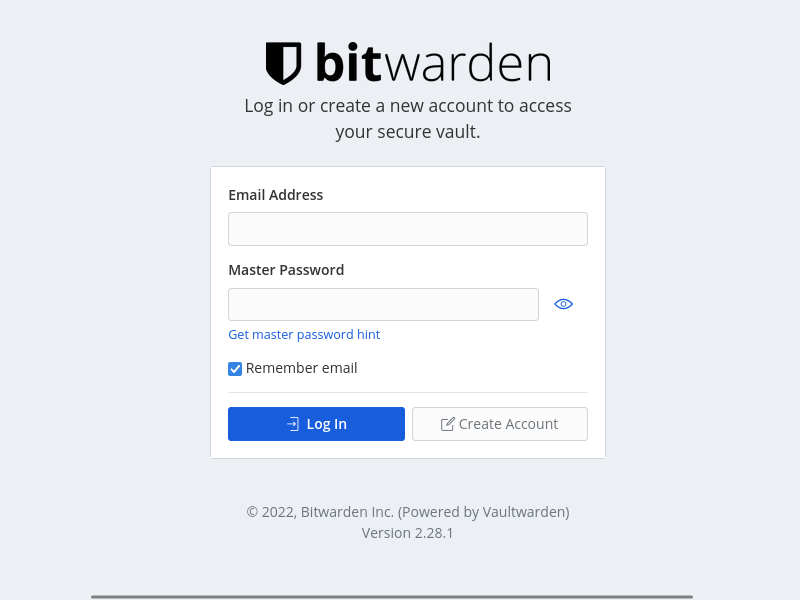
bitwarden-login-screen

@stefan0xC commented on GitHub: Your second attached screenshot does not show the login screen but that the vault is locked. This is expected (upstream) behavior of the web vault. See https://bitwarden.com/help/vault-timeout/#web-and-browser-extension-timeouts The login screen looks like this: ![bitwarden-login-screen](https://user-images.githubusercontent.com/509385/172255808-009e6377-78a5-4b11-ac39-1eea0faf5d8f.png)
Author
Owner

@danfmihai commented on GitHub:

all files in storage:
attachments db.sqlite3 db.sqlite3-shm db.sqlite3-wal icon_cache rsa_key.pem rsa_key.pub.pem sends tmp vaultwarden.log

@danfmihai commented on GitHub: all files in storage: `attachments db.sqlite3 db.sqlite3-shm db.sqlite3-wal icon_cache rsa_key.pem rsa_key.pub.pem sends tmp vaultwarden.log`
Author
Owner

@BlackDex commented on GitHub:

A 504 is a reverse proxy server error. Not an error from Vaultwarden. Also i thought that you mend that you got logged out if you restart/reload the pod. If you mend reloading the web-vault, then yes that is normal behavior as mentioned by @stefan0xC .

@BlackDex commented on GitHub: A 504 is a reverse proxy server error. Not an error from Vaultwarden. Also i thought that you mend that you got logged out if you restart/reload the pod. If you mend reloading the web-vault, then yes that is normal behavior as mentioned by @stefan0xC .
Author
Owner

@danfmihai commented on GitHub:

ok. then I get sent to the lock screen not login.sorry...
If I try to import I get this error:

There was a problem with the data you tried to import. Please resolve the errors listed below in your source file and try again.
<html><body><h1>504 Gateway Time-out</h1>
The server didn't respond in time.
</body></html>

vault3
These are the last lines from log:

[2022-06-07 00:20:24.752][request][INFO] POST /api/ciphers/import
[2022-06-07 00:21:36.073][response][INFO] POST /api/ciphers/import (post_ciphers_import) => 200 OK
[2022-06-07 00:21:36.141][request][INFO] GET /api/accounts/revision-date
[2022-06-07 00:21:36.154][response][INFO] GET /api/accounts/revision-date (revision_date) => 200 OK
[2022-06-07 00:21:36.162][request][INFO] POST /identity/connect/token
[2022-06-07 00:21:36.184][response][INFO] POST /identity/connect/token (login) => 200 OK
[2022-06-07 00:21:36.195][request][INFO] GET /api/sync?excludeDomains=true
[2022-06-07 00:21:36.847][response][INFO] GET /api/sync?<data..> (sync) => 200 OK

@danfmihai commented on GitHub: ok. then I get sent to the lock screen not login.sorry... If I try to import I get this error: ``` There was a problem with the data you tried to import. Please resolve the errors listed below in your source file and try again. <html><body><h1>504 Gateway Time-out</h1> The server didn't respond in time. </body></html> ``` ![vault3](https://user-images.githubusercontent.com/45920486/172270330-b3c73411-68e5-4cf0-85d5-4e948716433f.png) These are the last lines from log: ``` [2022-06-07 00:20:24.752][request][INFO] POST /api/ciphers/import [2022-06-07 00:21:36.073][response][INFO] POST /api/ciphers/import (post_ciphers_import) => 200 OK [2022-06-07 00:21:36.141][request][INFO] GET /api/accounts/revision-date [2022-06-07 00:21:36.154][response][INFO] GET /api/accounts/revision-date (revision_date) => 200 OK [2022-06-07 00:21:36.162][request][INFO] POST /identity/connect/token [2022-06-07 00:21:36.184][response][INFO] POST /identity/connect/token (login) => 200 OK [2022-06-07 00:21:36.195][request][INFO] GET /api/sync?excludeDomains=true [2022-06-07 00:21:36.847][response][INFO] GET /api/sync?<data..> (sync) => 200 OK ```
Author
Owner

@BlackDex commented on GitHub:

And the logs you send, was that from a restart? What happens if you restart again? Does that generate the same kind of log?

I mean, the only way you will be logged out is if the rsa key is regenerated.

@BlackDex commented on GitHub: And the logs you send, was that from a restart? What happens if you restart again? Does that generate the same kind of log? I mean, the only way you will be logged out is if the rsa key is regenerated.
Sign in to join this conversation.
1 Participants
Notifications
Due Date
No due date set.
Dependencies

No dependencies set.

Reference: starred/vaultwarden#1123