Verification Code Sent to Old Email #1088

Closed
opened 2026-02-04 23:52:46 +03:00 by OVERLORD · 8 comments
Owner

Originally created by @AliAlhajji on GitHub (Jul 29, 2021).

Subject of the issue

I changed my email successfully, and verified the new email. However, when I try to login using 2FA, the verification code is sent to the old one.

I tried to re-enable the email 2FA, and it showed me a message that the code will be sent to the new email. But it's still sent to the old one.

Deployment environment

  • Vaultwarden version: v1.22.2
  • Web-vault version: v2.21.1
  • Running within Docker: true
  • Environment settings overridden: true
  • Uses a reverse proxy: true
  • IP Header check: true (X-Forwarded-For)
  • Internet access: true
  • Internet access via a proxy: false
  • DNS Check: true
  • Time Check: true
  • Domain Configuration Check: true
  • HTTPS Check: true
  • Database type: SQLite
  • Database version: 3.35.4
  • Clients used:
  • Reverse proxy and version:
  • Other relevant information:

Config (Generated via diagnostics page)

Show Running Config

Environment settings which are overridden: DOMAIN, SIGNUPS_ALLOWED, INVITATIONS_ALLOWED, SHOW_PASSWORD_HINT, ADMIN_TOKEN, SMTP_HOST, SMTP_SSL, SMTP_PORT, SMTP_FROM, SMTP_USERNAME, SMTP_PASSWORD

{
  "_duo_akey": null,
  "_enable_duo": false,
  "_enable_email_2fa": true,
  "_enable_smtp": true,
  "_enable_yubico": true,
  "_ip_header_enabled": true,
  "admin_token": "***",
  "allowed_iframe_ancestors": "",
  "attachments_folder": "data/attachments",
  "authenticator_disable_time_drift": false,
  "data_folder": "data",
  "database_max_conns": 10,
  "database_url": "****/**.*******",
  "db_connection_retries": 15,
  "disable_2fa_remember": false,
  "disable_admin_token": false,
  "disable_icon_download": false,
  "domain": "*****://**.******************.***",
  "domain_origin": "*****://**.******************.***",
  "domain_path": "",
  "domain_set": true,
  "duo_host": null,
  "duo_ikey": null,
  "duo_skey": null,
  "email_attempts_limit": 3,
  "email_expiration_time": 600,
  "email_token_size": 6,
  "enable_db_wal": true,
  "extended_logging": true,
  "helo_name": null,
  "hibp_api_key": null,
  "icon_blacklist_non_global_ips": true,
  "icon_blacklist_regex": null,
  "icon_cache_folder": "data/icon_cache",
  "icon_cache_negttl": 259200,
  "icon_cache_ttl": 2592000,
  "icon_download_timeout": 10,
  "invitation_org_name": "Bitwarden_RS",
  "invitations_allowed": true,
  "ip_header": "X-Forwarded-For",
  "job_poll_interval_ms": 30000,
  "log_file": null,
  "log_level": "Info",
  "log_timestamp_format": "%Y-%m-%d %H:%M:%S.%3f",
  "org_attachment_limit": null,
  "org_creation_users": "",
  "password_iterations": 100000,
  "reload_templates": false,
  "require_device_email": false,
  "rsa_key_filename": "data/rsa_key",
  "send_purge_schedule": "0 5 * * * *",
  "sends_allowed": true,
  "sends_folder": "data/sends",
  "show_password_hint": true,
  "signups_allowed": true,
  "signups_domains_whitelist": "",
  "signups_verify": false,
  "signups_verify_resend_limit": 6,
  "signups_verify_resend_time": 3600,
  "smtp_accept_invalid_certs": false,
  "smtp_accept_invalid_hostnames": false,
  "smtp_auth_mechanism": null,
  "smtp_debug": false,
  "smtp_explicit_tls": false,
  "smtp_from": "*********@**.******************.***",
  "smtp_from_name": "Bitwarden_RS",
  "smtp_host": "****.**.*******.***",
  "smtp_password": "***",
  "smtp_port": 587,
  "smtp_ssl": true,
  "smtp_timeout": 15,
  "smtp_username": "*********@**.******************.***",
  "templates_folder": "data/templates",
  "trash_auto_delete_days": null,
  "trash_purge_schedule": "0 5 0 * * *",
  "use_syslog": false,
  "user_attachment_limit": null,
  "web_vault_enabled": true,
  "web_vault_folder": "web-vault/",
  "websocket_address": "0.0.0.0",
  "websocket_enabled": true,
  "websocket_port": 3012,
  "yubico_client_id": null,
  "yubico_secret_key": null,
  "yubico_server": null
}
* vaultwarden version:
  • Install method: Docker image

  • Clients used: Web vault

Steps to reproduce

  • Change the email.
  • Try to log in with the new email.

Expected behaviour

Login is successful and verification code is sent to the new email.

Actual behaviour

Login is successful but verification code is sent to the old email.

Troubleshooting data

New email in account page:

Screenshot_20210729_223733.jpg

New email in 2 Step Login option:

Screenshot_20210729_223752.jpg

Code sent to old email:

Screenshot_20210729_223814.jpg

Originally created by @AliAlhajji on GitHub (Jul 29, 2021). <!-- # ### NOTE: Please update to the latest version of vaultwarden before reporting an issue! This saves you and us a lot of time and troubleshooting. See: * https://github.com/dani-garcia/vaultwarden/issues/1180 * https://github.com/dani-garcia/vaultwarden/wiki/Updating-the-vaultwarden-image # ### --> <!-- Please fill out the following template to make solving your problem easier and faster for us. This is only a guideline. If you think that parts are unnecessary for your issue, feel free to remove them. Remember to hide/redact personal or confidential information, such as passwords, IP addresses, and DNS names as appropriate. --> ### Subject of the issue <!-- Describe your issue here. --> I changed my email successfully, and verified the new email. However, when I try to login using 2FA, the verification code is sent to the old one. I tried to re-enable the email 2FA, and it showed me a message that the code will be sent to the new email. But it's still sent to the old one. ### Deployment environment * Vaultwarden version: v1.22.2 * Web-vault version: v2.21.1 * Running within Docker: true * Environment settings overridden: true * Uses a reverse proxy: true * IP Header check: true (X-Forwarded-For) * Internet access: true * Internet access via a proxy: false * DNS Check: true * Time Check: true * Domain Configuration Check: true * HTTPS Check: true * Database type: SQLite * Database version: 3.35.4 * Clients used: * Reverse proxy and version: * Other relevant information: ### Config (Generated via diagnostics page) <details><summary>Show Running Config</summary> **Environment settings which are overridden:** DOMAIN, SIGNUPS_ALLOWED, INVITATIONS_ALLOWED, SHOW_PASSWORD_HINT, ADMIN_TOKEN, SMTP_HOST, SMTP_SSL, SMTP_PORT, SMTP_FROM, SMTP_USERNAME, SMTP_PASSWORD ```json { "_duo_akey": null, "_enable_duo": false, "_enable_email_2fa": true, "_enable_smtp": true, "_enable_yubico": true, "_ip_header_enabled": true, "admin_token": "***", "allowed_iframe_ancestors": "", "attachments_folder": "data/attachments", "authenticator_disable_time_drift": false, "data_folder": "data", "database_max_conns": 10, "database_url": "****/**.*******", "db_connection_retries": 15, "disable_2fa_remember": false, "disable_admin_token": false, "disable_icon_download": false, "domain": "*****://**.******************.***", "domain_origin": "*****://**.******************.***", "domain_path": "", "domain_set": true, "duo_host": null, "duo_ikey": null, "duo_skey": null, "email_attempts_limit": 3, "email_expiration_time": 600, "email_token_size": 6, "enable_db_wal": true, "extended_logging": true, "helo_name": null, "hibp_api_key": null, "icon_blacklist_non_global_ips": true, "icon_blacklist_regex": null, "icon_cache_folder": "data/icon_cache", "icon_cache_negttl": 259200, "icon_cache_ttl": 2592000, "icon_download_timeout": 10, "invitation_org_name": "Bitwarden_RS", "invitations_allowed": true, "ip_header": "X-Forwarded-For", "job_poll_interval_ms": 30000, "log_file": null, "log_level": "Info", "log_timestamp_format": "%Y-%m-%d %H:%M:%S.%3f", "org_attachment_limit": null, "org_creation_users": "", "password_iterations": 100000, "reload_templates": false, "require_device_email": false, "rsa_key_filename": "data/rsa_key", "send_purge_schedule": "0 5 * * * *", "sends_allowed": true, "sends_folder": "data/sends", "show_password_hint": true, "signups_allowed": true, "signups_domains_whitelist": "", "signups_verify": false, "signups_verify_resend_limit": 6, "signups_verify_resend_time": 3600, "smtp_accept_invalid_certs": false, "smtp_accept_invalid_hostnames": false, "smtp_auth_mechanism": null, "smtp_debug": false, "smtp_explicit_tls": false, "smtp_from": "*********@**.******************.***", "smtp_from_name": "Bitwarden_RS", "smtp_host": "****.**.*******.***", "smtp_password": "***", "smtp_port": 587, "smtp_ssl": true, "smtp_timeout": 15, "smtp_username": "*********@**.******************.***", "templates_folder": "data/templates", "trash_auto_delete_days": null, "trash_purge_schedule": "0 5 0 * * *", "use_syslog": false, "user_attachment_limit": null, "web_vault_enabled": true, "web_vault_folder": "web-vault/", "websocket_address": "0.0.0.0", "websocket_enabled": true, "websocket_port": 3012, "yubico_client_id": null, "yubico_secret_key": null, "yubico_server": null } ``` </details> <!-- The version number, obtained from the logs (at startup) or the admin diagnostics page --> <!-- This is NOT the version number shown on the web vault, which is versioned separately from vaultwarden --> <!-- Remember to check if your issue exists on the latest version first! --> * vaultwarden version: <!-- How the server was installed: Docker image, OS package, built from source, etc. --> * Install method: Docker image * Clients used: Web vault ### Steps to reproduce <!-- Tell us how to reproduce this issue. What parameters did you set (differently from the defaults) and how did you start vaultwarden? --> - Change the email. - Try to log in with the new email. ### Expected behaviour Login is successful and verification code is sent to the new email. ### Actual behaviour Login is successful but verification code is sent to the old email. ### Troubleshooting data <!-- Share any log files, screenshots, or other relevant troubleshooting data --> New email in account page: ![Screenshot_20210729_223733.jpg](https://user-images.githubusercontent.com/35175106/127556106-39a58afe-774a-48b3-bd13-5c560d329282.jpg) New email in 2 Step Login option: ![Screenshot_20210729_223752.jpg](https://user-images.githubusercontent.com/35175106/127556215-bffa3746-e72d-4630-9978-bf663baa1dfc.jpg) Code sent to old email: ![Screenshot_20210729_223814.jpg](https://user-images.githubusercontent.com/35175106/127556261-06cdce0e-6e56-48fd-bffb-432466bbc5fa.jpg)
OVERLORD added the bug label 2026-02-04 23:52:46 +03:00
Author
Owner

@AliAlhajji commented on GitHub (Jul 29, 2021):

Update

I disabled the two step login and enabled it again with the new email, and it worked.

It seems that the issue is that the Two Step Login page says the new email will be used to authenticate, but in fact the email did not change in the database. I had to disable it and then enable it again to change it.

@AliAlhajji commented on GitHub (Jul 29, 2021): ## Update I disabled the two step login and enabled it again with the new email, and it worked. It seems that the issue is that the Two Step Login page says the new email will be used to authenticate, but in fact the email did not change in the database. I had to disable it and then enable it again to change it.
Author
Owner

@stefan0xC commented on GitHub (Aug 9, 2021):

It seems that the issue is that the Two Step Login page says the new email will be used to authenticate, but in fact the email did not change in the database. I had to disable it and then enable it again to change it.

To clarify the issue is that the email shown as the two-step login provider in the web vault is not the configured address but the account address.

Having the code sent to the configured address is in my opinion the correct behavior. Changing the email address of the two-step login provider when I change my account email address would be an unexpected side effect.

@stefan0xC commented on GitHub (Aug 9, 2021): > > It seems that the issue is that the Two Step Login page says the new email will be used to authenticate, but in fact the email did not change in the database. I had to disable it and then enable it again to change it. To clarify the issue is that the email shown as the two-step login provider in the web vault is not the configured address but the account address. Having the code sent to the configured address is in my opinion the correct behavior. Changing the email address of the two-step login provider when I change my account email address would be an unexpected side effect.
Author
Owner

@AliAlhajji commented on GitHub (Aug 9, 2021):

It seems that the issue is that the Two Step Login page says the new email will be used to authenticate, but in fact the email did not change in the database. I had to disable it and then enable it again to change it.

To clarify the issue is that the email shown as the two-step login provider in the web vault is not the configured address but the account address.

Having the code sent to the configured address is in my opinion the correct behavior. Changing the email address of the two-step login provider when I change my account email address would be an unexpected side effect.

When I updated the account email, the two factor email page showed me the new email as well. But the code was sent to the old one (which is not seen anymore in the two factor page).

You can see this in the second screenshot. My account email was changed to new@email.com .. and in the two factor page I see new@emai.com as well. But the code is sent to old@email.com. I could fix that only by disabling the two factor authentication and then re-enabling it again.

@AliAlhajji commented on GitHub (Aug 9, 2021): > > > > It seems that the issue is that the Two Step Login page says the new email will be used to authenticate, but in fact the email did not change in the database. I had to disable it and then enable it again to change it. > > To clarify the issue is that the email shown as the two-step login provider in the web vault is not the configured address but the account address. > > Having the code sent to the configured address is in my opinion the correct behavior. Changing the email address of the two-step login provider when I change my account email address would be an unexpected side effect. When I updated the account email, the two factor email page showed me the new email as well. But the code was sent to the old one (which is not seen anymore in the two factor page). You can see this in the second screenshot. My account email was changed to new@email.com .. and in the two factor page I see new@emai.com as well. But the code is sent to old@email.com. I could fix that only by disabling the two factor authentication and then re-enabling it again.
Author
Owner

@stefan0xC commented on GitHub (Aug 9, 2021):

You can see this in the second screenshot. My account email was changed to new@email.com .. and in the two factor page I see new@emai.com as well. But the code is sent to old@email.com. I could fix that only by disabling the two factor authentication and then re-enabling it again.

Yes. You have to configure the two-step login separately. The issue is that it says new@email.com where old@email.com has been configured (because the two-step login mail provider was and should not be affected by the change of the account email to new@email.com).

If you change the two step login provider to alternative@example.com the email address shown (after reloading the dialog) will be your account email address (e.g. new@email.com) and not alternative@example.com, even if the two-step verification code will be sent to alternative@example.com.

If you have configured another email address it will always say the incorrect thing here:
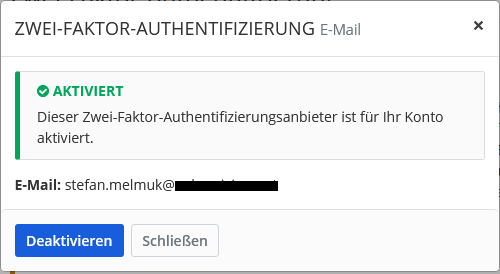
2fa-mail-account

But it actually does the correct thing:
2fa-mail-sent

@stefan0xC commented on GitHub (Aug 9, 2021): > > You can see this in the second screenshot. My account email was changed to [new@email.com](mailto:new@email.com) .. and in the two factor page I see [new@emai.com](mailto:new@emai.com) as well. But the code is sent to [old@email.com](mailto:old@email.com). I could fix that only by disabling the two factor authentication and then re-enabling it again. Yes. You have to configure the two-step login separately. The issue is that it says new@email.com where old@email.com has been configured (because the two-step login mail provider was and should not be affected by the change of the account email to new@email.com). If you change the two step login provider to alternative@example.com the email address shown (after reloading the dialog) will be your account email address (e.g. new@email.com) and not alternative@example.com, even if the two-step verification code will be sent to alternative@example.com. If you have configured another email address it will always say the incorrect thing here: ![2fa-mail-account](https://user-images.githubusercontent.com/509385/128710751-5bf1b6df-20c2-4ccd-8bd0-7e9cbe7d31ce.png) But it actually does the correct thing: ![2fa-mail-sent](https://user-images.githubusercontent.com/509385/128710774-d484a1ee-916a-46fa-98ea-e5b13c9cf488.png)
Author
Owner

@BlackDex commented on GitHub (Aug 18, 2021):

I just checked the code, and this is an actual bug.
The code doesn't return what is configured, but what the current user account e-mail is.
While actually sending the e-mail does use what is stored within the database.

@BlackDex commented on GitHub (Aug 18, 2021): I just checked the code, and this is an actual bug. The code doesn't return what is configured, but what the current user account e-mail is. While actually sending the e-mail does use what is stored within the database.
Author
Owner

@MartinTeichler commented on GitHub (Mar 8, 2025):

This has happened to me just now. I bought a domain and created a custom email address so I can ditch Outlook. Luckily, I didn't delete the Outlook address yet or I would now be locked out.

This all happened after I updated to the latest docker image. Now I am running the latest version

Edit: It seems that in the database, the entry for my account in the table "twofactor" was removed but not readded when I changed my email address. Adding this entry manually resolved the error. What was weird is that I could still see my recovery codes and use them to login.

@MartinTeichler commented on GitHub (Mar 8, 2025): This has happened to me just now. I bought a domain and created a custom email address so I can ditch Outlook. Luckily, I didn't delete the Outlook address yet or I would now be locked out. This all happened after I updated to the latest docker image. Now I am running the latest version Edit: It seems that in the database, the entry for my account in the table "twofactor" was removed but not readded when I changed my email address. Adding this entry manually resolved the error. What was weird is that I could still see my recovery codes and use them to login.
Author
Owner

@Temtaime commented on GitHub (Jan 9, 2026):

The issue still persist with latest release

@Temtaime commented on GitHub (Jan 9, 2026): The issue still persist with latest release
Author
Owner

@BlackDex commented on GitHub (Jan 10, 2026):

The issue still persist with latest release

Are you sure that the mfa email is set correct? That is different from the login mail, and is not affected during email change.

@BlackDex commented on GitHub (Jan 10, 2026): > The issue still persist with latest release Are you sure that the mfa email is set correct? That is different from the login mail, and is not affected during email change.
Sign in to join this conversation.
1 Participants
Notifications
Due Date
No due date set.
Dependencies

No dependencies set.

Reference: starred/vaultwarden#1088