Can't log in - cannot connect to server #296

Closed
opened 2026-02-04 18:26:11 +03:00 by OVERLORD · 5 comments
Owner

Originally created by @RyukoHQ on GitHub (Mar 10, 2023).

Hi!

Im facing with a problem for a quit a while, did everything that I found on internet. and now decided that I'll try my luck on forum
Im using Docker with Portainer and Im new to all of that staff.

Firstly I tried to launch planka with out extra software, was following instructions on docs.planka and it wasn't working out for me, then tried docker and it kinda worked, because I was able to access to the starting screen, but it start giving me error that it cant access to server. Then I found out about Portnainer and tried with it and still cant access.

I have no idea where and how access images\stacks on my machine to look up the files, and have no idea how to manipulate with Docker and Portnainer, so the other ticket with issues wont work... I already looked at them and they didn't help me out due to my low expertise in that area.

Please give me super dummy instruction, so i'll be able to follow them and finally run Planka on my domain.
If you need extra info, like logs... please also tell me how to get them.

used that for .yml and also tried just manually creating that file
curl -L https://raw.githubusercontent.com/plankanban/planka/master/docker-compose.yml -o docker-compose.yml

Logs from 2 containers
1. Planka_postgres log

PostgreSQL Database directory appears to contain a database; Skipping initialization

2023-03-10 12:27:23.171 UTC [1] LOG: starting PostgreSQL 14.7 on x86_64-pc-linux-musl, compiled by gcc (Alpine 12.2.1_git20220924-r4) 12.2.1 20220924, 64-bit
2023-03-10 12:27:23.179 UTC [1] LOG: listening on IPv4 address "0.0.0.0", port 5432
2023-03-10 12:27:23.179 UTC [1] LOG: listening on IPv6 address "::", port 5432
2023-03-10 12:27:23.318 UTC [1] LOG: listening on Unix socket "/var/run/postgresql/.s.PGSQL.5432"
2023-03-10 12:27:23.510 UTC [22] LOG: database system was shut down at 2023-03-10 11:31:50 UTC
2023-03-10 12:27:23.665 UTC [1] LOG: database system is ready to accept connections

2. planka_planka log

debug: Detected Sails environment is "production", but NODE_ENV is "undefined".
debug: Automatically setting the NODE_ENV environment variable to "production".
debug:
debug: It looks like your "sails.config.sockets.onlyAllowOrigins" array only includes
debug: references to the "localhost" origin. This is completely valid, but be sure
debug: to add any other origins to this list that you'd like to accept socket
debug: connections from!
debug:

image
image
image
image

(another trello-like kanban board working fine, but would love to use Planka)
(Also, is there a chance to change language in Planka?)

Will be super pleased with any help.
Thanks a lot.

Originally created by @RyukoHQ on GitHub (Mar 10, 2023). Hi! Im facing with a problem for a quit a while, did everything that I found on internet. and now decided that I'll try my luck on *forum* Im using Docker with Portainer and Im new to all of that staff. Firstly I tried to launch planka with out extra software, was following instructions on docs.planka and it wasn't working out for me, then tried docker and it kinda worked, because I was able to access to the starting screen, but it start giving me error that it cant access to server. Then I found out about Portnainer and tried with it and still cant access. I have no idea where and how access images\stacks on my machine to look up the files, and have no idea how to manipulate with Docker and Portnainer, so the other ticket with issues wont work... I already looked at them and they didn't help me out due to my low expertise in that area. Please give me super dummy instruction, so i'll be able to follow them and finally run Planka on my domain. If you need extra info, like logs... please also tell me how to get them. used that for .yml and also tried just manually creating that file curl -L https://raw.githubusercontent.com/plankanban/planka/master/docker-compose.yml -o docker-compose.yml Logs from 2 containers _1. Planka_postgres log_ PostgreSQL Database directory appears to contain a database; Skipping initialization 2023-03-10 12:27:23.171 UTC [1] LOG: starting PostgreSQL 14.7 on x86_64-pc-linux-musl, compiled by gcc (Alpine 12.2.1_git20220924-r4) 12.2.1 20220924, 64-bit 2023-03-10 12:27:23.179 UTC [1] LOG: listening on IPv4 address "0.0.0.0", port 5432 2023-03-10 12:27:23.179 UTC [1] LOG: listening on IPv6 address "::", port 5432 2023-03-10 12:27:23.318 UTC [1] LOG: listening on Unix socket "/var/run/postgresql/.s.PGSQL.5432" 2023-03-10 12:27:23.510 UTC [22] LOG: database system was shut down at 2023-03-10 11:31:50 UTC 2023-03-10 12:27:23.665 UTC [1] LOG: database system is ready to accept connections _2. planka_planka log_ debug: Detected Sails environment is "production", but NODE_ENV is "undefined". debug: Automatically setting the NODE_ENV environment variable to "production". debug: debug: It looks like your "sails.config.sockets.onlyAllowOrigins" array only includes debug: references to the "localhost" origin. This is completely valid, but be sure debug: to add any other origins to this list that you'd like to accept socket debug: connections from! debug: ![image](https://user-images.githubusercontent.com/39346815/224323984-ca392ffa-76e3-481a-800c-48dadcbc87e4.png) ![image](https://user-images.githubusercontent.com/39346815/224323629-3fd9029a-e466-40bb-9526-eefbc6040d65.png) ![image](https://user-images.githubusercontent.com/39346815/224324428-3ad1fe24-cae4-4f16-830c-032281e21834.png) ![image](https://user-images.githubusercontent.com/39346815/224323832-d9680e35-b8b8-48cb-b2e9-2eb8dfcb85c9.png) (another trello-like kanban board working fine, but would love to use Planka) (Also, is there a chance to change language in Planka?) Will be super pleased with any help. Thanks a lot.
Author
Owner

@meltyshev commented on GitHub (Mar 11, 2023):

Hi! Unfortunately it's very hard for me to understand what the problem is, since I'm not familiar with Portainer at all. But this is very strange, because the authorization uses a normal http request. You can try to open the Network tab in Developer Tools (F12), then click on the Login button and see what the error is in the query you made. With this information it will be easier to find a solution, maybe it goes to the wrong address...

@meltyshev commented on GitHub (Mar 11, 2023): Hi! Unfortunately it's very hard for me to understand what the problem is, since I'm not familiar with Portainer at all. But this is very strange, because the authorization uses a normal http request. You can try to open the Network tab in Developer Tools (F12), then click on the Login button and see what the error is in the query you made. With this information it will be easier to find a solution, maybe it goes to the wrong address...
Author
Owner

@RyukoHQ commented on GitHub (Mar 13, 2023):

Hi

Sorry for a late response.

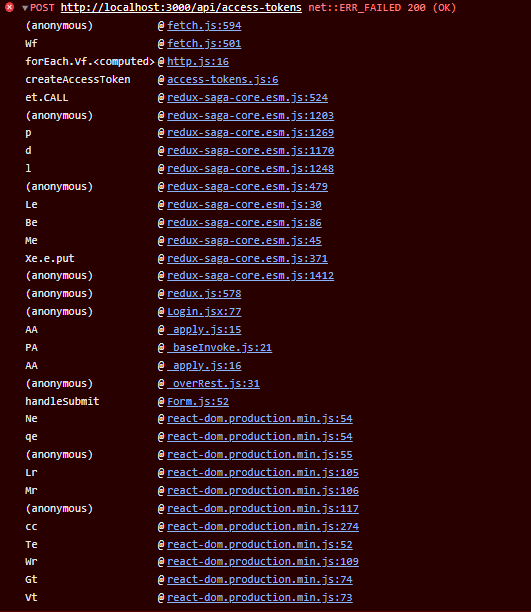
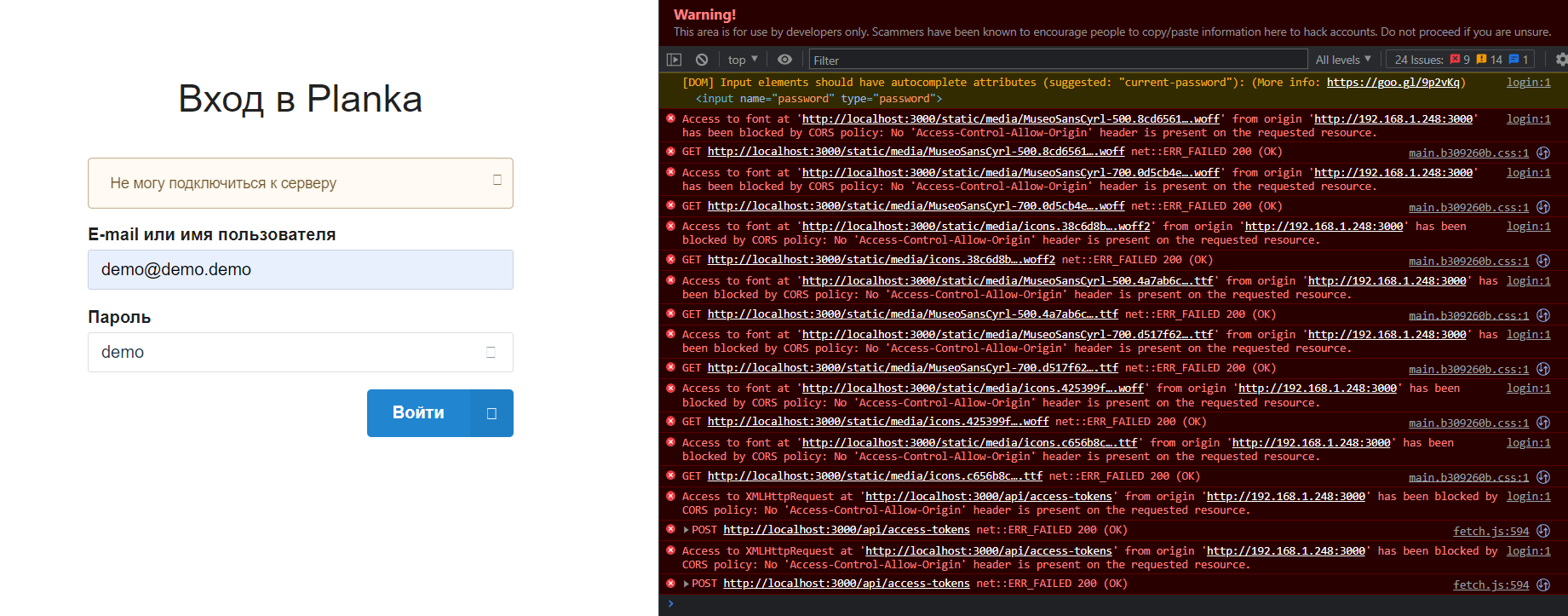
Its showing lots of errors, but when I click on Login, there 2 new errors popup.

image

If I open up POST (screenshot below)
image

Overall errors
image

Best regards.

@RyukoHQ commented on GitHub (Mar 13, 2023): Hi Sorry for a late response. Its showing lots of errors, but when I click on Login, there 2 new errors popup. ![image](https://user-images.githubusercontent.com/39346815/224632558-cb4d980a-14f1-41e4-8003-933775848c4f.png) If I open up POST (screenshot below) ![image](https://user-images.githubusercontent.com/39346815/224632760-9e792367-c331-4e42-b05b-e0aecb48fdec.png) Overall errors ![image](https://user-images.githubusercontent.com/39346815/224632972-da06bd84-50be-403b-8cc7-c1e76f0d780a.png) Best regards.
Author
Owner

@RyukoHQ commented on GitHub (Mar 13, 2023):

PS.

If I do - localhost:3000 - Then its all good, I can login and use Planka as intended.
But if I do 192.168.1.248:3000 (local IP and port) - then it doesn't work because of CORS policy

@RyukoHQ commented on GitHub (Mar 13, 2023): PS. If I do - localhost:3000 - Then its all good, I can login and use Planka as intended. But if I do 192.168.1.248:3000 (local IP and port) - then it doesn't work because of CORS policy
Author
Owner

@meltyshev commented on GitHub (Mar 13, 2023):

It looks like you missed one of the installation steps:

Edit BASE_URL to match your domain name or IP address.
Edit SECRET_KEY with random value. You can generate it by openssl rand -hex 64.

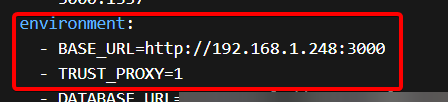
So, the BASE_URL in docker-compose must be exactly the address you enter in your browser (in your case http://192.168.1.248:3000), otherwise there will be a CORS error. Unfortunately, right now it is not possible to make Planka available on both localhost and 192.168.1.248.

@meltyshev commented on GitHub (Mar 13, 2023): It looks like you missed one of the installation steps: ``` Edit BASE_URL to match your domain name or IP address. Edit SECRET_KEY with random value. You can generate it by openssl rand -hex 64. ``` So, the BASE_URL in docker-compose must be exactly the address you enter in your browser (in your case http://192.168.1.248:3000), otherwise there will be a CORS error. Unfortunately, right now it is not possible to make Planka available on both localhost and 192.168.1.248.
Author
Owner

@RyukoHQ commented on GitHub (Mar 13, 2023):

Yeh, I was just about to type that.

Just changed this 2 and its began working
image

Thanks a lot!!!

@RyukoHQ commented on GitHub (Mar 13, 2023): Yeh, I was just about to type that. Just changed this 2 and its began working ![image](https://user-images.githubusercontent.com/39346815/224677225-c94ad7a3-3ee0-4654-bd52-414cf73a1bf9.png) Thanks a lot!!!
Sign in to join this conversation.
1 Participants
Notifications
Due Date
No due date set.
Dependencies

No dependencies set.

Reference: starred/planka#296