Instructions without docker #281

Closed
opened 2026-02-04 18:20:41 +03:00 by OVERLORD · 10 comments
Owner

Originally created by @0marcrem on GitHub (Jan 28, 2023).

Hi,
I'm trying to follow the instruction: Run without docker

After running start.sh, I have the following log:

./start.sh
debug: Detected Sails environment is "production", but NODE_ENV is `undefined`.
debug: Automatically setting the NODE_ENV environment variable to "production".
debug:
debug: It looks like your `sails.config.sockets.onlyAllowOrigins` array only includes
debug: references to the `localhost` origin.  This is completely valid, but be sure
debug: to add any other origins to this list that you'd like to accept socket
debug: connections from!
debug:

I guess that's ok?
I'm not sure how to open Planka in my browser. https://localhost https://localhost:3000 are not working

Any help would be appreciated.

Originally created by @0marcrem on GitHub (Jan 28, 2023). Hi, I'm trying to follow the instruction: Run without docker After running start.sh, I have the following log: ``` ./start.sh debug: Detected Sails environment is "production", but NODE_ENV is `undefined`. debug: Automatically setting the NODE_ENV environment variable to "production". debug: debug: It looks like your `sails.config.sockets.onlyAllowOrigins` array only includes debug: references to the `localhost` origin. This is completely valid, but be sure debug: to add any other origins to this list that you'd like to accept socket debug: connections from! debug: ``` I guess that's ok? I'm not sure how to open Planka in my browser. https://localhost https://localhost:3000 are not working Any help would be appreciated.
OVERLORD added the bug label 2026-02-04 18:20:41 +03:00
Author
Owner

@meltyshev commented on GitHub (Jan 29, 2023):

Hi! It seems we forgot to mention the default port number in the readme... Please try http://localhost:1337 🙂

@meltyshev commented on GitHub (Jan 29, 2023): Hi! It seems we forgot to mention the default port number in the readme... Please try http://localhost:1337 🙂
Author
Owner

@0marcrem commented on GitHub (Jan 31, 2023):

Thanks!

But I only get a blank page with title "Planka" and a warning in the browser console:
Loading failed for the <script> with source “http://localhost:1337/static/js/main.9ce4c69d.js”.
Any ideas?

@0marcrem commented on GitHub (Jan 31, 2023): Thanks! But I only get a blank page with title "Planka" and a warning in the browser console: `Loading failed for the <script> with source “http://localhost:1337/static/js/main.9ce4c69d.js”.` Any ideas?
Author
Owner

@meltyshev commented on GitHub (Feb 2, 2023):

Sorry, there's a mistake in readme. Please try to copy the contents of the build folder instead of copying the folder itself: cp -r build/. ../server/public.

@meltyshev commented on GitHub (Feb 2, 2023): Sorry, there's a mistake in readme. Please try to copy the contents of the build folder instead of copying the folder itself: `cp -r build/. ../server/public`.
Author
Owner

@meltyshev commented on GitHub (Feb 2, 2023):

I've updated the installation instructions without docker.

@meltyshev commented on GitHub (Feb 2, 2023): I've updated the installation instructions without docker.
Author
Owner

@0marcrem commented on GitHub (Feb 2, 2023):

It worked, but there are still some issues. I guess something is not loading correctly.
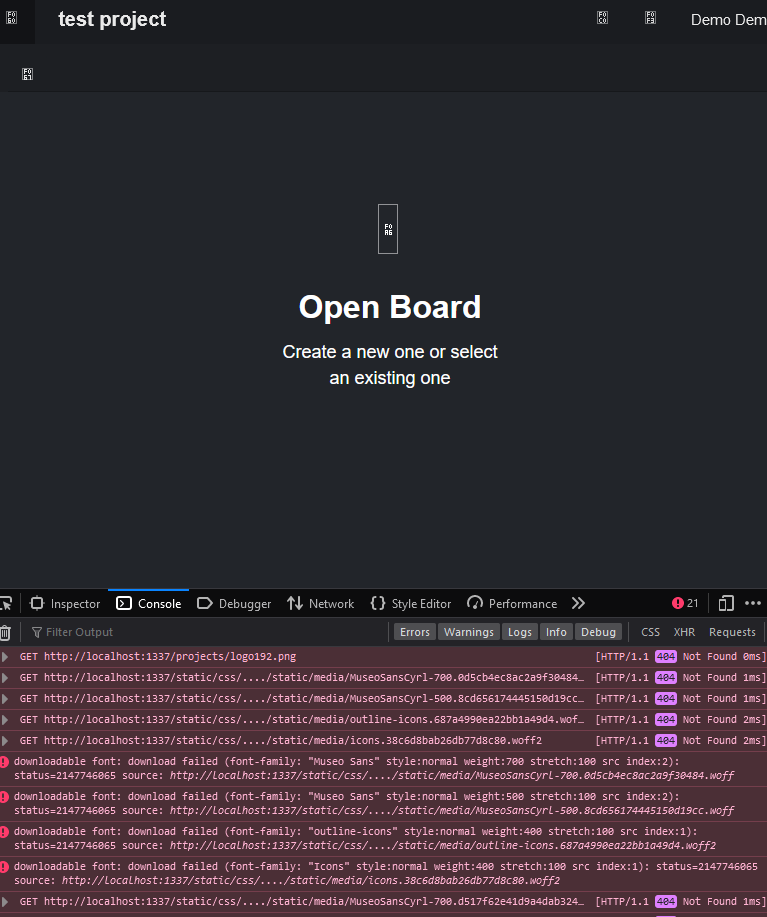
There are no icons, and some console errors.
image

@0marcrem commented on GitHub (Feb 2, 2023): It worked, but there are still some issues. I guess something is not loading correctly. There are no icons, and some console errors. ![image](https://user-images.githubusercontent.com/123837888/216379534-e93e78f0-8359-42ca-8f53-fc6711f87fd8.png)
Author
Owner

@0marcrem commented on GitHub (Feb 22, 2023):

Any ideas?

@0marcrem commented on GitHub (Feb 22, 2023): Any ideas?
Author
Owner

@meltyshev commented on GitHub (Feb 22, 2023):

Sorry, I missed your comment. Four dots in a row in the paths looks very strange. But I need more context to understand the problem. Could you describe all the steps that were performed to install Planka?

We also recently updated the documentation for dockerless installation: https://docs.planka.cloud/docs/installl-planka/Debian%20&%20Ubuntu.

@meltyshev commented on GitHub (Feb 22, 2023): Sorry, I missed your comment. Four dots in a row in the paths looks very strange. But I need more context to understand the problem. Could you describe all the steps that were performed to install Planka? We also recently updated the documentation for dockerless installation: https://docs.planka.cloud/docs/installl-planka/Debian%20&%20Ubuntu.
Author
Owner

@0marcrem commented on GitHub (Feb 22, 2023):

Oh, I use windows for the server, because I have other programs that require it and plenty of CPU, mem left. (Now, I see that it is for Debian and Ubuntu only).
But I guess it should be possible to run it on Windows - I mean its running, but without icons and fonts.

I tested it using the browser on the same machine.
Steps:

git clone https://github.com/plankanban/planka.git .
npm i
npm run client:build
cp -r client/build/. server/public
cp client/build/index.html server/views/index.ejs
cp start.sh server
cd server
cp .env.sample .env
./start.sh

Also, I tried the development mode and it worked just fine.

@0marcrem commented on GitHub (Feb 22, 2023): Oh, I use windows for the server, because I have other programs that require it and plenty of CPU, mem left. (Now, I see that it is for Debian and Ubuntu only). But I guess it should be possible to run it on Windows - I mean its running, but without icons and fonts. I tested it using the browser on the same machine. Steps: ``` git clone https://github.com/plankanban/planka.git . npm i npm run client:build cp -r client/build/. server/public cp client/build/index.html server/views/index.ejs cp start.sh server cd server cp .env.sample .env ./start.sh ``` Also, I tried the development mode and it worked just fine.
Author
Owner

@meltyshev commented on GitHub (Feb 22, 2023):

All steps seem to be correct. I have one guess, I heard somewhere that --prefix client in npm scripts may not work properly on Windows. Please try to replace npm run client:build with (cd client && npm run build) in your steps.

Update: that doesn't seem to work either, we're trying to find the problem.

@meltyshev commented on GitHub (Feb 22, 2023): All steps seem to be correct. I have one guess, I heard somewhere that `--prefix client` in npm scripts may not work properly on Windows. Please try to replace `npm run client:build` with `(cd client && npm run build)` in your steps. Update: that doesn't seem to work either, we're trying to find the problem.
Author
Owner

@meltyshev commented on GitHub (Feb 22, 2023):

Should be fixed by 8dd331b895. Please pull the update and build the client again 🙂

@meltyshev commented on GitHub (Feb 22, 2023): Should be fixed by 8dd331b89528948d239d01d97d6179c8036ec0d7. Please pull the update and build the client again 🙂
Sign in to join this conversation.
1 Participants
Notifications
Due Date
No due date set.
Dependencies

No dependencies set.

Reference: starred/planka#281