Service up but I can not login because it rejects the entry of credentials (Demo user: demo@demo.demo demo). #269

Closed
opened 2026-02-04 18:16:20 +03:00 by OVERLORD · 6 comments
Owner

Originally created by @Arturo-Penas-Rial on GitHub (Jan 3, 2023).

Hi @meltyshev

In Docker environment on CENTOS, I follow the installation instructions rigorously, and I raise the service up (docker-compose) and access the Web portal, but I can not login because it rejects the entry of credentials (Demo user: demo@demo.demo demo).

I guess the credentials have been changed or maybe I have not initialized the database correctly.

I have also tried in DEV environment using "git clone" but problems arise from the use of NODE 10, which is deprecated.

How can I run and login to the application, please? I will appreciate your support.

Thanks for your shared work!

Imagen de WhatsApp 2023-01-03 a las 09 49 14

Originally created by @Arturo-Penas-Rial on GitHub (Jan 3, 2023). Hi @meltyshev In Docker environment on CENTOS, I follow the installation instructions rigorously, and I raise the service up (docker-compose) and access the Web portal, but I can not login because it rejects the entry of credentials (Demo user: demo@demo.demo demo). I guess the credentials have been changed or maybe I have not initialized the database correctly. I have also tried in DEV environment using "git clone" but problems arise from the use of NODE 10, which is deprecated. How can I run and login to the application, please? I will appreciate your support. Thanks for your shared work! ![Imagen de WhatsApp 2023-01-03 a las 09 49 14](https://user-images.githubusercontent.com/73435621/210373498-40726ea9-bb49-4082-8b9d-d70d33ad79b2.jpg)
Author
Owner

@Arturo-Penas-Rial commented on GitHub (Jan 3, 2023):

Attached you can see database service log ...
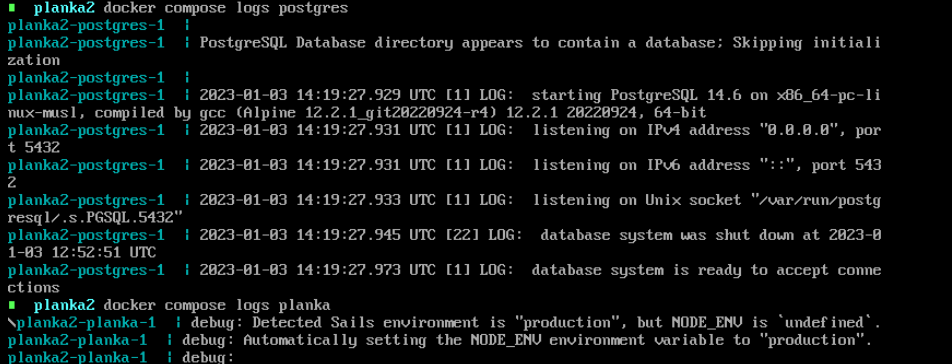
DB log

@Arturo-Penas-Rial commented on GitHub (Jan 3, 2023): Attached you can see database service log ... ![DB log](https://user-images.githubusercontent.com/73435621/210376163-2204f626-2017-4bb6-a2ba-1aa19d9ba8f9.png)
Author
Owner

@ghost commented on GitHub (Jan 3, 2023):

I had the same problem, I'll explain what I did to make it work.
First I just copied the docker-compose.yml file and started the service but the same thing happened to me, the username and password didn't work.
Then what I did was enter the repository, clone the repository and inside the repository run docker-compose up -d
In this way I was able to enter with the user demo@demo.demo and password demo

@ghost commented on GitHub (Jan 3, 2023): I had the same problem, I'll explain what I did to make it work. First I just copied the docker-compose.yml file and started the service but the same thing happened to me, the username and password didn't work. Then what I did was enter the repository, clone the repository and inside the repository run docker-compose up -d In this way I was able to enter with the user demo@demo.demo and password demo
Author
Owner

@Arturo-Penas-Rial commented on GitHub (Jan 3, 2023):

I had the same problem, I'll explain what I did to make it work. First I just copied the docker-compose.yml file and started the service but the same thing happened to me, the username and password didn't work. Then what I did was enter the repository, clone the repository and inside the repository run docker-compose up -d In this way I was able to enter with the user demo@demo.demo and password demo

I guess it is because the DB was not initialized, but I can't find how to do it either! The only alternative is the DEV environment but it doesn't work for me either with Node version 10. Let's wait and see if we get support :-) It is an excellent product but maybe the new version was not sufficiently tested.

@Arturo-Penas-Rial commented on GitHub (Jan 3, 2023): > I had the same problem, I'll explain what I did to make it work. First I just copied the docker-compose.yml file and started the service but the same thing happened to me, the username and password didn't work. Then what I did was enter the repository, clone the repository and inside the repository run docker-compose up -d In this way I was able to enter with the user [demo@demo.demo](mailto:demo@demo.demo) and password demo I guess it is because the DB was not initialized, but I can't find how to do it either! The only alternative is the DEV environment but it doesn't work for me either with Node version 10. Let's wait and see if we get support :-) It is an excellent product but maybe the new version was not sufficiently tested.
Author
Owner

@ghost commented on GitHub (Jan 3, 2023):

Tuve el mismo problema, explicaré lo que hice para que funcione. Primero simplemente copié el archivo docker-compose.yml e inicié el servicio, pero me pasó lo mismo, el nombre de usuario y la contraseña no funcionaban. Entonces lo que hice fue entrar al repositorio, clonar el repositorio y dentro del repositorio ejecutar docker-compose up -d De esta forma pude entrar con el usuario demo@demo.demo y contraseña demo

Supongo que es porque la base de datos no se inicializó, ¡pero tampoco puedo encontrar cómo hacerlo! La única alternativa es el entorno DEV, pero tampoco me funciona con la versión 10 de Node. Esperemos a ver si tenemos soporte :-) Es un producto excelente, pero tal vez la nueva versión no se haya probado lo suficiente.

Do you know any other kanban alternative like this? that is also local to implement in my company

@ghost commented on GitHub (Jan 3, 2023): > > Tuve el mismo problema, explicaré lo que hice para que funcione. Primero simplemente copié el archivo docker-compose.yml e inicié el servicio, pero me pasó lo mismo, el nombre de usuario y la contraseña no funcionaban. Entonces lo que hice fue entrar al repositorio, clonar el repositorio y dentro del repositorio ejecutar docker-compose up -d De esta forma pude entrar con el usuario [demo@demo.demo](mailto:demo@demo.demo) y contraseña demo > > Supongo que es porque la base de datos no se inicializó, ¡pero tampoco puedo encontrar cómo hacerlo! La única alternativa es el entorno DEV, pero tampoco me funciona con la versión 10 de Node. Esperemos a ver si tenemos soporte :-) Es un producto excelente, pero tal vez la nueva versión no se haya probado lo suficiente. Do you know any other kanban alternative like this? that is also local to implement in my company
Author
Owner

@meltyshev commented on GitHub (Jan 3, 2023):

Hi! It looks like there is nothing wrong with the database, if the user was not created there would be an error that the user was not found, but if the whole database is not created, you can just delete the volume db-data and it should recreate itself.
What BASE_URL environment variable did you specify and what URL do you enter in the browser?
Can you provide what appears in Developer Tools (F12) -> Network when you trying to log in?

@meltyshev commented on GitHub (Jan 3, 2023): Hi! It looks like there is nothing wrong with the database, if the user was not created there would be an error that the user was not found, but if the whole database is not created, you can just delete the volume db-data and it should recreate itself. What `BASE_URL` environment variable did you specify and what URL do you enter in the browser? Can you provide what appears in `Developer Tools (F12) -> Network` when you trying to log in?
Author
Owner

@Arturo-Penas-Rial commented on GitHub (Jan 3, 2023):

I had the same problem, I'll explain what I did to make it work. First I just copied the docker-compose.yml file and started the service but the same thing happened to me, the username and password didn't work. Then what I did was enter the repository, clone the repository and inside the repository run docker-compose up -d In this way I was able to enter with the user demo@demo.demo and password demo

I guess it is because the DB was not initialized, but I can't find how to do it either! The only alternative is the DEV environment but it doesn't work for me either with Node version 10. Let's wait and see if we get support :-) It is an excellent product but maybe the new version was not sufficiently tested.

Hi, Thanks for your support. Te issue was solved! You are my guru :-) Best wished for 2023!

@Arturo-Penas-Rial commented on GitHub (Jan 3, 2023): > > I had the same problem, I'll explain what I did to make it work. First I just copied the docker-compose.yml file and started the service but the same thing happened to me, the username and password didn't work. Then what I did was enter the repository, clone the repository and inside the repository run docker-compose up -d In this way I was able to enter with the user [demo@demo.demo](mailto:demo@demo.demo) and password demo > > I guess it is because the DB was not initialized, but I can't find how to do it either! The only alternative is the DEV environment but it doesn't work for me either with Node version 10. Let's wait and see if we get support :-) It is an excellent product but maybe the new version was not sufficiently tested. Hi, Thanks for your support. Te issue was solved! You are my guru :-) Best wished for 2023!
Sign in to join this conversation.
1 Participants
Notifications
Due Date
No due date set.
Dependencies

No dependencies set.

Reference: starred/planka#269