[Question] Will this work with Jellyfin? #765

Closed
opened 2026-02-06 20:04:45 +03:00 by OVERLORD · 7 comments
Owner

Originally created by @the-hotmann on GitHub (Jun 24, 2019).

Atm I've not tested Jellyfin because I would want it on my Synology NAS and as far as now I have not received any SPK File to test.

Also I would really like to know if something, I would want to use, is working or will be working on JellyFin

  1. Streaming from CloudServices directly to every client?
  2. Remote Transcoding/Converting?
  3. JellyFin special Server administrating

1.) I want to move/sync files (even manually) to my GDrive and just tell JellyFin where it should search for them.
Then Jellyfin should add all Medias from GDrive to its librarys.
When watching/streaming these Medias I want them to be delivered by GDrive, not routed through my Home-Internet, so they are not limited by my uploadspeed.

2.) I would love the Fact to have a (own) VPS, with special "JellyFin Worker" Software which I can register at my JellyFin Server and as soon as soemone want to have some files transcoded this worker-Server will do it instead of their local machines or the JellyFin Server.
So even befor you start watching a Movie you gonna tell this "JellyFin Worker Server" to get some movies and to convert them from 2160p to 1080p.

The Worker Server then Pulls the Movies and starts to do this. As soon as he finished a Movie he pushes it back to the original Server (whether it is the GDrive or the Local JellyFin Server) where they have been.
With a "Decode Server", "Worker Server" or whatever you want to call this you can with ease transcode all of the Files to the wished format without and you dont even have to do this at home!

3.) I would love to disable Transcoding on my Server as I have a Low-CPU Synology (DS1817+) which cant handle Transcoding of Video.

therefor I would love to have 4 Options:

Enable Transcoding (for JellyFin Server) of these Type of things:

Movies

  • Video from Movie
  • Audio from Movie

Music

  • Audio from Music

Enable Live-Transcoding

  • Live-Transcoding

In my case I just want to enable transcoding of Audio at all for the JellyFin Server

Enable Transcoding (for Decode Server) of these Type of things:

Movies

  • Video from Movie
  • Audio from Movie

Music

  • Audio from Music

Enable Live-Transcoding

  • Live-Transcoding

So for my Decode Server I want to enable all Types of Transcoding!
But for both Servers Live-Transcoding is disabled, means: you have to convert it in the Background and you cant stream it directly if you do not use Direct-Play!

.

.

.

So my Question: are things like this possible on JellyFin?
I'm actually a Plex User (since 3 Days or so) but I'm not really happy with how it goes over there so I really wanna switch to another Service which fits my needs :)

Originally created by @the-hotmann on GitHub (Jun 24, 2019). Atm I've not tested Jellyfin because I would want it on my Synology NAS and as far as now I have not received any SPK File to test. Also I would really like to know if something, I would want to use, is working or will be working on JellyFin 1. Streaming from CloudServices directly to every client? 2. Remote Transcoding/Converting? 3. JellyFin special Server administrating 1.) I want to move/sync files (even manually) to my GDrive and just tell JellyFin where it should search for them. Then Jellyfin should add all Medias from GDrive to its librarys. When watching/streaming these Medias I want them to be delivered by GDrive, not routed through my Home-Internet, so they are not limited by my uploadspeed. 2.) I would love the Fact to have a (own) VPS, with special "JellyFin Worker" Software which I can register at my JellyFin Server and as soon as soemone want to have some files transcoded this worker-Server will do it instead of their local machines or the JellyFin Server. So even befor you start watching a Movie you gonna tell this "JellyFin Worker Server" to get some movies and to convert them from 2160p to 1080p. The Worker Server then Pulls the Movies and starts to do this. As soon as he finished a Movie he pushes it back to the original Server (whether it is the GDrive or the Local JellyFin Server) where they have been. With a "Decode Server", "Worker Server" or whatever you want to call this you can with ease transcode all of the Files to the wished format without and you dont even have to do this at home! 3.) I would love to disable Transcoding on my Server as I have a Low-CPU Synology (DS1817+) which cant handle Transcoding of Video. therefor I would love to have 4 Options: Enable Transcoding (for **JellyFin Server**) of these Type of things: **Movies** - [ ] Video from Movie - [X] Audio from Movie **Music** - [X] Audio from Music **Enable Live-Transcoding** - [ ] Live-Transcoding In my case I just want to enable transcoding of Audio at all for the **JellyFin Server** Enable Transcoding (for **Decode Server**) of these Type of things: Movies - [X] Video from Movie - [X] Audio from Movie Music - [x] Audio from Music **Enable Live-Transcoding** - [x] Live-Transcoding So for my Decode Server I want to enable all Types of Transcoding! But for both Servers Live-Transcoding is disabled, means: you have to convert it in the Background and you cant stream it directly if you do not use Direct-Play! . . . So my Question: are things like this possible on JellyFin? I'm actually a Plex User (since 3 Days or so) but I'm not really happy with how it goes over there so I really wanna switch to another Service which fits my needs :)
OVERLORD added the support label 2026-02-06 20:04:45 +03:00
Author
Owner

@EraYaN commented on GitHub (Jun 25, 2019):

  1. No, if you mean that the client would access google cloud for example directly.
  2. No.
  3. What do you mean by "special server"?
@EraYaN commented on GitHub (Jun 25, 2019): 1. No, if you mean that the client would access google cloud for example directly. 2. No. 3. What do you mean by "special server"?
Author
Owner

@0ddb0d commented on GitHub (Jun 26, 2019):

The short answer is no to all three. Equivalent functionality is already offered by PGBlitz and Cloudbox and I think it's inevitable that Plex and Emby will eventually move to a SaaS model.

As for Jellyfin on Synology, why wait for an SPK, just install docker on your NAS, grab the container and away you go.

@0ddb0d commented on GitHub (Jun 26, 2019): The short answer is no to all three. Equivalent functionality is already offered by PGBlitz and Cloudbox and I think it's inevitable that Plex and Emby will eventually move to a SaaS model. As for Jellyfin on Synology, why wait for an SPK, just install docker on your NAS, grab the container and away you go.
Author
Owner

@the-hotmann commented on GitHub (Jun 28, 2019):

  1. No, if you mean that the client would access google cloud for example directly.

But will this be possible one day?
Why is it not possible yet? Is there a specific reason?
If it does not work like this, how does it work then? Does it get routed to my home-network?

  1. What do you mean by "special server"?

A Server that does transcoding for you, like described

As for Jellyfin on Synology, why wait for an SPK, just install docker on your NAS, grab the container and away you go.

Thanks, but I dont want to run any docker Images on my Synology. Its 'slow' anyway as it does have a very power-efficient CPU.
I will wait for a SPK file.

@the-hotmann commented on GitHub (Jun 28, 2019): > 1. No, if you mean that the client would access google cloud for example directly. But will this be possible one day? Why is it not possible yet? Is there a specific reason? If it does not work like this, how does it work then? Does it get routed to my home-network? > 3. What do you mean by "special server"? A Server that does transcoding for you, like described > As for Jellyfin on Synology, why wait for an SPK, just install docker on your NAS, grab the container and away you go. Thanks, but I dont want to run any docker Images on my Synology. Its 'slow' anyway as it does have a very power-efficient CPU. I will wait for a SPK file.
Author
Owner

@EraYaN commented on GitHub (Jun 28, 2019):

The SPK file and the docker image will run the same code, so no big difference there, docker is not like a VM and does not add overhead to CPU cycles, at worst a little bit to networking and IO.

As for the Google API support, we decided that all data and cloud access would be left to the OS, so you will want to use existing ways of mounting the Google storage (think fuse file systems on linux). Cause implementing many different hosting capabilities directly is way outside the scope of the project. And yes this means all traffic would go through your server.

@EraYaN commented on GitHub (Jun 28, 2019): The SPK file and the docker image will run the same code, so no big difference there, docker is not like a VM and does not add overhead to CPU cycles, at worst a little bit to networking and IO. As for the Google API support, we decided that all data and cloud access would be left to the OS, so you will want to use existing ways of mounting the Google storage (think fuse file systems on linux). Cause implementing many different hosting capabilities directly is way outside the scope of the project. And yes this means all traffic would go through your server.
Author
Owner

@the-hotmann commented on GitHub (Jun 29, 2019):

Well there is some overhead when it comes to Docker, but yes its not emulating the whole OS and thats makes it pretty efficient.

I still preffer waiting for native support. I dont have to use it. But would love to do so when having native support.

Otherwise, not supporting direct GDrive, storage is kind of dealbreaker for me as my case is:

in my House my Synology is located. It runs (atm Plex) and in my Brothers House (4km distance) we also want to watch my movies.
As in my village we just have a 100k Connection. (100MBit/s down, 35MBit/s up)
The upload will hardly limit the possibillity to stream any of my 4K Movies. These Days nearly every movie is made in 4K just becasue of the better resolution.
So From my brothers house we cant watch my Movies, as 4K needs a bandwidth about 60-70MBit/s.

So for people with less Bandwidth direct GDrive Support makes absolutely sence (Plex supported this untill Nov 2018) and I tought that JellyFin supports this.

So ATM I'm searching for a Programm that supports this (as I joined Plex after Nov 2018 and do not have the option of direct Cloud streaming)

Thanks for understanding. Maybe JellyFin one day will support direct Cloud streaming.
I think supporting this will not be too hard as it seems to be possible to connect it localy, why not on "Server-Base" so every user in the Server has direct (read)access to the Cloud Storage the Server is connected with.

@the-hotmann commented on GitHub (Jun 29, 2019): Well there is some overhead when it comes to Docker, but yes its not emulating the whole OS and thats makes it pretty efficient. I still preffer waiting for native support. I dont have to use it. But would love to do so when having native support. Otherwise, not supporting direct GDrive, storage is kind of dealbreaker for me as my case is: in my House my Synology is located. It runs (atm Plex) and in my Brothers House (4km distance) we also want to watch my movies. As in my village we just have a 100k Connection. (100MBit/s down, 35MBit/s up) The upload will hardly limit the possibillity to stream any of my 4K Movies. These Days nearly every movie is made in 4K just becasue of the better resolution. So From my brothers house we cant watch my Movies, as 4K needs a bandwidth about 60-70MBit/s. So for people with less Bandwidth direct GDrive Support makes absolutely sence (Plex supported this untill Nov 2018) and I tought that JellyFin supports this. So ATM I'm searching for a Programm that supports this (as I joined Plex after Nov 2018 and do not have the option of direct Cloud streaming) Thanks for understanding. Maybe JellyFin one day will support direct Cloud streaming. I think supporting this will not be too hard as it seems to be possible to connect it localy, why not on "Server-Base" so every user in the Server has direct (read)access to the Cloud Storage the Server is connected with.
Author
Owner

@EraYaN commented on GitHub (Jun 29, 2019):

Docker is not a VM, the overhead is insignificant, read this IBM research paper from 2014: https://domino.research.ibm.com/library/cyberdig.nsf/papers/0929052195DD819C85257D2300681E7B/$File/rc25482.pdf Basically anything computationally intensive will be 0% (or unmeasurable) overhead.

GDrive support is not "not that hard" it means we need to abstract away all file systems and that every client needs a way to play from any supported service directly, besides it's very much against the GDrive ToS. You should be using the Google Cloud Storage for it, you know the one you must pay per GB for. If you want cloud streaming run the server in the cloud, just find some cheap local VPS provider with plenty of bandwitdh. And then you can mount your GDrive or whatever else there so you don't need much VPS storage.

@EraYaN commented on GitHub (Jun 29, 2019): Docker is not a VM, the overhead is insignificant, read this IBM research paper from 2014: https://domino.research.ibm.com/library/cyberdig.nsf/papers/0929052195DD819C85257D2300681E7B/$File/rc25482.pdf Basically anything computationally intensive will be 0% (or unmeasurable) overhead. GDrive support is not "not that hard" it means we need to abstract away all file systems and that every client needs a way to play from any supported service directly, besides it's very much against the GDrive ToS. You should be using the Google Cloud Storage for it, you know the one you must pay per GB for. If you want cloud streaming run the server in the cloud, just find some cheap local VPS provider with plenty of bandwitdh. And then you can mount your GDrive or whatever else there so you don't need much VPS storage.
Author
Owner

@oddstr13 commented on GitHub (Jun 29, 2019):

First off, let me answer the native package question:

It is on the Future Roadmap (Tracked in issue #293, which I see you already responded to). What this means is that this is something we want to eventually get done, but there is no targeted release version or date.
It will happen after a contributor (that has a Synology NAS - I don't) submits an acceptable pull-request to handle the packaging, then the release after it has been integrated into the release pipeline, you will get a native installation package.

Jellyfin is based on 100% volunteer work.
Things get done when people feel like implementing the features.
None of us receive any money for this work.
Our reward is a better media server.

Disabling transcoding

This is currently a per-user setting;
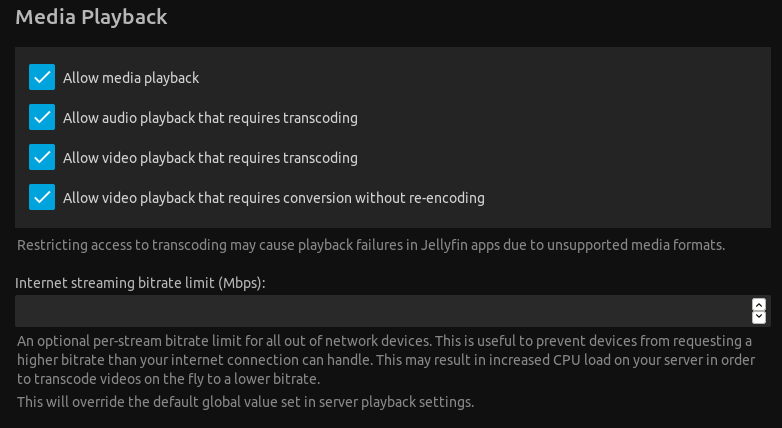
image

Then there is direct playback:

This requires client support in the individual clients.
To my knowledge, the only client that currently supports this, is the Kodi plugin.
I have not tested this particular feature myself, but the process to get it working should be the following;

In the Jellyfin library settings
Fill in the Shared network folder with the path the library folder will be visible at on the client side (the GDrive mount point). Repeat for all libraries and folders.

image

When setting up the Kodi addon
First, mount the cloud drive at the path specified (or create a symlink / directory junction).
Then select the Native playback mode when prompted during plug-in configuration.

image
(This screenshot is of the setting as shown in the Add-on settings, not from initial setup)

Native support for cloud services
Won't happen anytime soon, if ever.
This is a huge task - there are many many cloud providers, and their APIs change regularly.
Just supporting all cloud providers users could possibly want to use in all the Jellyfin client implementations would be a larger project than Jellyfin itself.
Most cloud services has a way to be mounted on a filesystem level (FUSE or similar).

For testing Jellyfin

Any computer should work. You can run the server on Windows, Linux or MacOS.

There are Docker images available, both official and from linuxserver.io.
In addition, we're building deb (Debian, Ubuntu - x86_64, armhf, arm64), rpm, tar.gz (linux, mac...), and zip for windows 32 and 64 bit.

Personally, I'm running Jellyfin in a fully virtualized (KVM) Ubuntu VM on a 8-ish years old i5 computer, with minimal issues (transcoding high definition x265 is understandably working poorly, as I don't have any hardware acceleration enabled).

In conclusion

Your best option would probably be to use one of the Docker images, and use the Kodi plug-in with direct play from GDrive mounted on the system.

Other clients probably (I haven't checked them all) don't support the native playback option, and many wouldn't support direct playback of x265/audio codec/subtitles, thus forcing transcode.

If the above suggested setup won't work for you, then I have the following suggestions;

  • Get a faster internet connection (I'm stuck at 15/8 Mbps myself).
  • Buy more powerful hardware to run Jellyfin on.
  • Get lower bitrate media for your media server. 1080p mp4(x264+AAC) would likely direct-play on most clients. Alternatively webm(vp8 + vorbis) for devices that don't have proprietary codecs (firefox on linux).
@oddstr13 commented on GitHub (Jun 29, 2019): ### First off, let me answer the native package question: It is on the [Future Roadmap](https://github.com/orgs/jellyfin/projects/14) _(Tracked in issue #293, which I see you already responded to)_. What this means is that this is something we want to eventually get done, but there is no targeted release version or date. It will happen after a contributor _(that has a Synology NAS - I don't)_ submits an acceptable pull-request to handle the packaging, then the release after it has been integrated into the release pipeline, you will get a native installation package. Jellyfin is based on 100% volunteer work. Things get done when people feel like implementing the features. None of us receive any money for this work. Our reward is a better media server. ### Disabling transcoding This is currently a per-user setting; ![image](https://user-images.githubusercontent.com/638706/60384420-aa48d480-9a7d-11e9-9293-35a494e5491c.png) ### Then there is direct playback: This requires client support in the individual clients. To my knowledge, the only client that currently supports this, is the [Kodi plugin](https://github.com/jellyfin/jellyfin-kodi). I have not tested this particular feature myself, but the process to get it working should be the following; **In the Jellyfin library settings** Fill in the `Shared network folder` with the path the library folder will be visible at on the client side (_the GDrive mount point_). Repeat for all libraries and folders. ![image](https://user-images.githubusercontent.com/638706/60383451-0d803a00-9a71-11e9-9ec1-5bbd969ddd7e.png) **When setting up the Kodi addon** First, mount the cloud drive at the path specified (_or create a symlink / directory junction_). Then select the `Native` playback mode when prompted during plug-in configuration. ![image](https://user-images.githubusercontent.com/638706/60383435-cf831600-9a70-11e9-99da-0f0cf903858e.png) _(This screenshot is of the setting as shown in the Add-on settings, not from initial setup)_ **Native support for cloud services** Won't happen anytime soon, if ever. This is a huge task - there are many many cloud providers, and their APIs change regularly. Just supporting all cloud providers users could possibly want to use in all the Jellyfin client implementations would be a larger project than Jellyfin itself. Most cloud services has a way to be mounted on a filesystem level ([FUSE](https://en.wikipedia.org/wiki/Filesystem_in_Userspace) or similar). ### For testing Jellyfin Any computer should work. You can run the server on Windows, Linux or MacOS. There are Docker images available, both [official](https://hub.docker.com/r/jellyfin/jellyfin) and from [linuxserver.io](https://hub.docker.com/r/linuxserver/jellyfin). In addition, we're [building deb (Debian, Ubuntu - x86_64, armhf, arm64), rpm, tar.gz (linux, mac...), and zip for windows 32 and 64 bit.](https://github.com/jellyfin/jellyfin/releases) Personally, I'm running Jellyfin in a fully virtualized (KVM) Ubuntu VM on a 8-ish years old i5 computer, with minimal issues (transcoding high definition x265 is understandably working poorly, as I don't have any hardware acceleration enabled). ### In conclusion Your best option would probably be to use one of the Docker images, and use the Kodi plug-in with direct play from GDrive mounted on the system. Other clients probably _(I haven't checked them all)_ don't support the native playback option, and many wouldn't support direct playback of x265/audio codec/subtitles, thus forcing transcode. If the above suggested setup won't work for you, then I have the following suggestions; * Get a faster internet connection _(I'm stuck at 15/8 Mbps myself)_. * Buy more powerful hardware to run Jellyfin on. * Get lower bitrate media for your media server. 1080p mp4(x264+AAC) would likely direct-play on most clients. Alternatively webm(vp8 + vorbis) for devices that don't have proprietary codecs (firefox on linux).
Sign in to join this conversation.
1 Participants
Notifications
Due Date
No due date set.
Dependencies

No dependencies set.

Reference: starred/jellyfin#765