mirror of
https://github.com/jellyfin/jellyfin.git
synced 2026-05-04 18:09:12 +03:00
Unable to authenticate when using the jellyfin container #606

Reference in New Issue
Block a user
Delete Branch "%!s()"
Deleting a branch is permanent. Although the deleted branch may continue to exist for a short time before it actually gets removed, it CANNOT be undone in most cases. Continue?
Originally created by @groenator on GitHub (Apr 20, 2019).
Describe the bug
I downloaded the latest version of Jellyfin container image, 10.3.0 and today I wanted to configure Jellyfin on my android tv. I installed the latest beta5 version on my android TV, when I got to the user part, the user was not able to log in. Jellyfin had no user/password configured at the time.
I thought I did something wrong, so eventually, I configured a password for the user in my server. Now, either if I go via the web interface or android, I cannot log in. I used the forgot password method, I copied the pin from the passwordreset1.json file but is not working. I keep getting user not found.
To Reproduce
Expected behavior
Logs
Screenshots
System (please complete the following information):
Additional context
@sparky8251 commented on GitHub (Apr 20, 2019):
@groenator Do you use nginx as a reverse proxy? If so see our latest docs on nginx settings. Have had users struggle to login until they change settings to what we now reccomend (the move to Kestrel changed the HTTP server and therefore proxy options).
@groenator commented on GitHub (Apr 20, 2019):
No, I don't use any reverse proxy at all.
@groenator commented on GitHub (Apr 20, 2019):
After I type the new pin I always get back to this page.
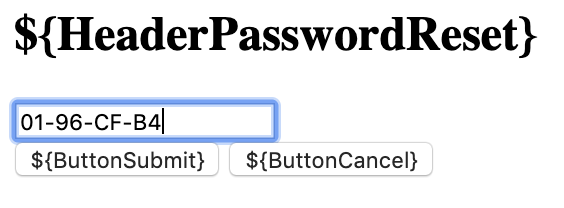
@sparky8251 commented on GitHub (Apr 20, 2019):
Hmm... So far you are the second I've seen report this particular bug with the 10.3.0 release.
If you reset it you can login once, browse for a bit, then it kicks you out?
What is the exact flow of the problem here from start to finish? Hoping to get to the bottom of this.
@sparky8251 commented on GitHub (Apr 20, 2019):
Oh wait... I'm sorry, I see now. You had no password set then upgraded to 10.3.0 right?
You have a sqlite browser you can use to open the users.db file? We should investigate some of those fields, see where the breakdown is.
@groenator commented on GitHub (Apr 20, 2019):
The actual problem is that I cannot log inside the server. I used the password reset, copied the pin without any luck. I used the browser, the Android phone, nothing allows me to log in into the server nor resetting my password.
This is an example of the pin:
{"Pin":"63-00-40-B5","UserName":"jellyfin-wonkypaw","PinFile":"/config/passwordreset1.json","ExpirationDate":"2019-04-20T11:55:15.8167429+00:00"}
Why is the pin expiring so quickly?
@groenator commented on GitHub (Apr 20, 2019):
that's correct!
if you can give me the instructions I will.
@groenator commented on GitHub (Apr 20, 2019):
I installed this now; https://sqlitebrowser.org/dl/
@groenator commented on GitHub (Apr 20, 2019):
Crap! More issues now. I've changed my time zone from UTC to Europe/London on my ubuntu server and now the container doesn't start.
@sparky8251 commented on GitHub (Apr 20, 2019):
It used to expire in days, so we changed to to be more reasonable. Think we decided on 15 minutes? If you feel its too short, open and issue on it. We just didn't want the PIN being valid for days anymore which is hopefully a reasonable change :)
As for sqlite, https://sqlitebrowser.org/ is a good browser for all platforms. Shut down the server, copy all the
user.db*files somewhere that you can access via the sqlitebrowser and then open theusers.dbfile in the browser.There should only be 1 table and there is a "data" column in it. Set the data column as the one you view and set the mode to JSON or text.
Is the Password field set to "", NULL, or some long completely random string? Kinda curious what it is in your case.
@groenator commented on GitHub (Apr 20, 2019):
cool, thanks for the help - I will do this. In the meantime can you please look at the above error.? Now I can;t start the container because of that error.
@sparky8251 commented on GitHub (Apr 20, 2019):
My first thought is that you need to delete the old plugins in the
/config/pluginsdirectory manually. Looks like its trying to load old plugins and failing, thereby crashing. Once you got it started, you can just reinstall the plugins you want through the catalog and it should be fine.There is a bugfix for that crash coming out in 10.3.1 that we merged in like 2 hours ago. For now, the above is how you do it by hand.
@groenator commented on GitHub (Apr 20, 2019):
that worked. I deleted the folder and now the server is up. Thanks.
@groenator commented on GitHub (Apr 20, 2019):
Now back to the sqllite steps. I did what you told me to do, but when I open the users.db file, there's no table inside. It is empty.
I thought I did something wrong when I copied the file, like permissions issue because is managed by root. I copied another file and chown it to my own user from the server and it didn't work. the file is empty.
@sparky8251 commented on GitHub (Apr 20, 2019):
Did you copy all 3 of the
users.dbfiles? there is a-shmand-walthat should be in the same folder as the mainusers.dbfile when you open it.It's very important that you got all 3 before we make any assumptions.
@groenator commented on GitHub (Apr 20, 2019):
My bad, I manage to open the database with sql3 inside the server. Now I see the user and password.
@groenator commented on GitHub (Apr 20, 2019):
no, I haven't - it does make sense now. Let me try again.
@sparky8251 commented on GitHub (Apr 20, 2019):
What is the password? Is it "", NULL, blank, or some random string? Since you had no password set and haven't set one, I'd appreciate a pic of the result whatever it is (assuming you are comfortable with it).
@groenator commented on GitHub (Apr 20, 2019):
password is not null,
`sqlite> SELECT * FROM LocalUsersv2;
Id guid data
1 &d����'D��Oy^ҵ� {"UsesIdForConfigurationPath":true,"Password":"$PBKDF2$iterations=1000$6BF6E9DC07B7FFB75538610E11134D588DBC58865DDB01DA635CE6E5F8652EB13C2258F27FD04999BC81BD358501F08C81A6DE3398A4A1508F73F9FE9C39BE2B$218BC91CC6555E9C7A3711846DB5517F364F2A84F11CD479A52DB524386A7A72","EasyPassword":"$SHA1$B322D5B17CF4863C041FAD51BFCCC1F5F300EBAA52412
sqlite>`
I am trying to find the syntax to make it null 👍
@sparky8251 commented on GitHub (Apr 20, 2019):
I'm not sure what it should be if its blank but I doubt its NULL. That's a @LogicalPhallacy question since he made the changes to the authentication system.
That said, the sqlitebrowser will work for making edits without having to wrangle syntax.
@sparky8251 commented on GitHub (Apr 20, 2019):
If you want to try something, try setting the password to
""since that's what I think it was before we moved to the new auth system.That said, make sure you make backups before you do any edits!
@groenator commented on GitHub (Apr 20, 2019):
so removing the password and easypassword worked.
from:
{"UsesIdForConfigurationPath":true,"Password":"PASSWORD","EasyPassword":"PASSWORDEXAMPLE","ImageInfos":[],"Name":"jellyfin","LastLoginDate":"2019-04-18T18:14:17.5811531Z","LastActivityDate":"2019-04-20T10:50:21.5221195Z","InternalId":1,"RemoteTrailers":[],"IsHD":false,"IsShortcut":false,"Width":0,"Height":0,"ExtraIds":[],"SupportsExternalTransfer":false}to:
{"UsesIdForConfigurationPath":true,"Password":"","EasyPassword":"","ImageInfos":[],"Name":"jellyfin","LastLoginDate":"2019-04-18T18:14:17.5811531Z","LastActivityDate":"2019-04-20T10:50:21.5221195Z","InternalId":1,"RemoteTrailers":[],"IsHD":false,"IsShortcut":false,"Width":0,"Height":0,"ExtraIds":[],"SupportsExternalTransfer":false}@sparky8251 commented on GitHub (Apr 20, 2019):
Ok. Please leave this issue open so @LogicalPhallacy can look it over and see if we have to push a second fix to 10.3.1.
To me it seems so. Glad you are working now however!
@groenator commented on GitHub (Apr 20, 2019):
sure, I won't close it - thanks for your help.
Yeah! me too.
@groenator commented on GitHub (Apr 20, 2019):
just to add another note. I am trying the android tv - beta5 version, I selected the server, it shows the user but when I try to log in it says - username and password invalid.
I will try to reinstall the app and do it again.
@sparky8251 commented on GitHub (Apr 20, 2019):
Pretty sure this is a known bug? @dkanada might know more about the Android TV specific bug.
@groenator commented on GitHub (Apr 20, 2019):
what info do you need?
@groenator commented on GitHub (Apr 20, 2019):
btw, this is happening only with android TV, the mobile version works fine.
@grafixeyehero commented on GitHub (Apr 20, 2019):
@sparky8251 this issue was reported on https://github.com/jellyfin/jellyfin/issues/1076
@EraYaN commented on GitHub (Apr 20, 2019):
@groenator
Your other startup error is because you have the open subtitles plugin installed twice:
/config/plugins/jellyfin-plugin-opensubtitles_1.0.0here and/config/plugins/Open Subtitlesremove one of them and the server should start.@joshuaboniface commented on GitHub (Apr 20, 2019):
Specifically, remove the one ending
1.0.0as that is the old one.@groenator commented on GitHub (Apr 20, 2019):
thanks! I removed the plugins folder and now everything works well.
@ghzgod commented on GitHub (Apr 21, 2019):
Can confirm, the "easy pin" local login option no longer works on the FireTV (Android). The only option is to set a password and delete the pin which allows you to manually input the password to view the library. I've deleted users and added users to test if there was some sort of bug which did not change.
Before this update, logging in via the local network required no pin / password due to the "easy pin" feature. The error received is "Invalid User id or Password"
@dkanada commented on GitHub (Jul 3, 2019):
@groenator since your initial problem has been resolved I am closing the issue. @ghzgod we should have fixed all issues with the PIN login by now, please open a new issue if you are still unable to login on the latest version.
@groenator commented on GitHub (Jul 3, 2019):
Sure, sounds good. Thank you!
On Wed, 3 Jul 2019, 03:30 dkanada, notifications@github.com wrote: