Users unable to authenticate through web interface or Android app #582

Closed
opened 2026-02-06 19:51:25 +03:00 by OVERLORD · 5 comments
Owner

Originally created by @ajdunevent on GitHub (Apr 11, 2019).

Describe the bug
When accessing Jellyfin via the web interface or the Android app either within the local network or remotely, none of the users for which I have the password are able to authenticate. The server shows a message that says "Invalid user name or password. Please try again."

To Reproduce

  1. Go to IP address of Jellyfin server (for me: http://172.16.42.168:8085)
  2. Click on a user name
  3. Enter password
  4. See error

Expected behavior
Users should be able to authenticate with their passwords.

Logs

[13:42:05] [ERR] Error authenticating with provider Default
System.Exception: Invalid username or password
   at Emby.Server.Implementations.Library.DefaultAuthenticationProvider.Authenticate(String username, String password, User resolvedUser) in jellyfin/Emby.Server.Implementations/Library/DefaultAuthenticationProvider.cs:line 37
   at Emby.Server.Implementations.Library.UserManager.AuthenticateWithProvider(IAuthenticationProvider provider, String username, String password, User resolvedUser) in jellyfin-git/src/jellyfin/Emby.Server.Implementations/Library/UserManager.cs:line 424
[13:42:05] [INF] Authentication request for aj has been denied.
[13:42:05] [ERR] Invalid user or password entered.

Screenshots
Screenshot from 2019-04-11 14-49-53

System (please complete the following information):

  • OS: Arch Linux (server) // Arch Linux (client)
  • Browser: Firefox 66.0.2
  • Jellyfin Version: 10.2.2.r534.ga1d50a6d05
  • Reverse proxy: Apache (though the problem persists when not used)

Additional context
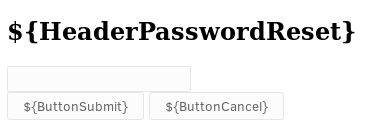
The "Forgot Password" function also doesn't seem to work. It creates the passwordreset4.json file just fine but the page to input the PIN looks like it's missing string translations and CSS and doesn't do anything when the PIN is submitted (PIN disappears, nothing else happens). See following image:
Screenshot from 2019-04-11 14-56-16

Originally created by @ajdunevent on GitHub (Apr 11, 2019). **Describe the bug** When accessing Jellyfin via the web interface or the Android app either within the local network or remotely, none of the users for which I have the password are able to authenticate. The server shows a message that says "Invalid user name or password. Please try again." **To Reproduce** 1. Go to IP address of Jellyfin server (for me: http://172.16.42.168:8085) 2. Click on a user name 3. Enter password 4. See error **Expected behavior** Users should be able to authenticate with their passwords. **Logs** ``` [13:42:05] [ERR] Error authenticating with provider Default System.Exception: Invalid username or password at Emby.Server.Implementations.Library.DefaultAuthenticationProvider.Authenticate(String username, String password, User resolvedUser) in jellyfin/Emby.Server.Implementations/Library/DefaultAuthenticationProvider.cs:line 37 at Emby.Server.Implementations.Library.UserManager.AuthenticateWithProvider(IAuthenticationProvider provider, String username, String password, User resolvedUser) in jellyfin-git/src/jellyfin/Emby.Server.Implementations/Library/UserManager.cs:line 424 [13:42:05] [INF] Authentication request for aj has been denied. [13:42:05] [ERR] Invalid user or password entered. ``` **Screenshots** ![Screenshot from 2019-04-11 14-49-53](https://user-images.githubusercontent.com/14864268/55983528-5b9f5180-5c69-11e9-90fc-6cde4be1ad12.png) **System (please complete the following information):** - OS: Arch Linux (server) // Arch Linux (client) - Browser: Firefox 66.0.2 - Jellyfin Version: 10.2.2.r534.ga1d50a6d05 - Reverse proxy: Apache (though the problem persists when not used) **Additional context** The "Forgot Password" function also doesn't seem to work. It creates the passwordreset4.json file just fine but the page to input the PIN looks like it's missing string translations and CSS and doesn't do anything when the PIN is submitted (PIN disappears, nothing else happens). See following image: ![Screenshot from 2019-04-11 14-56-16](https://user-images.githubusercontent.com/14864268/55983941-4c6cd380-5c6a-11e9-9288-2fc99f4086fe.png)
OVERLORD added the bug label 2026-02-06 19:51:25 +03:00
Author
Owner

@anthonylavado commented on GitHub (Apr 12, 2019):

Hi @ajdunevent! Are you building from jellyfin-git on AUR? If so, please know that it is considered to be an unstable version, and it becomes slightly out of date as we approach a release (which is happening now).

As a result, a few of these issues are actually corrected when running something from our release-10.3.z branch, which is currently in RC2. When we get that release out, it will be backported to master, at which point it will probably work, then become unstable again soon.

@anthonylavado commented on GitHub (Apr 12, 2019): Hi @ajdunevent! Are you building from jellyfin-git on AUR? If so, please know that it is considered to be an unstable version, and it becomes slightly out of date as we approach a release (which is happening now). As a result, a few of these issues are actually corrected when running something from our release-10.3.z branch, which is currently in RC2. When we get that release out, it will be backported to master, at which point it will probably work, then become unstable again soon.
Author
Owner

@ajdunevent commented on GitHub (Apr 12, 2019):

Thanks! I am using jellyfin-git from the AUR. That was all that was available when I switched. I see now that there is a non-git version available. I'll give that a try later this evening and close this report or provide any new details at that time. I appreciate the feedback!

@ajdunevent commented on GitHub (Apr 12, 2019): Thanks! I am using jellyfin-git from the AUR. That was all that was available when I switched. I see now that there is a non-git version available. I'll give that a try later this evening and close this report or provide any new details at that time. I appreciate the feedback!
Author
Owner

@ajdunevent commented on GitHub (Apr 12, 2019):

Thanks for the tip, @anthonylavado ! As you suspected, switching away from the -git version in the AUR solved my problems. Sorry for the unnecessary bug report!

@ajdunevent commented on GitHub (Apr 12, 2019): Thanks for the tip, @anthonylavado ! As you suspected, switching away from the -git version in the AUR solved my problems. Sorry for the unnecessary bug report!
Author
Owner

@groenator commented on GitHub (Apr 20, 2019):

I have the same problem using jellyfin/jellyfin container image . Even after I reset the password, the user is not found. How can I fully reset the user?

@groenator commented on GitHub (Apr 20, 2019): I have the same problem using jellyfin/jellyfin container image . Even after I reset the password, the user is not found. How can I fully reset the user?
Author
Owner

@sparky8251 commented on GitHub (Apr 20, 2019):

@groenator Do you use nginx as a reverse proxy? If so see our latest docs on nginx settings. Have had users struggle to login until they change settings to what we now reccomend (the move to Kestrel changed the HTTP server and therefore proxy options).

@sparky8251 commented on GitHub (Apr 20, 2019): @groenator Do you use nginx as a reverse proxy? If so see our latest docs on nginx settings. Have had users struggle to login until they change settings to what we now reccomend (the move to Kestrel changed the HTTP server and therefore proxy options).
Sign in to join this conversation.
1 Participants
Notifications
Due Date
No due date set.
Dependencies

No dependencies set.

Reference: starred/jellyfin#582