[Issue]: Randomly can no longer login. Web UI and server work, but when trying to login, it says "Connection Failure" #4594

Closed
opened 2026-02-07 00:58:54 +03:00 by OVERLORD · 20 comments
Owner

Originally created by @MisterSirCode on GitHub (Feb 3, 2023).

Please describe your bug

Its a really vague error. Theres no particular "error" at all from what I can see.

On mobile it says "Error 500" and on PC / the Web UI, it says "Connection Failure"

Even connecting locally through localhost:8096, it still says I cant login. My users are visible, but any attempt at logging in with one throws that message.

I was told that maybe my journal file was corrupted, or something was corrupted related to my user settings.. Afaik nothing has crashed or changed. All my config / metadata is in the default location on windows, and all my settings are pretty normal. It was working fine a few nights ago, and one morning just randomly started doing this.

Jellyfin Version

10.8.0

if other:

No response

Environment

- OS: Windows 11
- Virtualization: n/a
- Clients: All. None work. Ive tried PC / iOS (various) / Web / Roku.
- Browser: Chrome 109.0.5414.120
- FFmpeg Version: 2022-06-06-git-73302aa193-full_build-www.gyan.dev
- Playback Method: n/a
- Hardware Acceleration: NVENC / RTX 2070 Super
- Plugins: default
- Reverse Proxy: cloudflared / cloudflare zero trust
- Base URL: n/a
- Networking: Host + Clients. Affects everyone.
- Storage: Local (HDD)

Jellyfin logs

https://pastebin.com/raw/dY3rHE6T

I cant access the dashboard so all I can provide is the latest .log file.

FFmpeg logs

I cant access the dashboard and dont know where else to obtain the ffmpeg logs, so I cant provide those

Please attach any browser or client logs here

Heres the chrome devtools log:

https://pastebin.com/raw/3FH7FMEz

Please attach any screenshots here

image

Code of Conduct

  • I agree to follow this project's Code of Conduct
Originally created by @MisterSirCode on GitHub (Feb 3, 2023). ### Please describe your bug Its a really vague error. Theres no particular "error" at all from what I can see. On mobile it says "Error 500" and on PC / the Web UI, it says "Connection Failure" Even connecting locally through localhost:8096, it still says I cant login. My users are visible, but any attempt at logging in with one throws that message. I was told that maybe my journal file was corrupted, or something was corrupted related to my user settings.. Afaik nothing has crashed or changed. All my config / metadata is in the default location on windows, and all my settings are pretty normal. It was working fine a few nights ago, and one morning just randomly started doing this. ### Jellyfin Version 10.8.0 ### if other: _No response_ ### Environment ```markdown - OS: Windows 11 - Virtualization: n/a - Clients: All. None work. Ive tried PC / iOS (various) / Web / Roku. - Browser: Chrome 109.0.5414.120 - FFmpeg Version: 2022-06-06-git-73302aa193-full_build-www.gyan.dev - Playback Method: n/a - Hardware Acceleration: NVENC / RTX 2070 Super - Plugins: default - Reverse Proxy: cloudflared / cloudflare zero trust - Base URL: n/a - Networking: Host + Clients. Affects everyone. - Storage: Local (HDD) ``` ### Jellyfin logs https://pastebin.com/raw/dY3rHE6T I cant access the dashboard so all I can provide is the latest .log file. ### FFmpeg logs I cant access the dashboard and dont know where else to obtain the ffmpeg logs, so I cant provide those ### Please attach any browser or client logs here Heres the chrome devtools log: https://pastebin.com/raw/3FH7FMEz ### Please attach any screenshots here ![image](https://user-images.githubusercontent.com/44554976/216703273-5c1b1804-ea37-48ca-b082-b080ba3c7851.png) ### Code of Conduct - [X] I agree to follow this project's Code of Conduct
OVERLORD added the bugstale labels 2026-02-07 00:58:54 +03:00
Author
Owner

@jedthe3rd commented on GitHub (Feb 4, 2023):

This can be resolved by deleting the library.db-journal file, if it exists, after shutting down jellyfin. I recommended just moving it to a backup folder and seeing if jellyfin starts up properly. If it does delete the journal file.

This occurs if jellyfin is not shutdown cleanly or terminated unexpectedly. The journal file basically locks the database from any new processes from accessing it.

Sometimes when this occurs jellyfin won't even startup properly.

@jedthe3rd commented on GitHub (Feb 4, 2023): This can be resolved by deleting the library.db-journal file, if it exists, after shutting down jellyfin. I recommended just moving it to a backup folder and seeing if jellyfin starts up properly. If it does delete the journal file. This occurs if jellyfin is not shutdown cleanly or terminated unexpectedly. The journal file basically locks the database from any new processes from accessing it. Sometimes when this occurs jellyfin won't even startup properly.
Author
Owner

@MisterSirCode commented on GitHub (Feb 7, 2023):

This fixes it, but only temporarily.

Every time I restart my computer now, it locks it again.

I essentially have to delete that file and restart my server every single day... :/

@MisterSirCode commented on GitHub (Feb 7, 2023): This fixes it, but only temporarily. Every time I restart my computer now, it locks it again. I essentially have to delete that file and restart my server every single day... :/
Author
Owner

@jedthe3rd commented on GitHub (Feb 7, 2023):

This fixes it, but only temporarily.

Every time I restart my computer now, it locks it again.

I essentially have to delete that file and restart my server every single day... :/

How are you restarting your computer? Is it every time you restart or does it occur even if you don't restart?

When you restart are you hitting the "restart anyway" prompt?

We need to know what exact steps do you do that leads to this issue. Please be as detailed as possible.

@jedthe3rd commented on GitHub (Feb 7, 2023): > This fixes it, but only temporarily. > > Every time I restart my computer now, it locks it again. > > I essentially have to delete that file and restart my server every single day... :/ How are you restarting your computer? Is it every time you restart or does it occur even if you don't restart? When you restart are you hitting the "restart anyway" prompt? We need to know what **_exact_** steps do you do that leads to this issue. Please be as detailed as possible.
Author
Owner

@MisterSirCode commented on GitHub (Feb 7, 2023):

@jedthe3rd Im just hitting shutdown / restart. Jellyfin closes on its own, and no ones using it.

Also.. on a side note? Restarting stopped working.

It now fully fails completely. Deleting the journal file and restarting the server does nothing. Still cant login.

At this point Id be willing to just completely wipe the server back to its default settings and set it up from scratch (Other than my metadata... I have literally thousands of media files... losing all of that customized metadata would suck)

Im not sure what I did but something broke it.

@MisterSirCode commented on GitHub (Feb 7, 2023): @jedthe3rd Im just hitting shutdown / restart. Jellyfin closes on its own, and no ones using it. Also.. on a side note? Restarting stopped working. It now fully fails completely. Deleting the journal file and restarting the server does nothing. Still cant login. At this point Id be willing to just completely wipe the server back to its default settings and set it up from scratch (Other than my metadata... I have literally thousands of media files... losing all of that customized metadata would suck) Im not sure what I did but something broke it.
Author
Owner

@anthonylavado commented on GitHub (Feb 11, 2023):

If we were to start clean, you would indeed lose all the customized metadata. There's ways to keep it, but that relies on having some settings configured ahead of time, while everything is still working.

The last error in the server log is this:

[2023-02-03 15:10:30.764 -05:00] [ERR] [14] Jellyfin.Server.Middleware.ExceptionMiddleware: Error processing request. URL "POST" "/Users/authenticatebyname".
Microsoft.Data.Sqlite.SqliteException (0x80004005): SQLite Error 8: 'attempt to write a readonly database

Breaking it down:

  • There was an error logging in (hence Users/authenticatebyname)
  • The error involves the database
  • The database is locked because of a conflict

The database could be locked for a variety of different reasons. It could be damaged and require repair. There could be more than one process trying to access the file. What's important is that before anything else, you should backup your config.

First, make sure Jellyfin is stopped/closed. Open the Task Manager, and under the Details tab, make sure there's no process starting with or including the name Jellyfin running at all.

Once that's done, go to "C:\ProgramData\Jellyfin", and make a copy of the entire folder named "Server". Put that somewhere safe in case we need it for any reason. Do not touch or delete anything in this backup.

Once you've made the copy, go ahead and start Jellyfin as you normally would.

If that works, we'll look at preserving your metadata for the future. If that doesn't work, we'll need to look more closely at what database files you do have on disk. Either listing them (or a screenshot if that's easier) so we can figure out what's going on. This would be a list of all the .db and any journal file that's present. Ideally if Jellyfin is stopped/shut down correctly, there would be no journal files present. Those should only be there when it is running/open.

@anthonylavado commented on GitHub (Feb 11, 2023): If we were to start clean, you would indeed lose all the customized metadata. There's ways to keep it, but that relies on having some settings configured ahead of time, while everything is still working. The last error in the server log is this: ``` [2023-02-03 15:10:30.764 -05:00] [ERR] [14] Jellyfin.Server.Middleware.ExceptionMiddleware: Error processing request. URL "POST" "/Users/authenticatebyname". Microsoft.Data.Sqlite.SqliteException (0x80004005): SQLite Error 8: 'attempt to write a readonly database ``` Breaking it down: - There was an error logging in (hence Users/authenticatebyname) - The error involves the database - The database is locked because of a conflict The database could be locked for a variety of different reasons. It could be damaged and require repair. There could be more than one process trying to access the file. What's important is that before anything else, you should backup your config. First, make sure Jellyfin is stopped/closed. Open the Task Manager, and under the Details tab, make sure there's no process starting with or including the name Jellyfin running at all. Once that's done, go to "C:\ProgramData\Jellyfin\", and make a copy of the entire folder named "Server". Put that somewhere safe in case we need it for any reason. Do not touch or delete anything in this backup. Once you've made the copy, go ahead and start Jellyfin as you normally would. If that works, we'll look at preserving your metadata for the future. If that doesn't work, we'll need to look more closely at what database files you do have on disk. Either listing them (or a screenshot if that's easier) so we can figure out what's going on. This would be a list of all the .db and any journal file that's present. Ideally if Jellyfin is stopped/shut down correctly, there would be no journal files present. Those should only be there when it is running/open.
Author
Owner

@MisterSirCode commented on GitHub (Feb 11, 2023):

@anthonylavado These are the only DB files I see.

Ive already run OpenedFilesView and tracked them, and theyre only used once by jellyfin, or not at all (some of them are, some arent)

So I dont think another process is locking them. As far as I can tell, its just straight up broken / corrupted or something. I really have no clue.

EDIT: I went and backed up the Server directory

image

@MisterSirCode commented on GitHub (Feb 11, 2023): @anthonylavado These are the only DB files I see. Ive already run OpenedFilesView and tracked them, and theyre only used once by jellyfin, or not at all (some of them are, some arent) So I dont think another process is locking them. As far as I can tell, its just straight up broken / corrupted or something. I really have no clue. EDIT: I went and backed up the Server directory ![image](https://user-images.githubusercontent.com/44554976/218264328-90ad5d3f-1f82-45f8-a09c-0a0d05d89222.png)
Author
Owner

@MisterSirCode commented on GitHub (Feb 11, 2023):

And yeah, Im aware that the journal file should be gone. For a few days, deleting the journal file would allow me to use the server again. Now that trick no longer works.

Or, atleast it appears to. There have been a few times I got it to work, other times (most of the time) it just stays locked

@MisterSirCode commented on GitHub (Feb 11, 2023): And yeah, Im aware that the journal file should be gone. For a few days, deleting the journal file would allow me to use the server again. Now that trick no longer works. Or, atleast it appears to. There have been a few times I got it to work, other times (most of the time) it just stays locked
Author
Owner

@MisterSirCode commented on GitHub (Feb 11, 2023):

Update: Deleting the journal file and I randomly got access again temporarily.. So if I need to change any settings I can while its working right now.

@MisterSirCode commented on GitHub (Feb 11, 2023): Update: Deleting the journal file and I randomly got access again temporarily.. So if I need to change any settings I can while its working right now.
Author
Owner

@anthonylavado commented on GitHub (Feb 13, 2023):

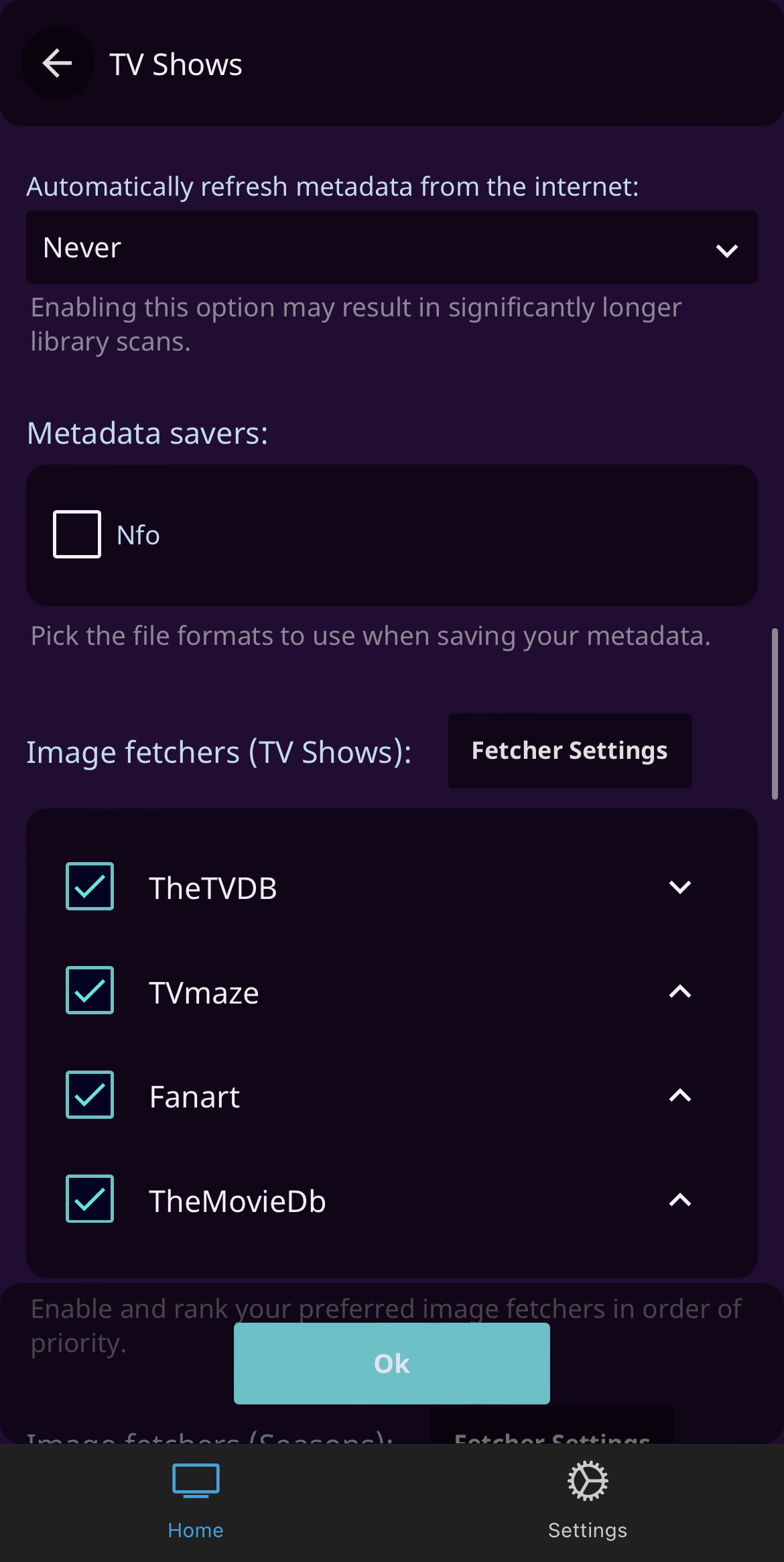
I'm thinking we'll want to enable NFO under the Metadata Savers section of each of your libraries, but I'm trying to figure out what triggers the write operation.

What this would do is save your metadata details for each item to disk - writing an NFO file with the same name as the movie/episode/etc, right next to the video file.

@anthonylavado commented on GitHub (Feb 13, 2023): I'm thinking we'll want to enable NFO under the Metadata Savers section of each of your libraries, but I'm trying to figure out what triggers the write operation. What this would do is save your metadata details for each item to disk - writing an NFO file with the same name as the movie/episode/etc, right next to the video file.
Author
Owner

@MisterSirCode commented on GitHub (Feb 14, 2023):

@anthonylavado thanks, though, Im having trouble finding the NFO setting. Ive checked the dashboard and the libraries section and clicked each one / scrolled through, I cant seem to find it.

EDIT: Found it, it says "Metadata Savers" but it only has "Emby XML" available.. no NFO setting

@MisterSirCode commented on GitHub (Feb 14, 2023): @anthonylavado thanks, though, Im having trouble finding the NFO setting. Ive checked the dashboard and the libraries section and clicked each one / scrolled through, I cant seem to find it. EDIT: Found it, it says "Metadata Savers" but it only has "Emby XML" available.. no NFO setting
Author
Owner

@anthonylavado commented on GitHub (Feb 14, 2023):

Hrm. This is what I get when I go to Dashboard>Libraries and then Manage Library for "Shows":
image

It's further down, but it's there. You're not seeing the same option?

@anthonylavado commented on GitHub (Feb 14, 2023): Hrm. This is what I get when I go to Dashboard>Libraries and then Manage Library for "Shows": ![image](https://user-images.githubusercontent.com/596194/218806959-bd2b8e58-6246-4ff9-aa71-fc7bb6b437d6.jpeg) It's further down, but it's there. You're not seeing the same option?
Author
Owner

@MisterSirCode commented on GitHub (Feb 15, 2023):

@anthonylavado Ok, I found the problem... My dumbass was clicking a collections library, not an actual media library.

I turned on NFO for everything. I manually refreshed all the libraries and I can see the NFO files for everything now.

What should I do now? (Ive had my PC running for 3 days so that the server wouldnt stop working, as it redoes the bug whenever I restart the app or my pc)

@MisterSirCode commented on GitHub (Feb 15, 2023): @anthonylavado Ok, I found the problem... My dumbass was clicking a collections library, not an actual media library. I turned on NFO for everything. I manually refreshed all the libraries and I can see the NFO files for everything now. What should I do now? (Ive had my PC running for 3 days so that the server wouldnt stop working, as it redoes the bug whenever I restart the app or my pc)
Author
Owner

@MisterSirCode commented on GitHub (Feb 22, 2023):

@anthonylavado sorry to ping ya again, but have you thought of any ideas so far?

Ive left my PC running for basically two weeks now in order to get away with this bug.

@MisterSirCode commented on GitHub (Feb 22, 2023): @anthonylavado sorry to ping ya again, but have you thought of any ideas so far? Ive left my PC running for basically two weeks now in order to get away with this bug.
Author
Owner

@jellyfin-bot commented on GitHub (Jun 23, 2023):

This issue has gone 120 days without comment. To avoid abandoned issues, it will be closed in 21 days if there are no new comments.

If you're the original submitter of this issue, please comment confirming if this issue still affects you in the latest release or master branch, or close the issue if it has been fixed. If you're another user also affected by this bug, please comment confirming so. Either action will remove the stale label.

This bot exists to prevent issues from becoming stale and forgotten. Jellyfin is always moving forward, and bugs are often fixed as side effects of other changes. We therefore ask that bug report authors remain vigilant about their issues to ensure they are closed if fixed, or re-confirmed - perhaps with fresh logs or reproduction examples - regularly. If you have any questions you can reach us on Matrix or Social Media.

@jellyfin-bot commented on GitHub (Jun 23, 2023): This issue has gone 120 days without comment. To avoid abandoned issues, it will be closed in 21 days if there are no new comments. If you're the original submitter of this issue, please comment confirming if this issue still affects you in the latest release or master branch, or close the issue if it has been fixed. If you're another user also affected by this bug, please comment confirming so. Either action will remove the stale label. This bot exists to prevent issues from becoming stale and forgotten. Jellyfin is always moving forward, and bugs are often fixed as side effects of other changes. We therefore ask that bug report authors remain vigilant about their issues to ensure they are closed if fixed, or re-confirmed - perhaps with fresh logs or reproduction examples - regularly. If you have any questions you can reach us on [Matrix or Social Media](https://docs.jellyfin.org/general/getting-help.html).
Author
Owner

@jimlynnjulian commented on GitHub (Jul 1, 2023):

You might want to try a clean install with the latest version. Hope this helps.

@jimlynnjulian commented on GitHub (Jul 1, 2023): You might want to try a clean install with the latest version. Hope this helps.
Author
Owner

@AdnanCudic commented on GitHub (Aug 2, 2023):

Kinda late to the conversation but I had the same issue just now, I have Jellyfin hosted on a Proxmox server as an LXC and the boot drive was at 100% capacity. I just resized it and it immediately solved the issue. I'm guessing the metadata and cache still goes to the boot drive as I have a 1TB HDD for media.

@AdnanCudic commented on GitHub (Aug 2, 2023): Kinda late to the conversation but I had the same issue just now, I have Jellyfin hosted on a Proxmox server as an LXC and the boot drive was at 100% capacity. I just resized it and it immediately solved the issue. I'm guessing the metadata and cache still goes to the boot drive as I have a 1TB HDD for media.
Author
Owner

@jellyfin-bot commented on GitHub (Dec 1, 2023):

This issue has gone 120 days without an update and will be closed within 21 days if there is no new activity. To prevent this issue from being closed, please confirm the issue has not already been fixed by providing updated examples or logs.

If you have any questions you can use one of several ways to contact us.

@jellyfin-bot commented on GitHub (Dec 1, 2023): This issue has gone 120 days without an update and will be closed within 21 days if there is no new activity. To prevent this issue from being closed, please confirm the issue has not already been fixed by providing updated examples or logs. If you have any questions you can use one of several ways to [contact us](https://jellyfin.org/contact).
Author
Owner

@jellyfin-bot commented on GitHub (Dec 23, 2023):

This issue was closed due to inactivity.

@jellyfin-bot commented on GitHub (Dec 23, 2023): This issue was closed due to inactivity.
Author
Owner

@OskarZyg commented on GitHub (Nov 3, 2024):

For future lurkers: In my case, my filesystem was corrupted- running sudo fsck fixed that. Telltale signs of that would be if all your logs suddenly started complaining about a read only filesystem. Do your research before running this however.

@OskarZyg commented on GitHub (Nov 3, 2024): For future lurkers: In my case, my filesystem was corrupted- running `sudo fsck` fixed that. Telltale signs of that would be if all your logs suddenly started complaining about a read only filesystem. Do your research before running this however.
Author
Owner

@MisterSirCode commented on GitHub (Nov 4, 2024):

For future lurkers: In my case, my filesystem was corrupted- running sudo fsck fixed that. Telltale signs of that would be if all your logs suddenly started complaining about a read only filesystem. Do your research before running this however.

In my case, I never quite figured it out. I essentially deleted my entire server and all the metadata and whatnot. It was totally ruined. I couldnt get anything to work.

Deleting jellyfin and reinstalling it from scratch was the only thing that ever fixed it. These days I backup all the metadata and important server files remotely, so hopefully this doesnt happen again.

@MisterSirCode commented on GitHub (Nov 4, 2024): > For future lurkers: In my case, my filesystem was corrupted- running `sudo fsck` fixed that. Telltale signs of that would be if all your logs suddenly started complaining about a read only filesystem. Do your research before running this however. In my case, I never quite figured it out. I essentially deleted my entire server and all the metadata and whatnot. It was totally ruined. I couldnt get anything to work. Deleting jellyfin and reinstalling it from scratch was the only thing that ever fixed it. These days I backup all the metadata and important server files remotely, so hopefully this doesnt happen again.
Sign in to join this conversation.
1 Participants
Notifications
Due Date
No due date set.
Dependencies

No dependencies set.

Reference: starred/jellyfin#4594