mirror of
https://github.com/jellyfin/jellyfin.git
synced 2026-05-04 18:09:12 +03:00
VAAPI decode not working on Intel GPU / Encode works fine #419

Reference in New Issue
Block a user
Delete Branch "%!s()"
Deleting a branch is permanent. Although the deleted branch may continue to exist for a short time before it actually gets removed, it CANNOT be undone in most cases. Continue?
Originally created by @fightforlife on GitHub (Feb 14, 2019).
Describe the bug
With VAAPI enabled, but Hardware encoding disabled, there is no GPU usage. If you enable hardware encoding, gpu usage goes up. (CPU always at 100%)
So I think VAAPI decoding is not working correctly.
Also trancoding performance with qsv on Windows was much better.
Same questions got asked here:
https://video.stackexchange.com/questions/24116/why-in-ffmpeg-do-i-have-vaapi-encoders-but-no-vaapi-decoders
To Reproduce
Play HEVC file with and without HW encoding activated.
Monitor GPU usage, while transcoding.
Expected behavior
Decoding the videostream should happen on the gpu. GPU usage should go up even if hw encoding is disabled.
On Windows with QSV it looks like this:
#0:0 -> #0:0 (hevc (hevc_qsv) -> h264 (h264_qsv))Shoudn't the equivalent on linux be like this for HW transcode (HW de- and encode):
#0:0 -> #0:0 (hevc (hevc_vaapi) -> h264 (h264_vaapi))Logs and Screenshots
All testfiles from here: https://www.h265files.com/
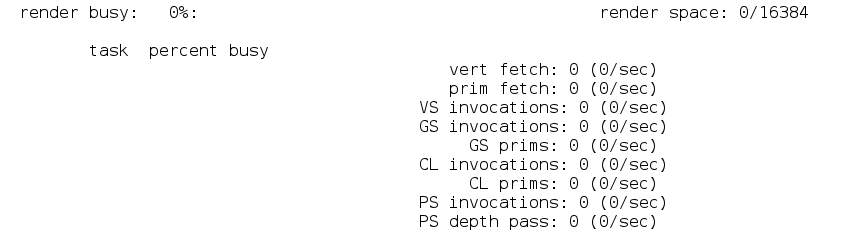
VAAPI enabled, HW encoding disabled
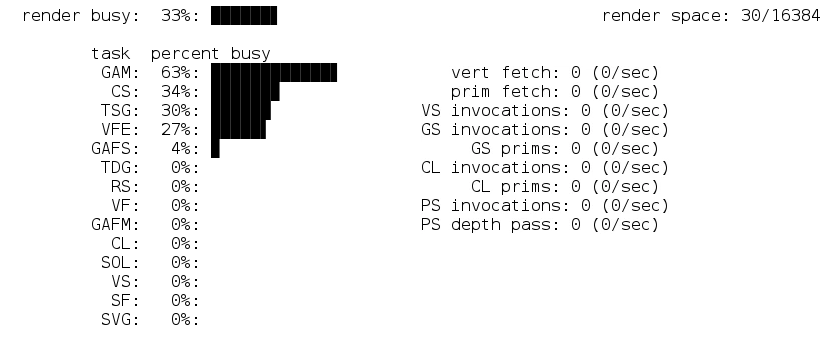
VAAPI enabled, HW encoding enabled
System (please complete the following information):
Additional context
This could also be a ffmpeg error or I am just missing something.
I took a look at these pages:
https://trac.ffmpeg.org/wiki/Hardware/VAAPI
http://www.ffmpeg.org/ffmpeg-codecs.html#Video-Decoders
but couldnt get any more information.
@fightforlife commented on GitHub (Feb 14, 2019):
If I run the following command inside the jellyfin docker container (it forces GPU decoding only) with the same file used above. I get some GPU usage:
/usr/local/bin/ffmpeg -hwaccel vaapi -hwaccel_device /dev/dri/renderD128 -i /media/Videos/Test/video-h265.mkv -c:v libx264 -crf 20 /media/Videos/Test/video-h265_2.mkvThis means GPU decoding with vaapi is working in the included ffmpeg build.
@JustAMan commented on GitHub (Feb 15, 2019):
AFAIK you cannot enable HW acceleration partially right now.
It's either used for both decoding and encoding, or not used at all.
@stale[bot] commented on GitHub (Jul 30, 2019):
Issues go stale after 60d of inactivity. Mark the issue as fresh by adding a comment or commit. Stale issues close after an additional 7d of inactivity. If this issue is safe to close now please do so. If you have any questions you can reach us on Matrix or Social Media.