[Issue]: User get stuck in a SyncPlay Group until you close the tab/client or force reload #4044

Open
opened 2026-02-07 00:19:38 +03:00 by OVERLORD · 22 comments
Owner

Originally created by @KaXaSA on GitHub (Jul 19, 2022).

Temporary Solution

When you create the SyncPlay group, make sure you see the 'SyncPlay enabled' message on the screen, if you don't see it then reload the page and create the group again (repeat until you see the message), then everything should work as intended.

Just reloading was not enough for some user, they had to actually close & reopen the client/server, I haven't experienced that yet.

Current Status:

  • 10.11.x - Haven't had the issue happen yet, someone commented that it was still happening, but I'm not sure if it's the exact same bug.

IMPORTANT:

For a better/updated step-by-step of the issue, see: #issuecomment-1491157546
It's a better, more reliable way to reproduce the issue than what I described below. So, feel free to skip the rest of the text and click that link.


Please describe your bug

There are actually 3 issues, but they are all probably related.

[First] - User get stuck in SyncPlay Group

  1. Start Jellyfin Server

  2. Open Web Client

  3. Log in with the primary user, I will call him: USER_AAA

  4. Click on SyncPlay to Create a Group

[21:34:48] [INF] [12] Emby.Server.Implementations.SyncPlay.Group: Session 13d76... created group 4591...

(everything worked fine, no problems yet)

  1. Sign Out

  1. Log in with secondary user, I will call him: USER_BBB
  2. Click on the SyncPlay icon, this is what I see:

'USER_AAA's group'
'USER_AAA'

and 2 options:

'Settings'
'Leave Group'

That group shouldn't exist, USER_AAA is not connected, and even if that was the case, then when I click on the SyncPlay icon as USER_BBB I should be seeing that 'Join a Group' menu.

  1. Clicking 'Leave Group':
    [21:38:50] [INF] [25] Jellyfin.Api.Auth.CustomAuthenticationHandler: AuthenticationScheme: CustomAuthentication was forbidden.

  2. Sign out


  1. Sign in with USER_AAA, same thing happens, you click 'Leave Group':
    [21:42:25] [INF] [17] Jellyfin.Api.Auth.CustomAuthenticationHandler: AuthenticationScheme: CustomAuthentication was forbidden.

To fix it, you have to close/restart the client (web tab/Jellyfin Media Player). Using Firefox/web client you can also CTRL + F5 (force reload)


[Second] - Group from a previous session get stuck(?)

If you watch something using SyncPlay (and everything works fine), then close the server, open it again tomorrow, SyncPlay doesn't work.
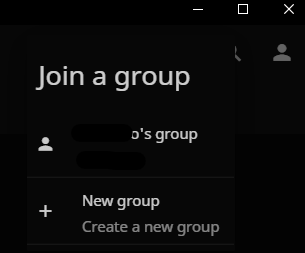
You can create a group, but if you click the SyncPlay icon again, you see the menu like this:
image
As if you are not the User who just created the group.

Other users can join, but nothing happens when you click on a video, because you are not really in the same group.

To fix it, you have to Sign Out > Sign In (CTRL + F5 probably works, not sure?)


[Third] - The SyncPlay menu looks fine, but SyncPlay only works after the other user sign out/close the client and sign in/open it again.

Edit: 17/Nov/25 - Probably related to: https://github.com/jellyfin/jellyfin-android/issues/1583

...
[INF] [10] Emby.Server.Implementations.SyncPlay.Group: Session "13d76..." created group "79b7...".
[INF] [34] Emby.Server.Implementations.SyncPlay.Group: Session "dcd07..." joined group "79b7...".
[INF] [30] Emby.Server.Implementations.SyncPlay.Group: Session "13d76..." requested Play in group "79b7..." that is Idle.
[INF] [30] Emby.Server.Implementations.SyncPlay.Group: Group "79b7..." switching from Idle to Waiting.
[INF] [32] Jellyfin.Api.Helpers.MediaInfoHelper: User policy for "USER_AAA". EnablePlaybackRemuxing: True EnableVideoPlaybackTranscoding: True EnableAudioPlaybackTranscoding: True
...
[INF] [38] Emby.Server.Implementations.SyncPlay.Group: Session "13d76..." requested Ready in group "79b7..." that is Waiting.
[INF] [38] MediaBrowser.Controller.SyncPlay.GroupStates.WaitingGroupState: Session "13d76..." will pause when ready in 0 seconds. Group "79b7..." is waiting for all ready events.
[INF] [32] Jellyfin.Api.Helpers.MediaInfoHelper: User policy for "USER_AAA". EnablePlaybackRemuxing: True EnableVideoPlaybackTranscoding: True EnableAudioPlaybackTranscoding: True
...
[INF] [27] Emby.Server.Implementations.SyncPlay.Group: Session "13d76..." requested Ready in group "79b7..." that is Waiting.
[INF] [27] MediaBrowser.Controller.SyncPlay.GroupStates.WaitingGroupState: Session "13d76..." will pause when ready in -0.0423592 seconds. Group "79b7..." is waiting for all ready events.
[INF] [30] Emby.Server.Implementations.SyncPlay.Group: Session "13d76..." requested Unpause in group "79b7..." that is Waiting.
[INF] [30] Emby.Server.Implementations.SyncPlay.Group: Group "79b7..." switching from Waiting to Playing.
[INF] [16] Emby.Server.Implementations.SyncPlay.Group: Session "13d76..." requested Ready in group "79b7..." that is Playing.
[INF] [28] Emby.Server.Implementations.SyncPlay.Group: Session "13d76..." requested Pause in group "79b7..." that is Playing.
[INF] [28] Emby.Server.Implementations.SyncPlay.Group: Group "79b7..." switching from Playing to Paused.
[INF] [33] Emby.Server.Implementations.SyncPlay.Group: Session "dcd07..." left group "79b7...".
[INF] [28] Emby.Server.Implementations.HttpServer.WebSocketManager: WS "187.10..." closed
[INF] [32] Emby.Server.Implementations.SyncPlay.Group: Group "79b7..." switching from Paused to Waiting.
[INF] [32] Emby.Server.Implementations.SyncPlay.Group: Session "dcd07..." joined group "79b7...".
[INF] [20] Jellyfin.Api.Helpers.MediaInfoHelper: User policy for "USER_CCC". EnablePlaybackRemuxing: True EnableVideoPlaybackTranscoding: True EnableAudioPlaybackTranscoding: True
...

So I create a group, one other user joins.
I play any video, the video loads on my end and instantly pauses, the other user doesn't see anything.
I try to resume, the Video works for me, the other user still doesn't see anything.
Then he closes the web client and open it again, now the Video and SyncPlay works fine with no issues.


In 10.7.x SyncPlay was working fine, and I tested with a clean 10.8.1 installation (uninstalled and removed the jellyfin appdata folder), the issue still persists.


Jellyfin Version

Other

if other:

10.8.1
~
10.9.3

Environment

- OS: Windows 10/11 PRO
- Clients: Web and Jellyfin Media Player
- Browser: Firefox
- FFmpeg Version: 5.0.1-Jellyfin
- Playback Method:
- Hardware Acceleration:
- Reverse Proxy: Caddy
- Storage: local

Jellyfin logs

No response

FFmpeg logs

No response

Please attach any browser or client logs here

No response

Please attach any screenshots here

No response

Code of Conduct

  • I agree to follow this project's Code of Conduct
Originally created by @KaXaSA on GitHub (Jul 19, 2022). ### Temporary Solution When you create the SyncPlay group, make sure you see the _'SyncPlay enabled'_ message on the screen, if you don't see it then reload the page and create the group again (repeat until you see the message), then everything should work as intended. Just reloading was not enough for some user, they had to actually close & reopen the client/server, I haven't experienced that yet. ### Current Status: - 10.11.x - Haven't had the issue happen yet, someone commented that it was still happening, but I'm not sure if it's the exact same bug. --- ### IMPORTANT: **For a better/updated step-by-step of the issue, see:** [#issuecomment-1491157546](#issuecomment-1491157546) It's a better, more reliable way to reproduce the issue than what I described below. So, feel free to skip the rest of the text and click that link. --- ### Please describe your bug There are actually 3 issues, but they are all probably related. #### **[First]** - User get stuck in SyncPlay Group 1. Start Jellyfin Server 1. Open Web Client 1. Log in with the primary user, I will call him: USER_**AAA** 1. Click on SyncPlay to Create a Group `[21:34:48] [INF] [12] Emby.Server.Implementations.SyncPlay.Group: Session 13d76... created group 4591...` (everything worked fine, no problems yet) 5. Sign Out --- 1. Log in with secondary user, I will call him: USER_**BBB** 1. Click on the SyncPlay icon, this is what I see: > 'USER_**AAA**'s group' > 'USER_**AAA**' and 2 options: > 'Settings' > 'Leave Group' That group shouldn't exist, USER_AAA is not connected, and even if that was the case, then when I click on the SyncPlay icon **as USER_BBB** I should be seeing that 'Join a Group' menu. 3. Clicking 'Leave Group': `[21:38:50] [INF] [25] Jellyfin.Api.Auth.CustomAuthenticationHandler: AuthenticationScheme: CustomAuthentication was forbidden.` 4. Sign out --- 1. Sign in with USER_**AAA**, same thing happens, you click 'Leave Group': `[21:42:25] [INF] [17] Jellyfin.Api.Auth.CustomAuthenticationHandler: AuthenticationScheme: CustomAuthentication was forbidden.` To fix it, you have to close/restart the client (web tab/Jellyfin Media Player). Using Firefox/web client you can also CTRL + F5 (force reload) --- #### **[Second]** - Group from a previous session get stuck(?) If you watch something using SyncPlay (and everything works fine), then close the server, open it again tomorrow, SyncPlay doesn't work. You can create a group, but if you click the SyncPlay icon again, you see the menu like this: ![image](https://user-images.githubusercontent.com/6237603/179876695-462a116d-b021-45e0-8b84-26d77f9b479d.png) As if you are not the User who just created the group. Other users can join, but nothing happens when you click on a video, because you are not really in the same group. To fix it, you have to Sign Out > Sign In (CTRL + F5 probably works, not sure?) --- #### **[Third]** - The SyncPlay menu looks fine, but SyncPlay only works after the other user sign out/close the client and sign in/open it again. Edit: 17/Nov/25 - Probably related to: https://github.com/jellyfin/jellyfin-android/issues/1583 ``` ... [INF] [10] Emby.Server.Implementations.SyncPlay.Group: Session "13d76..." created group "79b7...". [INF] [34] Emby.Server.Implementations.SyncPlay.Group: Session "dcd07..." joined group "79b7...". [INF] [30] Emby.Server.Implementations.SyncPlay.Group: Session "13d76..." requested Play in group "79b7..." that is Idle. [INF] [30] Emby.Server.Implementations.SyncPlay.Group: Group "79b7..." switching from Idle to Waiting. [INF] [32] Jellyfin.Api.Helpers.MediaInfoHelper: User policy for "USER_AAA". EnablePlaybackRemuxing: True EnableVideoPlaybackTranscoding: True EnableAudioPlaybackTranscoding: True ... [INF] [38] Emby.Server.Implementations.SyncPlay.Group: Session "13d76..." requested Ready in group "79b7..." that is Waiting. [INF] [38] MediaBrowser.Controller.SyncPlay.GroupStates.WaitingGroupState: Session "13d76..." will pause when ready in 0 seconds. Group "79b7..." is waiting for all ready events. [INF] [32] Jellyfin.Api.Helpers.MediaInfoHelper: User policy for "USER_AAA". EnablePlaybackRemuxing: True EnableVideoPlaybackTranscoding: True EnableAudioPlaybackTranscoding: True ... [INF] [27] Emby.Server.Implementations.SyncPlay.Group: Session "13d76..." requested Ready in group "79b7..." that is Waiting. [INF] [27] MediaBrowser.Controller.SyncPlay.GroupStates.WaitingGroupState: Session "13d76..." will pause when ready in -0.0423592 seconds. Group "79b7..." is waiting for all ready events. [INF] [30] Emby.Server.Implementations.SyncPlay.Group: Session "13d76..." requested Unpause in group "79b7..." that is Waiting. [INF] [30] Emby.Server.Implementations.SyncPlay.Group: Group "79b7..." switching from Waiting to Playing. [INF] [16] Emby.Server.Implementations.SyncPlay.Group: Session "13d76..." requested Ready in group "79b7..." that is Playing. [INF] [28] Emby.Server.Implementations.SyncPlay.Group: Session "13d76..." requested Pause in group "79b7..." that is Playing. [INF] [28] Emby.Server.Implementations.SyncPlay.Group: Group "79b7..." switching from Playing to Paused. [INF] [33] Emby.Server.Implementations.SyncPlay.Group: Session "dcd07..." left group "79b7...". [INF] [28] Emby.Server.Implementations.HttpServer.WebSocketManager: WS "187.10..." closed [INF] [32] Emby.Server.Implementations.SyncPlay.Group: Group "79b7..." switching from Paused to Waiting. [INF] [32] Emby.Server.Implementations.SyncPlay.Group: Session "dcd07..." joined group "79b7...". [INF] [20] Jellyfin.Api.Helpers.MediaInfoHelper: User policy for "USER_CCC". EnablePlaybackRemuxing: True EnableVideoPlaybackTranscoding: True EnableAudioPlaybackTranscoding: True ... ``` So I create a group, one other user joins. I play any video, the video loads on my end and instantly pauses, the other user doesn't see anything. I try to resume, the Video works for me, the other user still doesn't see anything. Then he closes the web client and open it again, now the Video and SyncPlay works fine with no issues. --- In 10.7.x SyncPlay was working fine, and I tested with a clean 10.8.1 installation (uninstalled and removed the jellyfin appdata folder), the issue still persists. --- ### Jellyfin Version Other ### if other: 10.8.1 ~ 10.9.3 ### Environment ```markdown - OS: Windows 10/11 PRO - Clients: Web and Jellyfin Media Player - Browser: Firefox - FFmpeg Version: 5.0.1-Jellyfin - Playback Method: - Hardware Acceleration: - Reverse Proxy: Caddy - Storage: local ``` ### Jellyfin logs _No response_ ### FFmpeg logs _No response_ ### Please attach any browser or client logs here _No response_ ### Please attach any screenshots here _No response_ ### Code of Conduct - [X] I agree to follow this project's Code of Conduct
OVERLORD added the bugsyncplay labels 2026-02-07 00:19:38 +03:00
Author
Owner

@jellyfin-bot commented on GitHub (Mar 5, 2023):

This issue has gone 120 days without comment. To avoid abandoned issues, it will be closed in 21 days if there are no new comments.

If you're the original submitter of this issue, please comment confirming if this issue still affects you in the latest release or master branch, or close the issue if it has been fixed. If you're another user also affected by this bug, please comment confirming so. Either action will remove the stale label.

This bot exists to prevent issues from becoming stale and forgotten. Jellyfin is always moving forward, and bugs are often fixed as side effects of other changes. We therefore ask that bug report authors remain vigilant about their issues to ensure they are closed if fixed, or re-confirmed - perhaps with fresh logs or reproduction examples - regularly. If you have any questions you can reach us on Matrix or Social Media.

@jellyfin-bot commented on GitHub (Mar 5, 2023): This issue has gone 120 days without comment. To avoid abandoned issues, it will be closed in 21 days if there are no new comments. If you're the original submitter of this issue, please comment confirming if this issue still affects you in the latest release or master branch, or close the issue if it has been fixed. If you're another user also affected by this bug, please comment confirming so. Either action will remove the stale label. This bot exists to prevent issues from becoming stale and forgotten. Jellyfin is always moving forward, and bugs are often fixed as side effects of other changes. We therefore ask that bug report authors remain vigilant about their issues to ensure they are closed if fixed, or re-confirmed - perhaps with fresh logs or reproduction examples - regularly. If you have any questions you can reach us on [Matrix or Social Media](https://docs.jellyfin.org/general/getting-help.html).
Author
Owner

@KaXaSA commented on GitHub (Mar 7, 2023):

This still happens in 10.8.9

I've found an easier way to reproduce the issue:

  • Start the server
  • Open the Jellyfin Client (I tested this on both Web version and Jellyin Media Player and got the same result on both)
  • Click on your user
  • Check the 'Remember Me' checkbox ← important (I assume the issue happens because of this option)
  • Sign In

--

  • Click SyncPlay icon
  • Click New Group
    (The 'SyncPlay Enabled' notification appears bottom left)

--

  • Click the user menu (top right)
  • Click Sign out

--

  • Click on your user
  • Make sure 'Remember Me' is still marked
  • Sign In

--

  • Click SyncPlay Icon
  • Click Leave group
    Notice that you can't leave, check the terminal:
    [INF] [54] Jellyfin.Api.Auth.CustomAuthenticationHandler: AuthenticationScheme: CustomAuthentication was forbidden.

--

  • Sign Out → Sign In
  • Click SyncPlay Icon
  • Click Leave group
    You still can't leave the group:
    [INF] [54] Jellyfin.Api.Auth.CustomAuthenticationHandler: AuthenticationScheme: CustomAuthentication was forbidden.

--

  • Right-click the page > Reload (or just F5 if you are using the browser)
    [INF] [97] Emby.Server.Implementations.HttpServer.WebSocketManager: WS ... closed
    [INF] [50] Emby.Server.Implementations.HttpServer.WebSocketManager: WS ... request

  • Click SyncPlay Icon
    The Group has finally disappeared
    Now you can create a new SyncPlay Group again.
    Everything works fine

IMPORTANT: Again, as soon as I stop using the 'remember me' option, during login, the issue stops happening.

@KaXaSA commented on GitHub (Mar 7, 2023): This still happens in 10.8.9 I've found an easier way to reproduce the issue: - Start the server - Open the Jellyfin Client (I tested this on both Web version and Jellyin Media Player and got the same result on both) - Click on your user - Check the 'Remember Me' checkbox ← important (I assume the issue happens because of this option) - Sign In -- - Click SyncPlay icon - Click New Group (The 'SyncPlay Enabled' notification appears bottom left) -- - Click the user menu (top right) - Click Sign out -- - Click on your user - Make sure 'Remember Me' is still marked - Sign In -- - Click SyncPlay Icon - Click Leave group Notice that you can't leave, check the terminal: `[INF] [54] Jellyfin.Api.Auth.CustomAuthenticationHandler: AuthenticationScheme: CustomAuthentication was forbidden.` -- - Sign Out → Sign In - Click SyncPlay Icon - Click Leave group You still can't leave the group: `[INF] [54] Jellyfin.Api.Auth.CustomAuthenticationHandler: AuthenticationScheme: CustomAuthentication was forbidden.` -- - Right-click the page > Reload (or just F5 if you are using the browser) `[INF] [97] Emby.Server.Implementations.HttpServer.WebSocketManager: WS ... closed` `[INF] [50] Emby.Server.Implementations.HttpServer.WebSocketManager: WS ... request` - Click SyncPlay Icon The Group has finally disappeared Now you can create a new SyncPlay Group again. Everything works fine **IMPORTANT: Again, as soon as I stop using the 'remember me' option, during login, the issue stops happening.**
Author
Owner

@famellad commented on GitHub (Mar 30, 2023):

I too have this problem but I cannot reproduce the behavior described by @KaXaSA, when I make a group, it never works, I don't see anything significant in the logs, and when I log out the group is always removed, unless there's someone else is there. I cannot leave the group using the group button.

@famellad commented on GitHub (Mar 30, 2023): I too have this problem but I cannot reproduce the behavior described by @KaXaSA, when I make a group, it never works, I don't see anything significant in the logs, and when I log out the group is always removed, unless there's someone else is there. I cannot leave the group using the group button.
Author
Owner

@KaXaSA commented on GitHub (Mar 31, 2023):

I tested it again, and this time, instead of the problem described in my last comment, I got something similar to the [second] issue -described in the original post-

I can consistently replicate the issue by repeatedly restarting the Jellyfin's server until the scenario described in the 1st step below occurs.
(you can test this using just your admin account, a second user/device are not necessary)

  1. Click on the SyncPlay button and Create a new group
    [INF] [27] Emby.Server.Implementations.SyncPlay.Group: Session fc61... created group 7e584...

    'SyncPlay enabled' message doesn't appear on the screen, indicating that something is already wrong.
    This is a big red flag, as soon as I don't see that message, I know for sure that SyncPlay will not work, but let's ignore this for now and keep going.

  2. Click on the SyncPlay button again, I see:
    SyncPlay  Menu - Bug
    This menu is 100% wrong, you already created the group in step 1, so here you're supposed to be seeing that SyncPlay menu with your group settings, preferences, the button to 'leave group'...

  3. Try to join the group anyway:
    [INF] [43] Emby.Server.Implementations.SyncPlay.Group: Session fc61... joined group 7e584...

  4. Click on the SyncPlay button, I see the same as I did before, and I can still join the same group again:
    [INF] [40] Emby.Server.Implementations.SyncPlay.Group: Session fc61... joined group 7e584...

  5. Click on New Group:

    [INF] [40] Emby.Server.Implementations.SyncPlay.Group: Session fc61... left group 7e584...
    [INF] [40] Emby.Server.Implementations.SyncPlay.SyncPlayManager: Group 7e584... is empty, removing it.
    [INF] [40] Emby.Server.Implementations.SyncPlay.Group: Session fc61... created group 399cc...
    

    It allows you to join your own group and to create a new one, but none of this fixes the issue:
    At any step until now if other user join your SyncPlay group, and you try to launch any video, you will have problems, like the video launching for you but not for the other user, the next step 'fixes' the issue.

  6. Reload the page (F5 - Browser OR right click reload - Jellyfin Media Player):

    [INF] [41] Emby.Server.Implementations.SyncPlay.Group: Session fc61... left group 399cc...
    [INF] [41] Emby.Server.Implementations.SyncPlay.SyncPlayManager: Group 399cc...
    [INF] [52] Emby.Server.Implementations.HttpServer.WebSocketManager: WS ... closed
    [INF] [53] Emby.Server.Implementations.HttpServer.WebSocketManager: WS ... request
    
  7. Now, when I create a new group and click on the SyncPlay button, I see:
    SyncPlay  Menu - Normal
    This seems 100% correct, this is what I expected to see on the 2nd step


So, reloading, when you don't see the 'SyncPlay enabled' message, still fixes the issue
I can leave, create a new group, and also restart the client, without any problems.

Then I restarted the server no issues, restarted again nothing, on the 3rd restart I got the same issue again.
This happens super often, but then, again, the following steps seem to always fix the issue:

  1. Refresh the page
  2. Recreate the SyncPlay group
  3. Repeat the previous steps until you see the 'SyncPlay enabled' message.
@KaXaSA commented on GitHub (Mar 31, 2023): I tested it again, and this time, instead of the problem described in my last comment, I got something similar to the [second] issue -described in the original post- I can consistently replicate the issue by repeatedly restarting the Jellyfin's server until the scenario described in the 1st step below occurs. (you can test this using just your admin account, a second user/device are not necessary) 1. Click on the SyncPlay button and Create a new group ` [INF] [27] Emby.Server.Implementations.SyncPlay.Group: Session fc61... created group 7e584...`</br> **'SyncPlay enabled' message doesn't appear** on the screen, indicating that something is already wrong. This is a big red flag, as soon as I don't see that message, I know for sure that SyncPlay will not work, but let's ignore this for now and keep going. 1. Click on the SyncPlay button again, I see: ![SyncPlay Menu - Bug](https://github.com/jellyfin/jellyfin/assets/6237603/9a82526a-18fc-450e-892f-be0996d5a885) This menu is 100% **wrong**, you already created the group in step 1, so here you're supposed to be seeing that SyncPlay menu with your group settings, preferences, the button to 'leave group'... 1. Try to join the group anyway: ` [INF] [43] Emby.Server.Implementations.SyncPlay.Group: Session fc61... joined group 7e584...` 1. Click on the SyncPlay button, I see the same as I did before, and I can still join the same group again: ` [INF] [40] Emby.Server.Implementations.SyncPlay.Group: Session fc61... joined group 7e584...` 1. Click on New Group: ``` [INF] [40] Emby.Server.Implementations.SyncPlay.Group: Session fc61... left group 7e584... [INF] [40] Emby.Server.Implementations.SyncPlay.SyncPlayManager: Group 7e584... is empty, removing it. [INF] [40] Emby.Server.Implementations.SyncPlay.Group: Session fc61... created group 399cc... ``` It allows you to join your own group and to create a new one, but none of this fixes the issue: At any step until now if other user join your SyncPlay group, and you try to launch any video, you will have problems, like the video launching for you but not for the other user, the next step 'fixes' the issue. 1. Reload the page (F5 - Browser OR right click reload - Jellyfin Media Player): ``` [INF] [41] Emby.Server.Implementations.SyncPlay.Group: Session fc61... left group 399cc... [INF] [41] Emby.Server.Implementations.SyncPlay.SyncPlayManager: Group 399cc... [INF] [52] Emby.Server.Implementations.HttpServer.WebSocketManager: WS ... closed [INF] [53] Emby.Server.Implementations.HttpServer.WebSocketManager: WS ... request ``` 1. Now, when I create a new group and click on the SyncPlay button, I see: ![SyncPlay Menu - Normal](https://github.com/jellyfin/jellyfin/assets/6237603/dae2f1ae-6b72-4bab-a2b2-141730929042) This seems 100% **correct**, this is what I expected to see on the 2nd step --- So, reloading, when you don't see the 'SyncPlay enabled' message, still fixes the issue I can leave, create a new group, and also restart the client, without any problems. Then I restarted the server no issues, restarted again nothing, on the 3rd restart I got the same issue again. This happens super often, but then, again, the following steps seem to always fix the issue: 1. Refresh the page 2. Recreate the SyncPlay group 3. Repeat the previous steps until you see the 'SyncPlay enabled' message.
Author
Owner

@ghost commented on GitHub (Aug 3, 2023):

I'm not sure if related, but whenever I click the SyncPlay icon it tries loading me into a movie again.

In the background jellystat claims a specific title that we tested syncplay with has been started over 70 times...

I have a very large group of friends and family that has migrated to Jellyfin from Plex, and this is a really big issue for us.

There are a whole host of SyncPlay bugs that seems to have been around for years: https://github.com/jellyfin/jellyfin/issues?q=is%3Aissue+is%3Aopen+syncplay

Has SyncPlay been abandoned?

@ghost commented on GitHub (Aug 3, 2023): I'm not sure if related, but whenever I click the SyncPlay icon it tries loading me into a movie again. In the background jellystat claims a specific title that we tested syncplay with has been started over 70 times... I have a very large group of friends and family that has migrated to Jellyfin from Plex, and this is a really big issue for us. There are a whole host of SyncPlay bugs that seems to have been around for years: https://github.com/jellyfin/jellyfin/issues?q=is%3Aissue+is%3Aopen+syncplay Has SyncPlay been abandoned?
Author
Owner

@jellyfin-bot commented on GitHub (Feb 29, 2024):

This issue has gone 120 days without an update and will be closed within 21 days if there is no new activity. To prevent this issue from being closed, please confirm the issue has not already been fixed by providing updated examples or logs.

If you have any questions you can use one of several ways to contact us.

@jellyfin-bot commented on GitHub (Feb 29, 2024): This issue has gone 120 days without an update and will be closed within 21 days if there is no new activity. To prevent this issue from being closed, please confirm the issue has not already been fixed by providing updated examples or logs. If you have any questions you can use one of several ways to [contact us](https://jellyfin.org/contact).
Author
Owner

@ghost commented on GitHub (Feb 29, 2024):

Stalebot sucks and should be removed. I don’t have the time to fight against stalebot across all the issues I follow.

@ghost commented on GitHub (Feb 29, 2024): Stalebot sucks and should be removed. I don’t have the time to fight against stalebot across all the issues I follow.
Author
Owner

@ghost commented on GitHub (Apr 18, 2024):

@thornbill @felix920506 if there is insufficient data, please request more data instead of marking it as such without letting us know what you need. Otherwise, people will be less inclined to contribute in the future. Thank you!

@ghost commented on GitHub (Apr 18, 2024): @thornbill @felix920506 if there is insufficient data, please request more data instead of marking it as such without letting us know what you need. Otherwise, people will be less inclined to contribute in the future. Thank you!
Author
Owner

@felix920506 commented on GitHub (Apr 18, 2024):

@douglasparker this one simply needs to be retested on the latest unstable build.

@felix920506 commented on GitHub (Apr 18, 2024): @douglasparker this one simply needs to be retested on the latest unstable build.
Author
Owner

@EinfachNurMaxi commented on GitHub (May 27, 2024):

I encountered a similar issue, and I discovered that it was due to an error in my Nginx proxy configuration. Fortunately, I was able to fix it with the help of this article from the Jellyfin documentation.

@EinfachNurMaxi commented on GitHub (May 27, 2024): I encountered a similar issue, and I discovered that it was due to an error in my Nginx proxy configuration. Fortunately, I was able to fix it with the help of this [article](https://jellyfin.org/docs/general/networking/nginx/) from the Jellyfin documentation.
Author
Owner

@KaXaSA commented on GitHub (Jun 5, 2024):

I tested 10.9.3 and the issue still happens

I encountered a similar issue, and I discovered that it was due to an error in my Nginx proxy configuration. Fortunately, I was able to fix it with the help of this article from the Jellyfin documentation.

I'm using Caddy with Duck DNS module, my caddyfile look a lot like this:

{
	email my_email_here
	auto_https disable_redirects
}

mydomain.duckdns.org {
	tls {
		dns duckdns my_duckdns_token_here
	}
	encode gzip

	redir /jfin /jfin/
	reverse_proxy /jfin/* localhost:8098
	
	header /* {
		Strict-Transport-Security "max-age=31536000;"
		X-XSS-Protection "1; mode=block"
		X-Content-Type-Options "nosniff"
		X-Frame-Options "DENY"
		-Server
		Cache-Control "no-store"
		Pragma "no-cache"
		Content-Security-Policy "upgrade-insecure-requests"
		Referrer-Policy "strict-origin-when-cross-origin"
		Permissions-Policy "accelerometer=(), ambient-light-sensor=(), autoplay=('self'); camera=(), encrypted-media=('self'), fullscreen=('self'); geolocation=(), gyroscope=(), magnetometer=(), microphone=(), midi=(), payment=(), picture-in-picture=('self'); speaker=('self'), sync-xhr=(), usb=(), vr=()"
	}
}

I don't see any errors in my caddy log, and aside from the issue described here, the other 99% of the time, when Jellyfin/sync works, it works great, but, honestly, I'm not sure if I should be using half of these settings in the caddyfile. It does improve the security grade on https://securityheaders.com


I'm not sure if related, but whenever I click the SyncPlay icon it tries loading me into a movie again.

This also happens on my end, very easy to replicate using just one device/user:

  1. Open jellyfin
  2. Create a Sync Play group
  3. Open a video
  4. Stop playback and go back to the Jellyfin home screen
  5. Exit the Sync Play group
  6. Create a new Sync Play group
  7. For some reason, the previous video will automatically open up, without you doing anything else.
@KaXaSA commented on GitHub (Jun 5, 2024): I tested 10.9.3 and the issue still happens > I encountered a similar issue, and I discovered that it was due to an error in my Nginx proxy configuration. Fortunately, I was able to fix it with the help of this [article](https://jellyfin.org/docs/general/networking/nginx/) from the Jellyfin documentation. I'm using Caddy with Duck DNS module, my caddyfile look a lot like this: ``` { email my_email_here auto_https disable_redirects } mydomain.duckdns.org { tls { dns duckdns my_duckdns_token_here } encode gzip redir /jfin /jfin/ reverse_proxy /jfin/* localhost:8098 header /* { Strict-Transport-Security "max-age=31536000;" X-XSS-Protection "1; mode=block" X-Content-Type-Options "nosniff" X-Frame-Options "DENY" -Server Cache-Control "no-store" Pragma "no-cache" Content-Security-Policy "upgrade-insecure-requests" Referrer-Policy "strict-origin-when-cross-origin" Permissions-Policy "accelerometer=(), ambient-light-sensor=(), autoplay=('self'); camera=(), encrypted-media=('self'), fullscreen=('self'); geolocation=(), gyroscope=(), magnetometer=(), microphone=(), midi=(), payment=(), picture-in-picture=('self'); speaker=('self'), sync-xhr=(), usb=(), vr=()" } } ``` I don't see any errors in my caddy log, and aside from the issue described here, the other 99% of the time, when Jellyfin/sync works, it works great, but, honestly, I'm not sure if I should be using half of these settings in the caddyfile. It does improve the security grade on https://securityheaders.com ___ > I'm not sure if related, but whenever I click the SyncPlay icon it tries loading me into a movie again. This also happens on my end, very easy to replicate using just one device/user: 1. Open jellyfin 2. Create a Sync Play group 3. Open a video 4. Stop playback and go back to the Jellyfin home screen 5. Exit the Sync Play group 6. Create a new Sync Play group 7. For some reason, the previous video will automatically open up, without you doing anything else.
Author
Owner

@KaXaSA commented on GitHub (Jul 3, 2024):

Edit: never mind, spoke too soon, still happening.


I've been testing 1.9.6 ~ 1.9.7 for about 2 weeks and the issue didn't happen yet.
I will give this a few more days before closing this issue.

@KaXaSA commented on GitHub (Jul 3, 2024): Edit: never mind, spoke too soon, still happening. --- I've been testing 1.9.6 ~ 1.9.7 for about 2 weeks and the issue didn't happen yet. I will give this a few more days before closing this issue.
Author
Owner

@jellyfin-bot commented on GitHub (Jan 8, 2025):

This issue has gone 120 days without an update and will be closed within 21 days if there is no new activity. To prevent this issue from being closed, please confirm the issue has not already been fixed by providing updated examples or logs.

If you have any questions you can use one of several ways to contact us.

@jellyfin-bot commented on GitHub (Jan 8, 2025): This issue has gone 120 days without an update and will be closed within 21 days if there is no new activity. To prevent this issue from being closed, please confirm the issue has not already been fixed by providing updated examples or logs. If you have any questions you can use one of several ways to [contact us](https://jellyfin.org/contact).
Author
Owner

@neptuwunium commented on GitHub (Jan 20, 2025):

Issue still persists on 10.10.3 on direct connection to the server (no reverse proxy.)

@neptuwunium commented on GitHub (Jan 20, 2025): Issue still persists on 10.10.3 on direct connection to the server (no reverse proxy.)
Author
Owner

@ShadowJonathan commented on GitHub (Feb 2, 2025):

cc @felix920506

@ShadowJonathan commented on GitHub (Feb 2, 2025): cc @felix920506
Author
Owner

@felix920506 commented on GitHub (Feb 3, 2025):

Does this issue happen with anything other than the web client, JMP or any web wrapper clients?

@felix920506 commented on GitHub (Feb 3, 2025): Does this issue happen with anything other than the web client, JMP or any web wrapper clients?
Author
Owner

@thornbill commented on GitHub (Feb 9, 2025):

Those are the only clients that support SyncPlay @felix920506

@thornbill commented on GitHub (Feb 9, 2025): Those are the only clients that support SyncPlay @felix920506
Author
Owner

@jellyfin-bot commented on GitHub (Jul 1, 2025):

This issue has gone 120 days without an update and will be closed within 21 days if there is no new activity. To prevent this issue from being closed, please confirm the issue has not already been fixed by providing updated examples or logs.

If you have any questions you can use one of several ways to contact us.

@jellyfin-bot commented on GitHub (Jul 1, 2025): This issue has gone 120 days without an update and will be closed within 21 days if there is no new activity. To prevent this issue from being closed, please confirm the issue has not already been fixed by providing updated examples or logs. If you have any questions you can use one of several ways to [contact us](https://jellyfin.org/contact).
Author
Owner

@ShadowJonathan commented on GitHub (Jul 2, 2025):

Still relevant, since ball is in maintainer's court

@ShadowJonathan commented on GitHub (Jul 2, 2025): Still relevant, since ball is in maintainer's court
Author
Owner

@belst commented on GitHub (Jul 30, 2025):

I also often don't get the syncplay popup, and it wont work. retrying until it works also often fails. What always worked was restarting the server then redoing the group

@belst commented on GitHub (Jul 30, 2025): I also often don't get the syncplay popup, and it wont work. retrying until it works also often fails. What always worked was restarting the server then redoing the group
Author
Owner

@KaXaSA commented on GitHub (Nov 17, 2025):

I updated to 10.11.x, and I've been testing it for a few weeks now, and so far I couldn't trigger the issue.

I can consistently replicate the issue by repeatedly restarting the Jellyfin's server until the scenario described in the 1st step below occurs. (you can test this using just your admin account, a second user/device are not necessary)

  1. Click on the SyncPlay button and Create a new group
    [INF] [27] Emby.Server.Implementations.SyncPlay.Group: Session fc61... created group 7e584...

    'SyncPlay enabled' message doesn't appear on the screen, indicating that something is already wrong.
    This is a big red flag, as soon as I don't see that message, I know for sure that SyncPlay will not work, but let's ignore this for now and keep going.

The 'SyncPlay enabled' seems to appear 100% of the time. I'm not closing this yet, but maybe this got fixed?

By the way, I was just reading my initial post again, and it just hit me, the third example, where the second user, probably on an android device, get a frozen screen/playback and had to close the client and re-open to force SyncPlay to work, is most likely related to this:
https://github.com/jellyfin/jellyfin-android/issues/1583

Just mentioning because some of the subs/users may be facing the same problem, and changing who start the playback or when the the user joins SyncPlay may work as a temporary solution:

  1. [    PC    ] Create the SyncPlay group
  2. [    PC    ] Start playback and pause it
  3. [ PHONE ] Join the SyncPlay group
  4. [    PC    ] Resume playback

This seems to avoid the ScreenOrientation error, so this is what I've been doing when using SyncPlay.

@KaXaSA commented on GitHub (Nov 17, 2025): I updated to 10.11.x, and I've been testing it for a few weeks now, and so far I couldn't trigger the issue. > I can consistently replicate the issue by repeatedly restarting the Jellyfin's server until the scenario described in the 1st step below occurs. (you can test this using just your admin account, a second user/device are not necessary) > >1. Click on the SyncPlay button and Create a new group > `[INF] [27] Emby.Server.Implementations.SyncPlay.Group: Session fc61... created group 7e584...` > > **'SyncPlay enabled' message doesn't appear** on the screen, indicating that something is already wrong. > This is a big red flag, as soon as I don't see that message, I know for sure that SyncPlay will not work, but let's ignore this for now and keep going. The 'SyncPlay enabled' seems to appear 100% of the time. I'm not closing this yet, but maybe this got fixed? By the way, I was just reading my initial post again, and it just hit me, the third example, where the second user, probably on an android device, get a frozen screen/playback and had to close the client and re-open to force SyncPlay to work, is most likely related to this: https://github.com/jellyfin/jellyfin-android/issues/1583 Just mentioning because some of the subs/users may be facing the same problem, and changing who start the playback or when the the user joins SyncPlay may work as a temporary solution: > 1. **[    PC    ]** Create the SyncPlay group > 2. **[    PC    ]** Start playback and pause it > 3. **[ PHONE ]** Join the SyncPlay group > 4. **[    PC    ]** Resume playback > > This seems to avoid the ScreenOrientation error, so this is what I've been doing when using SyncPlay.
Author
Owner

@LevitatingBusinessMan commented on GitHub (Nov 17, 2025):

I am still having the exact same behavior you described above, but with the exception that refreshing does not fix the issue.

I cannot get SyncPlay to work at all, using 10.11.3

@LevitatingBusinessMan commented on GitHub (Nov 17, 2025): I am still having the exact same behavior you described above, but with the exception that refreshing does not fix the issue. I cannot get SyncPlay to work at all, using 10.11.3
Sign in to join this conversation.
1 Participants
Notifications
Due Date
No due date set.
Dependencies

No dependencies set.

Reference: starred/jellyfin#4044