DLNA Profile detection does not work correctly #2955

Closed
opened 2026-02-06 22:36:26 +03:00 by OVERLORD · 12 comments
Owner

Originally created by @pablocpas on GitHub (Apr 18, 2021).

Originally assigned to: @BaronGreenback on GitHub.

Describe the bug
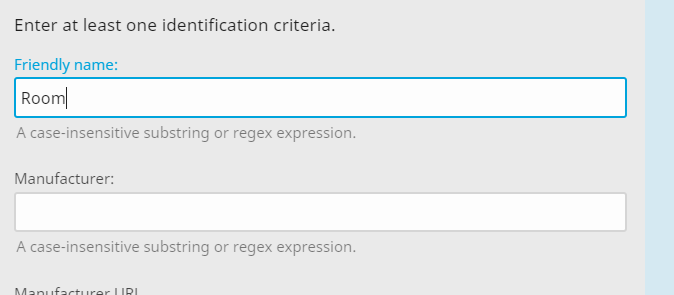
I was trying to differentiate the DLNA profiles of two different LG TVs in my house (both with WebOS but one 4K and one 1080p). For this I have given them a friendly name (Room) but jellyfin does not recognize them and it shows them as no matching device profile in the log and also shows the device data that matches the friendly name. I have also noticed that it only recognizes it by adding a header like LG's default profile but that does not allow me to differentiate the two televisions.

System (please complete the following information):

  • OS: Ubuntu Server 20.04
  • Virtualization: LinuxServer Docker image
  • Clients: LG TVs
  • Browser: WebOS
  • Jellyfin Version: 10.7.2
  • Playback: Direct Play and Transcode
  • Installed Plugins: none
  • Reverse Proxy: swag (linuxServer)
  • Base URL: none
  • Networking: Host
  • Storage: local hdd

To Reproduce

  1. Create new DLNA profile.
  2. Set the friendly name of the device in question.
  3. Set device capabilities (codecs, resolutions etc).
  4. Save changes and restart the server.
  5. The device does not reproduce as we have specified and in the log we can see that the friendly names match.

Expected behavior
It should recognize the friendly name (Room) and thus be able to differentiate one tv from another.

Logs
[2021-04-18 09:51:12.132 +02:00] [INF] [141] Emby.Dlna.DlnaManager: No matching device profile found. The default will need to be used.
DeviceDescription:
FriendlyName:Room
Manufacturer:LG Electronics.
ManufacturerUrl:http://www.lge.com
ModelDescription:LG WebOSTV DMRplus
ModelName:LG TV
ModelNumber:1.0
ModelUrl:
SerialNumber:

Screenshots
Captura

Additional context

Originally created by @pablocpas on GitHub (Apr 18, 2021). Originally assigned to: @BaronGreenback on GitHub. **Describe the bug** I was trying to differentiate the DLNA profiles of two different LG TVs in my house (both with WebOS but one 4K and one 1080p). For this I have given them a friendly name (Room) but jellyfin does not recognize them and it shows them as no matching device profile in the log and also shows the device data that matches the friendly name. I have also noticed that it only recognizes it by adding a header like LG's default profile but that does not allow me to differentiate the two televisions. **System (please complete the following information):** - OS: Ubuntu Server 20.04 - Virtualization: LinuxServer Docker image - Clients: LG TVs - Browser: WebOS - Jellyfin Version: 10.7.2 - Playback: Direct Play and Transcode - Installed Plugins: none - Reverse Proxy: swag (linuxServer) - Base URL: none - Networking: Host - Storage: local hdd **To Reproduce** 1. Create new DLNA profile. 2. Set the friendly name of the device in question. 3. Set device capabilities (codecs, resolutions etc). 4. Save changes and restart the server. 5. The device does not reproduce as we have specified and in the log we can see that the friendly names match. **Expected behavior** It should recognize the friendly name (Room) and thus be able to differentiate one tv from another. **Logs** [2021-04-18 09:51:12.132 +02:00] [INF] [141] Emby.Dlna.DlnaManager: No matching device profile found. The default will need to be used. DeviceDescription: FriendlyName:Room Manufacturer:LG Electronics. ManufacturerUrl:http://www.lge.com ModelDescription:LG WebOSTV DMRplus ModelName:LG TV ModelNumber:1.0 ModelUrl: SerialNumber: **Screenshots** ![Captura](https://user-images.githubusercontent.com/62502825/115145512-2268fb80-a052-11eb-8fba-5a6528ebb491.PNG) **Additional context** <!-- Add any other context about the problem here. -->
OVERLORD added the bugconfirmed labels 2026-02-06 22:36:26 +03:00
Author
Owner

@BaronGreenback commented on GitHub (Apr 18, 2021):

Could you upload the two xml profiles from the config/dlna/user folder please?

@BaronGreenback commented on GitHub (Apr 18, 2021): Could you upload the two xml profiles from the config/dlna/user folder please?
Author
Owner

@pablocpas commented on GitHub (Apr 18, 2021):

Profiles.zip

@pablocpas commented on GitHub (Apr 18, 2021): [Profiles.zip](https://github.com/jellyfin/jellyfin/files/6332121/Profiles.zip)
Author
Owner

@BaronGreenback commented on GitHub (Apr 19, 2021):

The follow fields all must match for a profile to be selected. Manufacturer, ModelName, ModelNumber, FriendlyName, ManufacturerUrl, ModelUrl, ModelDescription, SerialNumber

Populating these fields with the values you lists above should enable a match to be made.

@BaronGreenback commented on GitHub (Apr 19, 2021): The follow fields **all** must match for a profile to be selected. `Manufacturer`, `ModelName`, `ModelNumber`, `FriendlyName`, `ManufacturerUrl`, `ModelUrl`, `ModelDescription`, `SerialNumber` Populating these fields with the values you lists above should enable a match to be made.
Author
Owner

@pablocpas commented on GitHub (Apr 19, 2021):

So why does the interface say "Enter at least one identification criteria"?
And I understand that adding the same fields to the two profiles except the friendly name (Room and Kitchen) should work. Correct?

@pablocpas commented on GitHub (Apr 19, 2021): So why does the interface say "Enter **at least one** identification criteria"? And I understand that adding the same fields to the two profiles except the friendly name (Room and Kitchen) should work. Correct?
Author
Owner

@BaronGreenback commented on GitHub (Apr 19, 2021):

Sorry - haven't looked at the web-server end.

At the moment it matches on all the following fields. So would need two profiles. (editing the xml directly will be faster)

    <Identification>
    <FriendlyName></FriendlyName>
    <ModelNumber />
    <SerialNumber />
    <ModelName />
    <ModelDescription />
    <ModelUrl />
    <Manufacturer />
    <ManufacturerUrl />
    <Headers />
  </Identification>

Looking at what you're attempting, it does seem to be a pain.

@BaronGreenback commented on GitHub (Apr 19, 2021): Sorry - haven't looked at the web-server end. At the moment it matches on all the following fields. So would need two profiles. (editing the xml directly will be faster) ``` <Identification> <FriendlyName></FriendlyName> <ModelNumber /> <SerialNumber /> <ModelName /> <ModelDescription /> <ModelUrl /> <Manufacturer /> <ManufacturerUrl /> <Headers /> </Identification> ``` Looking at what you're attempting, it does seem to be a pain.
Author
Owner

@pablocpas commented on GitHub (Apr 19, 2021):

I don't understand, so now is it impossible to do this?
I think it would be better if it works as the interface indicates and only needs one field to match. In fact, even if the fields don't match, if only the header matches, it does recognize the profile, it should work like this with all fields.

Edit: And if fields coincide in several profiles, choose the one that matches the most fields.

@pablocpas commented on GitHub (Apr 19, 2021): I don't understand, so now is it impossible to do this? I think it would be better if it works as the interface indicates and only needs one field to match. In fact, even if the fields don't match, if only the header matches, it does recognize the profile, it should work like this with all fields. Edit: And if fields coincide in several profiles, choose the one that matches the most fields.
Author
Owner

@BaronGreenback commented on GitHub (Apr 19, 2021):

See PR #5861 above

@BaronGreenback commented on GitHub (Apr 19, 2021): See PR #5861 above
Author
Owner

@BaronGreenback commented on GitHub (Apr 19, 2021):

It is possible to do with the version you've got installed. You just need to populate all the fields.

Post #5861 - you should be able to do this with the config you currently have.

@BaronGreenback commented on GitHub (Apr 19, 2021): It is possible to do with the version you've got installed. You just need to populate all the fields. Post #5861 - you should be able to do this with the config you currently have.
Author
Owner

@pablocpas commented on GitHub (Apr 19, 2021):

Ok, thanks for the work. All the best

@pablocpas commented on GitHub (Apr 19, 2021): Ok, thanks for the work. All the best
Author
Owner

@pablocpas commented on GitHub (Apr 30, 2021):

It is possible to do with the version you've got installed. You just need to populate all the fields.

Post #5861 - you should be able to do this with the config you currently have.

I've been testing linuxserver nightly with merged changes (#5861) but it still doesn't work. It seems that the problem is the http headers since with the profiles indicated at the beginning they are not recognized because the default 'LG Smart TV' has priority because it has the headers.

If I create two profiles modifying the default 'LG Smart TV' with the friendly names of each one, it only recognizes one of the profiles

@pablocpas commented on GitHub (Apr 30, 2021): > It is possible to do with the version you've got installed. You just need to populate all the fields. > > Post #5861 - you should be able to do this with the config you currently have. I've been testing linuxserver nightly with merged changes (#5861) but it still doesn't work. It seems that the problem is the http headers since with the profiles indicated at the beginning they are not recognized because the default 'LG Smart TV' has priority because it has the headers. If I create two profiles modifying the default 'LG Smart TV' with the friendly names of each one, it only recognizes one of the profiles
Author
Owner

@BaronGreenback commented on GitHub (Apr 30, 2021):

I know the code your referring to - have been looking to see what can be done with it - including adding an ip address, and linking it across with the playTo environment so that once a device is "known" to playTo, it will also be "known" everywhere else.

I take it, both TV's are sending the same host headers to the system for playback?

@BaronGreenback commented on GitHub (Apr 30, 2021): I know the code your referring to - have been looking to see what can be done with it - including adding an ip address, and linking it across with the playTo environment so that once a device is "known" to playTo, it will also be "known" everywhere else. I take it, both TV's are sending the same host headers to the system for playback?
Author
Owner

@pablocpas commented on GitHub (Apr 30, 2021):

Indeed, both are sending the same headers to the system and it is impossible to differentiate one tv from the other.
Thanks, hope you can fix it. All the best.

@pablocpas commented on GitHub (Apr 30, 2021): Indeed, both are sending the same headers to the system and it is impossible to differentiate one tv from the other. Thanks, hope you can fix it. All the best.
Sign in to join this conversation.
1 Participants
Notifications
Due Date
No due date set.
Dependencies

No dependencies set.

Reference: starred/jellyfin#2955