Subtitles Not Loading on 10.5.3 #1525

Closed
opened 2026-02-06 21:04:54 +03:00 by OVERLORD · 10 comments
Owner

Originally created by @Furhreious on GitHub (Apr 10, 2020).

Describe the bug
Stumbled on an issues which results in near all my subtitles not working or appearing on the videos anymore even tho they show up on the subtitle selection. They worked in the version 10.5.0 but been on 10.5.3v for a bit and only a small amount of shows now result in subs being shown. Plus some subs are from the same providers but result in some working and other not.

System (please complete the following information):

  • OS: Windows 10
  • Virtualization: N/A
  • Clients: Browser, Andriod
  • Browser: Microsoft Edge Chromium Version 80
  • Jellyfin Version: 10.5.3 Stable
  • Playback: Direct Play, Direct Stream, Transcode
  • Installed Plugins: AudioDB 10.5.0.0, MusicBrainz 10.5.0 and Open Subtitles 7.0.0.0
  • Reverse Proxy: None
  • Base URL: None
  • Networking: Host
  • Storage: Local

To Reproduce

N/A

Expected behaviour
When I play a video the subtitles should automatically appear if not then I would select the subtitles from the icon.

Logs

N/A

Screenshots

N/A

Additional context

N/A

Originally created by @Furhreious on GitHub (Apr 10, 2020). **Describe the bug** Stumbled on an issues which results in near all my subtitles not working or appearing on the videos anymore even tho they show up on the subtitle selection. They worked in the version 10.5.0 but been on 10.5.3v for a bit and only a small amount of shows now result in subs being shown. Plus some subs are from the same providers but result in some working and other not. **System (please complete the following information):** - OS: Windows 10 - Virtualization: N/A - Clients: Browser, Andriod - Browser: Microsoft Edge Chromium Version 80 - Jellyfin Version: 10.5.3 Stable - Playback: Direct Play, Direct Stream, Transcode - Installed Plugins: AudioDB 10.5.0.0, MusicBrainz 10.5.0 and Open Subtitles 7.0.0.0 - Reverse Proxy: None - Base URL: None - Networking: Host - Storage: Local **To Reproduce** <!-- Steps to reproduce the behaviour: --> N/A **Expected behaviour** When I play a video the subtitles should automatically appear if not then I would select the subtitles from the icon. **Logs** <!-- Please paste any log errors. --> N/A **Screenshots** <!-- If applicable, add screenshots to help explain your problem. --> N/A **Additional context** <!-- Add any other context about the problem here. --> N/A
OVERLORD added the bug label 2026-02-06 21:04:54 +03:00
Author
Owner

@Artiume commented on GitHub (Apr 10, 2020):

For troubleshooting, hit F12 to bring up the browser debugger and go to Console, when you start playing a video with subs, are there any console errors popping up?

Let's verify proper operation with of the server. Go to your User Profile > Subtitles > Burn Subtitles and change it to ALL. This will remove the client aspect and verify the backend is properly operating.

@Artiume commented on GitHub (Apr 10, 2020): For troubleshooting, hit F12 to bring up the browser debugger and go to Console, when you start playing a video with subs, are there any console errors popping up? Let's verify proper operation with of the server. Go to your User Profile > Subtitles > Burn Subtitles and change it to ALL. This will remove the client aspect and verify the backend is properly operating.
Author
Owner

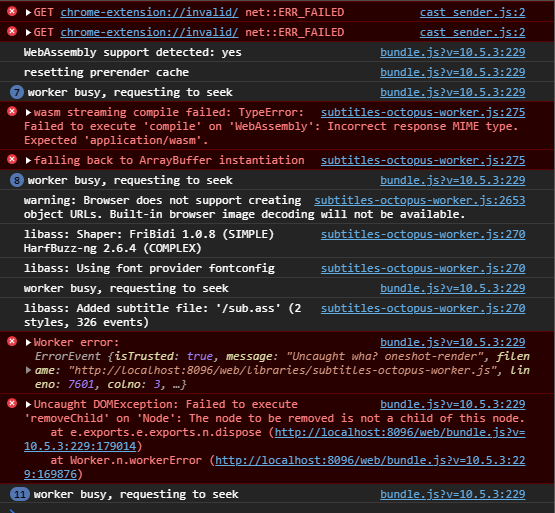
@Furhreious commented on GitHub (Apr 10, 2020):

This is what appears.
Capture

But just did the Burn subtitles which seemed to of worked, also is there a way to get the server to go thought all subs and burn them, so that they can be played Direct Stream is that not possible?

@Furhreious commented on GitHub (Apr 10, 2020): This is what appears. ![Capture](https://user-images.githubusercontent.com/63469576/79012478-4bf96800-7b5e-11ea-80c5-e6624e4a1d66.PNG) But just did the Burn subtitles which seemed to of worked, also is there a way to get the server to go thought all subs and burn them, so that they can be played Direct Stream is that not possible?
Author
Owner

@Artiume commented on GitHub (Apr 10, 2020):

Not yet. You could use something like tdarr but i find burning in subs to be a nasty solution.

@JustAMan I'm seeing lots of red here D:

@Artiume commented on GitHub (Apr 10, 2020): Not yet. You could use something like [tdarr](https://github.com/HaveAGitGat/Tdarr) but i find burning in subs to be a nasty solution. @JustAMan I'm seeing lots of red here D:
Author
Owner

@JustAMan commented on GitHub (Apr 11, 2020):

Some are expected, and some others are not.
From the first glance it looks like incompatible version of us calling into Octopus and what version of Octopus is bundled.

I would have to look closer.

@JustAMan commented on GitHub (Apr 11, 2020): Some are expected, and some others are not. From the first glance it looks like incompatible version of us calling into Octopus and what version of Octopus is bundled. I would have to look closer.
Author
Owner

@JustAMan commented on GitHub (Apr 11, 2020):

Okay, I've checked portable x64 package and it's fine.
Can you give me the link you used to install JF?

@JustAMan commented on GitHub (Apr 11, 2020): Okay, I've checked portable x64 package and it's fine. Can you give me the link you used to install JF?
Author
Owner

@Furhreious commented on GitHub (Apr 11, 2020):

I used this Link
https://repo.jellyfin.org/releases/server/windows/stable/jellyfin_v10.5.3-x64.exe

@Furhreious commented on GitHub (Apr 11, 2020): I used this Link https://repo.jellyfin.org/releases/server/windows/stable/jellyfin_v10.5.3-x64.exe
Author
Owner

@JustAMan commented on GitHub (Apr 13, 2020):

I've checked that, too, and it should be fine.
Please clear the cache and retry, it's definitely your browser getting old subtitles-octopus-worker.js from somewhere, and that somewhere is probably browser cache.

@JustAMan commented on GitHub (Apr 13, 2020): I've checked that, too, and it should be fine. Please clear the cache and retry, it's definitely your browser getting _old_ `subtitles-octopus-worker.js` from somewhere, and that somewhere is probably browser cache.
Author
Owner

@JustAMan commented on GitHub (Apr 13, 2020):

Definitely clear the cache, this seems to have the same root cause and probably the same "fix" (clearing cache): https://github.com/jellyfin/jellyfin/issues/2856

@JustAMan commented on GitHub (Apr 13, 2020): Definitely clear the cache, this seems to have the same root cause and probably the same "fix" (clearing cache): https://github.com/jellyfin/jellyfin/issues/2856
Author
Owner

@Furhreious commented on GitHub (Apr 13, 2020):

yep no more errors, just did as you stated above about clearing the cache and it all work with no errors.

@Furhreious commented on GitHub (Apr 13, 2020): yep no more errors, just did as you stated above about clearing the cache and it all work with no errors.
Author
Owner

@JustAMan commented on GitHub (Apr 16, 2020):

So I'm going to close this issue as it's fixed locally.
Meanwhile I hope that this https://github.com/jellyfin/jellyfin/pull/2864 would eliminate the need for later cache cleanups.

@JustAMan commented on GitHub (Apr 16, 2020): So I'm going to close this issue as it's fixed locally. Meanwhile I hope that this https://github.com/jellyfin/jellyfin/pull/2864 would eliminate the need for later cache cleanups.
Sign in to join this conversation.
1 Participants
Notifications
Due Date
No due date set.
Dependencies

No dependencies set.

Reference: starred/jellyfin#1525