mirror of
https://github.com/jellyfin/jellyfin.git
synced 2026-05-04 18:09:12 +03:00
Getting HTTP error code 404 when trying to save hardware acceleration settings #1442

Reference in New Issue
Block a user
Delete Branch "%!s()"
Deleting a branch is permanent. Although the deleted branch may continue to exist for a short time before it actually gets removed, it CANNOT be undone in most cases. Continue?
Originally created by @erkexzcx on GitHub (Mar 26, 2020).
Describe the bug
Hardware acceleration cannot be enabled on my Raspberry Pi 4. Once I click save and get past the warning - I get error that tells me to try again later. In browser console it shows 404...
System:
To Reproduce
Expected behavior
Successfully save selected settings
Logs
None. See screenshot.
Screenshots
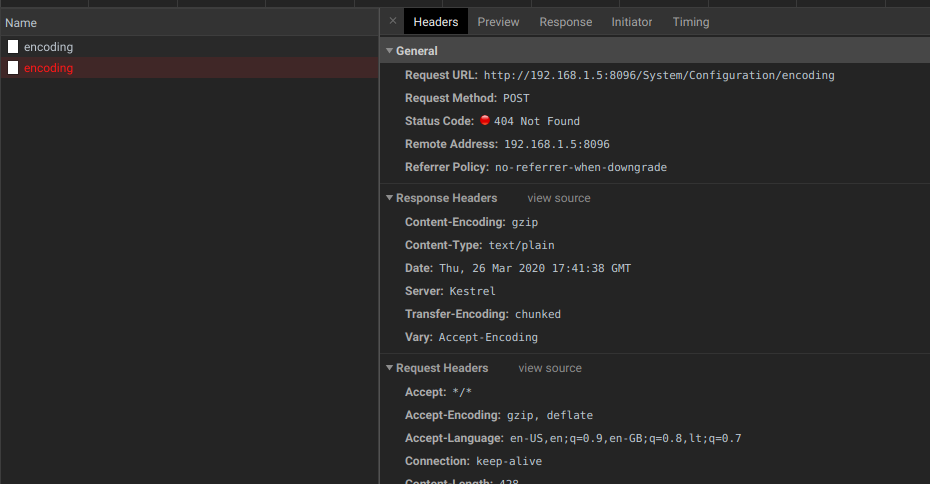
Additional context
I am author & maintainer of jellyfin-bin package. :)
@dkanada commented on GitHub (Mar 26, 2020):
I looked into this and discovered that all configurable paths will throw an error if the directory doesn't exist, which isn't ideal.
@nyanmisaka commented on GitHub (Mar 26, 2020):
It seems that the
transcodesandmetadatafolders are not created automatically during installation, at least on archlinux. Unless I manually create these two folders and grant permissions, there will be no error when saving the settings.@erkexzcx commented on GitHub (Mar 26, 2020):
So do these folders are expected to be created by the installer, or by Jellyfin app?
Looks like these folders exist on the system, and in overall
/var/lib/jellyfinseem to have correct permissions:@stevleibelt commented on GitHub (Mar 26, 2020):
Almost the same for me.
I have a transcoding-temp.
@erkexzcx commented on GitHub (Mar 26, 2020):
OK I haven't touched anything. Just randomly went to settings, set hardware acceleration and clicked save - settings are now saved without any error. Feel free to close this issue. No idea what happened...
@JustAMan commented on GitHub (Apr 3, 2020):
@dkanada @nyanmisaka were you able to reproduce the issue?
@nyanmisaka commented on GitHub (Apr 3, 2020):
Yes. Usually, the
metadataandtranscodes/transcoding-tempfolders are not created automatically when jellyfin is installed for the first time. Therefore, the interface language set during initialization will not take effect and cannot be saved manually. Until you manually create these folders.@JustAMan commented on GitHub (May 7, 2020):
@erkexzcx this should be fixed now, could you please re-test?
@stale[bot] commented on GitHub (Sep 4, 2020):
This issue has gone 120 days without comment. To avoid abandoned issues, it will be closed in 21 days if there are no new comments.
If you're the original submitter of this issue, please comment confirming if this issue still affects you in the latest release or nightlies, or close the issue if it has been fixed. If you're another user also affected by this bug, please comment confirming so. Either action will remove the stale label.
This bot exists to prevent issues from becoming stale and forgotten. Jellyfin is always moving forward, and bugs are often fixed as side effects of other changes. We therefore ask that bug report authors remain vigilant about their issues to ensure they are closed if fixed, or re-confirmed - perhaps with fresh logs or reproduction examples - regularly. If you have any questions you can reach us on Matrix or Social Media.