Unable to Reset Credentials #997

Closed
opened 2026-02-04 23:21:23 +03:00 by OVERLORD · 6 comments
Owner

Originally created by @ghost on GitHub (Jan 18, 2019).

Describe the bug
Installed the application and was able to successfully log in and reset the credentials from the admin@admin.com credentials. After using this for an hour, I log out. After another hour, when I attempt to log back in my credentials do not work. Getting the error >> These credentials do not match our records.

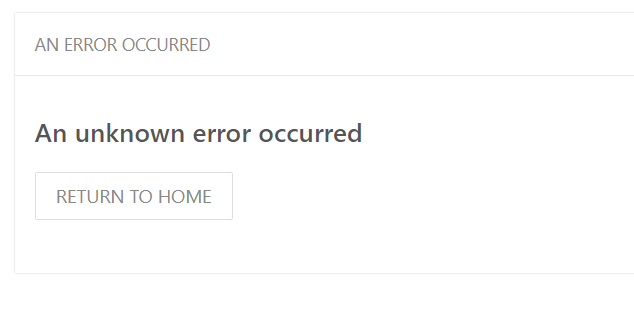
I have attempted the Forgot your Password method but get this error >> AN ERROR OCCURRED
An unknown error occurred

Steps To Reproduce
Steps to reproduce the behavior:

  1. Go to the site

  2. Submit the email and password

  3. Do not select remember the password

  4. Error > These credentials do not match our records.

  5. Click on Forgot Your Password?

  6. Enter email

  7. Error > AN ERROR OCCURRED
    An unknown error occurred

Expected behavior
Expected to be able to log in or get a reset password email notification
Screenshots
error1
error2

Your Configuration (please complete the following information):

  • Exact BookStack Version (Found in settings): Bookstack v0.25.0
  • PHP Version: 7.1
  • Hosting Method (Nginx/Apache/Docker): Centos7 w/cPanel

Additional context
N/A

Originally created by @ghost on GitHub (Jan 18, 2019). **Describe the bug** Installed the application and was able to successfully log in and reset the credentials from the admin@admin.com credentials. After using this for an hour, I log out. After another hour, when I attempt to log back in my credentials do not work. Getting the error >> These credentials do not match our records. I have attempted the Forgot your Password method but get this error >> AN ERROR OCCURRED An unknown error occurred **Steps To Reproduce** Steps to reproduce the behavior: 1. Go to the site 2. Submit the email and password 3. Do not select remember the password 4. Error > These credentials do not match our records. 1. Click on Forgot Your Password? 2. Enter email 3. Error > AN ERROR OCCURRED An unknown error occurred **Expected behavior** Expected to be able to log in or get a reset password email notification **Screenshots** ![error1](https://user-images.githubusercontent.com/43989945/51406647-6097ad80-1b1f-11e9-83bd-965eaee5aba2.PNG) ![error2](https://user-images.githubusercontent.com/43989945/51406648-6097ad80-1b1f-11e9-9d6d-c81b12d04749.PNG) **Your Configuration (please complete the following information):** - Exact BookStack Version (Found in settings): Bookstack v0.25.0 - PHP Version: 7.1 - Hosting Method (Nginx/Apache/Docker): Centos7 w/cPanel **Additional context** N/A
Author
Owner

@Mant1kor commented on GitHub (Jan 18, 2019):

Did you configure e-mail server strings?
You can add APP_DEBUG=true to your .env file to get more information about error.

@Mant1kor commented on GitHub (Jan 18, 2019): Did you configure e-mail server strings? You can add `APP_DEBUG=true` to your .env file to get more information about error.
Author
Owner

@ghost commented on GitHub (Jan 18, 2019):

As a quick fix, you might want to execute
php artisan bookstack:create-admin
while being in the installation-directory of the webapp on your server.
(from the official documentation).
This should create a new admin-user, so at least you get back access to the app even without a working e-mail system...

@ghost commented on GitHub (Jan 18, 2019): As a quick fix, you might want to execute `php artisan bookstack:create-admin` while being in the installation-directory of the webapp on your server. (from [the official documentation](https://www.bookstackapp.com/docs/admin/commands/)). This should create a new admin-user, so at least you get back access to the app even without a working e-mail system...
Author
Owner

@ghost commented on GitHub (Jan 19, 2019):

Did you configure e-mail server strings?
You can add APP_DEBUG=true to your .env file to get more information about error.

After doing this I got a ton of information. Not sure specifically where to look. I even added mail settings into the .env file but getting this error >>
Swift_TransportException
Connection could not be established with host localhost [ #0]

And then on the right it highlights a block of code >>

if (false === $this->stream) {
throw new Swift_TransportException(
'Connection could not be established with host '.$this->params['host'].

@ghost commented on GitHub (Jan 19, 2019): > Did you configure e-mail server strings? > You can add `APP_DEBUG=true` to your .env file to get more information about error. After doing this I got a ton of information. Not sure specifically where to look. I even added mail settings into the .env file but getting this error >> Swift_TransportException Connection could not be established with host localhost [ #0] And then on the right it highlights a block of code >> if (false === $this->stream) { throw new Swift_TransportException( 'Connection could not be established with host '.$this->params['host'].
Author
Owner

@ghost commented on GitHub (Jan 19, 2019):

As a quick fix, you might want to execute
php artisan bookstack:create-admin
while being in the installation-directory of the webapp on your server.
(from the official documentation).
This should create a new admin-user, so at least you get back access to the app even without a working e-mail system...

This worked, much appreciate it.

@ghost commented on GitHub (Jan 19, 2019): > As a quick fix, you might want to execute > `php artisan bookstack:create-admin` > while being in the installation-directory of the webapp on your server. > (from [the official documentation](https://www.bookstackapp.com/docs/admin/commands/)). > This should create a new admin-user, so at least you get back access to the app even without a working e-mail system... This worked, much appreciate it.
Author
Owner

@ghost commented on GitHub (Jan 21, 2019):

Thank you for the help you guys, I did a reinstall assuming that moving the content into another folder caused it and I believe it did. Works beautifully now.

@ghost commented on GitHub (Jan 21, 2019): Thank you for the help you guys, I did a reinstall assuming that moving the content into another folder caused it and I believe it did. Works beautifully now.
Author
Owner

@ssddanbrown commented on GitHub (Jan 26, 2019):

@ZerGBlunt Glad to hear things are working. Thanks everyone else for providing help. Will therefore close this now.

@ssddanbrown commented on GitHub (Jan 26, 2019): @ZerGBlunt Glad to hear things are working. Thanks everyone else for providing help. Will therefore close this now.
Sign in to join this conversation.
1 Participants
Notifications
Due Date
No due date set.
Dependencies

No dependencies set.

Reference: starred/BookStack#997
