Unable to upload an attachment to a page #989

Closed
opened 2026-02-04 23:17:44 +03:00 by OVERLORD · 2 comments
Owner

Originally created by @piiq on GitHub (Jan 15, 2019).

When editing a page unable to upload an attachment using the right side panel.
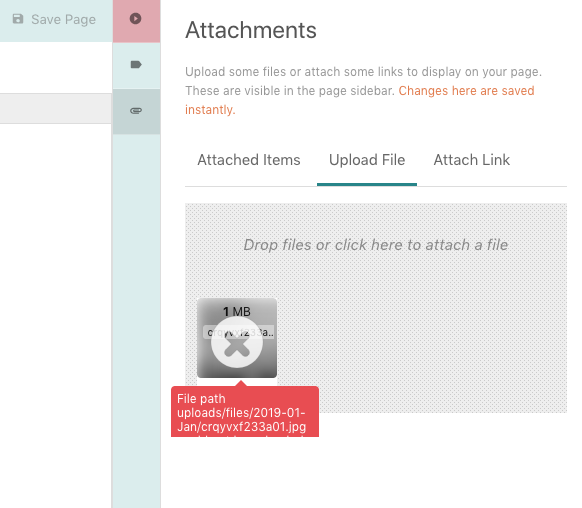
The response in states that File path uploads/files/2019-01-Jan/crqyvxf233a01.jpg could not be uploaded to. Ensure it is writable to the server.
I experience this only with attachments. When I upload images for book covers - everything seems to work fine.

Screenshots
image

Your Configuration (please complete the following information):

  • Exact BookStack Version: v0.24.3
  • PHP Version: 7
  • Hosting Method (Nginx/Apache/Docker): Docker, Nginx, MySQL

Additional context
The permissions for the uploads folder are recursively set to 0777.
The owner is:
drwxrwxrwx 4 www-data www-data 4096 Jan 9 18:36 uploads

What should be the correct permissions for the attachment file to upload and save?

Originally created by @piiq on GitHub (Jan 15, 2019). When editing a page unable to upload an attachment using the right side panel. The response in states that `File path uploads/files/2019-01-Jan/crqyvxf233a01.jpg could not be uploaded to. Ensure it is writable to the server.` *I experience this only with attachments. When I upload images for book covers - everything seems to work fine.* **Screenshots** ![image](https://user-images.githubusercontent.com/11668535/51169249-75c0d200-18bc-11e9-9fe5-1ce7460eaaaf.png) **Your Configuration (please complete the following information):** - Exact BookStack Version: v0.24.3 - PHP Version: 7 - Hosting Method (Nginx/Apache/Docker): Docker, Nginx, MySQL **Additional context** The permissions for the uploads folder are recursively set to 0777. The owner is: `drwxrwxrwx 4 www-data www-data 4096 Jan 9 18:36 uploads` **What should be the correct permissions for the attachment file to upload and save?**
OVERLORD added the 🐕 Support label 2026-02-04 23:17:44 +03:00
Author
Owner

@ssddanbrown commented on GitHub (Jan 15, 2019):

Hi @piiq,
Sorry to hear you're experiencing issues.
By default, Attachments use a different folder to images. You may need to check that the attachments folder is writable. Folder details can be found in the documentation here.

@ssddanbrown commented on GitHub (Jan 15, 2019): Hi @piiq, Sorry to hear you're experiencing issues. By default, Attachments use a different folder to images. You may need to check that the attachments folder is writable. Folder details can be found in the[ documentation here](https://www.bookstackapp.com/docs/admin/upload-config/#local).
Author
Owner

@piiq commented on GitHub (Jan 17, 2019):

Thanks @ssddanbrown .

There was some confusion between the two folders that host uploaded data
Images stored in <bookstack_install_dir>/public/uploads/images
Attachment stored in: <bookstack_install_dir>/storage/uploads/files

After fixing folder permissions at first the page responded with a 419 status code, but after a page refresh everything is working.

@piiq commented on GitHub (Jan 17, 2019): Thanks @ssddanbrown . There was some confusion between the two folders that host uploaded data Images stored in `<bookstack_install_dir>/public/uploads/images` Attachment stored in: `<bookstack_install_dir>/storage/uploads/files` After fixing folder permissions at first the page responded with a 419 status code, but after a page refresh everything is working.
Sign in to join this conversation.
1 Participants
Notifications
Due Date
No due date set.
Dependencies

No dependencies set.

Reference: starred/BookStack#989