How to make a site public? #845

Closed
opened 2026-02-04 22:27:45 +03:00 by OVERLORD · 12 comments
Owner

Originally created by @Biepa on GitHub (Oct 4, 2018).

Hey everyone,
maybe someone can help me with making a site public?

The Public group had all ticks on show and the guest user is in the public group.
I then ticked "show" on the specific site for the public role but if i take the link and want to open it without being logged in, i get to the login page.

What am I doing wrong?

Originally created by @Biepa on GitHub (Oct 4, 2018). Hey everyone, maybe someone can help me with making a site public? The Public group had all ticks on show and the guest user is in the public group. I then ticked "show" on the specific site for the public role but if i take the link and want to open it without being logged in, i get to the login page. What am I doing wrong?
OVERLORD added the Question label 2026-02-04 22:27:45 +03:00
Author
Owner

@lithium-ap commented on GitHub (Oct 4, 2018):

The public group is the default group for public registrations. I'm otherwise unsure if access is available without registration / logon.

If it isnt, implementing OAuth with G. Suite is a fairly straightforward process.

@lithium-ap commented on GitHub (Oct 4, 2018): The public group is the default group for public registrations. I'm otherwise unsure if access is available without registration / logon. If it isnt, implementing OAuth with G. Suite is a fairly straightforward process.
Author
Owner

@Biepa commented on GitHub (Oct 4, 2018):

Oh ok, i thought public meant, that everybody can see it without login.
So this option isn't implented yet?

@Biepa commented on GitHub (Oct 4, 2018): Oh ok, i thought public meant, that everybody can see it without login. So this option isn't implented yet?
Author
Owner

@lithium-ap commented on GitHub (Oct 4, 2018):

I'm not sure, @ssddanbrown is this a function?

@lithium-ap commented on GitHub (Oct 4, 2018): I'm not sure, @ssddanbrown is this a function?
Author
Owner

@TBK commented on GitHub (Oct 4, 2018):

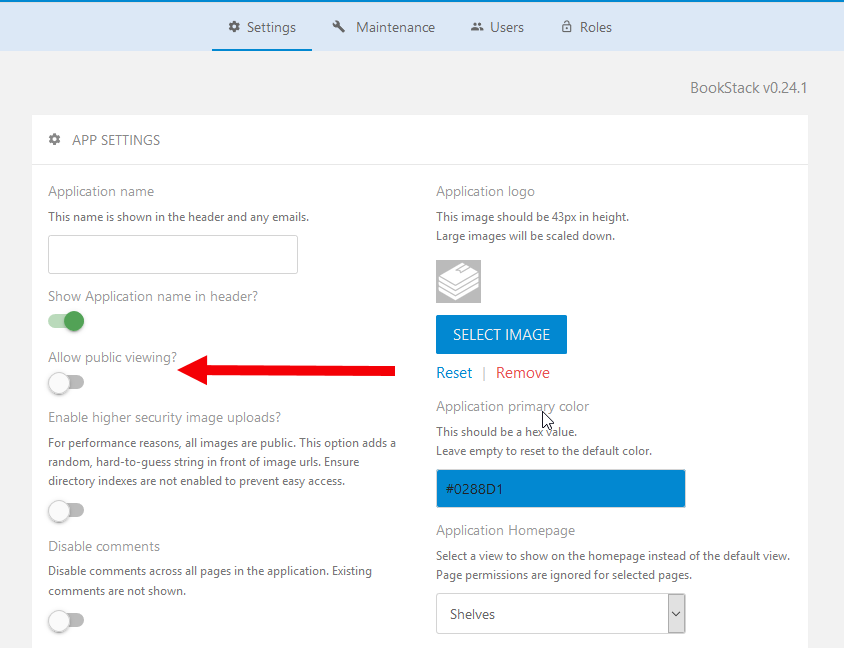
@Biepa @lithium-ap Yes it is possible, under settings enable this setting:
image

@TBK commented on GitHub (Oct 4, 2018): @Biepa @lithium-ap Yes it is possible, under settings enable this setting: ![image](https://user-images.githubusercontent.com/858296/46495639-40650c80-c816-11e8-94b7-246d0c4806c7.png)
Author
Owner

@Biepa commented on GitHub (Oct 4, 2018):

Wow. Didn't saw that facepalm. Thank you!
But if I enable this option, the whole Bookstack instance is viewable for public.
I wanted only to show parts to everyone.

@Biepa commented on GitHub (Oct 4, 2018): Wow. Didn't saw that *facepalm*. Thank you! But if I enable this option, the whole Bookstack instance is viewable for public. I wanted only to show parts to everyone.
Author
Owner

@TBK commented on GitHub (Oct 5, 2018):

I have not tested this but I would imagine you could set "Allow public viewing" to yes and then set the permissions level to a higher level on the content you want to "hide".

@TBK commented on GitHub (Oct 5, 2018): I have not tested this but I would imagine you could set "Allow public viewing" to yes and then set the permissions level to a higher level on the content you want to "hide".
Author
Owner

@Biepa commented on GitHub (Oct 5, 2018):

@TBK Tested it, you're right. I set "Allow public viewing" to yes and the can "hide" if I dont tick "view" for the public group.

Maybe there is a better way to implement this?
For example if we could set the "public viewing" option per book/chapter/page. This way you also don't have to overwrite all permissions for every book/chapter/page, you don't want to make viewable to the public.
Then you just have to tick it, where you want it, and not everywhere you don't want.
Or maybe there is an another, better idea.

@Biepa commented on GitHub (Oct 5, 2018): @TBK Tested it, you're right. I set "Allow public viewing" to yes and the can "hide" if I dont tick "view" for the public group. Maybe there is a better way to implement this? For example if we could set the "public viewing" option per book/chapter/page. This way you also don't have to overwrite all permissions for every book/chapter/page, you don't want to make viewable to the public. Then you just have to tick it, where you want it, and not everywhere you don't want. Or maybe there is an another, better idea.
Author
Owner

@TBK commented on GitHub (Oct 6, 2018):

One solution would be to add a new view to "Settings" where you could see and change the permissions of all content individually and in bulk.

@TBK commented on GitHub (Oct 6, 2018): One solution would be to add a new view to "Settings" where you could see and change the permissions of all content individually and in bulk.
Author
Owner

@tpeacock19 commented on GitHub (Oct 7, 2018):

Another workaround was mentioned in an earlier feature request #407 the steps are as follows:

To achieve a 'whitelist' approach for public users you can do the following:

  1. Turn on the "Allow public viewing" setting.
  2. Edit the 'Public' role and uncheck all permissions then save.
  3. Go to the book you want to make visible publicly and edit the permissions via the dropdown to the right of the 'Edit' link.
  4. Check 'Enable Custom Permissions' then set all the permissions you want, Ensuring you check the view permission for the public role.

Following the above has worked for me in that any shelf/book/chapter/page I want public.

@tpeacock19 commented on GitHub (Oct 7, 2018): Another workaround was mentioned in an earlier feature request #407 the steps are as follows: > To achieve a 'whitelist' approach for public users you can do the following: > 1. Turn on the "Allow public viewing" setting. > 2. Edit the 'Public' role and uncheck all permissions then save. > 3. Go to the book you want to make visible publicly and edit the permissions via the dropdown to the right of the 'Edit' link. > 4. Check 'Enable Custom Permissions' then set all the permissions you want, Ensuring you check the view permission for the public role. Following the above has worked for me in that any shelf/book/chapter/page I want public.
Author
Owner

@Biepa commented on GitHub (Oct 10, 2018):

Thank you @tpeacock19 !
Still not the best way i think, but much better than the alternative.

@Biepa commented on GitHub (Oct 10, 2018): Thank you @tpeacock19 ! Still not the best way i think, but much better than the alternative.
Author
Owner

@ssddanbrown commented on GitHub (Oct 13, 2018):

Thanks everyone for providing support. Will now close this as it looks solved (Although I am aware the permissions UX needs a bit of work).

As an extra tip, You could keep all public books in a bookshelf, Then when you need to update the permissions of those, You can simply change the shelf permission and there's a button to apply the same permissions to all child books. Pages and chapters within books will then inherit those book permissions. Just a way to potentially make things more manageable by batch-setting permissions.

@ssddanbrown commented on GitHub (Oct 13, 2018): Thanks everyone for providing support. Will now close this as it looks solved (Although I am aware the permissions UX needs a bit of work). As an extra tip, You could keep all public books in a bookshelf, Then when you need to update the permissions of those, You can simply change the shelf permission and there's a button to apply the same permissions to all child books. Pages and chapters within books will then inherit those book permissions. Just a way to potentially make things more manageable by batch-setting permissions.
Author
Owner

@srvprivate commented on GitHub (Jul 30, 2025):

Here is the code necessary for hiding the Left Bar Recent Activity for unauthenticated users, the right bar "Revisions" section, but maintains Recent activity for logged in users. This took me awhile.

<script>
document.addEventListener("DOMContentLoaded", function () {
    // Detect public user by checking for the "Log in" link in the header
    const isPublicUser = document.querySelector('a[href*="/login"]') !== null;

    if (isPublicUser) {
        // Hide left sidebar Recent Activity block
        const recentActivity = document.querySelector('#recent-activity');
        if (recentActivity) recentActivity.style.display = 'none';

        // Hide revision-like metadata in the right sidebar (Updated by, Created by)
        const entityMeta = document.querySelectorAll('.entity-meta-item');
        entityMeta.forEach(item => {
            const text = item.textContent.toLowerCase();
            if (text.includes('updated') || text.includes('created')) {
                item.style.display = 'none';
            }
        });

        // Hide "Revisions" links if any appear (future-proofing)
        const links = document.querySelectorAll('a[href*="/revisions"]');
        links.forEach(link => {
            link.style.display = 'none';
        });
    }
});
</script>
@srvprivate commented on GitHub (Jul 30, 2025): Here is the code necessary for hiding the Left Bar Recent Activity for unauthenticated users, the right bar "Revisions" section, but maintains Recent activity for logged in users. This took me awhile. ``` <script> document.addEventListener("DOMContentLoaded", function () { // Detect public user by checking for the "Log in" link in the header const isPublicUser = document.querySelector('a[href*="/login"]') !== null; if (isPublicUser) { // Hide left sidebar Recent Activity block const recentActivity = document.querySelector('#recent-activity'); if (recentActivity) recentActivity.style.display = 'none'; // Hide revision-like metadata in the right sidebar (Updated by, Created by) const entityMeta = document.querySelectorAll('.entity-meta-item'); entityMeta.forEach(item => { const text = item.textContent.toLowerCase(); if (text.includes('updated') || text.includes('created')) { item.style.display = 'none'; } }); // Hide "Revisions" links if any appear (future-proofing) const links = document.querySelectorAll('a[href*="/revisions"]'); links.forEach(link => { link.style.display = 'none'; }); } }); </script> ```
Sign in to join this conversation.
1 Participants
Notifications
Due Date
No due date set.
Dependencies

No dependencies set.

Reference: starred/BookStack#845