GitLabExtendSocialite.php failed to open stream No such file or directory #826

Closed
opened 2026-02-04 22:24:23 +03:00 by OVERLORD · 7 comments
Owner

Originally created by @leiyu1139 on GitHub (Sep 23, 2018).

I am sorry, my english is not ok!
Describe the bug
A clear and concise description of what the bug is.

Steps To Reproduce
Steps to reproduce the behavior:

  1. Go to '...'
  2. Click on '....'
  3. Scroll down to '....'
  4. See error
    When i access my website,it takes an error:
    ErrorException (E_WARNING)
    include(/var/www/html/BookStack/vendor/composer/../socialiteproviders/gitlab/GitLabExtendSocialite.php): failed to open stream: No such file or directory

Expected behavior
A clear and concise description of what you expected to happen.

Screenshots
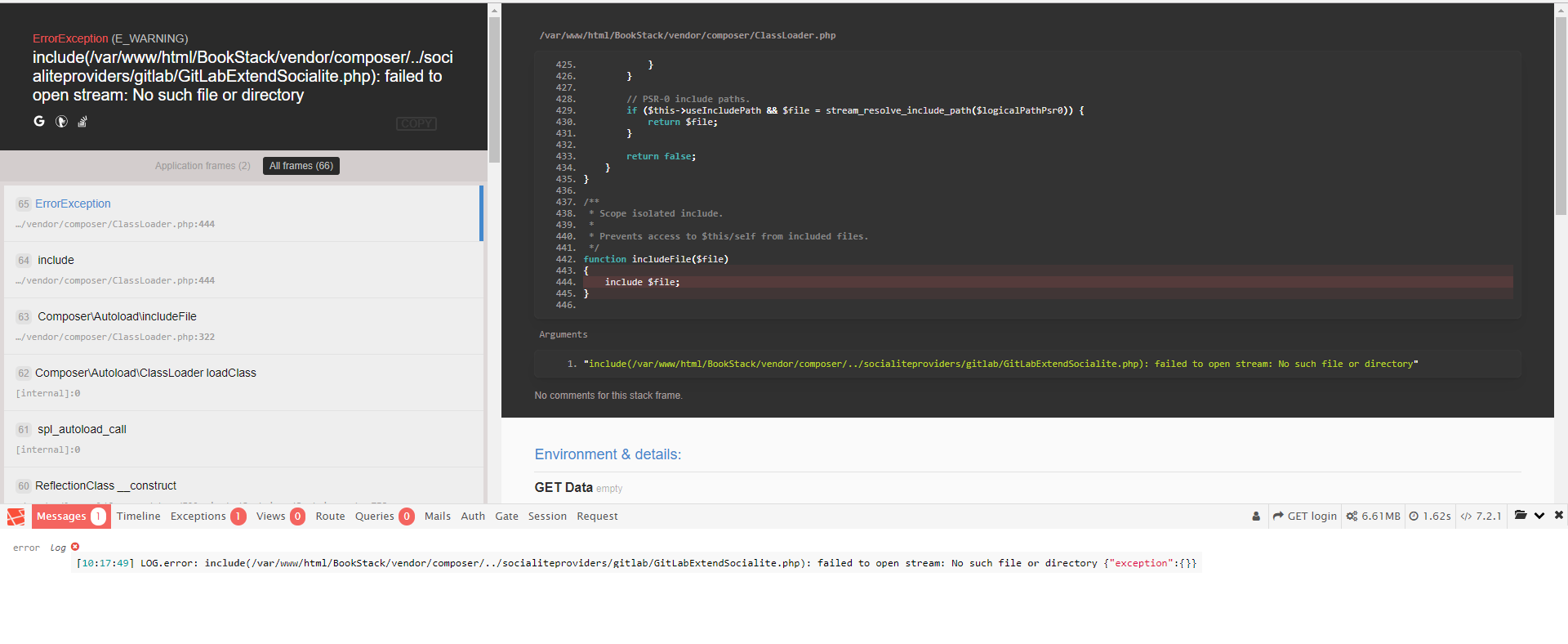
If applicable, add screenshots to help explain your problem.
image

Your Configuration (please complete the following information):

  • Exact BookStack Version (Found in settings):
    BookStack-0.22.0

  • PHP Version:
    image

  • Hosting Method (Nginx/Apache/Docker):
    nginx

Additional context
Add any other context about the problem here.

Originally created by @leiyu1139 on GitHub (Sep 23, 2018). I am sorry, my english is not ok! **Describe the bug** A clear and concise description of what the bug is. **Steps To Reproduce** Steps to reproduce the behavior: 1. Go to '...' 2. Click on '....' 3. Scroll down to '....' 4. See error When i access my website,it takes an error: ErrorException (E_WARNING) include(/var/www/html/BookStack/vendor/composer/../socialiteproviders/gitlab/GitLabExtendSocialite.php): failed to open stream: No such file or directory **Expected behavior** A clear and concise description of what you expected to happen. **Screenshots** If applicable, add screenshots to help explain your problem. ![image](https://user-images.githubusercontent.com/19724032/45927022-19c5ec80-bf5f-11e8-97d3-ef83d0079b4f.png) **Your Configuration (please complete the following information):** - Exact BookStack Version (Found in settings): BookStack-0.22.0 - PHP Version: ![image](https://user-images.githubusercontent.com/19724032/45927025-2e09e980-bf5f-11e8-8ae2-57a0be0b4231.png) - Hosting Method (Nginx/Apache/Docker): nginx **Additional context** Add any other context about the problem here.
OVERLORD added the 🐕 Support label 2026-02-04 22:24:23 +03:00
Author
Owner

@ssddanbrown commented on GitHub (Sep 23, 2018):

Hi @leiyu1139, Sorry to hear you are experiencing issues.
When did this issue occur? On upgrade or on initial install?

What happens when you run composer install or php composer.phar install from the command line in your BookStack install folder.

@ssddanbrown commented on GitHub (Sep 23, 2018): Hi @leiyu1139, Sorry to hear you are experiencing issues. When did this issue occur? On upgrade or on initial install? What happens when you run `composer install` or `php composer.phar install` from the command line in your BookStack install folder.
Author
Owner

@leiyu1139 commented on GitHub (Sep 23, 2018):

when i run php composer.phar install in BookStack install folder ,there is an error:

image

@leiyu1139 commented on GitHub (Sep 23, 2018): when i run php composer.phar install in BookStack install folder ,there is an error: ![image](https://user-images.githubusercontent.com/19724032/45927397-38c77d00-bf65-11e8-8395-900c4ab4c347.png)
Author
Owner

@leiyu1139 commented on GitHub (Sep 23, 2018):

This site is still available a week ago, but it is not accessible today, during which I just reinstall gitlab-ce.

@leiyu1139 commented on GitHub (Sep 23, 2018): This site is still available a week ago, but it is not accessible today, during which I just reinstall gitlab-ce.
Author
Owner

@leiyu1139 commented on GitHub (Sep 23, 2018):

thanks to help me! @ssddanbrown

@leiyu1139 commented on GitHub (Sep 23, 2018): thanks to help me! @ssddanbrown
Author
Owner

@ssddanbrown commented on GitHub (Sep 23, 2018):

@leiyu1139 You may need to install composer again.

Download composer from this site:
https://getcomposer.org/download/
Follow the commands at the top of the page and you should end up with a composer.phar file in that directory.

Once done retry running the php composer.phar install command.

@ssddanbrown commented on GitHub (Sep 23, 2018): @leiyu1139 You may need to install composer again. Download composer from this site: https://getcomposer.org/download/ Follow the commands at the top of the page and you should end up with a `composer.phar` file in that directory. Once done retry running the `php composer.phar install` command.
Author
Owner

@leiyu1139 commented on GitHub (Sep 23, 2018):

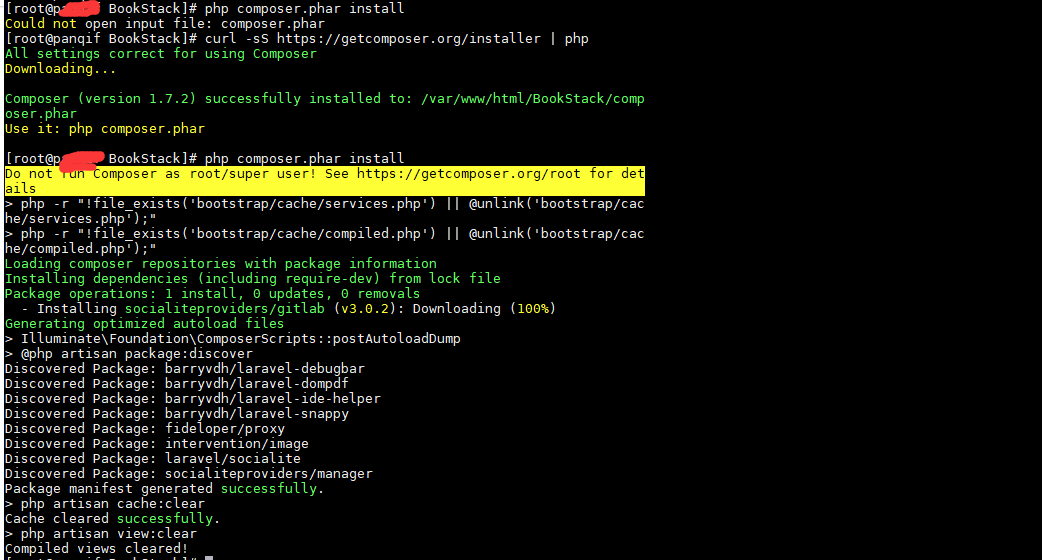
OK! it works! thanks a lot! @ssddanbrown
image

@leiyu1139 commented on GitHub (Sep 23, 2018): OK! it works! thanks a lot! @ssddanbrown ![image](https://user-images.githubusercontent.com/19724032/45928155-9c57a780-bf71-11e8-91cb-129847599600.png)
Author
Owner

@ssddanbrown commented on GitHub (Sep 23, 2018):

@leiyu1139 Awesome, Happy to hear things are now working!

@ssddanbrown commented on GitHub (Sep 23, 2018): @leiyu1139 Awesome, Happy to hear things are now working!
Sign in to join this conversation.
1 Participants
Notifications
Due Date
No due date set.
Dependencies

No dependencies set.

Reference: starred/BookStack#826
