PDF Export : Font underline issue #801

Closed
opened 2026-02-04 22:19:21 +03:00 by OVERLORD · 3 comments
Owner

Originally created by @vparmeland on GitHub (Aug 29, 2018).

Describe the bug
I found an issue with font "Header Large" in "underline" when you want to export to PDF your page.

Steps To Reproduce
When try to export in HTML : OK but in PDF (Screenshot bellow)

Screenshots

image

Your Configuration (please complete the following information):

  • BookStack v0.22.0
  • PHP Version: 7.X
  • Hosting Method Apache:
Originally created by @vparmeland on GitHub (Aug 29, 2018). **Describe the bug** I found an issue with font "Header Large" in "underline" when you want to export to PDF your page. **Steps To Reproduce** When try to export in HTML : OK but in PDF (Screenshot bellow) **Screenshots** ![image](https://user-images.githubusercontent.com/17825769/44781080-baed9d00-ab83-11e8-81d0-798dbb0cd119.png) **Your Configuration (please complete the following information):** - BookStack v0.22.0 - PHP Version: 7.X - Hosting Method Apache:
OVERLORD added the 🐛 Bug🛡️ Blocked labels 2026-02-04 22:19:21 +03:00
Author
Owner

@nvnvnvnvn commented on GitHub (Aug 29, 2018):

Hi NK74,

Works for me:
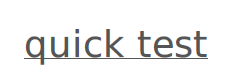
image

I'm using the wkhtmltopdf for export which, as stated, is an option for more accurate PDF generation:
https://www.bookstackapp.com/docs/admin/pdf-rendering/

--
Dan

@nvnvnvnvn commented on GitHub (Aug 29, 2018): Hi NK74, Works for me: ![image](https://user-images.githubusercontent.com/29762011/44794656-86231b00-ab6e-11e8-9ef8-9cc6b53276b2.png) I'm using the wkhtmltopdf for export which, as stated, is an option for more accurate PDF generation: https://www.bookstackapp.com/docs/admin/pdf-rendering/ -- Dan
Author
Owner

@ssddanbrown commented on GitHub (Aug 30, 2018):

Confirmed this is an issue for the default DomPDF rendering. Will just have to be patient since it appears to be a bug open in DomPDF: dompdf/dompdf/issues/609

There's a fix due in the next release of DomPDF which I just tested and I found it will fix this issue. Just need to wait for that.

Otherwise can always setup WKHTMLtoPDF as suggested by @nvnvnvnvn above.

@ssddanbrown commented on GitHub (Aug 30, 2018): Confirmed this is an issue for the default DomPDF rendering. Will just have to be patient since it appears to be a bug open in DomPDF: dompdf/dompdf/issues/609 There's a fix due in the next release of DomPDF which I just tested and I found it will fix this issue. Just need to wait for that. Otherwise can always setup WKHTMLtoPDF as suggested by @nvnvnvnvn above.
Author
Owner

@vparmeland commented on GitHub (Sep 4, 2018):

Hello guys

I'll try next week, i close my issue and i'll see later ;)

@vparmeland commented on GitHub (Sep 4, 2018): Hello guys I'll try next week, i close my issue and i'll see later ;)
Sign in to join this conversation.
1 Participants
Notifications
Due Date
No due date set.
Dependencies

No dependencies set.

Reference: starred/BookStack#801