Scrolling with longer side navigation causes rubber-banding #730

Closed
opened 2026-02-04 22:05:26 +03:00 by OVERLORD · 13 comments
Owner

Originally created by @spiritedsnowcat on GitHub (Jun 29, 2018).

Originally assigned to: @ssddanbrown on GitHub.

Versions
  • BookStack Version: v0.22.0-release
  • PHP Version: v7.2.6-nts
  • MySQL Version: v8.0.11-community
Expected Behavior

For a page with no scrollable content and a long book navigation that causes scrolling for the page, the user should be able to scroll to the bottom of the page and view the rest of the book navigation panel in the side menu.

Current Behavior

Attempting to scroll causes rubber-banding, where the user is taken back to the top of the page. As the user attempts to scroll, it keeps glitching them up back to the top of the page, causing the website to shutter / rubber-band violently. On smaller screens, the book navigation will be cut.

Steps to Reproduce
  1. Create a new page in a chapter with many pages added.
  2. Edit the page to display a limited amount of content (that would not scroll otherwise). I added 3 subheaders to mine.
  3. Attempt to scroll, with the book navigation section requiring scrolling.
Originally created by @spiritedsnowcat on GitHub (Jun 29, 2018). Originally assigned to: @ssddanbrown on GitHub. ##### Versions * BookStack Version: v0.22.0-release * PHP Version: v7.2.6-nts * MySQL Version: v8.0.11-community ##### Expected Behavior For a page with no scrollable content and a long book navigation that causes scrolling for the page, the user should be able to scroll to the bottom of the page and view the rest of the book navigation panel in the side menu. ##### Current Behavior Attempting to scroll causes rubber-banding, where the user is taken back to the top of the page. As the user attempts to scroll, it keeps glitching them up back to the top of the page, causing the website to shutter / rubber-band violently. On smaller screens, the book navigation will be cut. ##### Steps to Reproduce 1. Create a new page in a chapter with many pages added. 2. Edit the page to display a limited amount of content (that would not scroll otherwise). I added 3 subheaders to mine. 3. Attempt to scroll, with the book navigation section requiring scrolling.
OVERLORD added the 🐛 Bug label 2026-02-04 22:05:26 +03:00
Author
Owner

@aljawaid commented on GitHub (Jul 29, 2018):

I have this issue too on 0.22 but couldn't figure out what the problem was. Thanks for explaining it better. Hopefully it might be resolved in 0.23

@aljawaid commented on GitHub (Jul 29, 2018): I have this issue too on 0.22 but couldn't figure out what the problem was. Thanks for explaining it better. Hopefully it might be resolved in 0.23
Author
Owner

@aljawaid commented on GitHub (Jul 30, 2018):

same issue exists in 0.23

@aljawaid commented on GitHub (Jul 30, 2018): same issue exists in 0.23
Author
Owner

@fmaytain commented on GitHub (Jul 31, 2018):

Same issue here

@fmaytain commented on GitHub (Jul 31, 2018): Same issue here
Author
Owner

@vmarlier commented on GitHub (Jul 31, 2018):

Same here with v0.22.0

@vmarlier commented on GitHub (Jul 31, 2018): Same here with v0.22.0
Author
Owner

@aljawaid commented on GitHub (Aug 21, 2018):

This is a growing problem for short pages :(

@aljawaid commented on GitHub (Aug 21, 2018): This is a growing problem for short pages :(
Author
Owner

@ssddanbrown commented on GitHub (Aug 25, 2018):

Can anyone having this issue confirm browser & OS they're using?

I'm having trouble replicating this on current Chrome or Firefox on Ubuntu.

@ssddanbrown commented on GitHub (Aug 25, 2018): Can anyone having this issue confirm browser & OS they're using? I'm having trouble replicating this on current Chrome or Firefox on Ubuntu.
Author
Owner

@spiritedsnowcat commented on GitHub (Aug 25, 2018):

Replicated on Chrome and Firefox on Windows 10. Larger side navigation pane that scrolls off page for a small content page causes violent rubber banding.

@spiritedsnowcat commented on GitHub (Aug 25, 2018): Replicated on Chrome and Firefox on Windows 10. Larger side navigation pane that scrolls off page for a small content page causes violent rubber banding.
Author
Owner

@aljawaid commented on GitHub (Aug 25, 2018):

@ssddanbrown Windows 10 Pro 64bit version 1803 build 17134.228 running Firefox v61.0.2 64bit

@aljawaid commented on GitHub (Aug 25, 2018): @ssddanbrown `Windows 10 Pro 64bit version 1803 build 17134.228` running `Firefox v61.0.2 64bit`
Author
Owner

@Kdecherf commented on GitHub (Aug 28, 2018):

Same here, Linux (Exherbo) / Firefox running 61.0.1. BookStack 0.23.2.

If the dynamically fixed sidebar is not a top feature for you, here is a workaround which will disable the separate scroll. Add the following block in the Custom HTML head content textbox:

<script type="text/javascript">
window.onload = function() {
document.querySelector('#sidebar .scroll-body').classList.remove('scroll-body');
};
</script>
@Kdecherf commented on GitHub (Aug 28, 2018): Same here, Linux (Exherbo) / Firefox running 61.0.1. BookStack 0.23.2. If the dynamically fixed sidebar is not a top feature for you, here is a workaround which will disable the separate scroll. Add the following block in the _Custom HTML head content_ textbox: ``` javascript <script type="text/javascript"> window.onload = function() { document.querySelector('#sidebar .scroll-body').classList.remove('scroll-body'); }; </script> ```
Author
Owner

@ssddanbrown commented on GitHub (Sep 22, 2018):

I have been able to re-produce this effect when the sidebar content is expanded after load. Have added a fix for that although ideally the general layout needs to be rebuilt for a full fix.
Hopefully may fix this issue also but won't close this, until confirmed, in-case it's something else.

@ssddanbrown commented on GitHub (Sep 22, 2018): I have been able to re-produce this effect when the sidebar content is expanded after load. Have added a fix for that although ideally the general layout needs to be rebuilt for a full fix. Hopefully may fix this issue also but won't close this, until confirmed, in-case it's something else.
Author
Owner

@ssddanbrown commented on GitHub (Dec 10, 2018):

Can anyone confirm if they still experience this issue on the latest BookStack version? If not I will assume this is fixed

@ssddanbrown commented on GitHub (Dec 10, 2018): Can anyone confirm if they still experience this issue on the latest BookStack version? If not I will assume this is fixed
Author
Owner

@ssddanbrown commented on GitHub (Dec 22, 2018):

As above, Assuming this is now fixed.

@ssddanbrown commented on GitHub (Dec 22, 2018): As above, Assuming this is now fixed.
Author
Owner

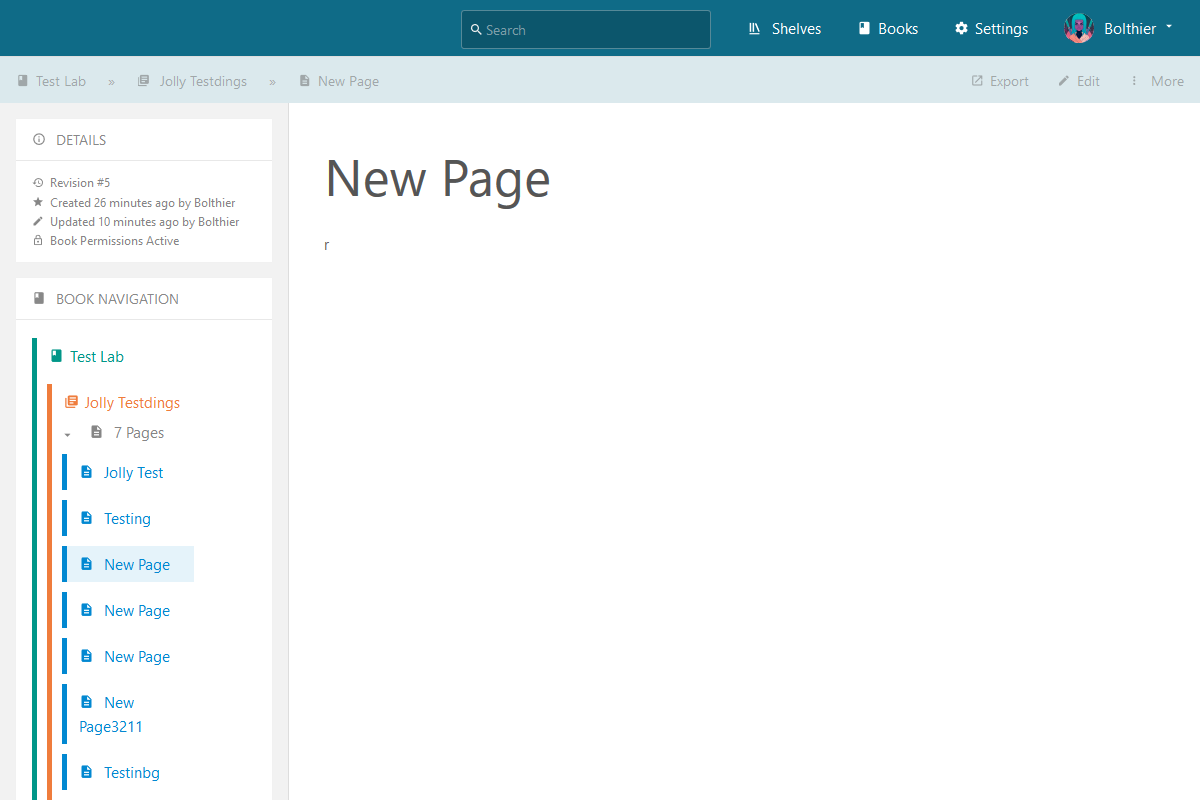
@Bolthier commented on GitHub (Jan 14, 2019):

Experiencing the same issue. With v24 and v25. Hoped it's going to be fixed in this release.

Steps to Reproduce

  1. Create several new pages
  2. Leave the page blank.
  3. Restrict the viewport so the navbar has to scroll. Reload the site.
  4. Can't scroll past the page content.

Example
screen shot 2019-01-14 at 20 15 40
Viewport 1200x800 or below vh

Your Configuration (please complete the following information):

  • Exact BookStack Version (Found in settings): BookStack v0.25
  • PHP Version: 7.2
  • Hosting Method: Apache2
  • Tested Browser: Mozilla Firefox 64, Microsoft Edge
@Bolthier commented on GitHub (Jan 14, 2019): Experiencing the same issue. With v24 and v25. Hoped it's going to be fixed in this release. **Steps to Reproduce** 1. Create several new pages 2. Leave the page blank. 3. Restrict the viewport so the navbar has to scroll. Reload the site. 4. Can't scroll past the page content. **Example** ![screen shot 2019-01-14 at 20 15 40](https://user-images.githubusercontent.com/42382626/51135677-e45d4b80-183a-11e9-90d2-7f039bad6146.png) Viewport 1200x800 or below vh Your Configuration (please complete the following information): - Exact BookStack Version (Found in settings): BookStack v0.25 - PHP Version: 7.2 - Hosting Method: Apache2 - Tested Browser: Mozilla Firefox 64, Microsoft Edge
Sign in to join this conversation.
1 Participants
Notifications
Due Date
No due date set.
Dependencies

No dependencies set.

Reference: starred/BookStack#730