Collapsible Content Blocks #72

Closed
opened 2026-02-04 16:30:57 +03:00 by OVERLORD · 20 comments
Owner

Originally created by @cpressland on GitHub (Mar 10, 2016).

Originally assigned to: @ssddanbrown on GitHub.

It'd be awesome to be able to create FAQ's within Bookstack with Expandable and Collapsible text. For example: http://www.w3schools.com/jquerymobile/jquerymobile_collapsibles.asp

Originally created by @cpressland on GitHub (Mar 10, 2016). Originally assigned to: @ssddanbrown on GitHub. It'd be awesome to be able to create FAQ's within Bookstack with Expandable and Collapsible text. For example: http://www.w3schools.com/jquerymobile/jquerymobile_collapsibles.asp
OVERLORD added the 🛠️ Enhancement📝 WYSIWYG Editor> Markdown Editor labels 2026-02-04 16:30:57 +03:00
Author
Owner

@Di2g10 commented on GitHub (Jun 13, 2016):

i would also want to be able to colapse Images / Code Snippets

@Di2g10 commented on GitHub (Jun 13, 2016): i would also want to be able to colapse Images / Code Snippets
Author
Owner

@ghost commented on GitHub (Sep 13, 2017):

If I could add to this, what I think would work well would be if you added into the rich editor Panels that could be collapsible. Would also be nice to have panels as they could be colored.

@ghost commented on GitHub (Sep 13, 2017): If I could add to this, what I think would work well would be if you added into the rich editor Panels that could be collapsible. Would also be nice to have panels as they could be colored.
Author
Owner

@ssddanbrown commented on GitHub (Jun 18, 2018):

Just to add, Would be ideal to use the proper browser-native tags for this:
https://developer.mozilla.org/en-US/docs/Web/HTML/Element/details

Not supported by IE/Edge but it's being worked on for edge. Will need some simple IE/edge only JS for now to support functionality on those.

@ssddanbrown commented on GitHub (Jun 18, 2018): Just to add, Would be ideal to use the proper browser-native tags for this: https://developer.mozilla.org/en-US/docs/Web/HTML/Element/details Not supported by IE/Edge but it's being worked on for edge. Will need some simple IE/edge only JS for now to support functionality on those.
Author
Owner

@aljawaid commented on GitHub (Aug 21, 2018):

This would be excellent

@aljawaid commented on GitHub (Aug 21, 2018): This would be excellent
Author
Owner

@Valiantiam commented on GitHub (Dec 29, 2018):

I have to say this would be huge. The ability to expand / collapse large codeblock even, would be enormously helpful regarding documentation relating to IT especially.

@Valiantiam commented on GitHub (Dec 29, 2018): I have to say this would be huge. The ability to expand / collapse large codeblock even, would be enormously helpful regarding documentation relating to IT especially.
Author
Owner

@drmax24 commented on GitHub (Jun 27, 2019):

Any news on this?
Can I use some plugin to have this feature already?
Without this feature wiki is unusable for us.

@drmax24 commented on GitHub (Jun 27, 2019): Any news on this? Can I use some plugin to have this feature already? Without this feature wiki is unusable for us.
Author
Owner

@ssddanbrown commented on GitHub (Jun 27, 2019):

@drmax24 Nope nothing at this time. An editor review is on the road-map, at which point features like this may be considered. The transition of edge browser to chromium will probably make this a little easier.

@ssddanbrown commented on GitHub (Jun 27, 2019): @drmax24 Nope nothing at this time. An editor review is on the road-map, at which point features like this may be considered. The transition of edge browser to chromium will probably make this a little easier.
Author
Owner

@X-15 commented on GitHub (Jan 20, 2020):

@ssddanbrown Hey, I was fighting myself through the issues and pull requests and either I am blind or I actually couldn't find any info on this? Spoilers actually are a very needed feature for MSP documentation purposes and am actually very surprised to find out it's not implemented. Would be amazing if it was in 0.28.0! Pretty pretty please???

@X-15 commented on GitHub (Jan 20, 2020): @ssddanbrown Hey, I was fighting myself through the issues and pull requests and either I am blind or I actually couldn't find any info on this? Spoilers actually are a very needed feature for MSP documentation purposes and am actually very surprised to find out it's not implemented. Would be amazing if it was in 0.28.0! Pretty pretty please???
Author
Owner

@haripako commented on GitHub (Apr 23, 2020):

This would be great if it comes in any of the next upcoming updates.

@haripako commented on GitHub (Apr 23, 2020): This would be great if it comes in any of the next upcoming updates.
Author
Owner

@Science4583 commented on GitHub (Aug 8, 2020):

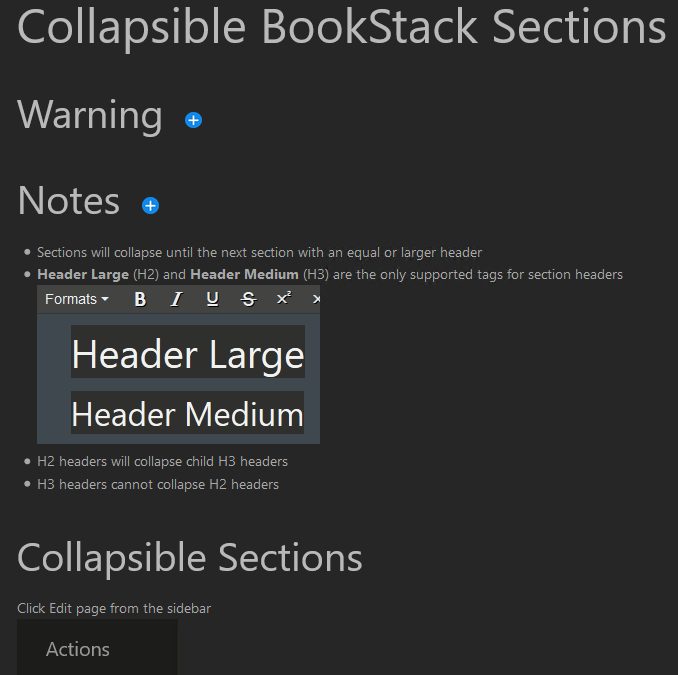
I ended up writing a hack to get this done. I put this in the Custom HTML Header section and added jquery and a png to /uploads. To use it I add class="collapse" or class="collapsible" to an H2 or H3 tag on a page using the Source Editor. It looks a bit funky in action but it's close enough.

<script src="/uploads/jquery-3.5.1.min.js"></script>
<script>
    function setCollapseStop (tag) {
        // Collapse all smaller headers
        if ( tag == "H1") {
            collapseStop = "H1";
        }
        if (tag == "H2") {
                collapseStop = "H1,H2";
        }
        if (tag == "H3") {
                collapseStop = "H1,H2,H3";
        };
        return collapseStop;
    };

    // Actions to perform when the page is loaded
    $(document).ready(function () {
        
        // Find all "collapse" class members and collapse them on load
        $(".collapse").each(function (i, item) {
            var collapseTag = $(item).prop("tagName")
            setCollapseStop(collapseTag);
            $(item).nextUntil(collapseStop).toggle();

            // Add "collapsible" class if missing
            if (!$(item).hasClass("collapsible")) {
                $(item).addClass("collapsible");
            };
        })

        // Add an image and target for users to expand sections
        $(".collapsible").append("&nbsp;&nbsp;<img src='/uploads/plus.png' style='max-width: 2%; cursor: pointer;' class='collapseimg' />");
    });


    // Actions to perform when the expand toggle image is clicked
    $(document).on('click', '.collapseimg', function () {
        var collapseTag = $(this).parent().prop("tagName");
        setCollapseStop(collapseTag);
        // Slide toggle might look like an accordion
        $(this).parent().nextUntil(collapseStop).slideToggle();
    });
</script>

Ends up looking like
image

@Science4583 commented on GitHub (Aug 8, 2020): I ended up writing a hack to get this done. I put this in the Custom HTML Header section and added jquery and a png to `/uploads`. To use it I add `class="collapse"` or `class="collapsible"` to an H2 or H3 tag on a page using the Source Editor. It looks a bit funky in action but it's close enough. ```html <script src="/uploads/jquery-3.5.1.min.js"></script> <script> function setCollapseStop (tag) { // Collapse all smaller headers if ( tag == "H1") { collapseStop = "H1"; } if (tag == "H2") { collapseStop = "H1,H2"; } if (tag == "H3") { collapseStop = "H1,H2,H3"; }; return collapseStop; }; // Actions to perform when the page is loaded $(document).ready(function () { // Find all "collapse" class members and collapse them on load $(".collapse").each(function (i, item) { var collapseTag = $(item).prop("tagName") setCollapseStop(collapseTag); $(item).nextUntil(collapseStop).toggle(); // Add "collapsible" class if missing if (!$(item).hasClass("collapsible")) { $(item).addClass("collapsible"); }; }) // Add an image and target for users to expand sections $(".collapsible").append("&nbsp;&nbsp;<img src='/uploads/plus.png' style='max-width: 2%; cursor: pointer;' class='collapseimg' />"); }); // Actions to perform when the expand toggle image is clicked $(document).on('click', '.collapseimg', function () { var collapseTag = $(this).parent().prop("tagName"); setCollapseStop(collapseTag); // Slide toggle might look like an accordion $(this).parent().nextUntil(collapseStop).slideToggle(); }); </script> ``` Ends up looking like ![image](https://user-images.githubusercontent.com/5973940/89714742-f5b2ff00-d96e-11ea-906d-78d4d2fd3a5d.png)
Author
Owner

@kirillnad commented on GitHub (Nov 12, 2020):

How it works

Markdown:

<div class=accordion>

### Spoiler
It's me - a spoiler. I am collapsible!  

</div>

Custom HTML:

<link rel="stylesheet" href="//code.jquery.com/ui/1.12.1/themes/base/jquery-ui.css">
<script src="https://code.jquery.com/jquery-1.12.4.js"></script>
<script src="https://code.jquery.com/ui/1.12.1/jquery-ui.js"></script>

<script>
  $( function() {
    $( ".accordion" ).accordion({
      heightStyle: "content",
      collapsible: true,
      active: false
    });
  } );
</script>

Based on JQuery Accordion

@kirillnad commented on GitHub (Nov 12, 2020): ![How it works](https://user-images.githubusercontent.com/2784530/98876438-57fc2e00-248f-11eb-8d7d-0e62dacd0369.gif) #### Markdown: ``` <div class=accordion> ### Spoiler It's me - a spoiler. I am collapsible! It's me - a spoiler. I am collapsible! It's me - a spoiler. I am collapsible! It's me - a spoiler. I am collapsible! It's me - a spoiler. I am collapsible! </div> ``` #### Custom HTML: ``` <link rel="stylesheet" href="//code.jquery.com/ui/1.12.1/themes/base/jquery-ui.css"> <script src="https://code.jquery.com/jquery-1.12.4.js"></script> <script src="https://code.jquery.com/ui/1.12.1/jquery-ui.js"></script> <script> $( function() { $( ".accordion" ).accordion({ heightStyle: "content", collapsible: true, active: false }); } ); </script> ``` Based on [JQuery Accordion](https://api.jqueryui.com/accordion/)
Author
Owner

@technerdist commented on GitHub (Apr 27, 2021):

I tried to use mbazdell's solution above, but I'm missing something. I am a total beginner and do not know HTML. This is why I use Bookstack, because it's easy to use. Is there any way to simplify this or build it in to the platform? It does not seem like a complicated solution. Nested comment blocks are absolutely necessary to a wiki. Please help out those of use who use the WYSIWYG editor exclusively.

@technerdist commented on GitHub (Apr 27, 2021): I tried to use mbazdell's solution above, but I'm missing something. I am a total beginner and do not know HTML. This is why I use Bookstack, because it's easy to use. Is there any way to simplify this or build it in to the platform? It does not seem like a complicated solution. Nested comment blocks are absolutely necessary to a wiki. Please help out those of use who use the WYSIWYG editor exclusively.
Author
Owner

@FingerlessGlov3s commented on GitHub (Aug 7, 2021):

+1 on adding this, ideal for code blocks.

@FingerlessGlov3s commented on GitHub (Aug 7, 2021): +1 on adding this, ideal for code blocks.
Author
Owner

@afbpinheiro commented on GitHub (Aug 8, 2021):

@ssddanbrown I wonder if this couldn't be implemented with the HTML tags "details" and "summary".
Reference: https://developer.mozilla.org/en-US/docs/Web/HTML/Element/summary

To anyone else in this thread, maybe something like this works for you:

<details>
    <summary>Click to expand</summary>
    Hidden text
</details>

Demo:

Click to expand Hidden text
@afbpinheiro commented on GitHub (Aug 8, 2021): @ssddanbrown I wonder if this couldn't be implemented with the HTML tags "details" and "summary". Reference: https://developer.mozilla.org/en-US/docs/Web/HTML/Element/summary To anyone else in this thread, maybe something like this works for you: ``` <details> <summary>Click to expand</summary> Hidden text </details> ``` Demo: <details> <summary>Click to expand</summary> Hidden text </details>
Author
Owner

@ssddanbrown commented on GitHub (Aug 8, 2021):

@afbpinheiro Yeah, That was my suggestion above back in 2018. We now wouldn't be held back by IE/Edge. This this can already be used by Markdown editor users on BookStack, I'm planning on reworking the editors as part of #2738 so I don't really feel like it's worth adding to the WYSIWYG editor at this time.

@ssddanbrown commented on GitHub (Aug 8, 2021): @afbpinheiro Yeah, That was my suggestion [above back in 2018](https://github.com/BookStackApp/BookStack/issues/78#issuecomment-398177711). We now wouldn't be held back by IE/Edge. This this can already be used by Markdown editor users on BookStack, I'm planning on reworking the editors as part of #2738 so I don't really feel like it's worth adding to the WYSIWYG editor at this time.
Author
Owner

@geefix commented on GitHub (Sep 15, 2021):

I faced this issue too. While @kirillnad 's approach was not that bad, i decided to make my own while reworking on the editor is done. I think this is a lot more appealing.

Add following to your custom html:

jquery is required for this:

<script src="https://cdnjs.cloudflare.com/ajax/libs/jquery/3.6.0/jquery.min.js"></script>

Inside the <script> tag:

$(document).ready(function () {
  /* collapsible h1-h6 */
  var counter = 0;
  $('.collapsible').each(function () {  
    $(this).css('cursor', 'pointer');
    $(this).attr('data-collapse-id', counter);
    
    displayNone = $(this).hasClass('collapsed') ? 'style="display: none;"' : '';
    $(this).nextUntil('h1,h2,h3,h4,h5,h6').wrapAll('<div ' + displayNone + ' data-collapse-target-id="' + counter + '"></div>');

    $(this).on('click', function () {
      collapseId = $(this).attr('data-collapse-id');
      targetEl = $('div[data-collapse-target-id=' + collapseId + ']');
      targetEl.toggle();

      if ($(targetEl).css('display') == 'none') {
        $('[data-collapse-id=' + collapseId + ']').addClass('collapsed');
      } else {
        $('[data-collapse-id=' + collapseId + ']').removeClass('collapsed');
      }
    });
    
    counter++;
  });
});

A bit styling (inside <style> tag):

.collapsible:after {
  content: ' ';
  border-left: 6px solid transparent;
  border-right: 6px solid transparent;
  border-top: 6px solid #656464;
  font-size: 0pt;
  position: relative;
  top: -4px;
  left: 10px;
}

.collapsible.collapsed:after {
  border-top: 6px solid transparent;
  border-bottom: 6px solid transparent;
  border-left: 6px solid #656464;
  top: -6px;
}

When this is added to custom html, all you need to do is assign a class "collapsible" to any element.
When you add "collapsed", the content block is collapsed initially.

Garnished with a neat arrow.

A little presentation how this works and looks like.

20210915_205214

@geefix commented on GitHub (Sep 15, 2021): I faced this issue too. While @kirillnad 's approach was not that bad, i decided to make my own while reworking on the editor is done. I think this is a lot more appealing. Add following to your custom html: jquery is required for this: ```<script src="https://cdnjs.cloudflare.com/ajax/libs/jquery/3.6.0/jquery.min.js"></script>``` Inside the <script> tag: ``` $(document).ready(function () { /* collapsible h1-h6 */ var counter = 0; $('.collapsible').each(function () { $(this).css('cursor', 'pointer'); $(this).attr('data-collapse-id', counter); displayNone = $(this).hasClass('collapsed') ? 'style="display: none;"' : ''; $(this).nextUntil('h1,h2,h3,h4,h5,h6').wrapAll('<div ' + displayNone + ' data-collapse-target-id="' + counter + '"></div>'); $(this).on('click', function () { collapseId = $(this).attr('data-collapse-id'); targetEl = $('div[data-collapse-target-id=' + collapseId + ']'); targetEl.toggle(); if ($(targetEl).css('display') == 'none') { $('[data-collapse-id=' + collapseId + ']').addClass('collapsed'); } else { $('[data-collapse-id=' + collapseId + ']').removeClass('collapsed'); } }); counter++; }); }); ``` A bit styling (inside <style> tag): ``` .collapsible:after { content: ' '; border-left: 6px solid transparent; border-right: 6px solid transparent; border-top: 6px solid #656464; font-size: 0pt; position: relative; top: -4px; left: 10px; } .collapsible.collapsed:after { border-top: 6px solid transparent; border-bottom: 6px solid transparent; border-left: 6px solid #656464; top: -6px; } ``` When this is added to custom html, all you need to do is assign a class "collapsible" to any element. When you add "collapsed", the content block is collapsed initially. Garnished with a neat arrow. A little presentation how this works and looks like. ![20210915_205214](https://user-images.githubusercontent.com/4639153/133493101-13fd7d5e-bf38-4851-9a28-85ebb064fd87.gif)
Author
Owner

@topa-LE commented on GitHub (Dec 5, 2021):

I need for my bookstack now the spoiler in the edit of the posts Is this now current? Thanks

@topa-LE commented on GitHub (Dec 5, 2021): I need for my bookstack now the spoiler in the edit of the posts Is this now current? Thanks
Author
Owner

@ssddanbrown commented on GitHub (Dec 6, 2021):

@topa-LE This is not yet a built-in feature in the WYSIWYG editor. My last comment above is still the current status: https://github.com/BookStackApp/BookStack/issues/78#issuecomment-894786260

@ssddanbrown commented on GitHub (Dec 6, 2021): @topa-LE This is not yet a built-in feature in the WYSIWYG editor. My last comment above is still the current status: https://github.com/BookStackApp/BookStack/issues/78#issuecomment-894786260
Author
Owner

@finzzz commented on GitHub (Jan 23, 2022):

Is this going to be implemented at all? I feel like this is very much needed when reading a long wiki. It would be awesome if every headers and code blocks are automatically collapsible.

@finzzz commented on GitHub (Jan 23, 2022): Is this going to be implemented at all? I feel like this is very much needed when reading a long wiki. It would be awesome if every headers and code blocks are automatically collapsible.
Author
Owner

@ssddanbrown commented on GitHub (Feb 9, 2022):

Collapsible sections, backed by native details blocks has now been added to the editor via work in #3260.

These can be used to wrap pretty much any other block type (Code, Callouts, Headers, Text, Images) and the label displayed will be editable. Note, this does not use headers as collapse boundaries as per some of the custom implementations above.

This will be part of the next feature release, roughly planned for later this month. Since the work has been merged, I'll close off this issue.

@ssddanbrown commented on GitHub (Feb 9, 2022): Collapsible sections, backed by native [details](https://developer.mozilla.org/en-US/docs/Web/HTML/Element/details) blocks has now been added to the editor via work in #3260. These can be used to wrap pretty much any other block type (Code, Callouts, Headers, Text, Images) and the label displayed will be editable. Note, this does not use headers as collapse boundaries as per some of the custom implementations above. This will be part of the next feature release, roughly planned for later this month. Since the work has been merged, I'll close off this issue.
Sign in to join this conversation.
1 Participants
Notifications
Due Date
No due date set.
Dependencies

No dependencies set.

Reference: starred/BookStack#72