Tags panel should be always visible in editing pages #4273

Closed
opened 2026-02-05 08:23:57 +03:00 by OVERLORD · 8 comments
Owner

Originally created by @mlipok on GitHub (Oct 19, 2023).

Describe the feature you'd like

When I start new page or just want to edit page then I see:
image

I always should CLICK open and fullfill/correct tags, but in the nature of things, sometimes I forget about this obligation.

There is so many place on the left and right, that I often come to the conclusion that it's a waste of screen space, especially when I think that after turning on the TAG panel, everything looks better.

image

Please add an option to automatic opening of the TAGS panel immediately after opening the page editor.

Describe the benefits this would bring to existing BookStack users

New users will start using TAGS more often
Users who have already used TAGS will start updating them.
Users who were in the habit of updating TAGS will start to do it more easily.

Can the goal of this request already be achieved via other means?

Yes. You have to remember and click.

But the role of the software is not that the user has to remember something, but that the software facilitates and secures the correctness of operations.

Have you searched for an existing open/closed issue?

  • I have searched for existing issues and none cover my fundamental request

How long have you been using BookStack?

1 to 5 years

Additional context

No response

Originally created by @mlipok on GitHub (Oct 19, 2023). ### Describe the feature you'd like When I start new page or just want to edit page then I see: ![image](https://github.com/BookStackApp/BookStack/assets/11089482/c8d7fb8d-9ba7-4702-940f-64fcdc793e67) I always should CLICK open and fullfill/correct tags, but in the nature of things, sometimes I forget about this obligation. There is so many place on the left and right, that I often come to the conclusion that it's a waste of screen space, especially when I think that after turning on the TAG panel, everything looks better. ![image](https://github.com/BookStackApp/BookStack/assets/11089482/848cffee-0bb8-481c-828b-83649bb40de5) Please add an option to automatic opening of the TAGS panel immediately after opening the page editor. ### Describe the benefits this would bring to existing BookStack users New users will start using TAGS more often Users who have already used TAGS will start updating them. Users who were in the habit of updating TAGS will start to do it more easily. ### Can the goal of this request already be achieved via other means? Yes. You have to remember and click. But the role of the software is not that the user has to remember something, but that the software facilitates and secures the correctness of operations. ### Have you searched for an existing open/closed issue? - [X] I have searched for existing issues and none cover my fundamental request ### How long have you been using BookStack? 1 to 5 years ### Additional context _No response_
OVERLORD added the 🔨 Feature Request label 2026-02-05 08:23:57 +03:00
Author
Owner

@radiantwave commented on GitHub (Oct 19, 2023):

I think this should be a setting for the preferences.
Btw did you see the recent design changes to the editor?
#4604

@radiantwave commented on GitHub (Oct 19, 2023): I think this should be a setting for the preferences. Btw did you see the recent design changes to the editor? #4604
Author
Owner

@mlipok commented on GitHub (Oct 20, 2023):

I think this should be a setting for the preferences.

Agree.
EDIT: by user or global setting ? I prefer global to mean for all users in a specific installation.

Btw did you see the recent design changes to the editor?
#4604

checking now.

Thanks.

@mlipok commented on GitHub (Oct 20, 2023): > I think this should be a setting for the preferences. Agree. EDIT: by user or global setting ? I prefer global to mean for all users in a specific installation. > Btw did you see the recent design changes to the editor? > #4604 checking now. Thanks.
Author
Owner

@mlipok commented on GitHub (Oct 20, 2023):

Checked out: https://github.com/BookStackApp/BookStack/pull/4604

I saw this screen:
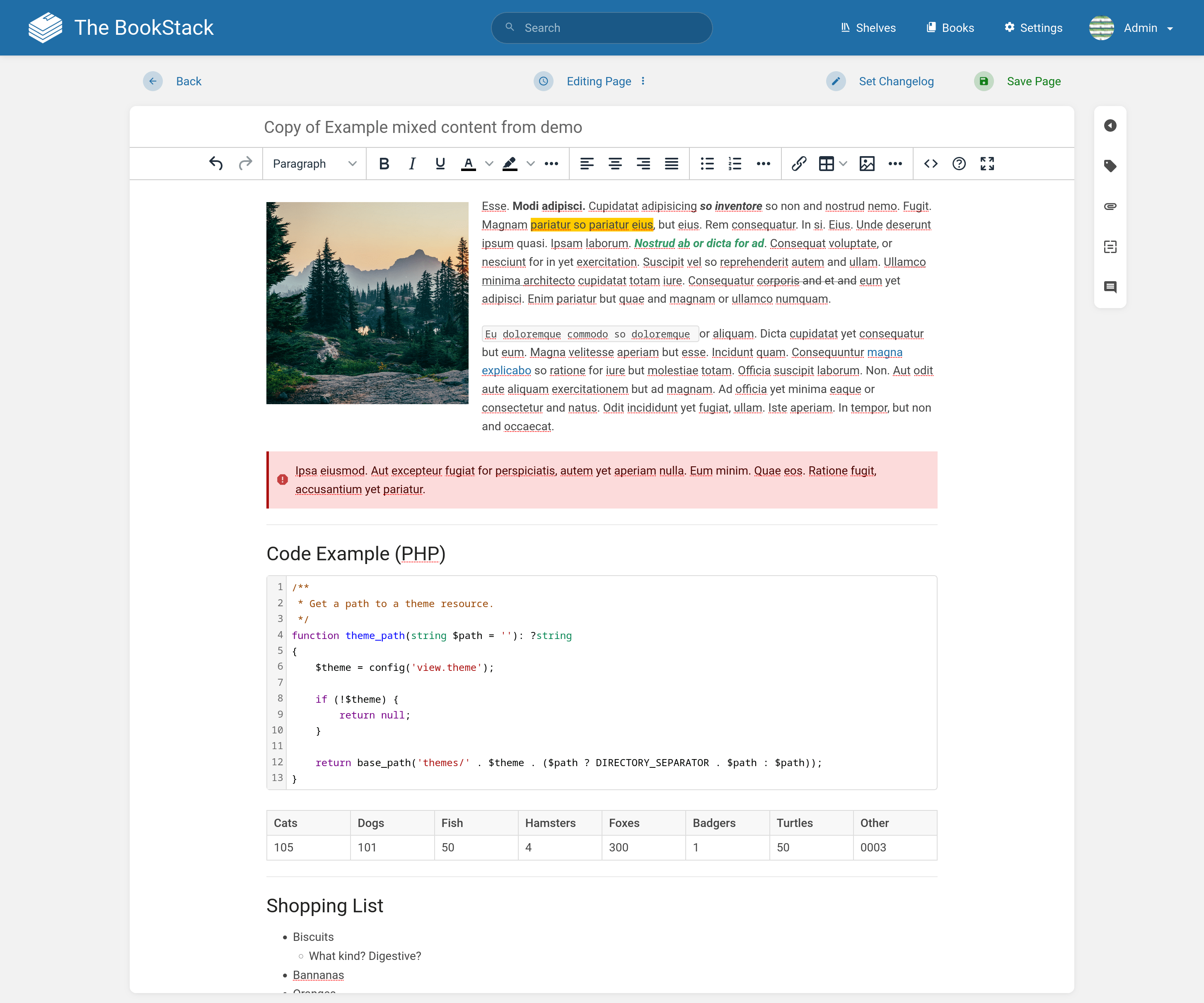
image

@ssddanbrown :
Please attach one additionall screenshot with:
Zoom out for example 80% and with visible TABS panel

EDIT:
btw. how do you plan the release date?

@mlipok commented on GitHub (Oct 20, 2023): Checked out: https://github.com/BookStackApp/BookStack/pull/4604 I saw this screen: ![image](https://user-images.githubusercontent.com/8343178/275256112-5500c564-1d95-4033-aec4-0fb0bfd2a409.png) @ssddanbrown : Please attach one additionall screenshot with: Zoom out for example 80% and with visible TABS panel EDIT: btw. how do you plan the release date?
Author
Owner

@mlipok commented on GitHub (Oct 20, 2023):

Corelated FR: https://github.com/BookStackApp/BookStack/issues/4622

@mlipok commented on GitHub (Oct 20, 2023): Corelated FR: https://github.com/BookStackApp/BookStack/issues/4622
Author
Owner

@ssddanbrown commented on GitHub (Oct 20, 2023):

Please attach one additionall screenshot with:

You'll be able to experience and screenshot the changes as much as you like upon the next release.

btw. how do you plan the release date?

The general high-level process can be found in our release process docs.
If you're specifically asking in reference to the next upcoming feature release, I'm generally aiming to get it out before the end of this month.


In regards to the requested feature here, this is usually a level of option/configuration I try to avoid.

Assuming you're using the WYSIWYG editor, you could use something like this via the "Custom HTML Head Content" customization setting to auto-click-open the tags in the toolbox:

<script>
    // Replaces the editor content with redacted message 3 seconds after load.
    window.addEventListener('editor-tinymce::setup', event => {
        const toolbox = document.querySelector('.floating-toolbox');
        toolbox.style.transition = 'none';

        const tabButton = toolbox.querySelector('button[data-tab="tags"]');
        tabButton.click();
        setTimeout(() => toolbox.style.transition = null, 200);
    });
</script>
@ssddanbrown commented on GitHub (Oct 20, 2023): > Please attach one additionall screenshot with: You'll be able to experience and screenshot the changes as much as you like upon the next release. > btw. how do you plan the release date? The general high-level process can be found [in our release process docs](https://github.com/BookStackApp/BookStack/blob/development/dev/docs/release-process.md). If you're specifically asking in reference to the next upcoming feature release, I'm generally aiming to get it out before the end of this month. --- In regards to the requested feature here, this is usually a level of option/configuration I try to avoid. Assuming you're using the WYSIWYG editor, you could use something like this via the "Custom HTML Head Content" customization setting to auto-click-open the tags in the toolbox: ```html <script> // Replaces the editor content with redacted message 3 seconds after load. window.addEventListener('editor-tinymce::setup', event => { const toolbox = document.querySelector('.floating-toolbox'); toolbox.style.transition = 'none'; const tabButton = toolbox.querySelector('button[data-tab="tags"]'); tabButton.click(); setTimeout(() => toolbox.style.transition = null, 200); }); </script> ```
Author
Owner

@mlipok commented on GitHub (Oct 20, 2023):

"Custom HTML Head Content"

I just edit
https://....../settings/customization

and this did the trick.
Awesome.

as for me the issue can be considered resolved.

@mlipok commented on GitHub (Oct 20, 2023): > "Custom HTML Head Content" I just edit https://....../settings/customization and this did the trick. Awesome. as for me the issue can be considered resolved.
Author
Owner

@mlipok commented on GitHub (Oct 20, 2023):

btw.
Is this good idea to add this solution to:
https://github.com/BookStackApp/hacks
?

@mlipok commented on GitHub (Oct 20, 2023): btw. Is this good idea to add this solution to: https://github.com/BookStackApp/hacks ?
Author
Owner

@ssddanbrown commented on GitHub (Oct 20, 2023):

and this did the trick. Awesome. as for me the issue can be considered resolved

Great, I'll therefore close this off.

Is this good idea to add this solution to:

Maybe, I'll think about if I'd want to add this. Could be helpful but is not something previously requested nor something that would display any new ideas/techniques of customization.

@ssddanbrown commented on GitHub (Oct 20, 2023): > and this did the trick. Awesome. as for me the issue can be considered resolved Great, I'll therefore close this off. > Is this good idea to add this solution to: Maybe, I'll think about if I'd want to add this. Could be helpful but is not something previously requested nor something that would display any new ideas/techniques of customization.
Sign in to join this conversation.
1 Participants
Notifications
Due Date
No due date set.
Dependencies

No dependencies set.

Reference: starred/BookStack#4273