registration fails with login loop #3725

Closed
opened 2026-02-05 07:14:55 +03:00 by OVERLORD · 22 comments
Owner

Originally created by @franciscojasousa on GitHub (Apr 3, 2023).

Describe the Bug

Hi,
first off, let just say, BookStack is a wonderful platform that I've been using for a while now with several implementations.

The one that uses Active Directory integration for authentication was working until the latest update.
Now, every time a user tries to register, receives the e-mail, clicks the link and it opens the former page stating that an e-mail was sent.

Can someone please advise?

Thank you so much

Francisco

Steps to Reproduce

  1. User logins for the first time;
  2. Receive information that e-mail was sent;
  3. On the received e-mail, clicks the link to verify;
  4. Page stating that e-mail was sent is shown again.

Expected Behaviour

Upon clicking the link, in the received e-mail, login page appears and login happens with success.

Screenshots or Additional Context

nao confirmado
confirmar email

Browser Details

Brave 1.49.128 64bits

Exact BookStack Version

v23.02.1

PHP Version

PHP 8.1.2-1ubuntu2.11 (cli) (built: Feb 22 2023 22:56:18) (NTS)

Hosting Environment

Ubuntu Server 22.04

Originally created by @franciscojasousa on GitHub (Apr 3, 2023). ### Describe the Bug Hi, first off, let just say, BookStack is a wonderful platform that I've been using for a while now with several implementations. The one that uses Active Directory integration for authentication was working until the latest update. Now, every time a user tries to register, receives the e-mail, clicks the link and it opens the former page stating that an e-mail was sent. Can someone please advise? Thank you so much Francisco ### Steps to Reproduce 1. User logins for the first time; 2. Receive information that e-mail was sent; 3. On the received e-mail, clicks the link to verify; 4. Page stating that e-mail was sent is shown again. ### Expected Behaviour Upon clicking the link, in the received e-mail, login page appears and login happens with success. ### Screenshots or Additional Context ![nao confirmado](https://user-images.githubusercontent.com/3234969/229482991-0294ff36-dd60-4d3e-bcdf-c24e2519ff7e.png) ![confirmar email](https://user-images.githubusercontent.com/3234969/229482993-498d4fbe-6d5b-4f50-99e6-8c4f0f99950c.png) ### Browser Details Brave 1.49.128 64bits ### Exact BookStack Version v23.02.1 ### PHP Version PHP 8.1.2-1ubuntu2.11 (cli) (built: Feb 22 2023 22:56:18) (NTS) ### Hosting Environment Ubuntu Server 22.04
OVERLORD added the 🐛 Bug label 2026-02-05 07:14:55 +03:00
Author
Owner

@ssddanbrown commented on GitHub (Apr 3, 2023):

Hi @franciscojasousa,

it opens the former page stating that an e-mail was sent.

Do you see a notification pop up (red/green pop-up in top-right) on this stage when going through the process?

@ssddanbrown commented on GitHub (Apr 3, 2023): Hi @franciscojasousa, > it opens the former page stating that an e-mail was sent. Do you see a notification pop up (red/green pop-up in top-right) on this stage when going through the process?
Author
Owner

@franciscojasousa commented on GitHub (Apr 3, 2023):

Hi Dan,
thank you for your prompt reply.
It goes to the main page, the user clicks in Login, inserts AD credentials
and gets the page stating that the e-mail is not confirmed (see attached
image).

Thank you for your time,

Francisco Sousa
+351936675655
https://pages2read.com
Navegação segura na Web

[REDACTED BY SSDDANBROWN]

On Mon, Apr 3, 2023 at 12:18 PM Dan Brown @.***> wrote:

Hi @franciscojasousa https://github.com/franciscojasousa,

it opens the former page stating that an e-mail was sent.

Do you see a notification pop up (red/green pop-up in top-right) on this
stage when going through the process?


Reply to this email directly, view it on GitHub
https://github.com/BookStackApp/BookStack/issues/4152#issuecomment-1494137966,
or unsubscribe
https://github.com/notifications/unsubscribe-auth/AAYVZGMT7OKZMRFQ53IKLETW7KWWXANCNFSM6AAAAAAWRDU55Y
.
You are receiving this because you were mentioned.Message ID:
@.***>

@franciscojasousa commented on GitHub (Apr 3, 2023): Hi Dan, thank you for your prompt reply. It goes to the main page, the user clicks in Login, inserts AD credentials and gets the page stating that the e-mail is not confirmed (see attached image). Thank you for your time, *Francisco Sousa* +351936675655 https://pages2read.com Navegação segura na Web [REDACTED BY SSDDANBROWN] On Mon, Apr 3, 2023 at 12:18 PM Dan Brown ***@***.***> wrote: > Hi @franciscojasousa <https://github.com/franciscojasousa>, > > it opens the former page stating that an e-mail was sent. > > Do you see a notification pop up (red/green pop-up in top-right) on this > stage when going through the process? > > — > Reply to this email directly, view it on GitHub > <https://github.com/BookStackApp/BookStack/issues/4152#issuecomment-1494137966>, > or unsubscribe > <https://github.com/notifications/unsubscribe-auth/AAYVZGMT7OKZMRFQ53IKLETW7KWWXANCNFSM6AAAAAAWRDU55Y> > . > You are receiving this because you were mentioned.Message ID: > ***@***.***> >
Author
Owner

@ssddanbrown commented on GitHub (Apr 3, 2023):

Hi @franciscojasousa, Please be aware that reply to email includes your BookStack URL, I removed it from your comment.
Also, I don't think it retains attachments if you meant an image to be provided with that message.

  • Did that attachment show a notification pop up (red/green pop-up in top-right)?
  • Do you expect or desire email confirmation functionality to be active/enabled?
@ssddanbrown commented on GitHub (Apr 3, 2023): Hi @franciscojasousa, Please be aware that reply to email includes your BookStack URL, I removed it from your comment. Also, I don't think it retains attachments if you meant an image to be provided with that message. - Did that attachment show a notification pop up (red/green pop-up in top-right)? - Do you expect or desire email confirmation functionality to be active/enabled?
Author
Owner

@franciscojasousa commented on GitHub (Apr 3, 2023):

Hi Dan,
thank you though no problem, I'm proud of using your product, it's been a wonderful tool (here's an external example).
Yes, the attachment was an image of the page shown to the user, after login, stating that the e-mail has not been verified.
And no, verification is not a must since it's used internally only but I'm restricting domains so that colaborators signup with instituion e-mail, and as such, it's intrinsically forced.
Is there something that I should be doing and that I've missed?
Kind regards

@franciscojasousa commented on GitHub (Apr 3, 2023): Hi Dan, thank you though no problem, I'm proud of using your product, it's been a wonderful tool (here's an [external example](https://guiastuga.pt/books/plataformas/page/bookstack-instalacao-em-ubuntu-2204)). Yes, the attachment was an image of the page shown to the user, after login, stating that the e-mail has not been verified. And no, verification is not a must since it's used internally only but I'm restricting domains so that colaborators signup with instituion e-mail, and as such, it's intrinsically forced. Is there something that I should be doing and that I've missed? Kind regards
Author
Owner

@ssddanbrown commented on GitHub (Apr 3, 2023):

Thanks @franciscojasousa,

It's still not clear from your message if you're seeing a pop-up notification (red/green pop-up in top-right) when seeing the final "your email has not been verified" view after clicking the email (First click from the email).
Note, this will be different when clicking from the email again.

Additionally:

  • Was email-confirmation working before the latest update or have you only recently started using domain restrictions?
  • What auth method are you using in BookStack for Active Directory?

The only thing I can think, which would lead back direct to the email confirmation view, is that the token is expiring. The confirmation takes have a 24 hour expiry. If the time/date on the server is behind then this could occur. You should be seeing The confirmation token has expired, A new confirmation email has been sent. notification warning in this case though hence my questioning around seeing a pop-up notification.

@ssddanbrown commented on GitHub (Apr 3, 2023): Thanks @franciscojasousa, It's still not clear from your message if you're seeing a pop-up notification (red/green pop-up in top-right) when seeing the final "your email has not been verified" view after clicking the email (First click from the email). **Note, this will be different when clicking from the email again**. Additionally: - Was email-confirmation working before the latest update or have you only recently started using domain restrictions? - What auth method are you using in BookStack for Active Directory? The only thing I can think, which would lead back direct to the email confirmation view, is that the token is expiring. The confirmation takes have a 24 hour expiry. If the time/date on the server is behind then this could occur. You should be seeing `The confirmation token has expired, A new confirmation email has been sent.` notification warning in this case though hence my questioning around seeing a pop-up notification.
Author
Owner

@franciscojasousa commented on GitHub (Apr 4, 2023):

Hi Dan,
it does not show a notification.
If the user clicks the link in the e-mail, it goes to the page thanking the user for the registration and if I copy the e-mail link and paste it in an anonymous browser tab, it goes to the main page, the user then clicks to login e it states that the e-mail is not verified.
It's a loop.
Thank you

Anotação 2023-04-04 084711

@franciscojasousa commented on GitHub (Apr 4, 2023): Hi Dan, it does not show a notification. If the user clicks the link in the e-mail, it goes to the page thanking the user for the registration and if I copy the e-mail link and paste it in an anonymous browser tab, it goes to the main page, the user then clicks to login e it states that the e-mail is not verified. It's a loop. Thank you ![Anotação 2023-04-04 084711](https://user-images.githubusercontent.com/3234969/229723994-41914f0c-2c7e-48f2-a2c5-aaedc646816c.jpg)
Author
Owner

@ssddanbrown commented on GitHub (Apr 4, 2023):

@franciscojasousa Thanks. Have attempted to re-produce this but no luck so far, everything works as expected.

Please could you answer the following from my previous message:

What auth method are you using in BookStack for Active Directory?

Additionally, how exactly have you installed BookStack? Is any of the server configuration custom or did you just follow a guide/script?

@ssddanbrown commented on GitHub (Apr 4, 2023): @franciscojasousa Thanks. Have attempted to re-produce this but no luck so far, everything works as expected. Please could you answer the following from my previous message: > What auth method are you using in BookStack for Active Directory? Additionally, how exactly have you installed BookStack? Is any of the server configuration custom or did you just follow a guide/script?
Author
Owner

@franciscojasousa commented on GitHub (Apr 4, 2023):

Hi Dan,
it's LDAP.
I've attached .env file scheenshot of the authentication section.
Thank you so much for your time

Anotação 2023-04-04 120049
Anotação 2023-04-04 120043

@franciscojasousa commented on GitHub (Apr 4, 2023): Hi Dan, it's LDAP. I've attached .env file scheenshot of the authentication section. Thank you so much for your time ![Anotação 2023-04-04 120049](https://user-images.githubusercontent.com/3234969/229772244-40ecfef1-5a0b-4ce6-b06f-0a68a3f09900.jpg) ![Anotação 2023-04-04 120043](https://user-images.githubusercontent.com/3234969/229772248-dd65978d-cb12-417c-a5a4-d323ce75304e.jpg)
Author
Owner

@franciscojasousa commented on GitHub (Apr 5, 2023):

P.S: Forgot to mention that I've followed the script.
Thank you Dan

@franciscojasousa commented on GitHub (Apr 5, 2023): P.S: Forgot to mention that I've followed the script. Thank you Dan
Author
Owner

@franciscojasousa commented on GitHub (Apr 6, 2023):

Hi Dan,
is there something I can do to solve this issue?
Kind regards and Happy Easter

@franciscojasousa commented on GitHub (Apr 6, 2023): Hi Dan, is there something I can do to solve this issue? Kind regards and Happy Easter
Author
Owner

@ssddanbrown commented on GitHub (Apr 6, 2023):

@franciscojasousa I just attempted to replicate this scenario, by performing an LDAP registration & login flows, on a domain restricted setup, using both public & non-public configured setups. This was on BookStack v23.02.2.
I was not able to reproduce any issues.
Each time I would be taken from the email back to the login page, with a notification advising of successful email confirmation. Proceeding to fill & submit the login form then worked as expected, providing access to the system.
I also downloaded Brave browser and tested the process there.

I'm still not really sure what would cause the scenario which you describe.
I can only suggest attempting to replicate with as many variables changes as possible, so test this process using a different browser, with a different LDAP login account, With a different (approved) email domain that ensures the email goes to a different email-service-provider (Like a spare gmail account? Potentially Microsoft's email link scanning is pre-emptively scanning the email and triggering the email confirmation early. I did try to replicate this potential flow but could still login fine in the end).

Otherwise, do you have anything else at play that's been unmentioned? Have you changed any webserver config after install? Do you have any proxies or things like Cloudflare at play?

@ssddanbrown commented on GitHub (Apr 6, 2023): @franciscojasousa I just attempted to replicate this scenario, by performing an LDAP registration & login flows, on a domain restricted setup, using both public & non-public configured setups. This was on BookStack v23.02.2. I was not able to reproduce any issues. Each time I would be taken from the email back to the login page, with a notification advising of successful email confirmation. Proceeding to fill & submit the login form then worked as expected, providing access to the system. I also downloaded Brave browser and tested the process there. I'm still not really sure what would cause the scenario which you describe. I can only suggest attempting to replicate with as many variables changes as possible, so test this process using a different browser, with a different LDAP login account, With a different (approved) email domain that ensures the email goes to a different email-service-provider (Like a spare gmail account? Potentially Microsoft's email link scanning is pre-emptively scanning the email and triggering the email confirmation early. I did try to replicate this potential flow but could still login fine in the end). Otherwise, do you have anything else at play that's been unmentioned? Have you changed any webserver config after install? Do you have any proxies or things like Cloudflare at play?
Author
Owner

@franciscojasousa commented on GitHub (Apr 6, 2023):

I do have a Sophos XGS as Proxy.
Monday will try to debug it even deeper.
Thank you so much for your time and effort, Dan.

@franciscojasousa commented on GitHub (Apr 6, 2023): I do have a Sophos XGS as Proxy. Monday will try to debug it even deeper. Thank you so much for your time and effort, Dan.
Author
Owner

@ssddanbrown commented on GitHub (Apr 17, 2023):

Since there's been no further follow-up I'm going to close this. If you need further help on this just comment and this can then be re-opened.

@ssddanbrown commented on GitHub (Apr 17, 2023): Since there's been no further follow-up I'm going to close this. If you need further help on this just comment and this can then be re-opened.
Author
Owner

@franciscojasousa commented on GitHub (Apr 19, 2023):

Hi Dan,
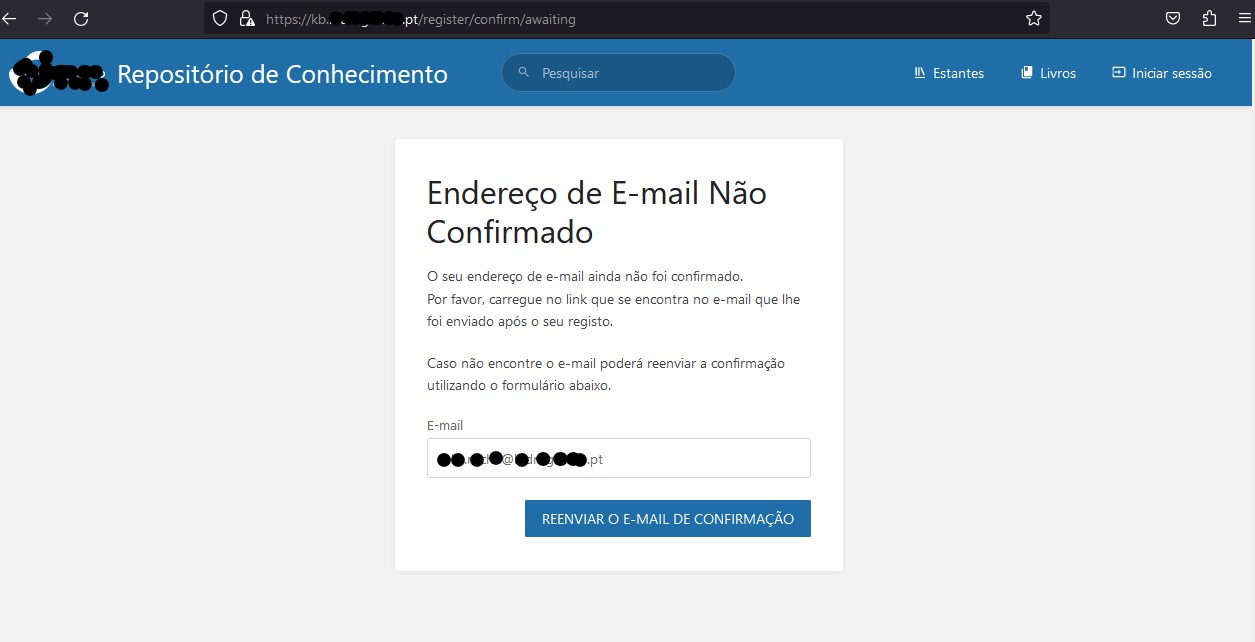
I've been trying to understand what might be the cause but still at a complete loss.

Have changed the password of the user that does the LDAP queries, changed domain controller, updated server, we do have a proxy but is ignored since this domain is internal so the querie made by the browser is replied directly by the web server, in this case, the bookstack server.

All users that are confirmed are working without any issues.

All new users pass through the same glitch:
They login, get the message that an e-mail was sent for account verification, e-mail arrives, they click the link to confirm, a page opens thanking the user for the registration and to please verify the e-mail;
If they try to login, get the message that e-mail is not confirmed and should confirm or resend, they resend, get the e-mail, click the link and the loop continues.

With the above what I can say is:
LDAP communication occurs successfully (the user is created in Bookstack with all details inclusively photo);
E-mail communication occurs, the user gets all the e-mails sent;
The state of the account, in bookstack, is not changing from unverified to verified.

Please advise and thank you so much for any help you can provide (I'm eager to roll out this platform for our 300+ users).

Kind regards

Francisco

@franciscojasousa commented on GitHub (Apr 19, 2023): Hi Dan, I've been trying to understand what might be the cause but still at a complete loss. Have changed the password of the user that does the LDAP queries, changed domain controller, updated server, we do have a proxy but is ignored since this domain is internal so the querie made by the browser is replied directly by the web server, in this case, the bookstack server. All users that are confirmed are working without any issues. All new users pass through the same glitch: They login, get the message that an e-mail was sent for account verification, e-mail arrives, they click the link to confirm, a page opens thanking the user for the registration and to please verify the e-mail; If they try to login, get the message that e-mail is not confirmed and should confirm or resend, they resend, get the e-mail, click the link and the loop continues. With the above what I can say is: LDAP communication occurs successfully (the user is created in Bookstack with all details inclusively photo); E-mail communication occurs, the user gets all the e-mails sent; The state of the account, in bookstack, is not changing from unverified to verified. Please advise and thank you so much for any help you can provide (I'm eager to roll out this platform for our 300+ users). Kind regards Francisco
Author
Owner

@ssddanbrown commented on GitHub (Apr 19, 2023):

Hi @franciscojasousa,

Very strange. One thing I can think to try:

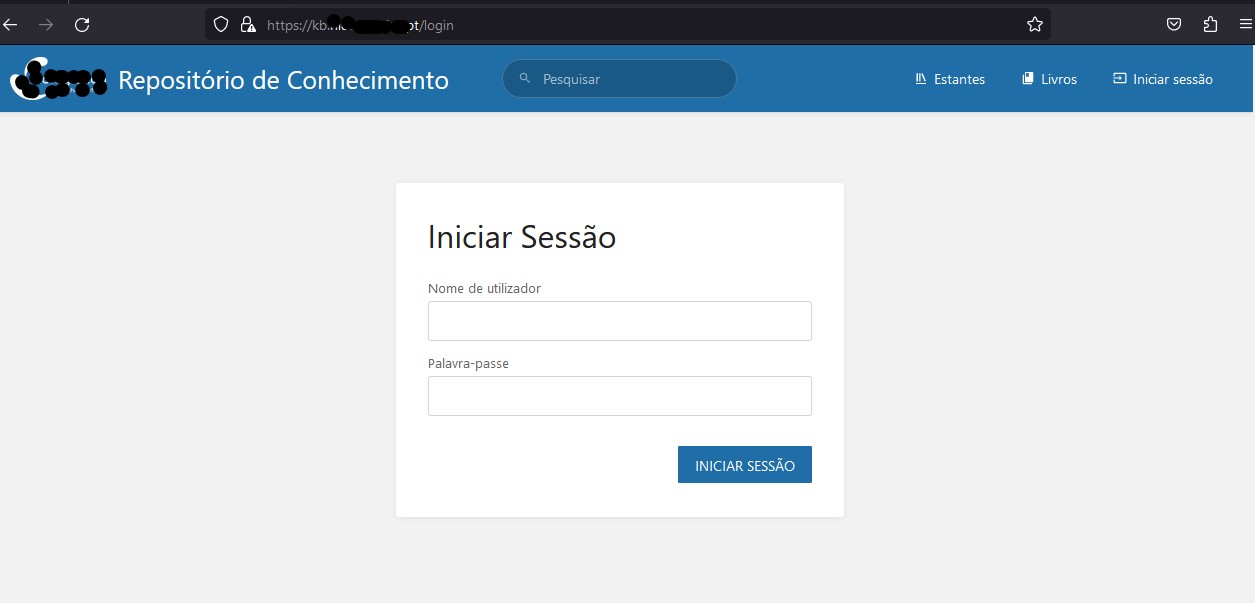
Can you disable JavaScript (will have to search for options to do this on your Browser), at least of your BookStack domain, then confirm exactly what you see (Ideally via screenshot) after clicking through from the email for the first time.

@ssddanbrown commented on GitHub (Apr 19, 2023): Hi @franciscojasousa, Very strange. One thing I can think to try: Can you disable JavaScript (will have to search for options to do this on your Browser), at least of your BookStack domain, then confirm exactly what you see (Ideally via screenshot) after clicking through from the email for the first time.
Author
Owner

@franciscojasousa commented on GitHub (Apr 19, 2023):

Hi Dan,
just tested with Javascript disabled in Firefox (this website has info for many browsers).
The behavior was the same.
Below are the screenshots.
Thank you
01
05
04
03
02

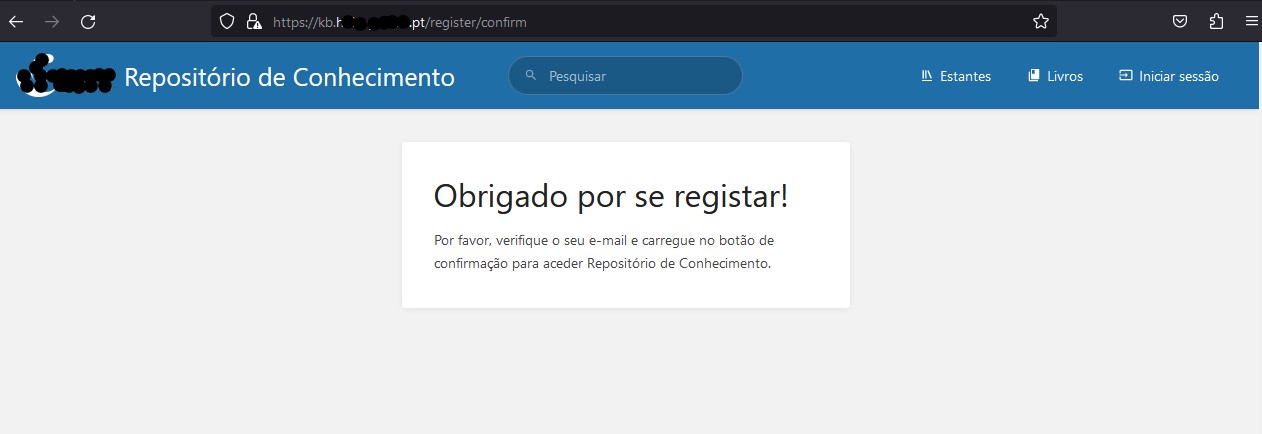
@franciscojasousa commented on GitHub (Apr 19, 2023): Hi Dan, just tested with Javascript disabled in Firefox ([this website](https://www.impressivewebs.com/how-to-disable-javascript-in-almost-any-browser/#disable-javascript-in-firefox) has info for many browsers). The behavior was the same. Below are the screenshots. Thank you ![01](https://user-images.githubusercontent.com/3234969/233100464-98bceca4-101f-4d86-8e60-06845fb28fc5.jpg) ![05](https://user-images.githubusercontent.com/3234969/233100471-a420add8-0029-4bc6-88a9-2d55d58b0f09.jpg) ![04](https://user-images.githubusercontent.com/3234969/233100474-f1600ba5-adcb-427b-a72a-f9fb8dc23214.jpg) ![03](https://user-images.githubusercontent.com/3234969/233100478-307a9bce-7cd0-4ab2-ac4e-bca98ff863d7.jpg) ![02](https://user-images.githubusercontent.com/3234969/233100482-d03d5fb8-2beb-42de-9d98-d3a2af409c58.jpg)
Author
Owner

@ssddanbrown commented on GitHub (Apr 19, 2023):

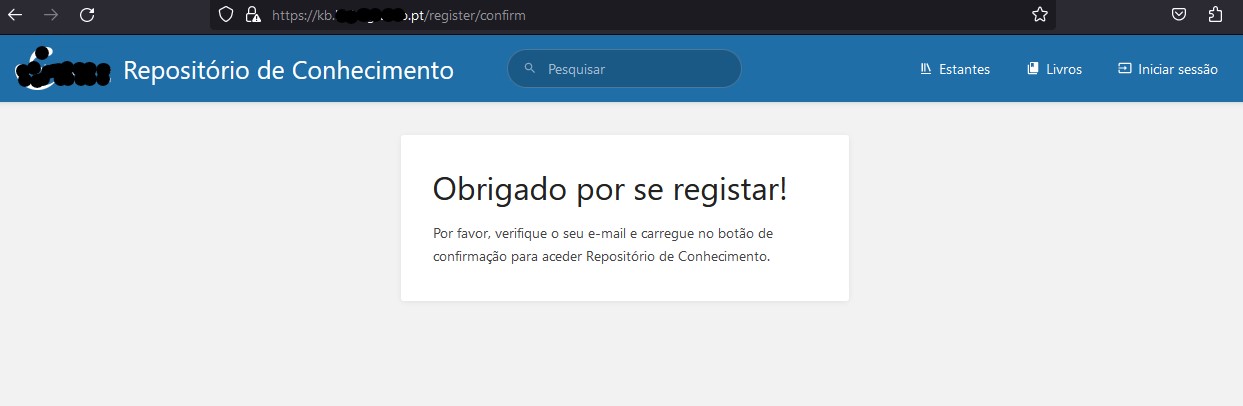
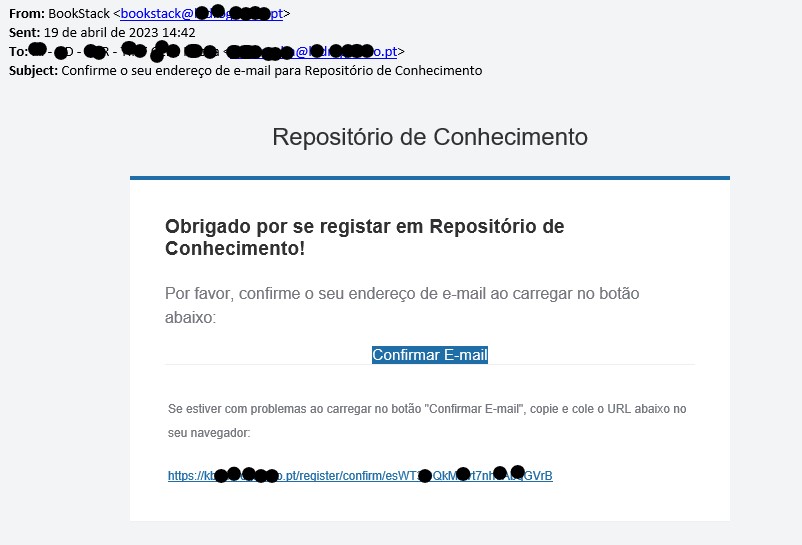
@franciscojasousa Thanks for the extra details, that's helpful. There's a step being completely missed out, between the email screenshot and the one afterwards. I'm not sure how the URL changes to /register/confirm after clicking the email.

  • Can you copy the full URL shown in the email (Not just clicking the button) into the browser (With JavaScript off) and confirm exactly what you see. Do you get automatically redirected to the url (without the long unique Id string)?
  • Can you confirm the output of running ls -alh bootstrap/cache from your BookStack install directory?
@ssddanbrown commented on GitHub (Apr 19, 2023): @franciscojasousa Thanks for the extra details, that's helpful. There's a step being completely missed out, between the email screenshot and the one afterwards. I'm not sure how the URL changes to `/register/confirm` after clicking the email. - Can you copy the full URL shown in the email (Not just clicking the button) into the browser (With JavaScript off) and confirm exactly what you see. Do you get automatically redirected to the url (without the long unique Id string)? - Can you confirm the output of running `ls -alh bootstrap/cache` from your BookStack install directory?
Author
Owner

@franciscojasousa commented on GitHub (Apr 19, 2023):

I copied and paste the url in Firefox and it automatically goes to "register/confirm".
Below are the screenshots.
Thank you Dan.

01_Copy_and_paste_in_Firefox
3_ls_result
02_confirmation_result

@franciscojasousa commented on GitHub (Apr 19, 2023): I copied and paste the url in Firefox and it automatically goes to "register/confirm". Below are the screenshots. Thank you Dan. ![01_Copy_and_paste_in_Firefox](https://user-images.githubusercontent.com/3234969/233111646-aac7bc46-3614-4fda-a55c-1f1e4c8bd4a8.jpg) ![3_ls_result](https://user-images.githubusercontent.com/3234969/233111652-e1c69cad-9f62-4e41-b49d-f9a6b774ace0.jpg) ![02_confirmation_result](https://user-images.githubusercontent.com/3234969/233111656-2391c3a0-a2b0-420f-9ae1-978ef34bffc9.jpg)
Author
Owner

@ssddanbrown commented on GitHub (Apr 19, 2023):

@franciscojasousa Okay, thanks, delete that /var/www/bookstack/bootstrap/cache/routes-v7.php file then see if things start working again.

@ssddanbrown commented on GitHub (Apr 19, 2023): @franciscojasousa Okay, thanks, delete that `/var/www/bookstack/bootstrap/cache/routes-v7.php` file then see if things start working again.
Author
Owner

@franciscojasousa commented on GitHub (Apr 19, 2023):

Deleted it and rebooted server.
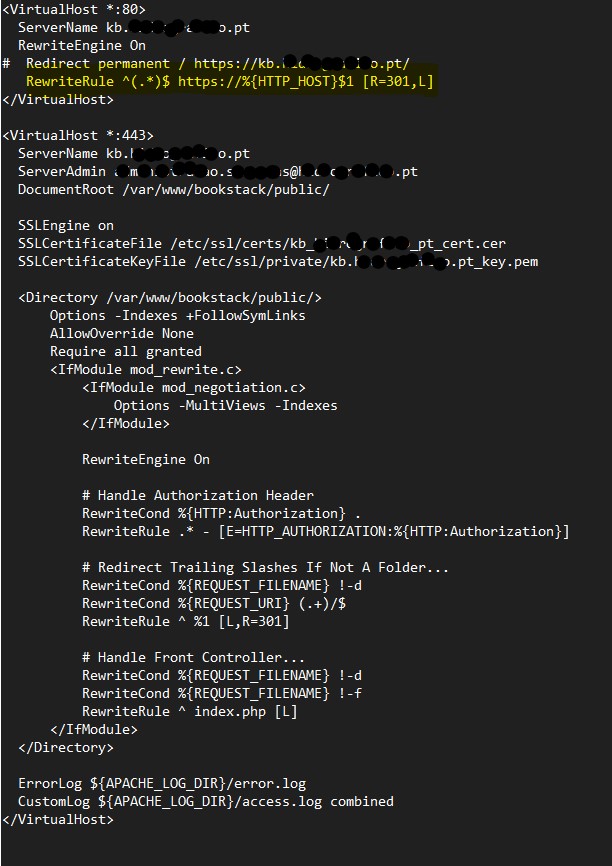
The same behavior still. Could the line "RewriteRule, in yellow below, present in the vhost, be the culprit?
Just scrapping here.
Thank you
VirtualHost_RewriteRule

@franciscojasousa commented on GitHub (Apr 19, 2023): Deleted it and rebooted server. The same behavior still. Could the line "RewriteRule, in yellow below, present in the vhost, be the culprit? Just scrapping here. Thank you ![VirtualHost_RewriteRule](https://user-images.githubusercontent.com/3234969/233115782-4aa3317f-dbfc-4468-a6d2-3f65bc295c19.jpg)
Author
Owner

@franciscojasousa commented on GitHub (Apr 19, 2023):

Wait, just worked :)
It's solved.
Thank you so much Dan.
Yet again, congratulations on this wonderful platform.
P.S.: Updated the guide in Portuguese to reflect this solution.

@franciscojasousa commented on GitHub (Apr 19, 2023): Wait, just worked :) It's solved. Thank you so much Dan. Yet again, congratulations on this wonderful platform. P.S.: Updated the [guide in Portuguese](https://guiastuga.pt/books/plataformas/page/bookstack-instalacao-em-ubuntu-2204) to reflect this solution.
Author
Owner

@ssddanbrown commented on GitHub (Apr 19, 2023):

@franciscojasousa Awesome! Good to hear.

That routes-*.php file should not generally exist, I don't think any of our official guidance leads to that being generated, but it could be generated if there's any attempt to run optimization or caching commands built into the framework we use.

Will therefore close this off now that the issue is solved.

@ssddanbrown commented on GitHub (Apr 19, 2023): @franciscojasousa Awesome! Good to hear. That `routes-*.php` file should not generally exist, I don't think any of our official guidance leads to that being generated, but it could be generated if there's any attempt to run optimization or caching commands built into the framework we use. Will therefore close this off now that the issue is solved.
Sign in to join this conversation.
1 Participants
Notifications
Due Date
No due date set.
Dependencies

No dependencies set.

Reference: starred/BookStack#3725