Bookstack not connecting to existing database #3491

Closed
opened 2026-02-05 06:52:37 +03:00 by OVERLORD · 15 comments
Owner

Originally created by @Inventhrice on GitHub (Feb 4, 2023).

Attempted Debugging

  • I have read the debugging page

Searched GitHub Issues

  • I have searched GitHub for the issue.

Describe the Scenario

I'm trying to setup bookstack using docker compose, and trying to integrate it with my already existing mariadb database? However, every time i try to run it, it gives me this error:

SQLSTATE[HY000] [2002] Operation timed out (SQL: select * from information_schema.tables where table_schema = wiki and table_name = migrations and table_type = 'BASE TABLE')

Any help would be greatly appreciated!

Exact BookStack Version

v23.01.1-LS61

Log Content

No response

PHP Version

No response

Hosting Environment

up1
up2

Originally created by @Inventhrice on GitHub (Feb 4, 2023). ### Attempted Debugging - [X] I have read the debugging page ### Searched GitHub Issues - [X] I have searched GitHub for the issue. ### Describe the Scenario I'm trying to setup bookstack using docker compose, and trying to integrate it with my already existing mariadb database? However, every time i try to run it, it gives me this error: SQLSTATE[HY000] [2002] Operation timed out (SQL: select * from information_schema.tables where table_schema = wiki and table_name = migrations and table_type = 'BASE TABLE') Any help would be greatly appreciated! ### Exact BookStack Version v23.01.1-LS61 ### Log Content _No response_ ### PHP Version _No response_ ### Hosting Environment ![up1](https://user-images.githubusercontent.com/45127310/216779714-7e323427-600e-4d50-9b8a-3e3845db78c3.png) ![up2](https://user-images.githubusercontent.com/45127310/216779716-4c5c2cd2-9a8a-4dcf-8f15-b2079ef0f53a.png)
OVERLORD added the 🐕 Support label 2026-02-05 06:52:37 +03:00
Author
Owner

@ssddanbrown commented on GitHub (Feb 6, 2023):

Hi @Inventhrice,
That kind of error would typically be due to lack of network access to the DB.
Assuming you're making use of the mariadb instance shown in your docker-compose view, could you instead go direct to the mariadb container instead of juggling the host IP for the DB_HOST? You should just be able to use a DB_HOST=mariadb. Not fully sure how exposed ports work in that case. Can try via both 3306 and your DBPORT value to see if either works.

@ssddanbrown commented on GitHub (Feb 6, 2023): Hi @Inventhrice, That kind of error would typically be due to lack of network access to the DB. Assuming you're making use of the mariadb instance shown in your docker-compose view, could you instead go direct to the mariadb container instead of juggling the host IP for the `DB_HOST`? You should just be able to use a `DB_HOST=mariadb`. Not fully sure how exposed ports work in that case. Can try via both `3306` and your `DBPORT` value to see if either works.
Author
Owner

@Inventhrice commented on GitHub (Feb 6, 2023):

Hi @ssddanbrown ! Thank you for your response! I have modified both of those values to be mariadb and the actual port number, and the same error pops up unfortunately!

@Inventhrice commented on GitHub (Feb 6, 2023): Hi @ssddanbrown ! Thank you for your response! I have modified both of those values to be `mariadb` and the actual port number, and the same error pops up unfortunately!
Author
Owner

@ssddanbrown commented on GitHub (Feb 6, 2023):

Okay, If you access a shell on the running bookstack container, are you able to sucessfully ping the mariadb host?
If so, as a next step, You could also try installing mysql-client in that container and attempting a connecting between the containers manually.

@ssddanbrown commented on GitHub (Feb 6, 2023): Okay, If you access a shell on the running bookstack container, are you able to sucessfully ping the mariadb host? If so, as a next step, You could also try installing mysql-client in that container and attempting a connecting between the containers manually.
Author
Owner

@Inventhrice commented on GitHub (Feb 6, 2023):

Yes, I am able to ping the mariadb container! As for the next step, just for clarity sake, I'd need to install mysqlsh and try connecting to the database using the bookstack db credentials?

@Inventhrice commented on GitHub (Feb 6, 2023): Yes, I am able to ping the mariadb container! As for the next step, just for clarity sake, I'd need to install `mysqlsh` and try connecting to the database using the bookstack db credentials?
Author
Owner

@ssddanbrown commented on GitHub (Feb 6, 2023):

Yeah, It's usually a mysql-client package you need.

@ssddanbrown commented on GitHub (Feb 6, 2023): Yeah, It's usually a `mysql-client` package you need.
Author
Owner

@Inventhrice commented on GitHub (Feb 6, 2023):

Do you by chance have any resources I could take a look at to do this? I'm hitting a roadblock as I'm trying to install this using docker exec -ti bookstack /bin/bash, however apt is not installed on it. I'm fairly new to linux haha, so thank you for taking the time!

@Inventhrice commented on GitHub (Feb 6, 2023): Do you by chance have any resources I could take a look at to do this? I'm hitting a roadblock as I'm trying to install this using `docker exec -ti bookstack /bin/bash`, however apt is not installed on it. I'm fairly new to linux haha, so thank you for taking the time!
Author
Owner

@ssddanbrown commented on GitHub (Feb 6, 2023):

@Inventhrice Okay. apt is mainly used in debian-based linux environments.
I'm pretty sure the docker image you're using is alpine-linux based. Their wiki is here.

I'd imagine you'd need to do something along the lines of:

apk update
apk add mysql-client

Then, once installed, you'd test MySQL connection like so:

mysql --host=mysql_host --user=db_username --password=password --port=3306 db_name
@ssddanbrown commented on GitHub (Feb 6, 2023): @Inventhrice Okay. `apt` is mainly used in debian-based linux environments. I'm pretty sure the docker image you're using is alpine-linux based. Their [wiki is here](https://wiki.alpinelinux.org/wiki/Alpine_Package_Keeper). I'd imagine you'd need to do something along the lines of: ```bash apk update apk add mysql-client ``` Then, once installed, you'd test MySQL connection like so: ``` mysql --host=mysql_host --user=db_username --password=password --port=3306 db_name ```
Author
Owner

@Inventhrice commented on GitHub (Feb 6, 2023):

Thank you! I tried --host=mariadb and it gave me an immediate Can't connect to server on 'mariadb', then I tried using my machine's IP address, and I got a timed-out (presumably, as it took a while to get to the error message) Can't connect to server on 'IPADDRESS'.

I got the connection to work! I used the container's ip address, and used the port 3306, and that worked!

@Inventhrice commented on GitHub (Feb 6, 2023): Thank you! I tried `--host=mariadb` and it gave me an immediate `Can't connect to server on 'mariadb'`, then I tried using my machine's IP address, and I got a timed-out (presumably, as it took a while to get to the error message) `Can't connect to server on 'IPADDRESS'`. I got the connection to work! I used the container's ip address, and used the port 3306, and that worked!
Author
Owner

@Inventhrice commented on GitHub (Feb 6, 2023):

I hope this doesn't come across as impolite, but this wouldn't be the ideal solution, I don't think. From what I've gathered, the container ip address (in this case it was 172.23.0.2) can change, so I believe we;d need to somehow troubleshoot why it does not want to connect up to the mariadb container using the container name?

@Inventhrice commented on GitHub (Feb 6, 2023): I hope this doesn't come across as impolite, but this wouldn't be the ideal solution, I don't think. From what I've gathered, the container ip address (in this case it was `172.23.0.2`) can change, so I believe we;d need to somehow troubleshoot why it does not want to connect up to the mariadb container using the container name?
Author
Owner

@ssddanbrown commented on GitHub (Feb 6, 2023):

What does running ping mariadb from inside the bookstack container show? Is it successful and does it return show 172.23.0.2 in the responses?

@ssddanbrown commented on GitHub (Feb 6, 2023): What does running `ping mariadb` from inside the bookstack container show? Is it successful and does it return show `172.23.0.2` in the responses?
Author
Owner

@Inventhrice commented on GitHub (Feb 6, 2023):

Yes!
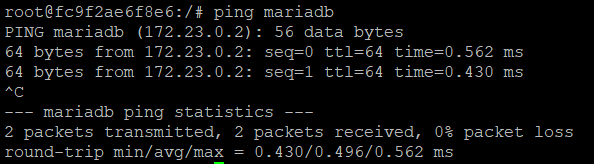
image

@Inventhrice commented on GitHub (Feb 6, 2023): Yes! ![image](https://user-images.githubusercontent.com/45127310/217017434-30bf8362-339a-4a5b-9747-b8ad46f49886.png)
Author
Owner

@Inventhrice commented on GitHub (Feb 6, 2023):

Hold on, let me check something, and I'll get back to you?

@Inventhrice commented on GitHub (Feb 6, 2023): Hold on, let me check something, and I'll get back to you?
Author
Owner

@Inventhrice commented on GitHub (Feb 6, 2023):

I figured it out! I'll explain what happened below:

  • connecting 172.23.0.2 using port 3306 worked
  • It did not work with mariadb as when I was connecting using that, i used a different port, the ${DB_PORT}
  • Upon realizing this, I modified my docker-compose.yml to use DB_PORT=3306 instead of the ${DB_PORT} variable

And that fixed it!

@Inventhrice commented on GitHub (Feb 6, 2023): I figured it out! I'll explain what happened below: - connecting 172.23.0.2 using port 3306 worked - It did not work with mariadb as when I was connecting using that, i used a different port, the ${DB_PORT} - Upon realizing this, I modified my docker-compose.yml to use DB_PORT=3306 instead of the ${DB_PORT} variable And that fixed it!
Author
Owner

@ssddanbrown commented on GitHub (Feb 6, 2023):

Ah, I thought that would have been tested already in the response to my message here.
Good news though! will therefore close this off.

@ssddanbrown commented on GitHub (Feb 6, 2023): Ah, I thought that would have been tested already in the response to [my message here](https://github.com/BookStackApp/BookStack/issues/4019#issuecomment-1418359666). Good news though! will therefore close this off.
Author
Owner

@Inventhrice commented on GitHub (Feb 6, 2023):

@ssddanbrown Hi! Please let me know if I should open a new issue for this or if I should stick around here, however I figured all of this information would be helpful for the new problem I have. I've referred to #3772, however as previously discussed, we've fixed the connection error. However, when I try accessing my wiki page, I still get a blank screen.

2023/02/06 17:48:49 [error] 295#295: *3 FastCGI sent in stderr: "PHP message: PHP Fatal error: Uncaught PDOException: SQLSTATE[42S02]: Base table or view not found: 1146 Table 'wiki.users> Stack trace: #0 /app/www/vendor/laravel/framework/src/Illuminate/Database/Connection.php(368): PDO->prepare() #1 /app/www/vendor/laravel/framework/src/Illuminate/Database/Connection.php(705): Illuminate\Database\Connection->Illuminate\Database\{closure}() #2 /app/www/vendor/laravel/framework/src/Illuminate/Database/Connection.php(672): Illuminate\Database\Connection->runQueryCallback() #3 /app/www/vendor/laravel/framework/src/Illuminate/Database/Connection.php(376): Illuminate\Database\Connection->run() #4 /app/www/vendor/laravel/framework/src/Illuminate/Database/Query/Builder.php(2414): Illuminate\Database\Connection->select() #5 /app/www/vendor/laravel/framework/src/Illuminate/Database/Query/Builder.php(2402): Illuminate\Database\Query\Builder->runSelect() #6 /app/www/vendor/larav...PHP message: PHP Fatal error: Uncaught PDOException: SQLSTATE[42S02]: Base table or view not found: 1146 Table 'wiki.users' doesn't exist in /app/www/vendor/lar> Stack trace: #0 /app/www/vendor/laravel/framework/src/Illuminate/Database/Connection.php(368): PDO->prepare() #1 /app/www/vendor/laravel/framework/src/Illuminate/Database/Connection.php(705): Illuminate\Database\Connection->Illuminate\Database\{closure}() #2 /app/www/vendor/laravel/framework/src/Illuminate/Database/Connection.php(672): Illuminate\Database\Connection->runQueryCallback() #3 /app/www/vendor/laravel/framework/src/Illuminate/Database/Connection.php(376): Illuminate\Database\Connection->run() #4 /app/www/vendor/laravel/framework/src/Illuminate/Database/Query/Builder.php(2414): Illuminate\Database\Connection->select() #5 /app/www/vendor/laravel/framework/src/Illuminate/Database/Query/Builder.php(2402): Illuminate\Database\Query\

Any help would be greatly appriciated, thank you so much for your patience!

@Inventhrice commented on GitHub (Feb 6, 2023): @ssddanbrown Hi! Please let me know if I should open a new issue for this or if I should stick around here, however I figured all of this information would be helpful for the new problem I have. I've referred to #3772, however as previously discussed, we've fixed the connection error. However, when I try accessing my wiki page, I still get a blank screen. `2023/02/06 17:48:49 [error] 295#295: *3 FastCGI sent in stderr: "PHP message: PHP Fatal error: Uncaught PDOException: SQLSTATE[42S02]: Base table or view not found: 1146 Table 'wiki.users> Stack trace: #0 /app/www/vendor/laravel/framework/src/Illuminate/Database/Connection.php(368): PDO->prepare() #1 /app/www/vendor/laravel/framework/src/Illuminate/Database/Connection.php(705): Illuminate\Database\Connection->Illuminate\Database\{closure}() #2 /app/www/vendor/laravel/framework/src/Illuminate/Database/Connection.php(672): Illuminate\Database\Connection->runQueryCallback() #3 /app/www/vendor/laravel/framework/src/Illuminate/Database/Connection.php(376): Illuminate\Database\Connection->run() #4 /app/www/vendor/laravel/framework/src/Illuminate/Database/Query/Builder.php(2414): Illuminate\Database\Connection->select() #5 /app/www/vendor/laravel/framework/src/Illuminate/Database/Query/Builder.php(2402): Illuminate\Database\Query\Builder->runSelect() #6 /app/www/vendor/larav...PHP message: PHP Fatal error: Uncaught PDOException: SQLSTATE[42S02]: Base table or view not found: 1146 Table 'wiki.users' doesn't exist in /app/www/vendor/lar> Stack trace: #0 /app/www/vendor/laravel/framework/src/Illuminate/Database/Connection.php(368): PDO->prepare() #1 /app/www/vendor/laravel/framework/src/Illuminate/Database/Connection.php(705): Illuminate\Database\Connection->Illuminate\Database\{closure}() #2 /app/www/vendor/laravel/framework/src/Illuminate/Database/Connection.php(672): Illuminate\Database\Connection->runQueryCallback() #3 /app/www/vendor/laravel/framework/src/Illuminate/Database/Connection.php(376): Illuminate\Database\Connection->run() #4 /app/www/vendor/laravel/framework/src/Illuminate/Database/Query/Builder.php(2414): Illuminate\Database\Connection->select() #5 /app/www/vendor/laravel/framework/src/Illuminate/Database/Query/Builder.php(2402): Illuminate\Database\Query\ ` Any help would be greatly appriciated, thank you so much for your patience!
Sign in to join this conversation.
1 Participants
Notifications
Due Date
No due date set.
Dependencies

No dependencies set.

Reference: starred/BookStack#3491