Can't add image in custom footer? #3451

Closed
opened 2026-02-05 06:45:21 +03:00 by OVERLORD · 14 comments
Owner

Originally created by @liuhuanshuo on GitHub (Jan 15, 2023).

Describe the feature you'd like

I found that the footer can be customized in the settings of the web version, but only text and links can be added, and media such as pictures cannot be added

For example I can only set footer like this

But actually I want to set it like this

Even if I put the hyperlink of the picture in the settings, it will not be displayed normally, it seems that it can only be displayed as text

Describe the benefits this would bring to existing BookStack users

Simple text display cannot meet the development needs very well

Can the goal of this request already be achieved via other means?

What I know is that if I use php source code to build a page, there should be a way to modify the source code to achieve it, but I use docker compose for deployment, and I can't find the source code in the container!

Have you searched for an existing open/closed issue?

  • I have searched for existing issues and none cover my fundemental request

How long have you been using BookStack?

0 to 6 months

Additional context

No response

Originally created by @liuhuanshuo on GitHub (Jan 15, 2023). ### Describe the feature you'd like I found that the footer can be customized in the settings of the web version, but only text and links can be added, and media such as pictures cannot be added For example I can only set footer like this ![](https://pic.liuzaoqi.com/picgo/202301151124278.png) But actually I want to set it like this ![](https://pic.liuzaoqi.com/picgo/202301151125151.png) Even if I put the hyperlink of the picture in the settings, it will not be displayed normally, it seems that it can only be displayed as text ![](https://pic.liuzaoqi.com/picgo/202301151127090.png) ### Describe the benefits this would bring to existing BookStack users Simple text display cannot meet the development needs very well ### Can the goal of this request already be achieved via other means? What I know is that if I use php source code to build a page, there should be a way to modify the source code to achieve it, but I use docker compose for deployment, and I can't find the source code in the container! ### Have you searched for an existing open/closed issue? - [X] I have searched for existing issues and none cover my fundemental request ### How long have you been using BookStack? 0 to 6 months ### Additional context _No response_
OVERLORD added the 🔨 Feature Request label 2026-02-05 06:45:21 +03:00
Author
Owner

@ssddanbrown commented on GitHub (Jan 15, 2023):

Hi @liuhuanshuo,
Yeah, we only support simple text links via the in-platform options.
There's a limit to the customization controls we'd provide in-platform.

Advanced customization can be achieved via the visual theme system. If it helps, I have a video covering usage of this system here.
If you are using the linuxserver docker image, I'm fairly sure they expose the required themes folder to the mounted /config volume folder.
This would be the view that you'd target for override to replace the system footer with custom code.

@ssddanbrown commented on GitHub (Jan 15, 2023): Hi @liuhuanshuo, Yeah, we only support simple text links via the in-platform options. There's a limit to the customization controls we'd provide in-platform. Advanced customization can be achieved via the [visual theme system](https://github.com/BookStackApp/BookStack/blob/development/dev/docs/visual-theme-system.md). If it helps, I have a [video covering usage of this system here](https://www.youtube.com/watch?v=gLy_2GBse48). If you are using the linuxserver docker image, I'm fairly sure they expose the required `themes` folder to the mounted `/config` volume folder. [This would be the view](https://github.com/BookStackApp/BookStack/blob/e794c977bcaeaae715bdce45f3dbca8284bcbbcd/resources/views/common/footer.blade.php) that you'd target for override to replace the system footer with custom code.
Author
Owner

@liuhuanshuo commented on GitHub (Jan 16, 2023):

hi,

Thank you very much for your guidance, I think I should understand how to add a custom footer to my page。

I did find a folder called theme in my docker container volume,of course this folder is empty

But there is still something I don't understand, I watched your instructional video on youtube,I found that you can find the source code of the whole page, that is a lot of php files or some static files, so you know which file should be replaced, but I can't find it in my container volume

Below is the full directory of bookstack in my docker container
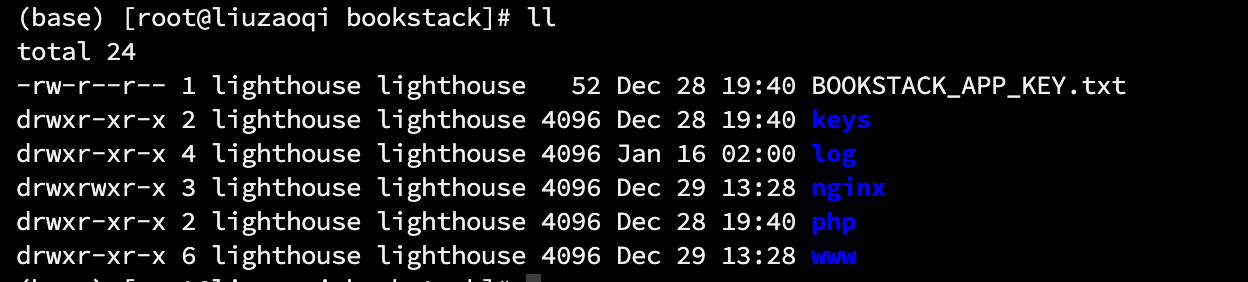
So, if I want to customize the footer, I just need to create a new folder under the theme folder, add this folder to.env, and then create a new footer.blade.php file under this folder, The content can be like this


<footer>
<p>my custom footer</p>
</footer>

That's it, right? In addition, if I want to modify other content, where should I find the directory of the source code, I can't find it in the dokcer.

Thanks again for developing such a great work!

@liuhuanshuo commented on GitHub (Jan 16, 2023): hi, Thank you very much for your guidance, I think I should understand how to add a custom footer to my page。 I did find a folder called theme in my docker container volume,of course this folder is empty But there is still something I don't understand, I watched your instructional video on youtube,I found that you can find the source code of the whole page, that is a lot of php files or some static files, so you know which file should be replaced, but I can't find it in my container volume Below is the full directory of bookstack in my docker container ![](https://pic.liuzaoqi.com/picgo/202301162057110.png) So, if I want to customize the footer, I just need to create a new folder under the theme folder, add this folder to`.env`, and then create a new `footer.blade.php` file under this folder, The content can be like this ```php <footer> <p>my custom footer</p> </footer> ``` That's it, right? In addition, if I want to modify other content, where should I find the directory of the source code, I can't find it in the dokcer. Thanks again for developing such a great work!
Author
Owner

@ssddanbrown commented on GitHub (Jan 16, 2023):

I found that you can find the source code of the whole page, that is a lot of php files or some static files, so you know which file should be replaced, but I can't find it in my container volume

Yeah, you won't find it in your mounted volume folder. These files are within the container, and not exposed to the volume since they're not supposed to be touched or retained. You could find them by going into the container (Accessing running container via bash) then going to the /app directory I think for the linuxserver image.
Alternatively, you can just find the source of the views here in GitHub instead.

So, if I want to customize the footer, I just need to create a new folder under the theme folder, add this folder to.env, and then create a new footer.blade.php file under this folder, The content can be like this

Yeah, almost. The new view file needs to be in a common folder, so would need to be stored as themes/<theme_name>/common/footer.blade.php. This is to match it's path within the original resources/views folder (As can be seen towards the top when viewing the file on GitHub).

@ssddanbrown commented on GitHub (Jan 16, 2023): > I found that you can find the source code of the whole page, that is a lot of php files or some static files, so you know which file should be replaced, but I can't find it in my container volume Yeah, you won't find it in your mounted volume folder. These files are within the container, and not exposed to the volume since they're not supposed to be touched or retained. You could find them by going into the container (Accessing running container via `bash`) then going to the `/app` directory I think for the linuxserver image. Alternatively, you can just find the [source of the views here in GitHub](https://github.com/BookStackApp/BookStack/tree/release/resources/views) instead. > So, if I want to customize the footer, I just need to create a new folder under the theme folder, add this folder to.env, and then create a new footer.blade.php file under this folder, The content can be like this Yeah, almost. The new view file needs to be in a `common` folder, so would need to be stored as `themes/<theme_name>/common/footer.blade.php`. This is to match it's path within the original `resources/views` folder (As can be seen towards the top when [viewing the file on GitHub](https://github.com/BookStackApp/BookStack/blob/release/resources/views/common/footer.blade.php)).
Author
Owner

@liuhuanshuo commented on GitHub (Jan 21, 2023):

@ssddanbrown

hi,With your guidance, I created footer.blade.php and successfully modified the footer to the style I want!

However, when I try to add some js-controlled click styles in footer.blade.php, these js codes collectively fail!

For example, the following simple js code, in order to realize clicking on a picture to appear a picture

<script>
  function showPopup() {
    var popup = document.getElementById("popup");
    popup.style.display = "block";
  }
</script>

I am sure there is no problem with the code, even if I put this code in the settings, it will not take effect

Finally, I read a lot of information, I found that you seem to be set, by default, the user's js code is prohibited from taking effect

then. I followed your prompt, I setALLOW_CONTENT_SCRIPTS=true, and then my js code took effect

But I still don't understand why you want to guide users to use it like this, why do you turn off js by default, and what is the risk of me doing this?

(Sorry, I am a newcomer in this area, I am worried that if I do this, the website will become very insecure, but I do need some custom js, such as Google analysis)

@liuhuanshuo commented on GitHub (Jan 21, 2023): @ssddanbrown hi,With your guidance, I created `footer.blade.php` and successfully modified the footer to the style I want! However, when I try to add some js-controlled click styles in footer.blade.php, these js codes collectively fail! For example, the following simple js code, in order to realize clicking on a picture to appear a picture ```javascript <script> function showPopup() { var popup = document.getElementById("popup"); popup.style.display = "block"; } </script> ``` I am sure there is no problem with the code, even if I put this code in the settings, it will not take effect Finally, I read a lot of information,[ I found that you seem to be set, by default, the user's js code is prohibited from taking effect](https://www.bookstackapp.com/docs/admin/security/#javascript-in-page-content:~:text=Bcrypt%20hashing%20algorithm.-,JavaScript%20in%20Page%20Content,-By%20default%2C%20JavaScript) then. I followed your prompt, I set`ALLOW_CONTENT_SCRIPTS=true`, and then my js code took effect But I still don't understand why you want to guide users to use it like this, why do you turn off js by default, and what is the risk of me doing this? (Sorry, I am a newcomer in this area, I am worried that if I do this, the website will become very insecure, but I do need some custom js, such as Google analysis)
Author
Owner

@ssddanbrown commented on GitHub (Jan 21, 2023):

But I still don't understand why you want to guide users to use it like this,

Not sure what this question is referencing.

why do you turn off js by default

To prevent the running of possibly maliciously injected JavaScript. Just another level of safety against potentially bad code.

and what is the risk of me doing this?

The risk of ALLOW_CONTENT_SCRIPTS=true is quite high, since it disables significant XSS security protections.
Instead, when adding custom scripts in your content, you can start them like so:

<script nonce="{{ $cspNonce }}">

This should allow them to be ran without ALLOW_CONTENT_SCRIPTS=true.

@ssddanbrown commented on GitHub (Jan 21, 2023): > But I still don't understand why you want to guide users to use it like this, Not sure what this question is referencing. > why do you turn off js by default To prevent the running of possibly maliciously injected JavaScript. Just another level of safety against potentially bad code. > and what is the risk of me doing this? The risk of `ALLOW_CONTENT_SCRIPTS=true` is quite high, since it disables significant XSS security protections. Instead, when adding custom scripts in your content, you can start them like so: ```html <script nonce="{{ $cspNonce }}"> ``` This should allow them to be ran without `ALLOW_CONTENT_SCRIPTS=true`.
Author
Owner

@liuhuanshuo commented on GitHub (Jan 21, 2023):

<script nonce="{{ $cspNonce }}">

I commented ALLOW_CONTENT_SCRIPTS=true

Then use the following js code, it will not take effect, do you need additional settings?


<script nonce="{{ $cspNonce }}">
    function showPopup(event) {
        event.preventDefault();
        var popup = document.getElementById("popup");
        var overlay = document.getElementById("overlay");
        popup.style.display = "block";
        overlay.style.display = "block";
    }

    function closePopup() {
        var popup = document.getElementById("popup");
        var overlay = document.getElementById("overlay");
        popup.style.display = "none";
        overlay.style.display = "none";
    }
</script>
@liuhuanshuo commented on GitHub (Jan 21, 2023): > <script nonce="{{ $cspNonce }}"> I commented `ALLOW_CONTENT_SCRIPTS=true` Then use the following js code, it will not take effect, do you need additional settings? ```js <script nonce="{{ $cspNonce }}"> function showPopup(event) { event.preventDefault(); var popup = document.getElementById("popup"); var overlay = document.getElementById("overlay"); popup.style.display = "block"; overlay.style.display = "block"; } function closePopup() { var popup = document.getElementById("popup"); var overlay = document.getElementById("overlay"); popup.style.display = "none"; overlay.style.display = "none"; } </script> ```
Author
Owner

@ssddanbrown commented on GitHub (Jan 21, 2023):

do you need additional settings?

No. Should just work. Are you getting a warning/error in the browser console? Does a console.log('hello!') ; work and log a message if placed outside the functions?

@ssddanbrown commented on GitHub (Jan 21, 2023): > do you need additional settings? No. Should just work. Are you getting a warning/error in the browser console? Does a `console.log('hello!') ;` work and log a message if placed outside the functions?
Author
Owner

@liuhuanshuo commented on GitHub (Jan 21, 2023):

Now the strange thing is that this js will output hello, but the function inside does not work

<script nonce="{{ $cspNonce }}">
    console.log('hello!') ;
    function showPopup(event) {
        event.preventDefault();
        var popup = document.getElementById("popup");
        var overlay = document.getElementById("overlay");
        popup.style.display = "block";
        overlay.style.display = "block";
    }

    function closePopup() {
        var popup = document.getElementById("popup");
        var overlay = document.getElementById("overlay");
        popup.style.display = "none";
        overlay.style.display = "none";
    }
</script>

It works if I cancel ALLOW_CONTENT_SCRIPTS=true

The console shows like this

→ running MPA content script, version: 8.0.14
content-script.js:1 Content App init
(index):1122 hello!
wiki.liuzaoqi.com/:376 Refused to execute inline event handler because it violates the following Content Security Policy directive: "script-src http: https: 'nonce-8YScXRxDlXCTp3NllODxuxVs' 'strict-dynamic'". Either the 'unsafe-inline' keyword, a hash ('sha256-...'), or a nonce ('nonce-...') is required to enable inline execution. Note that hashes do not apply to event handlers, style attributes and javascript: navigations unless the 'unsafe-hashes' keyword is present.

(index):409 Uncaught TypeError: Cannot read properties of undefined (reading 'contentWindow')
    at (index):409:38
@liuhuanshuo commented on GitHub (Jan 21, 2023): Now the strange thing is that this js will output hello, but the function inside does not work ```js <script nonce="{{ $cspNonce }}"> console.log('hello!') ; function showPopup(event) { event.preventDefault(); var popup = document.getElementById("popup"); var overlay = document.getElementById("overlay"); popup.style.display = "block"; overlay.style.display = "block"; } function closePopup() { var popup = document.getElementById("popup"); var overlay = document.getElementById("overlay"); popup.style.display = "none"; overlay.style.display = "none"; } </script> ``` It works if I cancel `ALLOW_CONTENT_SCRIPTS=true` The console shows like this ``` → running MPA content script, version: 8.0.14 content-script.js:1 Content App init (index):1122 hello! wiki.liuzaoqi.com/:376 Refused to execute inline event handler because it violates the following Content Security Policy directive: "script-src http: https: 'nonce-8YScXRxDlXCTp3NllODxuxVs' 'strict-dynamic'". Either the 'unsafe-inline' keyword, a hash ('sha256-...'), or a nonce ('nonce-...') is required to enable inline execution. Note that hashes do not apply to event handlers, style attributes and javascript: navigations unless the 'unsafe-hashes' keyword is present. (index):409 Uncaught TypeError: Cannot read properties of undefined (reading 'contentWindow') at (index):409:38 ```
Author
Owner

@ssddanbrown commented on GitHub (Jan 21, 2023):

Ah, it's the inline event listener causing problems.
You'd need to use even handlers instead of inline event attributes.

So instead of <div id="custom-thing" onclick="showPopup"> or something, you'd register the event in your script:

const customBlock = document.getElementById('custom-thing');
customBlock.addEventListener('click', showPopup);
@ssddanbrown commented on GitHub (Jan 21, 2023): Ah, it's the inline event listener causing problems. You'd need to use even handlers instead of inline event attributes. So instead of `<div id="custom-thing" onclick="showPopup">` or something, you'd register the event in your script: ```js const customBlock = document.getElementById('custom-thing'); customBlock.addEventListener('click', showPopup); ```
Author
Owner

@liuhuanshuo commented on GitHub (Jan 21, 2023):

Thanks, I'll give it a try, I'm not very knowledgeable about js here

@liuhuanshuo commented on GitHub (Jan 21, 2023): Thanks, I'll give it a try, I'm not very knowledgeable about js here
Author
Owner

@sven7654321 commented on GitHub (Jan 21, 2023):

@ssddanbrown

I'm sorry I might have to turn to you again

I checked some information and changed part of the code in my footer.blade.php as follows, but the JS code still doesn't work!

In fact, my js is very simple. Click on my picture to pop up a small window, and click on other positions to close it.

But I don't know why it doesn't work, below is the html code

    <a href="javascript:void(0)" onclick="showPopup(event)">
        <img src="pic1.png" style="outline:none"></a>

<div id="parent-element">
  <div id="popup" style="display: none">
    <img src="pic1.png">
    <img src="pic2.png">
  </div>
</div>

<div id="overlay" onclick="closePopup()"></div>

and below is the js code

<script nonce="{{ $cspNonce }}">
    document.getElementById("popup").addEventListener("click", showPopup);
    document.getElementById("overlay").addEventListener("click", closePopup);

    function showPopup(event) {
        event.preventDefault();
        var popup = document.getElementById("popup");
        var overlay = document.getElementById("overlay");
        popup.style.display = "block";
        overlay.style.display = "block";
    }

    function closePopup() {
        var popup = document.getElementById("popup");
        var overlay = document.getElementById("overlay");
        popup.style.display = "none";
        overlay.style.display = "none";
    }
</script>
@sven7654321 commented on GitHub (Jan 21, 2023): @ssddanbrown I'm sorry I might have to turn to you again I checked some information and changed part of the code in my footer.blade.php as follows, but the JS code still doesn't work! In fact, my js is very simple. Click on my picture to pop up a small window, and click on other positions to close it. But I don't know why it doesn't work, below is the html code ```html <a href="javascript:void(0)" onclick="showPopup(event)"> <img src="pic1.png" style="outline:none"></a> <div id="parent-element"> <div id="popup" style="display: none"> <img src="pic1.png"> <img src="pic2.png"> </div> </div> <div id="overlay" onclick="closePopup()"></div> ``` and below is the js code ```js <script nonce="{{ $cspNonce }}"> document.getElementById("popup").addEventListener("click", showPopup); document.getElementById("overlay").addEventListener("click", closePopup); function showPopup(event) { event.preventDefault(); var popup = document.getElementById("popup"); var overlay = document.getElementById("overlay"); popup.style.display = "block"; overlay.style.display = "block"; } function closePopup() { var popup = document.getElementById("popup"); var overlay = document.getElementById("overlay"); popup.style.display = "none"; overlay.style.display = "none"; } </script> ```
Author
Owner

@liuhuanshuo commented on GitHub (Jan 21, 2023):

What I'm not sure about is if I need to do other settings like CSP related parameters

@liuhuanshuo commented on GitHub (Jan 21, 2023): What I'm not sure about is if I need to do other settings like CSP related parameters
Author
Owner

@ssddanbrown commented on GitHub (Jan 21, 2023):

You were listening for clicks on the hidden popup element.
Here's a tweaked variant:

<a id="custom-footer-popup-trigger" href="#">
    <img src="pic1.png" style="outline:none"></a>

<div id="parent-element">
  <div id="popup" style="display: none">
    <img src="pic1.png">
    <img src="pic2.png">
  </div>
</div>

<div id="overlay"></div>

<script nonce="{{ $cspNonce }}">
    document.getElementById("custom-footer-popup-trigger").addEventListener("click", showPopup);
    document.getElementById("overlay").addEventListener("click", closePopup);
    var popup = document.getElementById("popup");
    var overlay = document.getElementById("overlay");


    function showPopup(event) {
        event.preventDefault();
        popup.style.display = "block";
        overlay.style.display = "block";
    }

    function closePopup() {
        popup.style.display = "none";
        overlay.style.display = "none";
    }
</script>

Note: The <script> section must be placed after the other HTML.

@ssddanbrown commented on GitHub (Jan 21, 2023): You were listening for clicks on the hidden popup element. Here's a tweaked variant: ```html <a id="custom-footer-popup-trigger" href="#"> <img src="pic1.png" style="outline:none"></a> <div id="parent-element"> <div id="popup" style="display: none"> <img src="pic1.png"> <img src="pic2.png"> </div> </div> <div id="overlay"></div> <script nonce="{{ $cspNonce }}"> document.getElementById("custom-footer-popup-trigger").addEventListener("click", showPopup); document.getElementById("overlay").addEventListener("click", closePopup); var popup = document.getElementById("popup"); var overlay = document.getElementById("overlay"); function showPopup(event) { event.preventDefault(); popup.style.display = "block"; overlay.style.display = "block"; } function closePopup() { popup.style.display = "none"; overlay.style.display = "none"; } </script> ``` Note: The `<script>` section must be placed after the other HTML.
Author
Owner

@liuhuanshuo commented on GitHub (Jan 21, 2023):

That's ok, thanks a lot, I'll take a closer look at your code

@liuhuanshuo commented on GitHub (Jan 21, 2023): That's ok, thanks a lot, I'll take a closer look at your code
Sign in to join this conversation.
1 Participants
Notifications
Due Date
No due date set.
Dependencies

No dependencies set.

Reference: starred/BookStack#3451