Drawio images saved to BookStack server are bad #3404

Closed
opened 2026-02-05 06:36:57 +03:00 by OVERLORD · 5 comments
Owner

Originally created by @jeffshead on GitHub (Dec 16, 2022).

Attempted Debugging

  • I have read the debugging page

Searched GitHub Issues

  • I have searched GitHub for the issue.

Describe the Scenario

When inserting a diagram into a page, the resulting image is no good.
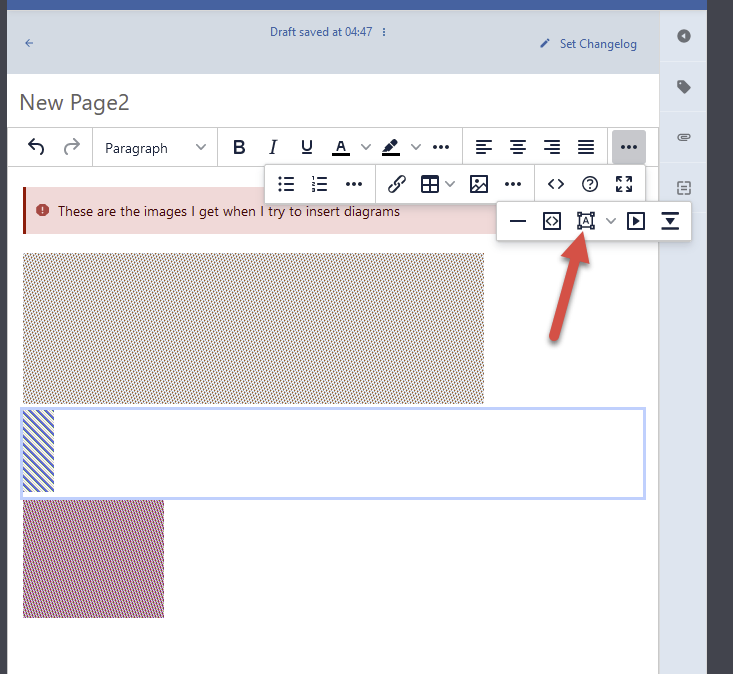
image

Those Drawio images depicted in the image above are what is actually saved on the BookStack server.

Exact BookStack Version

v22.11

Log Content

Not sure how to access logs since this is a docker image.

PHP Version

8.1

Hosting Environment

AlmaLinux 8.7 VM hosted on a vSphere server. BookStack is docker-compose and is behind Nginx Proxy Manager.

Originally created by @jeffshead on GitHub (Dec 16, 2022). ### Attempted Debugging - [X] I have read the debugging page ### Searched GitHub Issues - [X] I have searched GitHub for the issue. ### Describe the Scenario When inserting a diagram into a page, the resulting image is no good. ![image](https://user-images.githubusercontent.com/349651/208026518-3860449c-4d50-48ba-b617-f2b7a0f46232.png) Those Drawio images depicted in the image above are what is actually saved on the BookStack server. ### Exact BookStack Version v22.11 ### Log Content Not sure how to access logs since this is a docker image. ### PHP Version 8.1 ### Hosting Environment AlmaLinux 8.7 VM hosted on a vSphere server. BookStack is docker-compose and is behind Nginx Proxy Manager.
OVERLORD added the 🐕 Support label 2026-02-05 06:36:57 +03:00
Author
Owner

@ssddanbrown commented on GitHub (Dec 16, 2022):

Hi @jeffshead, That's a strange issue.
Do you also get this on our demo instance? If so, what browser are you using?

@ssddanbrown commented on GitHub (Dec 16, 2022): Hi @jeffshead, That's a strange issue. Do you also get this [on our demo instance](https://demo.bookstackapp.com/books/bookstack-demo-site/page/logging-in-to-the-demo-site)? If so, what browser are you using?
Author
Owner

@jeffshead commented on GitHub (Dec 17, 2022):

Yes, same results.
image

@jeffshead commented on GitHub (Dec 17, 2022): Yes, same results. ![image](https://user-images.githubusercontent.com/349651/208200746-8f283b60-643a-4bb4-afc2-1fcc0ac90641.png)
Author
Owner

@ssddanbrown commented on GitHub (Dec 17, 2022):

@jeffshead Thanks for confirming. Based on the screenshot, I'm assuming that's firefox?
Can you try another browser at all?
Maybe also try in a instance of the same browser with no plugins active (Private window if you don't have extensions enabled there).

@ssddanbrown commented on GitHub (Dec 17, 2022): @jeffshead Thanks for confirming. Based on the screenshot, I'm assuming that's firefox? Can you try another browser at all? Maybe also try in a instance of the same browser with no plugins active (Private window if you don't have extensions enabled there).
Author
Owner

@jeffshead commented on GitHub (Dec 17, 2022):

I'll give it a shot and report back but what's odd is the fact that I also have wiki.js installed in a docker container, on the same server. I can add diagrams to wiki.js pages, using the same browser, without a single issue. Not sure what's different because I use the same URL for both wiki apps. I just disable one or the other container and change the container name and port in Nginx Proxy Manager when I want to test the other.

@jeffshead commented on GitHub (Dec 17, 2022): I'll give it a shot and report back but what's odd is the fact that I also have wiki.js installed in a docker container, on the same server. I can add diagrams to wiki.js pages, using the same browser, without a single issue. Not sure what's different because I use the same URL for both wiki apps. I just disable one or the other container and change the container name and port in Nginx Proxy Manager when I want to test the other.
Author
Owner

@jeffshead commented on GitHub (Dec 17, 2022):

Thanks @ssddanbrown for pointing me in the right direction.

I do have Firefox FPR privacy.resistFingerprinting enabled in my main browser. I could have sworn I got the same results with my other FF browser (without FPR) but I must be mistaken because I just tested and I do not experience this issue with the other browser. I'm chalking that up to lack of sleep over the past few days due to testing BookStack, wiki.js and Joplin until the wee hours of the morning.

However, I never experienced this issue with wiki.js which is weird because it seems to be utilizing the same method of adding diagrams. Anyway, for those that run into this issue, rather than disabling FPR in my main browser, I added an FPR exception, for my site, in prefs.js which is located in the Firefox profile folder.

Something like this:

user_pref("privacy.resistFingerprinting.exemptedDomains", "*.fedex.com,*.yoursite.com");
@jeffshead commented on GitHub (Dec 17, 2022): Thanks @ssddanbrown for pointing me in the right direction. I do have Firefox FPR `privacy.resistFingerprinting` enabled in my main browser. I could have sworn I got the same results with my other FF browser (without FPR) but I must be mistaken because I just tested and I do not experience this issue with the other browser. I'm chalking that up to lack of sleep over the past few days due to testing BookStack, wiki.js and Joplin until the wee hours of the morning. However, I never experienced this issue with wiki.js which is weird because it seems to be utilizing the same method of adding diagrams. Anyway, for those that run into this issue, rather than disabling FPR in my main browser, I added an FPR exception, for my site, in `prefs.js` which is located in the Firefox profile folder. Something like this: ``` user_pref("privacy.resistFingerprinting.exemptedDomains", "*.fedex.com,*.yoursite.com"); ```
Sign in to join this conversation.
1 Participants
Notifications
Due Date
No due date set.
Dependencies

No dependencies set.

Reference: starred/BookStack#3404