Installing on top of Laravel #3384

Closed
opened 2026-02-05 06:33:39 +03:00 by OVERLORD · 9 comments
Owner

Originally created by @saidhasyim on GitHub (Dec 4, 2022).

Attempted Debugging

  • I have read the debugging page

Searched GitHub Issues

  • I have searched GitHub for the issue.

Describe the Scenario

Hello, I'm using a shared hosting provider.

I tried to install BookStack and i encountered error "No such file or directory for /vendor/autoload.php"

I see that we can follow the installation guide for Laravel. And, my hosting has a one-click installation for Laravel. So, I can install Laravel on my hosting, and run the key generation command successfully.

From there on, would you direct me how to install BookStack on top of it? or, I cannot install there?

Exact BookStack Version

22.11

Log Content

No response

PHP Version

8.0.25

Hosting Environment

CentOS Linux release 7.9.2009. Nginx.

Originally created by @saidhasyim on GitHub (Dec 4, 2022). ### Attempted Debugging - [X] I have read the debugging page ### Searched GitHub Issues - [X] I have searched GitHub for the issue. ### Describe the Scenario Hello, I'm using a shared hosting provider. I tried to install BookStack and i encountered error "No such file or directory for /vendor/autoload.php" I see that we can follow the installation guide for Laravel. And, my hosting has a one-click installation for Laravel. So, I can install Laravel on my hosting, and run the key generation command successfully. From there on, would you direct me how to install BookStack on top of it? or, I cannot install there? ### Exact BookStack Version 22.11 ### Log Content _No response_ ### PHP Version 8.0.25 ### Hosting Environment CentOS Linux release 7.9.2009. Nginx.
OVERLORD added the 🐕 Support label 2026-02-05 06:33:39 +03:00
Author
Owner

@ssddanbrown commented on GitHub (Dec 4, 2022):

Hi @saidhasyim,
You can't really install on top of Laravel, since that's likely to result in a mess.
BookStack is built with Laravel, and will come with via its dependencies.

Shared hosting support really depends on the tools and abilities provided by the hosting service.
You will ideally need command line access, with ability to use composer and git as per our install/requirements docs, along with the ability to set a document root folder for your site.
Without those tools, maintaining a BookStack instance will be tricky and likely problematic.

@ssddanbrown commented on GitHub (Dec 4, 2022): Hi @saidhasyim, You can't really install on top of Laravel, since that's likely to result in a mess. BookStack is built with Laravel, and will come with via its dependencies. Shared hosting support really depends on the tools and abilities provided by the hosting service. You will ideally need command line access, with ability to use composer and git as per our install/requirements docs, along with the ability to set a document root folder for your site. Without those tools, maintaining a BookStack instance will be tricky and likely problematic.
Author
Owner

@saidhasyim commented on GitHub (Dec 5, 2022):

I see. i can access the php command to issue Generate application key. But, i can't install anything in the server. I guess I'm out of luck :)

Thanks for letting me know.

@saidhasyim commented on GitHub (Dec 5, 2022): I see. i can access the php command to issue Generate application key. But, i can't install anything in the server. I guess I'm out of luck :) Thanks for letting me know.
Author
Owner

@saidhasyim commented on GitHub (Dec 5, 2022):

Hi @ssddanbrown , I managed to gain access to composer command. I have successfully issued the app key, and set up the env file. Now Im at the stage of running artisan migrate.

php artisan migrate

Somehow running this does not do anything. I verified in laravel.log too. there is nothing written. No error.

So, i issued the below:

php artisan migrate:install

This time it shows "Migration table created successfully."

Then, I go to the database, there is 1 table called "migration" with empty data. Is this correct?

Because when I launched the site, it just showed me the page directory files. I have already moved the /public folder data into the main directory.
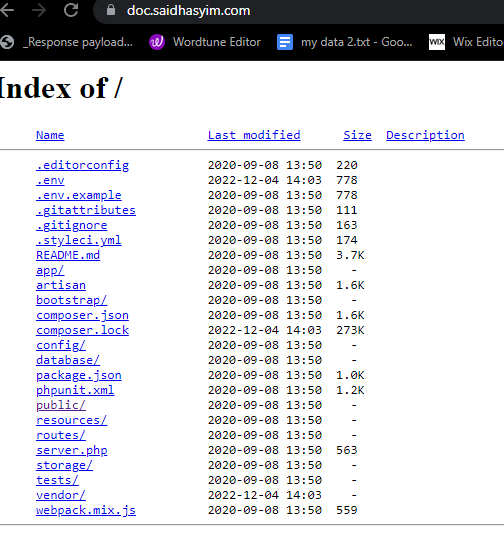
image

Hopefully you can help me out where I'm missing. I'm almost there :)

@saidhasyim commented on GitHub (Dec 5, 2022): Hi @ssddanbrown , I managed to gain access to composer command. I have successfully issued the app key, and set up the env file. Now Im at the stage of running artisan migrate. `php artisan migrate` Somehow running this does not do anything. I verified in laravel.log too. there is nothing written. No error. So, i issued the below: `php artisan migrate:install` This time it shows "Migration table created successfully." Then, I go to the database, there is 1 table called "migration" with empty data. Is this correct? Because when I launched the site, it just showed me the page directory files. I have already moved the /public folder data into the main directory. ![image](https://user-images.githubusercontent.com/111839161/205547282-2ca59b96-4f4b-4efe-8eda-03ce22ea567c.png) Hopefully you can help me out where I'm missing. I'm almost there :)
Author
Owner

@saidhasyim commented on GitHub (Dec 5, 2022):

Hey @ssddanbrown , I reran the migration command a few times, and this time it the mysql db shows a lot of tables in the DB. I suppose the DB are okay now.

So, I'm now left with the last step. I just can't launch the site. It shows me the index. Would you have any suggestion what i can follow?

image

This is my main folder where i installed it. I have moved all /public content into this folder, and the .htaccess is present. This is my htaccess content. It was the original content from git without any alternation. Not sure whether I shall amend something here?

image

@saidhasyim commented on GitHub (Dec 5, 2022): Hey @ssddanbrown , I reran the migration command a few times, and this time it the mysql db shows a lot of tables in the DB. I suppose the DB are okay now. So, I'm now left with the last step. I just can't launch the site. It shows me the index. Would you have any suggestion what i can follow? ![image](https://user-images.githubusercontent.com/111839161/205548884-925e3db1-533c-41cb-afd1-8568494494aa.png) This is my main folder where i installed it. I have moved all /public content into this folder, and the .htaccess is present. This is my htaccess content. It was the original content from git without any alternation. Not sure whether I shall amend something here? ![image](https://user-images.githubusercontent.com/111839161/205548976-ffc0310e-7bf5-4cb9-87f4-4b6b05c19db6.png)
Author
Owner

@ssddanbrown commented on GitHub (Dec 5, 2022):

I have moved all /public content into this folder, and the .htaccess is present. This is my htaccess content. It was the original content from git without any alternation. Not sure whether I shall amend something here?

Ideally you'd be able to update your hosting configuration to directly point to the BookStack public folder as the web root.
I cannot advise moving files, since this could cause unintended changes and make future updates harder. Nor would I advise deploying the BookStack files to a folder within another publicly accessible site since that can lead to security concerns of over-exposing way more files than necessary.

@ssddanbrown commented on GitHub (Dec 5, 2022): > I have moved all /public content into this folder, and the .htaccess is present. This is my htaccess content. It was the original content from git without any alternation. Not sure whether I shall amend something here? Ideally you'd be able to update your hosting configuration to directly point to the BookStack `public` folder as the web root. I cannot advise moving files, since this could cause unintended changes and make future updates harder. Nor would I advise deploying the BookStack files to a folder within another publicly accessible site since that can lead to security concerns of over-exposing way more files than necessary.
Author
Owner

@saidhasyim commented on GitHub (Dec 5, 2022):

Ah, thanks for letting me know. I successfully configured in web hosting the document root folder to point to /public.

I am now deleting everything and re-setting up from scratch.

I'll update back. Thanks so much :)

@saidhasyim commented on GitHub (Dec 5, 2022): Ah, thanks for letting me know. I successfully configured in web hosting the document root folder to point to /public. I am now deleting everything and re-setting up from scratch. I'll update back. Thanks so much :)
Author
Owner

@saidhasyim commented on GitHub (Dec 5, 2022):

Hey @ssddanbrown
I re-setup successfully and can login to the portal now. Thanks so much. But now the layout is messy. Inspecting through the browser, it shows some style error 404. Would you have any idea where i could be missing?

image

@saidhasyim commented on GitHub (Dec 5, 2022): Hey @ssddanbrown I re-setup successfully and can login to the portal now. Thanks so much. But now the layout is messy. Inspecting through the browser, it shows some style error 404. Would you have any idea where i could be missing? ![image](https://user-images.githubusercontent.com/111839161/205560611-c26d98d8-6f9e-40d0-9bb5-15c8e962e41d.png)
Author
Owner

@saidhasyim commented on GitHub (Dec 5, 2022):

Hi, my bad. I realized i cloned the development branch from Git. I am now going to use the release branch. I saw /dist folder inside the release branch.

Thanks a lot!

@saidhasyim commented on GitHub (Dec 5, 2022): Hi, my bad. I realized i cloned the development branch from Git. I am now going to use the release branch. I saw /dist folder inside the release branch. Thanks a lot!
Author
Owner

@saidhasyim commented on GitHub (Dec 5, 2022):

All good now. thanks so much for this.

@saidhasyim commented on GitHub (Dec 5, 2022): All good now. thanks so much for this.
Sign in to join this conversation.
1 Participants
Notifications
Due Date
No due date set.
Dependencies

No dependencies set.

Reference: starred/BookStack#3384