Hiding the book owner trough HTML header #3316

Closed
opened 2026-02-05 06:21:10 +03:00 by OVERLORD · 4 comments
Owner

Originally created by @mschoon85 on GitHub (Oct 28, 2022).

Attempted Debugging

  • I have read the debugging page

Searched GitHub Issues

  • I have searched GitHub for the issue.

Describe the Scenario

Hi @ssddanbrown,

I'm hiding a few elements trough the HTML header editor in the Bookstack settings, for example:

<style>
.text-muted.break-text {
    display: none;
}
</style>


<style>
.active-restriction {
    display: none;
}
</style>

I'm trying to find the right piece for hiding the book owner under 'Details' on the right side. However, when i hide .entity-meta-item all detail items are gone instead of only the book owner.

To make this more clear, im trying to hide the crossed out text in red:
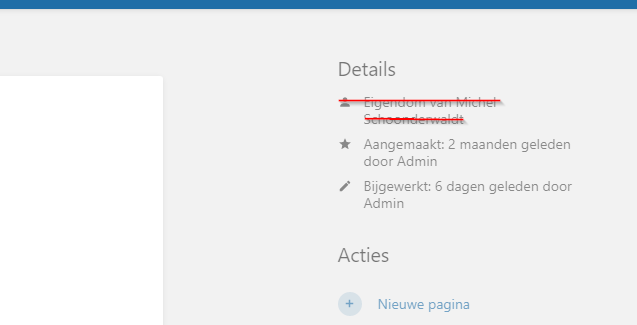
image

Exact BookStack Version

22.10.1

Log Content

No response

PHP Version

No response

Hosting Environment

Windows Server 2022

Originally created by @mschoon85 on GitHub (Oct 28, 2022). ### Attempted Debugging - [X] I have read the debugging page ### Searched GitHub Issues - [X] I have searched GitHub for the issue. ### Describe the Scenario Hi @ssddanbrown, I'm hiding a few elements trough the HTML header editor in the Bookstack settings, for example: ``` <style> .text-muted.break-text { display: none; } </style> <style> .active-restriction { display: none; } </style> ``` I'm trying to find the right piece for hiding the book owner under 'Details' on the right side. However, when i hide .entity-meta-item all detail items are gone instead of only the book owner. To make this more clear, im trying to hide the crossed out text in red: ![image](https://user-images.githubusercontent.com/96066244/198580017-080488f8-c0f6-4921-83a6-9d4824a15944.png) ### Exact BookStack Version 22.10.1 ### Log Content _No response_ ### PHP Version _No response_ ### Hosting Environment Windows Server 2022
OVERLORD added the 🐕 Support label 2026-02-05 06:21:10 +03:00
Author
Owner

@ssddanbrown commented on GitHub (Nov 3, 2022):

Hi @mschoon85,
Unfortunately I can't think of a reliable way to do this via a CSS tweak alone, at least without using very new features that wouldn't work for Firefox yet.

Alternatively, you can tweak any of our views using the visual theme system. It'd be a case of overriding this view, and removing the highlighted lines.

@ssddanbrown commented on GitHub (Nov 3, 2022): Hi @mschoon85, Unfortunately I can't think of a reliable way to do this via a CSS tweak alone, at least without using very new features that wouldn't work for Firefox yet. Alternatively, you can tweak any of our views using the [visual theme system](https://github.com/BookStackApp/BookStack/blob/development/dev/docs/visual-theme-system.md). It'd be a case of [overriding this view](https://github.com/BookStackApp/BookStack/blob/33e5c8550356b022a759c5ac61c2317ee742e308/resources/views/entities/meta.blade.php#L18-L27), and removing the highlighted lines.
Author
Owner

@mschoon85 commented on GitHub (Nov 4, 2022):

Hi @ssddanbrown,

We are using Microsoft Edge within our company, our users cannot use other browsers. Would your very new feature work for me? I would be willing to try this out.

@mschoon85 commented on GitHub (Nov 4, 2022): Hi @ssddanbrown, We are using Microsoft Edge within our company, our users cannot use other browsers. Would your very new feature work for me? I would be willing to try this out.
Author
Owner

@ssddanbrown commented on GitHub (Nov 4, 2022):

@mschoon85 In that case, you could use this tweak:

<style type="text/css">
	.entity-meta-item:has(svg[data-icon="user"]) {
		display: none;
	}
</style>

Just to confirm, this is a custom CSS tweak which is not officially supported, and may stop working on future updates, and the CSS used will only work in certain browsers supporting some of the modern CSS syntax used, and the content could still be visible/accessed to those that know how to work around the hiding of this content, the data is still sent to the browser.

@ssddanbrown commented on GitHub (Nov 4, 2022): @mschoon85 In that case, you could use this tweak: ```html <style type="text/css"> .entity-meta-item:has(svg[data-icon="user"]) { display: none; } </style> ``` Just to confirm, this is a custom CSS tweak which is not officially supported, and may stop working on future updates, and the CSS used will only work in certain browsers supporting some of the modern CSS syntax used, and the content could still be visible/accessed to those that know how to work around the hiding of this content, the data is still sent to the browser.
Author
Owner

@mschoon85 commented on GitHub (Nov 4, 2022):

@ssddanbrown , this works like a charm. Thanks!

@mschoon85 commented on GitHub (Nov 4, 2022): @ssddanbrown , this works like a charm. Thanks!
Sign in to join this conversation.
1 Participants
Notifications
Due Date
No due date set.
Dependencies

No dependencies set.

Reference: starred/BookStack#3316