Add new title and text editing capabilities #3295

Closed
opened 2026-02-05 06:16:59 +03:00 by OVERLORD · 4 comments
Owner

Originally created by @diasdmhub on GitHub (Oct 22, 2022).

Describe the feature you'd like

I found BookStack so nice to work on. It is simple yet gives us a good amount of options.
Its interface is very clean and organized.
The book shelves organization was very clever and has grown on me.

Still, there are some points I believe could be improved.

First, I find every title huge... for shelves, books or pages, all titles are very big in comparison to the section text.
Second, there is no option to edit the section title, not even a minor change like size or color.

In contrast, texts are very small everywhere and we can not resize them.
The editor offers no option for text size besides the header or paragraph options.
Unless we dive into HTML style coding, I found no options to edit any text size in BookStack.

Also, when editing some text set as a code block, I can not add some padding. Why not?
Even if I try to add some style padding at the <pre> tag, it is immediately removed.

Therefore, I believe it would be of much value to add some features:

  • Editor text size option;
  • Editor padding capability to code block;
  • Section title font options.

Describe the benefits this would bring to existing BookStack users

  • Editor text size option;
    • Easier to read text;
    • Accessibility;
  • Editor padding capability to code block;
    • Organization with better text indentation;
  • Section title font options;
    • More options of title organization and differentiation (colors for example).

Can the goal of this request already be achieved via other means?

  • Editor text size option;
    • Changing paragraph tag style <p stytle="font-size: 120%;">
  • Editor padding capability to code block;
    • N/A
  • Section title font options;
    • N/A

Have you searched for an existing open/closed issue?

  • I have searched for existing issues and none cover my fundemental request

How long have you been using BookStack?

0 to 6 months

Additional context

No response

Originally created by @diasdmhub on GitHub (Oct 22, 2022). ### Describe the feature you'd like I found BookStack so nice to work on. It is simple yet gives us a good amount of options. Its interface is very clean and organized. The book shelves organization was very clever and has grown on me. Still, there are some points I believe could be improved. First, I find every title huge... for shelves, books or pages, all titles are very big in comparison to the section text. Second, there is no option to edit the section title, not even a minor change like size or color. In contrast, texts are very small everywhere and we can not resize them. The editor offers no option for text size besides the header or paragraph options. Unless we dive into HTML style coding, I found no options to edit any text size in BookStack. Also, when editing some text set as a code block, I can not add some padding. Why not? Even if I try to add some style padding at the `<pre>` tag, it is immediately removed. Therefore, I believe it would be of much value to add some features: - Editor text size option; - Editor padding capability to code block; - Section title font options. ### Describe the benefits this would bring to existing BookStack users - **Editor text size option;** - Easier to read text; - Accessibility; - **Editor padding capability to code block;** - Organization with better text indentation; - **Section title font options;** - More options of title organization and differentiation (colors for example). ### Can the goal of this request already be achieved via other means? - **Editor text size option;** - Changing paragraph tag style `<p stytle="font-size: 120%;">` - **Editor padding capability to code block;** - N/A - **Section title font options;** - N/A ### Have you searched for an existing open/closed issue? - [X] I have searched for existing issues and none cover my fundemental request ### How long have you been using BookStack? 0 to 6 months ### Additional context _No response_
OVERLORD added the 🔨 Feature Request label 2026-02-05 06:16:59 +03:00
Author
Owner

@ssddanbrown commented on GitHub (Oct 22, 2022):

Hi @diasdmhub,
Many of these points relate to the default styles used in BookStack.
If you'd like to tweak these, I'd advise applying some custom styles via the "Custom HTML Head Content" customization setting. For example, if you wanted to bump up the text size of all page content you could use:

<style>
.page-content {
  font-size: 16px;
}
</style>

Some existing related issue to the points raised: #1148, #2638

@ssddanbrown commented on GitHub (Oct 22, 2022): Hi @diasdmhub, Many of these points relate to the default styles used in BookStack. If you'd like to tweak these, I'd advise applying some custom styles via the "Custom HTML Head Content" customization setting. For example, if you wanted to bump up the text size of all page content you could use: ```html <style> .page-content { font-size: 16px; } </style> ``` Some existing related issue to the points raised: #1148, #2638
Author
Owner

@diasdmhub commented on GitHub (Oct 22, 2022):

@ssddanbrown, thanks for the references provided and the tip on how to set up global preference.
Unfortunately, that global style affects text and titles, which is undesirable to me. I was hoping to edit text and titles individually.

My point was to have a font size option, not necessarily changing every page's font size in the app.
Maybe some pages can have a smaller font size, others a bigger size.

It seems that other users also find text size a "must-have" feature.
#1148 is an old issue with good arguments, and it offers better context.
So, I hope to see it implemented one day.

As for the code block padding, it doesn't seem issue #2638 is really related.
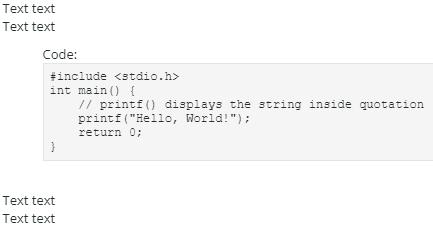
I can't really reproduce it here on Github. Please, take a look at the picture below and see if it makes sense and if it is possible at all.
code_block_padding

And finally, as for title fonts, is there a possibility to make them editable?

@diasdmhub commented on GitHub (Oct 22, 2022): @ssddanbrown, thanks for the references provided and the tip on how to set up global preference. Unfortunately, that global style affects text and titles, which is undesirable to me. I was hoping to edit text and titles individually. My point was to have a font size option, not necessarily changing every page's font size in the app. Maybe some pages can have a smaller font size, others a bigger size. It seems that other users also find text size a "must-have" feature. #1148 is an old issue with good arguments, and it offers better context. So, I hope to see it implemented one day. As for the code block padding, it doesn't seem issue #2638 is really related. I can't really reproduce it here on Github. Please, take a look at the picture below and see if it makes sense and if it is possible at all. ![code_block_padding](https://user-images.githubusercontent.com/67486897/197346394-185601df-ca00-4f34-8287-3bef7f036d5b.png) And finally, as for title fonts, is there a possibility to make them editable?
Author
Owner

@ssddanbrown commented on GitHub (Oct 23, 2022):

Unfortunately, that global style affects text and titles, which is undesirable to me. I was hoping to edit text and titles individually.

Sure, but this was just an example, You can alter specifics using the same method:

<style>
/** Alter paragraph styles **/ 
.page-content p {
  font-size: 16px;
}
/** Alter large header style **/ 
.page-content h2 {
  color: red;
}
</style>

If needed, tag classes can be used to only apply customization to pages that are tagged a certain way.

It seems that other users also find text size a "must-have" feature. ... So, I hope to see it implemented one day.

Probably not anytime too soon to be honest, have yet to see a significant reason to implement text size control, most demand seems to be based upon expectations so far.

Please, take a look at the picture below and see if it makes sense and if it is possible at all.

Okay, so horizontally indenting code blocks? Could use something like:

<style>
.page-content .CodeMirror {
   margin-left: 2rem;
   margin-right: 2rem;
}
</style>

And finally, as for title fonts, is there a possibility to make them editable?

No in-editor way to alter the fonts of title, at least built-in, but could use the above customization techniques to alter the required titles.

@ssddanbrown commented on GitHub (Oct 23, 2022): > Unfortunately, that global style affects text and titles, which is undesirable to me. I was hoping to edit text and titles individually. Sure, but this was just an example, You can alter specifics using the same method: ```html <style> /** Alter paragraph styles **/ .page-content p { font-size: 16px; } /** Alter large header style **/ .page-content h2 { color: red; } </style> ``` If needed, [tag classes](https://www.bookstackapp.com/docs/admin/hacking-bookstack/#tag-classes) can be used to only apply customization to pages that are tagged a certain way. > It seems that other users also find text size a "must-have" feature. ... So, I hope to see it implemented one day. Probably not anytime too soon to be honest, have yet to see a significant reason to implement text size control, most demand seems to be based upon expectations so far. > Please, take a look at the picture below and see if it makes sense and if it is possible at all. Okay, so horizontally indenting code blocks? Could use something like: ```html <style> .page-content .CodeMirror { margin-left: 2rem; margin-right: 2rem; } </style> ``` > And finally, as for title fonts, is there a possibility to make them editable? No in-editor way to alter the fonts of title, at least built-in, but could use the above customization techniques to alter the required titles.
Author
Owner

@ssddanbrown commented on GitHub (Oct 27, 2022):

Since there's been no further follow-up I'm going to close this off.

@ssddanbrown commented on GitHub (Oct 27, 2022): Since there's been no further follow-up I'm going to close this off.
Sign in to join this conversation.
1 Participants
Notifications
Due Date
No due date set.
Dependencies

No dependencies set.

Reference: starred/BookStack#3295