Unable to install BookStack on a fresh Digital Ocean Droplet with installation scripts #2962

Closed
opened 2026-02-05 05:52:07 +03:00 by OVERLORD · 10 comments
Owner

Originally created by @raycastly on GitHub (Aug 16, 2022).

Attempted Debugging

  • I have read the debugging page

Searched GitHub Issues

  • I have searched GitHub for the issue.

Describe the Scenario

I tried to do this with 22.04 and 20.04 ubuntu droplets and I tried to use adequate installation scripts:

  1. Buy a new, fresh digital ocean droplet just like in the tutorial video.
  2. Once you ssh into the server, follow the instructions given in the video (or the documentation).
  3. The mysql 8.0 fails and nothing works after that, it cannot migrate etc...

Exact BookStack Version

Latest used in the scripts

Log Content

Setting up mysql-server-8.0 (8.0.30-0ubuntu0.20.04.2) ...
Renaming removed key_buffer and myisam-recover options (if present)
/var/lib/dpkg/info/mysql-server-8.0.postinst: line 21: 20342 Killed                  mysqld --user=mysql --daemonize --socket="$tmpdir/mysqld.sock" --pid-file="$tmpdir/mysqld.pid" --skip-networking
Warning: Unable to start the server.
Job for mysql.service failed because a fatal signal was delivered to the control process.
See "systemctl status mysql.service" and "journalctl -xe" for details.
invoke-rc.d: initscript mysql, action "start" failed.
● mysql.service - MySQL Community Server
     Loaded: loaded (/lib/systemd/system/mysql.service; enabled; vendor preset: enabled)
     Active: activating (auto-restart) (Result: signal) since Tue 2022-08-16 02:03:50 UTC; 133ms ago
    Process: 20416 ExecStartPre=/usr/share/mysql/mysql-systemd-start pre (code=exited, status=0/SUCCESS)
    Process: 20434 ExecStart=/usr/sbin/mysqld (code=killed, signal=KILL)
   Main PID: 20434 (code=killed, signal=KILL)
     Status: "Server startup in progress"
dpkg: error processing package mysql-server-8.0 (--configure):
 installed mysql-server-8.0 package post-installation script subprocess returned error exit status 1
Errors were encountered while processing:
 mysql-server-8.0
E: Sub-process /usr/bin/dpkg returned an error code (1)
ERROR 2002 (HY000): Can't connect to local MySQL server through socket '/var/run/mysqld/mysqld.sock' (2)
fatal: destination path 'bookstack' already exists and is not an empty directory.

PHP Version

7.4 & 8.0 (neither worked)

Hosting Environment

Ubuntu 20.04 & 22.04 Digital ocean droplet installed with official installation script...

Originally created by @raycastly on GitHub (Aug 16, 2022). ### Attempted Debugging - [X] I have read the debugging page ### Searched GitHub Issues - [X] I have searched GitHub for the issue. ### Describe the Scenario I tried to do this with 22.04 and 20.04 ubuntu droplets and I tried to use adequate installation scripts: 1. Buy a new, fresh digital ocean droplet just like in the tutorial video. 2. Once you ssh into the server, follow the instructions given in the video (or the documentation). 3. The mysql 8.0 fails and nothing works after that, it cannot migrate etc... ### Exact BookStack Version Latest used in the scripts ### Log Content ``` Setting up mysql-server-8.0 (8.0.30-0ubuntu0.20.04.2) ... Renaming removed key_buffer and myisam-recover options (if present) /var/lib/dpkg/info/mysql-server-8.0.postinst: line 21: 20342 Killed mysqld --user=mysql --daemonize --socket="$tmpdir/mysqld.sock" --pid-file="$tmpdir/mysqld.pid" --skip-networking Warning: Unable to start the server. Job for mysql.service failed because a fatal signal was delivered to the control process. See "systemctl status mysql.service" and "journalctl -xe" for details. invoke-rc.d: initscript mysql, action "start" failed. ● mysql.service - MySQL Community Server Loaded: loaded (/lib/systemd/system/mysql.service; enabled; vendor preset: enabled) Active: activating (auto-restart) (Result: signal) since Tue 2022-08-16 02:03:50 UTC; 133ms ago Process: 20416 ExecStartPre=/usr/share/mysql/mysql-systemd-start pre (code=exited, status=0/SUCCESS) Process: 20434 ExecStart=/usr/sbin/mysqld (code=killed, signal=KILL) Main PID: 20434 (code=killed, signal=KILL) Status: "Server startup in progress" dpkg: error processing package mysql-server-8.0 (--configure): installed mysql-server-8.0 package post-installation script subprocess returned error exit status 1 Errors were encountered while processing: mysql-server-8.0 E: Sub-process /usr/bin/dpkg returned an error code (1) ERROR 2002 (HY000): Can't connect to local MySQL server through socket '/var/run/mysqld/mysqld.sock' (2) ERROR 2002 (HY000): Can't connect to local MySQL server through socket '/var/run/mysqld/mysqld.sock' (2) ERROR 2002 (HY000): Can't connect to local MySQL server through socket '/var/run/mysqld/mysqld.sock' (2) fatal: destination path 'bookstack' already exists and is not an empty directory. ``` ### PHP Version 7.4 & 8.0 (neither worked) ### Hosting Environment Ubuntu 20.04 & 22.04 Digital ocean droplet installed with official installation script...
OVERLORD added the 🐕 Support label 2026-02-05 05:52:07 +03:00
Author
Owner

@ssddanbrown commented on GitHub (Aug 16, 2022):

Hi @maxhacker11,

I just ran a test on Ubuntu 20.04 on Digital Ocean, using our 20.04 install script, and all installed fine without issue.
The MySQL version was exactly matching that shown in your provided logs.

  • Are you sure your server environment is fresh?
  • What exact image are you using when creating the droplet?
  • Are you providing any user data to digital ocean?
  • Are you running any other commands, other those within our install documentation, beforehand on the fresh droplet?
  • Are you ever running the script more that once?
@ssddanbrown commented on GitHub (Aug 16, 2022): Hi @maxhacker11, I just ran a test on Ubuntu 20.04 on Digital Ocean, using our 20.04 install script, and all installed fine without issue. The MySQL version was exactly matching that shown in your provided logs. - Are you sure your server environment is fresh? - What exact image are you using when creating the droplet? - Are you providing any user data to digital ocean? - Are you running any other commands, other those within our install documentation, beforehand on the fresh droplet? - Are you ever running the script more that once?
Author
Owner

@raycastly commented on GitHub (Aug 16, 2022):

Hello @ssddanbrown , first of all thanks for taking the time to help! I think I'm going to love this app once I get it running, it seems to have all I ever wanted:D

Here's the answers in order:

  1. Yes, it must be because I just created a new droplet and as soon as I logged in I started the script commands. The second and third time I tried it, I used the "rebuild" option which rebuilds the droplet, so that should be fresh too.
  2. I used "Ubuntu 22.04 x64" the first time, and I used "Ubuntu 20.04 (LTS) x64"
  3. How can I check this? I am honestly not sure, maybe I am
  4. No, I just create the droplet, ssh into it (with password) and then I don't change location etc, I just run the 3 commands one by one in order.
  5. I did not run the script more than once, it fails the very first time I run it.

I just tried it again:

  • I rebuilt the droplet with Ubuntu 20.04 (LTS) x64
  • I logged into the droplet with password into root user
  • I typed in the clear command to clear the screen
  • Then I followed the 3 commands listed for Ubuntu 20.04
  • It runs pretty well until it hits this mysql spot
done!
update-alternatives: using /var/lib/mecab/dic/ipadic-utf8 to provide /var/lib/mecab/dic/debian (mecab-dictionary) in auto mode
Setting up libhtml-parser-perl (3.72-5) ...
Setting up libtiff5:amd64 (4.1.0+git191117-2ubuntu0.20.04.3) ...
Setting up libfontconfig1:amd64 (2.13.1-2ubuntu3) ...
Setting up libhttp-message-perl (6.22-1) ...
Setting up apache2-utils (2.4.41-4ubuntu3.12) ...
Setting up mysql-server-8.0 (8.0.30-0ubuntu0.20.04.2) ...
update-alternatives: using /etc/mysql/mysql.cnf to provide /etc/mysql/my.cnf (my.cnf) in auto mode
Renaming removed key_buffer and myisam-recover options (if present)
mysqld will log errors to /var/log/mysql/error.log
2022-08-16T11:22:18.996894Z 0 [ERROR] [MY-011065] [Server] Unable to determine if daemon is running: No such file or directory (rc=0).
2022-08-16T11:22:19.002016Z 0 [ERROR] [MY-010946] [Server] Failed to start mysqld daemon. Check mysqld error log.
Warning: Unable to start the server.
Created symlink /etc/systemd/system/multi-user.target.wants/mysql.service → /lib/systemd/system/mysql.service.
Job for mysql.service failed because a fatal signal was delivered to the control process.
See "systemctl status mysql.service" and "journalctl -xe" for details.
invoke-rc.d: initscript mysql, action "start" failed.
● mysql.service - MySQL Community Server
     Loaded: loaded (/lib/systemd/system/mysql.service; enabled; vendor preset: enabled)
     Active: activating (auto-restart) (Result: signal) since Tue 2022-08-16 11:22:22 UTC; 51ms ago
    Process: 14703 ExecStartPre=/usr/share/mysql/mysql-systemd-start pre (code=exited, status=0/SUCCESS)
    Process: 14721 ExecStart=/usr/sbin/mysqld (code=killed, signal=KILL)
   Main PID: 14721 (code=killed, signal=KILL)
     Status: "Server startup in progress"
dpkg: error processing package mysql-server-8.0 (--configure):
 installed mysql-server-8.0 package post-installation script subprocess returned error exit status 1
Setting up php7.4-fpm (7.4.3-4ubuntu2.12) ...
Package apache2 is not configured yet. Will defer actions by package php7.4-fpm.

Creating config file /etc/php/7.4/fpm/php.ini with new version
NOTICE: Not enabling PHP 7.4 FPM by default.
NOTICE: To enable PHP 7.4 FPM in Apache2 do:

Later on it fails because mysql is not running I suppose?

Processing triggers for php7.4-cli (7.4.3-4ubuntu2.12) ...
Processing triggers for php7.4-fpm (7.4.3-4ubuntu2.12) ...
NOTICE: Not enabling PHP 7.4 FPM by default.
NOTICE: To enable PHP 7.4 FPM in Apache2 do:
NOTICE: a2enmod proxy_fcgi setenvif
NOTICE: a2enconf php7.4-fpm
NOTICE: You are seeing this message because you have apache2 package installed.
Processing triggers for libapache2-mod-php7.4 (7.4.3-4ubuntu2.12) ...
Errors were encountered while processing:
 mysql-server-8.0
E: Sub-process /usr/bin/dpkg returned an error code (1)
ERROR 2002 (HY000): Can't connect to local MySQL server through socket '/var/run/mysqld/mysqld.sock' (2)
Cloning into 'bookstack'...
remote: Enumerating objects: 46225, done.
remote: Counting objects: 100% (380/380), done.
remote: Compressing objects: 100% (294/294), done.
remote: Total 46225 (delta 99), reused 343 (delta 82), pack-reused 45845
Receiving objects: 100% (46225/46225), 26.32 MiB | 17.61 MiB/s, done.
Resolving deltas: 100% (33852/33852), done.

I will try it once again on a completely new droplet instead of rebuilding, maybe that also has some factor.

@raycastly commented on GitHub (Aug 16, 2022): Hello @ssddanbrown , first of all thanks for taking the time to help! I think I'm going to love this app once I get it running, it seems to have all I ever wanted:D Here's the answers in order: 1. Yes, it must be because I just created a new droplet and as soon as I logged in I started the script commands. The second and third time I tried it, I used the "rebuild" option which rebuilds the droplet, so that should be fresh too. 2. I used "Ubuntu 22.04 x64" the first time, and I used "Ubuntu 20.04 (LTS) x64" 3. How can I check this? I am honestly not sure, maybe I am 4. No, I just create the droplet, ssh into it (with password) and then I don't change location etc, I just run the 3 commands one by one in order. 5. I did not run the script more than once, it fails the very first time I run it. I just tried it again: - I rebuilt the droplet with Ubuntu 20.04 (LTS) x64 - I logged into the droplet with password into root user - I typed in the clear command to clear the screen - Then I followed the 3 commands listed for Ubuntu 20.04 - It runs pretty well until it hits this mysql spot ``` done! update-alternatives: using /var/lib/mecab/dic/ipadic-utf8 to provide /var/lib/mecab/dic/debian (mecab-dictionary) in auto mode Setting up libhtml-parser-perl (3.72-5) ... Setting up libtiff5:amd64 (4.1.0+git191117-2ubuntu0.20.04.3) ... Setting up libfontconfig1:amd64 (2.13.1-2ubuntu3) ... Setting up libhttp-message-perl (6.22-1) ... Setting up apache2-utils (2.4.41-4ubuntu3.12) ... Setting up mysql-server-8.0 (8.0.30-0ubuntu0.20.04.2) ... update-alternatives: using /etc/mysql/mysql.cnf to provide /etc/mysql/my.cnf (my.cnf) in auto mode Renaming removed key_buffer and myisam-recover options (if present) mysqld will log errors to /var/log/mysql/error.log 2022-08-16T11:22:18.996894Z 0 [ERROR] [MY-011065] [Server] Unable to determine if daemon is running: No such file or directory (rc=0). 2022-08-16T11:22:19.002016Z 0 [ERROR] [MY-010946] [Server] Failed to start mysqld daemon. Check mysqld error log. Warning: Unable to start the server. Created symlink /etc/systemd/system/multi-user.target.wants/mysql.service → /lib/systemd/system/mysql.service. Job for mysql.service failed because a fatal signal was delivered to the control process. See "systemctl status mysql.service" and "journalctl -xe" for details. invoke-rc.d: initscript mysql, action "start" failed. ● mysql.service - MySQL Community Server Loaded: loaded (/lib/systemd/system/mysql.service; enabled; vendor preset: enabled) Active: activating (auto-restart) (Result: signal) since Tue 2022-08-16 11:22:22 UTC; 51ms ago Process: 14703 ExecStartPre=/usr/share/mysql/mysql-systemd-start pre (code=exited, status=0/SUCCESS) Process: 14721 ExecStart=/usr/sbin/mysqld (code=killed, signal=KILL) Main PID: 14721 (code=killed, signal=KILL) Status: "Server startup in progress" dpkg: error processing package mysql-server-8.0 (--configure): installed mysql-server-8.0 package post-installation script subprocess returned error exit status 1 Setting up php7.4-fpm (7.4.3-4ubuntu2.12) ... Package apache2 is not configured yet. Will defer actions by package php7.4-fpm. Creating config file /etc/php/7.4/fpm/php.ini with new version NOTICE: Not enabling PHP 7.4 FPM by default. NOTICE: To enable PHP 7.4 FPM in Apache2 do: ``` Later on it fails because mysql is not running I suppose? ``` Processing triggers for php7.4-cli (7.4.3-4ubuntu2.12) ... Processing triggers for php7.4-fpm (7.4.3-4ubuntu2.12) ... NOTICE: Not enabling PHP 7.4 FPM by default. NOTICE: To enable PHP 7.4 FPM in Apache2 do: NOTICE: a2enmod proxy_fcgi setenvif NOTICE: a2enconf php7.4-fpm NOTICE: You are seeing this message because you have apache2 package installed. Processing triggers for libapache2-mod-php7.4 (7.4.3-4ubuntu2.12) ... Errors were encountered while processing: mysql-server-8.0 E: Sub-process /usr/bin/dpkg returned an error code (1) ERROR 2002 (HY000): Can't connect to local MySQL server through socket '/var/run/mysqld/mysqld.sock' (2) ERROR 2002 (HY000): Can't connect to local MySQL server through socket '/var/run/mysqld/mysqld.sock' (2) ERROR 2002 (HY000): Can't connect to local MySQL server through socket '/var/run/mysqld/mysqld.sock' (2) Cloning into 'bookstack'... remote: Enumerating objects: 46225, done. remote: Counting objects: 100% (380/380), done. remote: Compressing objects: 100% (294/294), done. remote: Total 46225 (delta 99), reused 343 (delta 82), pack-reused 45845 Receiving objects: 100% (46225/46225), 26.32 MiB | 17.61 MiB/s, done. Resolving deltas: 100% (33852/33852), done. ``` I will try it once again on a completely new droplet instead of rebuilding, maybe that also has some factor.
Author
Owner

@ssddanbrown commented on GitHub (Aug 16, 2022):

@maxhacker11 Okay, if it fails again please could you screenshot the digital ocean droplet creation screen, so I can for sure use the exact same image, zone and droplet size/type configuration.

@ssddanbrown commented on GitHub (Aug 16, 2022): @maxhacker11 Okay, if it fails again please could you screenshot the digital ocean droplet creation screen, so I can for sure use the exact same image, zone and droplet size/type configuration.
Author
Owner

@raycastly commented on GitHub (Aug 16, 2022):

image image image image image

This time around I used an SSH key instead of a password.

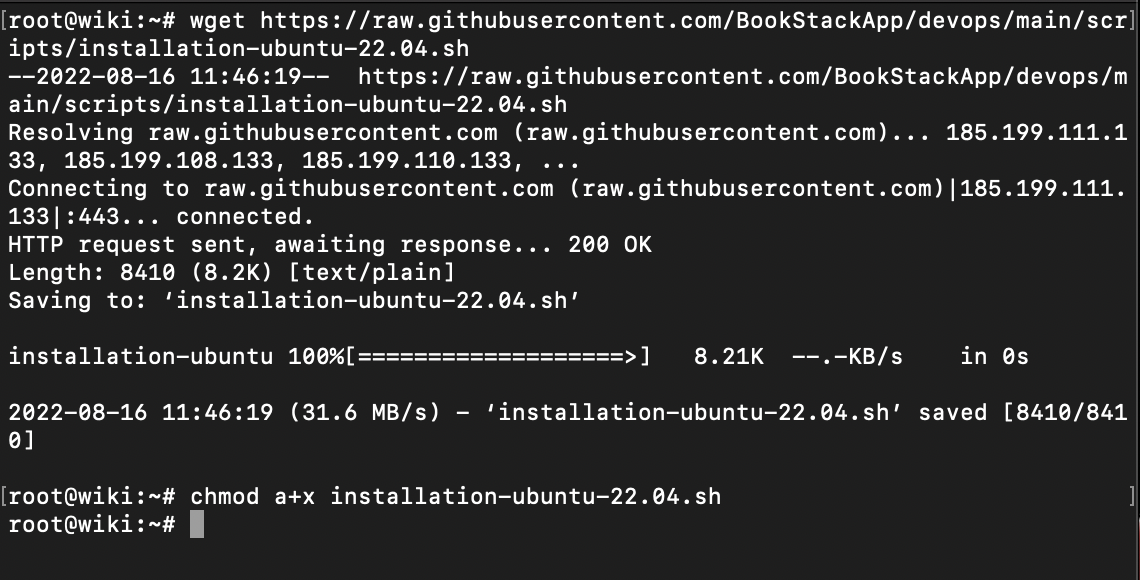
I just ran the 2 commands after ssh-ing into the server:
image

Then I ran the third command and entered wiki.bundos.org when prompted.

I get the same error once again in the log file:
image

@raycastly commented on GitHub (Aug 16, 2022): <img width="534" alt="image" src="https://user-images.githubusercontent.com/9881034/184869645-1f978dd1-9b84-48f9-87b0-1167ab8cfae9.png"> <img width="557" alt="image" src="https://user-images.githubusercontent.com/9881034/184869673-bce5368f-1f5c-4d13-a1f6-d0ff9b052425.png"> <img width="1083" alt="image" src="https://user-images.githubusercontent.com/9881034/184869707-23d82d3f-fe52-41dd-8709-9f89aeeafd23.png"> <img width="676" alt="image" src="https://user-images.githubusercontent.com/9881034/184870203-228781dc-a128-49e8-bdb5-5b4a3f9f496e.png"> <img width="1119" alt="image" src="https://user-images.githubusercontent.com/9881034/184869767-d28edaa5-a549-4f2a-b407-c514b9bc9a71.png"> This time around I used an SSH key instead of a password. I just ran the 2 commands after ssh-ing into the server: <img width="570" alt="image" src="https://user-images.githubusercontent.com/9881034/184872057-9e7c421a-3cb0-438a-a783-b8fdfe6e476f.png"> Then I ran the third command and entered wiki.bundos.org when prompted. I get the same error once again in the log file: <img width="835" alt="image" src="https://user-images.githubusercontent.com/9881034/184873087-56538520-7111-4782-9d4a-43eedad51766.png">
Author
Owner

@raycastly commented on GitHub (Aug 16, 2022):

@ssddanbrown let me know if that is enough details or if more is necessary:)

@raycastly commented on GitHub (Aug 16, 2022): @ssddanbrown let me know if that is enough details or if more is necessary:)
Author
Owner

@ssddanbrown commented on GitHub (Aug 16, 2022):

@maxhacker11 Thanks for the info.

The usage of the smallest droplet size has reminded me of an issue that can occur.
With default settings, during the install process on recent versions of Ubuntu & MySQL, MySQL can fail to start due to not having enough memory available, since 512MB is a little too tight for the defaults.

You can still get by on the smallest droplet size, but you just need some tweaks.
Before running the install script, on a fresh instance, you can add some swap space to provide some memory breathing room.

@ssddanbrown commented on GitHub (Aug 16, 2022): @maxhacker11 Thanks for the info. The usage of the smallest droplet size has reminded me of an issue that can occur. With default settings, during the install process on recent versions of Ubuntu & MySQL, MySQL can fail to start due to not having enough memory available, since 512MB is a little too tight for the defaults. You can still get by on the smallest droplet size, but you just need some tweaks. Before running the install script, on a fresh instance, you can [add some swap space](https://www.digitalocean.com/community/tutorials/how-to-add-swap-space-on-ubuntu-22-04) to provide some memory breathing room.
Author
Owner

@raycastly commented on GitHub (Aug 16, 2022):

Well @ssddanbrown , it seems like it worked judging by the logs, but I am quite confused at the moment - I am presented with a Digisac login screen on my subdomain wiki.bundos.org ? And this is some completely random website I have no clue what this is haha Do you have any clue what could have gone wrong? hahah
On my digital ocean I have setup the A DNS record to point to the adequate droplet.

@raycastly commented on GitHub (Aug 16, 2022): Well @ssddanbrown , it seems like it worked judging by the logs, but I am quite confused at the moment - I am presented with a Digisac login screen on my subdomain wiki.bundos.org ? And this is some completely random website I have no clue what this is haha Do you have any clue what could have gone wrong? hahah On my digital ocean I have setup the A DNS record to point to the adequate droplet.
Author
Owner

@raycastly commented on GitHub (Aug 16, 2022):

It might just be something local on my computer that's acting weird. My friend is able to access the adequate login page via the exact same link - I am very confused haha

@raycastly commented on GitHub (Aug 16, 2022): It might just be something local on my computer that's acting weird. My friend is able to access the adequate login page via the exact same link - I am very confused haha
Author
Owner

@ssddanbrown commented on GitHub (Aug 16, 2022):

It can take a while for DNS changes to roll-out.
From looking at this page I can see the domain is still pointing to a different IP (Which has the Digisac login screen) in some locations. Might just need to give it a bit more time to roll out and for caches to expire.

@ssddanbrown commented on GitHub (Aug 16, 2022): It can take a while for DNS changes to roll-out. From looking [at this page](https://dnschecker.org/#A/wiki.bundos.org) I can see the domain is still pointing to a different IP (Which has the Digisac login screen) in some locations. Might just need to give it a bit more time to roll out and for caches to expire.
Author
Owner

@raycastly commented on GitHub (Aug 16, 2022):

Gotcha, okay I will wait it out and see, thanks a quadrillion for the immense help, in any case we solved the base issue I had so I will close this now:D

@raycastly commented on GitHub (Aug 16, 2022): Gotcha, okay I will wait it out and see, thanks a quadrillion for the immense help, in any case we solved the base issue I had so I will close this now:D
Sign in to join this conversation.
1 Participants
Notifications
Due Date
No due date set.
Dependencies

No dependencies set.

Reference: starred/BookStack#2962