LDAP Setup is nearly impossible #2760

Closed
opened 2026-02-05 05:04:25 +03:00 by OVERLORD · 15 comments
Owner

Originally created by @saschabrockel on GitHub (Apr 24, 2022).

Describe the Bug

Hello there. I have really no idea how the hell this is coded but BookStack is the only app that I can't get working with LDAP for weeks. The documentation if something does not work is horrible. Debugging is simply not possible because it only tells me "malformed utf-8 characters possibly incorrectly encoded" when LDAP_DUMP_USER_DETAILS=true. It seems like I also need to set APP_DEBUG=true to let the message occur. Otherwise, it's just invalid credentials.

I mean even with the standard user filter LDAP_USER_FILTER=(&(uid=${user})) it does not work for me. I got one user filter that works but does not recognize what the user enters and always logs in as the first user in LDAP. Using this default filter just tells me invalid credentials which is not true. I'm using OpenLDAP and the newest Docker Image of BookStack.

This user filter does what I told you above:
LDAP_USER_FILTER=(&(|(objectclass=inetOrgPerson))(|(memberof=cn=admin,ou=groups,dc=sascha-brockel,dc=de)(memberof=cn=family,ou=groups,dc=sascha-brockel,dc=de)(memberof=cn=yass,ou=groups,dc=sascha-brockel,dc=de)))

MemberOf also seems not to work.

Edit: I tried the following filter now:
LDAP_USER_FILTER=(&(uid=${user})(|(objectclass=inetOrgPerson))(|(memberof=cn=admin,ou=groups,dc=sascha-brockel,dc=de)(memberof=cn=family,ou=groups,dc=sascha-brockel,dc=de)(memberof=cn=yass,ou=groups,dc=sascha-brockel,dc=de)))

This now ends up in invalid credentials too.

Steps to Reproduce

  1. Set LDAP_USER_FILTER to the default one.
  2. Try to log in and get invalid credentials.

Expected Behaviour

Get logged in.

Screenshots or Additional Context

No response

Browser Details

Google Chrome 100.0.4896.88 (64 Bit) on Windows 11

Exact BookStack Version

v22.03.1

PHP Version

No response

Hosting Environment

Docker Container: lscr.io/linuxserver/bookstack:latest

Originally created by @saschabrockel on GitHub (Apr 24, 2022). ### Describe the Bug Hello there. I have really no idea how the hell this is coded but BookStack is the only app that I can't get working with LDAP for weeks. The documentation if something does not work is horrible. Debugging is simply not possible because it only tells me "malformed utf-8 characters possibly incorrectly encoded" when `LDAP_DUMP_USER_DETAILS=true`. It seems like I also need to set `APP_DEBUG=true` to let the message occur. Otherwise, it's just invalid credentials. I mean even with the standard user filter `LDAP_USER_FILTER=(&(uid=${user}))` it does not work for me. I got one user filter that works but does not recognize what the user enters and always logs in as the first user in LDAP. Using this default filter just tells me invalid credentials which is not true. I'm using OpenLDAP and the newest Docker Image of BookStack. This user filter does what I told you above: `LDAP_USER_FILTER=(&(|(objectclass=inetOrgPerson))(|(memberof=cn=admin,ou=groups,dc=sascha-brockel,dc=de)(memberof=cn=family,ou=groups,dc=sascha-brockel,dc=de)(memberof=cn=yass,ou=groups,dc=sascha-brockel,dc=de)))` MemberOf also seems not to work. Edit: I tried the following filter now: `LDAP_USER_FILTER=(&(uid=${user})(|(objectclass=inetOrgPerson))(|(memberof=cn=admin,ou=groups,dc=sascha-brockel,dc=de)(memberof=cn=family,ou=groups,dc=sascha-brockel,dc=de)(memberof=cn=yass,ou=groups,dc=sascha-brockel,dc=de)))` This now ends up in invalid credentials too. ### Steps to Reproduce 1. Set LDAP_USER_FILTER to the default one. 2. Try to log in and get invalid credentials. ### Expected Behaviour Get logged in. ### Screenshots or Additional Context _No response_ ### Browser Details Google Chrome 100.0.4896.88 (64 Bit) on Windows 11 ### Exact BookStack Version v22.03.1 ### PHP Version _No response_ ### Hosting Environment Docker Container: `lscr.io/linuxserver/bookstack:latest`
OVERLORD added the 🐛 Bug label 2026-02-05 05:04:25 +03:00
Author
Owner

@ssddanbrown commented on GitHub (Apr 24, 2022):

Hi @saschabrockel,

  • Could you confirm exactly how you are setting the LDAP_USER_FILTER for your BookStack setup/install?
  • Does testing the LDAP_USER_FILTER work when querying the LDAP server manually outside of BookStack, when replacing ${user} with a valid uid?
@ssddanbrown commented on GitHub (Apr 24, 2022): Hi @saschabrockel, - Could you confirm exactly how you are setting the `LDAP_USER_FILTER` for your BookStack setup/install? - Does testing the `LDAP_USER_FILTER` work when querying the LDAP server manually outside of BookStack, when replacing `${user}` with a valid uid?
Author
Owner

@saschabrockel commented on GitHub (Apr 25, 2022):

Hi @ssddanbrown,

I'm setting it as an environment variable in my docker-compose.yml.
What exactly do you mean with outside of BookStack? How to test it? I'm running the same LDAP things with for example NextCloud and Authelia without problems. But the configuration options are clearer.

@saschabrockel commented on GitHub (Apr 25, 2022): Hi @ssddanbrown, I'm setting it as an environment variable in my docker-compose.yml. What exactly do you mean with outside of BookStack? How to test it? I'm running the same LDAP things with for example NextCloud and Authelia without problems. But the configuration options are clearer.
Author
Owner

@ssddanbrown commented on GitHub (Apr 25, 2022):

I'm setting it as an environment variable in my docker-compose.yml.

In that case, could you try using two $ signs instead of one? Like so:

LDAP_USER_FILTER=(&(uid=$${user}))

And let me know if that works?


What exactly do you mean with outside of BookStack? How to test it?

I just meant using something like the ldapsearch command to test the same settings from another perspective.
Try the change above first though, it's probably that.

@ssddanbrown commented on GitHub (Apr 25, 2022): > I'm setting it as an environment variable in my docker-compose.yml. In that case, could you try using two `$` signs instead of one? Like so: ```bash LDAP_USER_FILTER=(&(uid=$${user})) ``` And let me know if that works? --- > What exactly do you mean with outside of BookStack? How to test it? I just meant using something like the `ldapsearch` command to test the same settings from another perspective. Try the change above first though, it's probably that.
Author
Owner

@saschabrockel commented on GitHub (Apr 25, 2022):

LDAP_USER_FILTER=(&(uid=$${user}))
Nope does not work either sadly. I already tried it.

And that was the strange thing.

@saschabrockel commented on GitHub (Apr 25, 2022): `LDAP_USER_FILTER=(&(uid=$${user}))` Nope does not work either sadly. I already tried it. And that was the strange thing.
Author
Owner

@ssddanbrown commented on GitHub (Apr 25, 2022):

Okay,

  • Could you provide a fuller view of your configuration? So visibility of all LDAP options set in their original formatting? Obliviously you can obscure and private URLs and credentials, just need full visibility of how things are set and the format.
  • Did you have to go to extra steps to make memberOf work with OpenLDAP?
  • Are you using a specific distribution of OpenLDAP?
@ssddanbrown commented on GitHub (Apr 25, 2022): Okay, - Could you provide a fuller view of your configuration? So visibility of all LDAP options set in their original formatting? Obliviously you can obscure and private URLs and credentials, just need full visibility of how things are set and the format. - Did you have to go to extra steps to make `memberOf` work with OpenLDAP? - Are you using a specific distribution of OpenLDAP?
Author
Owner

@saschabrockel commented on GitHub (Apr 25, 2022):

# Enable LDAP group sync, Set to 'true' to enable.
LDAP_USER_TO_GROUPS=true

# LDAP user attribute containing groups, Defaults to 'memberOf'.
LDAP_GROUP_ATTRIBUTE="memberOf"

# Remove users from roles that don't match LDAP groups.
LDAP_REMOVE_FROM_GROUPS=false

# General auth
AUTH_METHOD=ldap

# The LDAP host, Adding a port is optional
LDAP_SERVER=192.168.178.29:389

# The base DN from where users will be searched within
LDAP_BASE_DN="ou=users,dc=sascha-brockel,dc=de"

# The full DN and password of the user used to search the server
# Can both be left as 'false' (without quotes) to bind anonymously
LDAP_DN="cn=adminuser,dc=sascha-brockel,dc=de"
LDAP_PASS="password"

# A filter to use when searching for users
# The user-provided user-name used to replace any occurrences of '${user}'
# If you're setting this option via other means, such as within a docker-compose.yml,
# you may need escape the $, often using $$ or \$ instead. 
#LDAP_USER_FILTER=(&(uid=${user}))
# this one works but always gives back the first user of course LDAP_USER_FILTER=(&(|(objectclass=inetOrgPerson))(|(memberof=cn=admin,ou=groups,dc=sascha-brockel,dc=de)(memberof=cn=family,ou=groups,dc=sascha-brockel,dc=de)(memberof=cn=homies,ou=groups,dc=sascha-brockel,dc=de)(memberof=cn=user,ou=groups,dc=sascha-brockel,dc=de)(memberof=cn=yass,ou=groups,dc=sascha-brockel,dc=de)))
LDAP_USER_FILTER=(&(uid=$${user})(|(objectclass=inetOrgPerson))(|(memberof=cn=admin,ou=groups,dc=sascha-brockel,dc=de)(memberof=cn=family,ou=groups,dc=sascha-brockel,dc=de)(memberof=cn=homies,ou=groups,dc=sascha-brockel,dc=de)(memberof=cn=yass,ou=groups,dc=sascha-brockel,dc=de)))

# Set the LDAP version to use when connecting to the server
# Should be set to 3 in most cases.
LDAP_VERSION=3

# Set the property to use as a unique identifier for this user.
# Stored and used to match LDAP users with existing BookStack users.
# Prefixing the value with 'BIN;' will assume the LDAP service provides the attribute value as
# binary data and BookStack will convert the value to a hexidecimal representation.
# Defaults to 'uid'.
LDAP_ID_ATTRIBUTE=uid

# Set the default 'email' attribute. Defaults to 'mail'
LDAP_EMAIL_ATTRIBUTE=mail

# Set the property to use for a user's display name. Defaults to 'cn'
LDAP_DISPLAY_NAME_ATTRIBUTE=cn

# Set the attribute to use for the user's avatar image.
# Must provide JPEG binary image data.
# Will be used upon login or registration when the user doesn't
# already have an avatar image set.
# Remove this option or set to 'null' to disable LDAP avatar import.
LDAP_THUMBNAIL_ATTRIBUTE=jpegphoto

# Force TLS to be used for LDAP communication.
# Use this if you can but your LDAP support will need to support it and
# you may need to import your certificate to the BookStack host machine.
# Defaults to 'false'.
LDAP_START_TLS=false

Did you have to go to extra steps to make memberOf work with OpenLDAP?

Yes. Like in this manual: https://kifarunix.com/how-to-create-openldap-member-groups/
I've needed to activate it.

Are you using a specific distribution of OpenLDAP?

The docker image: osixia/openldap:latest

@saschabrockel commented on GitHub (Apr 25, 2022): ``` # Enable LDAP group sync, Set to 'true' to enable. LDAP_USER_TO_GROUPS=true # LDAP user attribute containing groups, Defaults to 'memberOf'. LDAP_GROUP_ATTRIBUTE="memberOf" # Remove users from roles that don't match LDAP groups. LDAP_REMOVE_FROM_GROUPS=false # General auth AUTH_METHOD=ldap # The LDAP host, Adding a port is optional LDAP_SERVER=192.168.178.29:389 # The base DN from where users will be searched within LDAP_BASE_DN="ou=users,dc=sascha-brockel,dc=de" # The full DN and password of the user used to search the server # Can both be left as 'false' (without quotes) to bind anonymously LDAP_DN="cn=adminuser,dc=sascha-brockel,dc=de" LDAP_PASS="password" # A filter to use when searching for users # The user-provided user-name used to replace any occurrences of '${user}' # If you're setting this option via other means, such as within a docker-compose.yml, # you may need escape the $, often using $$ or \$ instead. #LDAP_USER_FILTER=(&(uid=${user})) # this one works but always gives back the first user of course LDAP_USER_FILTER=(&(|(objectclass=inetOrgPerson))(|(memberof=cn=admin,ou=groups,dc=sascha-brockel,dc=de)(memberof=cn=family,ou=groups,dc=sascha-brockel,dc=de)(memberof=cn=homies,ou=groups,dc=sascha-brockel,dc=de)(memberof=cn=user,ou=groups,dc=sascha-brockel,dc=de)(memberof=cn=yass,ou=groups,dc=sascha-brockel,dc=de))) LDAP_USER_FILTER=(&(uid=$${user})(|(objectclass=inetOrgPerson))(|(memberof=cn=admin,ou=groups,dc=sascha-brockel,dc=de)(memberof=cn=family,ou=groups,dc=sascha-brockel,dc=de)(memberof=cn=homies,ou=groups,dc=sascha-brockel,dc=de)(memberof=cn=yass,ou=groups,dc=sascha-brockel,dc=de))) # Set the LDAP version to use when connecting to the server # Should be set to 3 in most cases. LDAP_VERSION=3 # Set the property to use as a unique identifier for this user. # Stored and used to match LDAP users with existing BookStack users. # Prefixing the value with 'BIN;' will assume the LDAP service provides the attribute value as # binary data and BookStack will convert the value to a hexidecimal representation. # Defaults to 'uid'. LDAP_ID_ATTRIBUTE=uid # Set the default 'email' attribute. Defaults to 'mail' LDAP_EMAIL_ATTRIBUTE=mail # Set the property to use for a user's display name. Defaults to 'cn' LDAP_DISPLAY_NAME_ATTRIBUTE=cn # Set the attribute to use for the user's avatar image. # Must provide JPEG binary image data. # Will be used upon login or registration when the user doesn't # already have an avatar image set. # Remove this option or set to 'null' to disable LDAP avatar import. LDAP_THUMBNAIL_ATTRIBUTE=jpegphoto # Force TLS to be used for LDAP communication. # Use this if you can but your LDAP support will need to support it and # you may need to import your certificate to the BookStack host machine. # Defaults to 'false'. LDAP_START_TLS=false ``` > Did you have to go to extra steps to make memberOf work with OpenLDAP? Yes. Like in this manual: https://kifarunix.com/how-to-create-openldap-member-groups/ I've needed to activate it. > Are you using a specific distribution of OpenLDAP? The docker image: osixia/openldap:latest
Author
Owner

@ssddanbrown commented on GitHub (Apr 25, 2022):

Just to confirm, before I attempt to emulate your environment:

  • What exact error are you getting at this stage? Just invalid credentials still?
  • Have you tried the double-dollar with the simpler user filter (Without the memberof queries)?
  • Are you restarting the bookstack container between config changes?
  • What exact property or machanism are you using to set the environment variables within your docker-compose.yml config?
  • Is the user you're attempting login for within the ou=users,dc=sascha-brockel,dc=de tree of your LDAP system? Just checking because the admin user in use in your config does not appear to be.
@ssddanbrown commented on GitHub (Apr 25, 2022): Just to confirm, before I attempt to emulate your environment: - What exact error are you getting at this stage? Just invalid credentials still? - Have you tried the double-dollar with the simpler user filter (Without the `memberof` queries)? - Are you restarting the bookstack container between config changes? - What exact property or machanism are you using to set the environment variables within your `docker-compose.yml` config? - Is the user you're attempting login for within the `ou=users,dc=sascha-brockel,dc=de` tree of your LDAP system? Just checking because the admin user in use in your config does not appear to be.
Author
Owner

@saschabrockel commented on GitHub (Apr 26, 2022):

  • Yep. Invalid credentials still.
  • Yes I tried the double-dollar sign with the easy queue and it does not work either.
  • Of course. I always do docker-compose down and up again.
  • Do you mean env_file ? I'm using a file stored somewhere called bookstack.env for the environment variables of BookStack and the MariaDB for BookStack.
  • Yes all users are there with exception of one read-only user and the admin that is not shown anywhere.
@saschabrockel commented on GitHub (Apr 26, 2022): - Yep. Invalid credentials still. - Yes I tried the double-dollar sign with the easy queue and it does not work either. - Of course. I always do docker-compose down and up again. - Do you mean env_file ? I'm using a file stored somewhere called bookstack.env for the environment variables of BookStack and the MariaDB for BookStack. - Yes all users are there with exception of one read-only user and the admin that is not shown anywhere.
Author
Owner

@ssddanbrown commented on GitHub (Apr 26, 2022):

Okay, just spent a couple of hours on this. I replicated the LDAP side the best I could. I used my local dev bookstack instance though instead of a docker setup, I could attempt using the linuxserver.io image also with a similar config setup (using env_file) but it's late here. Maybe a next step if we don't get further from these findings.

My Setup

My .env options (Not docker-based, BookStack .env file)

LDAP_SERVER=127.0.0.1:389
LDAP_BASE_DN="ou=users,dc=example,dc=org"
LDAP_DN="cn=admin,dc=example,dc=org"
LDAP_PASS="admin"
LDAP_USER_FILTER=(&(uid=${user}))
LDAP_VERSION=3
LDAP_ID_ATTRIBUTE=uid
LDAP_EMAIL_ATTRIBUTE=mail
LDAP_DISPLAY_NAME_ATTRIBUTE=cn
LDAP_DUMP_USER_DETAILS=false
LDAP_DUMP_USER_GROUPS=false
LDAP_THUMBNAIL_ATTRIBUTE=jpegphoto
LDAP_USER_TO_GROUPS=true
LDAP_GROUP_ATTRIBUTE="memberOf"
LDAP_REMOVE_FROM_GROUPS=false

My OpenLDAP setup

Just a direct use of this compose file, no changes.

My OpenLDAP structure

Screenshot from 2022-04-26 01-51-39

My Findings

The above functionally works fine for me, including group-sync once I read-up on the classes required in OpenLDAP.
Some notes though:

  • The LDAP_DUMP_USER_DETAILS=false does fail as you reported in some cases, this is likely due to the LDAP_THUMBNAIL_ATTRIBUTE=jpegphoto option. If you remove/comment-out that option then the LDAP_DUMP_USER_DETAILS functionality should work again. I've opened #3396 to address this case in the future.
  • The osixia/openldap:latest docker container already had memberOf working, I did not have to do any setup.

Next Steps

While doing the above, I came up with the following additional questions and thoughts to diagnose:

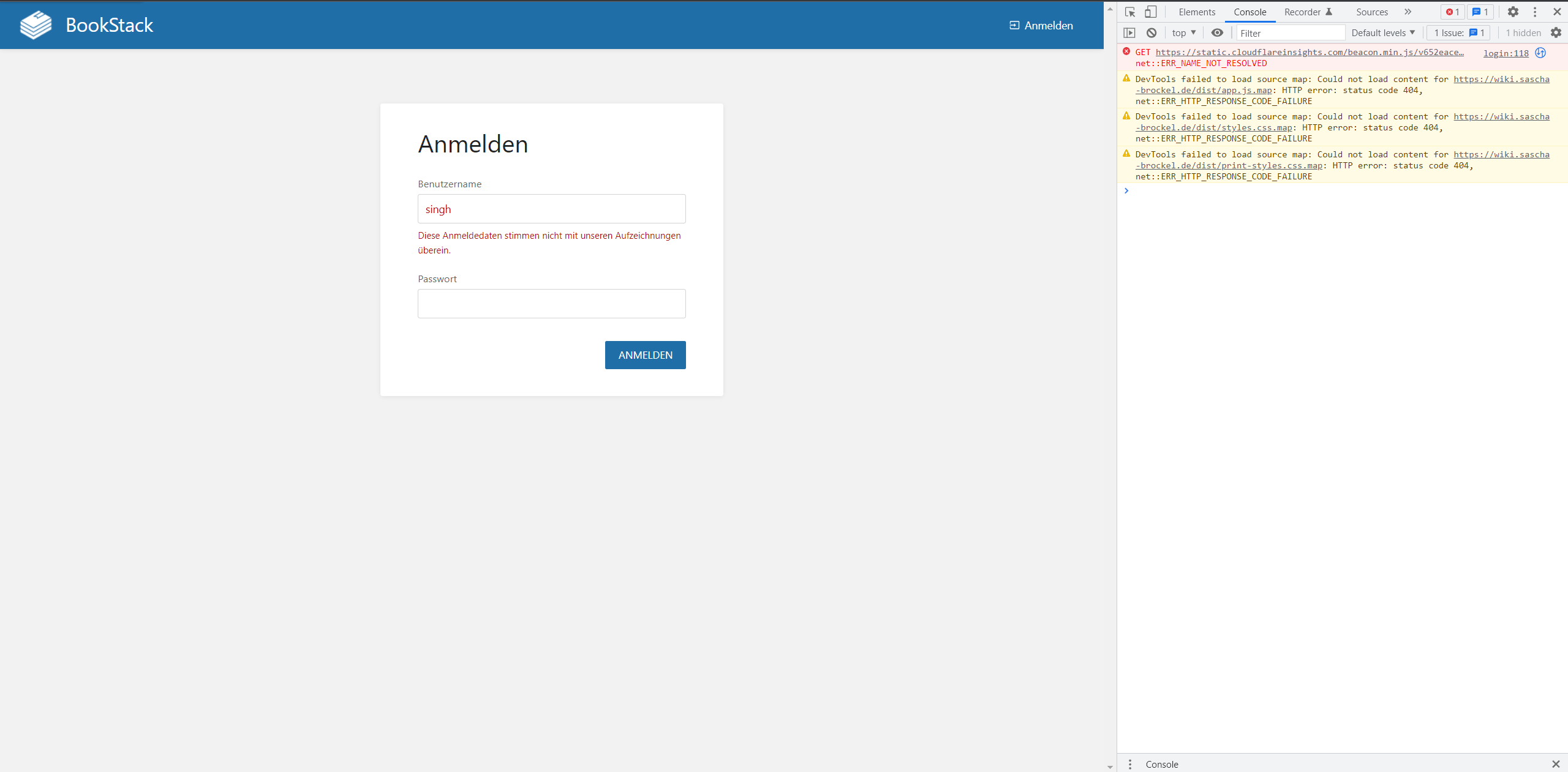
  • Can you screenshot the error you are seeing when attempting login? I just want to be 100% sure my assumption of the error, based on the information you have provided.
  • In the "Username" input upon login, Are you entering the uid of the user account? Definitely not the email, CN or some other username? Just want to be sure since by default all of these values would differ by default on OpenLDAP while being similar in some ways.
  • As per the above findings, try disabling the LDAP_THUMBNAIL_ATTRIBUTE and see if the LDAP_DUMP_USER_DETAILS option yields any results.
@ssddanbrown commented on GitHub (Apr 26, 2022): Okay, just spent a couple of hours on this. I replicated the LDAP side the best I could. I used my local dev bookstack instance though instead of a docker setup, I could attempt using the linuxserver.io image also with a similar config setup (using env_file) but it's late here. Maybe a next step if we don't get further from these findings. ### My Setup #### My `.env` options (Not docker-based, BookStack .env file) ```bash LDAP_SERVER=127.0.0.1:389 LDAP_BASE_DN="ou=users,dc=example,dc=org" LDAP_DN="cn=admin,dc=example,dc=org" LDAP_PASS="admin" LDAP_USER_FILTER=(&(uid=${user})) LDAP_VERSION=3 LDAP_ID_ATTRIBUTE=uid LDAP_EMAIL_ATTRIBUTE=mail LDAP_DISPLAY_NAME_ATTRIBUTE=cn LDAP_DUMP_USER_DETAILS=false LDAP_DUMP_USER_GROUPS=false LDAP_THUMBNAIL_ATTRIBUTE=jpegphoto LDAP_USER_TO_GROUPS=true LDAP_GROUP_ATTRIBUTE="memberOf" LDAP_REMOVE_FROM_GROUPS=false ``` #### My OpenLDAP setup [Just a direct use of this compose file, no changes.](https://github.com/osixia/docker-openldap/blob/master/example/docker-compose.yml) #### My OpenLDAP structure ![Screenshot from 2022-04-26 01-51-39](https://user-images.githubusercontent.com/8343178/165197485-c5bffe02-f26a-49cc-80b9-42ba25ba2229.png) ### My Findings The above functionally works fine for me, including group-sync once I read-up on the classes required in OpenLDAP. Some notes though: - The `LDAP_DUMP_USER_DETAILS=false` does fail as you reported in some cases, this is likely due to the `LDAP_THUMBNAIL_ATTRIBUTE=jpegphoto` option. If you remove/comment-out that option then the `LDAP_DUMP_USER_DETAILS` functionality should work again. I've opened #3396 to address this case in the future. - The `osixia/openldap:latest` docker container already had `memberOf` working, I did not have to do any setup. ### Next Steps While doing the above, I came up with the following additional questions and thoughts to diagnose: - Can you screenshot the error you are seeing when attempting login? I just want to be 100% sure my assumption of the error, based on the information you have provided. - In the "Username" input upon login, Are you entering the `uid` of the user account? Definitely not the email, CN or some other username? Just want to be sure since by default all of these values would differ by default on OpenLDAP while being similar in some ways. - As per the above findings, try disabling the `LDAP_THUMBNAIL_ATTRIBUTE` and see if the LDAP_DUMP_USER_DETAILS option yields any results.
Author
Owner

@saschabrockel commented on GitHub (Apr 26, 2022):

Okay sorry to hear that you've spent hours on that. I would have given you everything you need... because I already scripted enough files to exactly recreate the config. We can also have a call if it would help.

So first of all of course I'm using an adjusted docker-compose-yml for OpenLDAP. But interesting that you have memberOf instantly.

The error with LDAP_THUMBNAIL_ATTRIBUTE commented and LDAP_DUMP_USER_DETAILS=true:
image

The user I'll try to log in (you can see it is his uid):
image

I've used the exact same .env file now and I do not see any user information that is getting dumped. But of course it is Docker.
I really have no idea why. I mean at least something should happen.

LDAP Env Stuff:

LDAP_SERVER=192.168.178.29:389
LDAP_BASE_DN="ou=users,dc=sascha-brockel,dc=de"
LDAP_DN="cn=admin,dc=sascha-brockel,dc=de"
LDAP_PASS="pass"
LDAP_USER_FILTER=(&(uid=${user}))
LDAP_VERSION=3
LDAP_ID_ATTRIBUTE=uid
LDAP_EMAIL_ATTRIBUTE=mail
LDAP_DISPLAY_NAME_ATTRIBUTE=cn
LDAP_DUMP_USER_DETAILS=true
LDAP_DUMP_USER_GROUPS=false
LDAP_USER_TO_GROUPS=true
LDAP_GROUP_ATTRIBUTE="memberOf"
LDAP_REMOVE_FROM_GROUPS=false
AUTH_METHOD=ldap

Or do I need APP_DEBUG=true to be set?

@saschabrockel commented on GitHub (Apr 26, 2022): Okay sorry to hear that you've spent hours on that. I would have given you everything you need... because I already scripted enough files to exactly recreate the config. We can also have a call if it would help. So first of all of course I'm using an adjusted `docker-compose-yml` for OpenLDAP. But interesting that you have `memberOf ` instantly. The error with `LDAP_THUMBNAIL_ATTRIBUTE` commented and `LDAP_DUMP_USER_DETAILS=true`: ![image](https://user-images.githubusercontent.com/33376463/165326299-6218f868-133f-4df0-a0db-cfc98f10e22c.png) The user I'll try to log in (you can see it is his `uid`): ![image](https://user-images.githubusercontent.com/33376463/165326802-354f1ff4-3e9e-4ec4-a0e1-91a485a4ec0e.png) I've used the exact same `.env` file now and I do not see any user information that is getting dumped. But of course it is Docker. I really have no idea why. I mean at least something should happen. LDAP Env Stuff: ``` LDAP_SERVER=192.168.178.29:389 LDAP_BASE_DN="ou=users,dc=sascha-brockel,dc=de" LDAP_DN="cn=admin,dc=sascha-brockel,dc=de" LDAP_PASS="pass" LDAP_USER_FILTER=(&(uid=${user})) LDAP_VERSION=3 LDAP_ID_ATTRIBUTE=uid LDAP_EMAIL_ATTRIBUTE=mail LDAP_DISPLAY_NAME_ATTRIBUTE=cn LDAP_DUMP_USER_DETAILS=true LDAP_DUMP_USER_GROUPS=false LDAP_USER_TO_GROUPS=true LDAP_GROUP_ATTRIBUTE="memberOf" LDAP_REMOVE_FROM_GROUPS=false AUTH_METHOD=ldap ``` Or do I need `APP_DEBUG=true `to be set?
Author
Owner

@ssddanbrown commented on GitHub (Apr 26, 2022):

Or do I need APP_DEBUG=true to be set?

No, the data dump should show either way. Are you at least seeing JSON dumped to the screen (With lack of details) or does the option not seem to do anything?

I'll try and find some time later to spin up a linuxserver container to connect with the ldap setup to see if anything else shows up.

@ssddanbrown commented on GitHub (Apr 26, 2022): > Or do I need APP_DEBUG=true to be set? No, the data dump should show either way. Are you at least seeing JSON dumped to the screen (With lack of details) or does the option not seem to do anything? I'll try and find some time later to spin up a linuxserver container to connect with the ldap setup to see if anything else shows up.
Author
Owner

@saschabrockel commented on GitHub (Apr 26, 2022):

or does the option not seem to do anything

That's the exact problem. I have never seen anything from it with the exception of the malformed UTF-8 error. Tell me if I can help you in any way.

@saschabrockel commented on GitHub (Apr 26, 2022): > or does the option not seem to do anything That's the exact problem. I have never seen anything from it with the exception of the malformed UTF-8 error. Tell me if I can help you in any way.
Author
Owner

@ssddanbrown commented on GitHub (Apr 26, 2022):

Okay, Done some more testing, this time using docker for BookStack (via linuxserver.io container).

First of all, My recollection of LDAP_DUMP_USER_DETAILS was a bit off above, It will only dump when a user is found (Used more to check the values of a found user), sorry about that.

From my testing, I think this may be down to differences in how environment variables are handled between the docker composer environment and the env_file options. I found this by a fair amount of debugging by accessing the bookstack container while it was running and printing vars.
I could not get a way to get the user filter working in the env_file but if you move this option (Only need to do this single option due to its syntax) to the environment part of your docker-compose then things should work. Still need double-$ here though. Here's a snippet from my docker-comose.yml as an example:

  bookstack:
    image: linuxserver/bookstack
    container_name: ldap_bookstack
    env_file: ./bookstack.vars
    environment:
      - LDAP_USER_FILTER=(&(uid=$${user}))
    volumes:
     - ./bookstack/:/config
    ports:
     - 6875:80
    restart: unless-stopped
    depends_on:
     - bookstack_db

I think this different in handling has already been reported to docker under these issues:

Can you give that config change a try and let me know how it goes?

@ssddanbrown commented on GitHub (Apr 26, 2022): Okay, Done some more testing, this time using docker for BookStack (via linuxserver.io container). First of all, My recollection of `LDAP_DUMP_USER_DETAILS` was a bit off above, It will only dump when a user is found (Used more to check the values of a found user), sorry about that. From my testing, I think this may be down to differences in how environment variables are handled between the docker composer `environment` and the `env_file` options. I found this by a fair amount of debugging by accessing the bookstack container while it was running and printing vars. I could not get a way to get the user filter working in the `env_file` but if you move this option (Only need to do this single option due to its syntax) to the `environment` part of your docker-compose then things should work. Still need double-`$` here though. Here's a snippet from my `docker-comose.yml` as an example: ```yml bookstack: image: linuxserver/bookstack container_name: ldap_bookstack env_file: ./bookstack.vars environment: - LDAP_USER_FILTER=(&(uid=$${user})) volumes: - ./bookstack/:/config ports: - 6875:80 restart: unless-stopped depends_on: - bookstack_db ``` I think this different in handling has already been reported to docker under these issues: - https://github.com/docker/compose/issues/7648 - https://github.com/docker/compose/issues/7601 Can you give that config change a try and let me know how it goes?
Author
Owner

@saschabrockel commented on GitHub (Apr 27, 2022):

Oh, my goooood... I remember this bullshit... I'm sorry for wasting your time. This bug exists for years. On my work, I had the same problem with Spring Boot variables years ago with Docker and now I remember... it works now... so it is not your fault. Neither mine but yea...

Even my own complicated filter above works now. Maybe you should give a hint in the documentation for that problem and also link the issue of docker-compose... thank you very much for your effort! I can also tell that dump user worked instantly.

So the solution is: just put in the docker-compose.yml environment part and not in the env_file:
Even this works:

 environment:
      - LDAP_USER_FILTER=(&(uid=$${user})(|(objectclass=inetOrgPerson))(|(memberof=cn=admin,ou=groups,dc=sascha-brockel,dc=de)(memberof=cn=family,ou=groups,dc=sascha-brockel,dc=de)(memberof=cn=homies,ou=groups,dc=sascha-brockel,dc=de)(memberof=cn=yass,ou=groups,dc=sascha-brockel,dc=de)))
@saschabrockel commented on GitHub (Apr 27, 2022): Oh, my goooood... I remember this bullshit... I'm sorry for wasting your time. This bug exists for years. On my work, I had the same problem with Spring Boot variables years ago with Docker and now I remember... it works now... so it is not your fault. Neither mine but yea... Even my own complicated filter above works now. Maybe you should give a hint in the documentation for that problem and also link the issue of docker-compose... thank you very much for your effort! I can also tell that dump user worked instantly. So the solution is: just put in the `docker-compose.yml` environment part and not in the `env_file`: Even this works: ``` environment: - LDAP_USER_FILTER=(&(uid=$${user})(|(objectclass=inetOrgPerson))(|(memberof=cn=admin,ou=groups,dc=sascha-brockel,dc=de)(memberof=cn=family,ou=groups,dc=sascha-brockel,dc=de)(memberof=cn=homies,ou=groups,dc=sascha-brockel,dc=de)(memberof=cn=yass,ou=groups,dc=sascha-brockel,dc=de))) ```
Author
Owner

@ssddanbrown commented on GitHub (Apr 27, 2022):

@saschabrockel No worries, I'm just happy we found the issue and got things going!

We already had a note on that option for docker-compose regarding the double-dollar, but I've now updated the docs with an extra line just to say it cannot be used with the env_file option.

@ssddanbrown commented on GitHub (Apr 27, 2022): @saschabrockel No worries, I'm just happy we found the issue and got things going! We already had a note on that option for docker-compose regarding the double-dollar, but I've now updated the docs with an extra line just to say it cannot be used with the `env_file` option.
Sign in to join this conversation.
1 Participants
Notifications
Due Date
No due date set.
Dependencies

No dependencies set.

Reference: starred/BookStack#2760