WYSIWYG: The Code Block and Inline Code Options are missing #2722

Closed
opened 2026-02-05 04:55:39 +03:00 by OVERLORD · 4 comments
Owner

Originally created by @cdrfun on GitHub (Mar 23, 2022).

Describe the Bug

With one of the latest updates (sorry, can't pin it down to a version) the WYSIWYG lost the ability to define the formats Code Block and Inline Code. I also noticed the WYSIWYG Editor is in German for me now, this may be related. (German is my default Bookstack language).

Steps to Reproduce

  1. Open page
  2. Look into Formats

Expected Behaviour

Code Block and Inline Code Options shall be visible

Screenshots or Additional Context

grafik

Browser Details

Edge 99.0.1150.46 and Firefox 98.0.1 on Windows 10

Exact BookStack Version

v22.02.3

PHP Version

No response

Hosting Environment

linuxserver.io Docker

Originally created by @cdrfun on GitHub (Mar 23, 2022). ### Describe the Bug With one of the latest updates (sorry, can't pin it down to a version) the WYSIWYG lost the ability to define the formats Code Block and Inline Code. I also noticed the WYSIWYG Editor is in German for me now, this may be related. (German is my default Bookstack language). ### Steps to Reproduce 1. Open page 2. Look into Formats ### Expected Behaviour Code Block and Inline Code Options shall be visible ### Screenshots or Additional Context ![grafik](https://user-images.githubusercontent.com/146877/159645241-5f874d79-1582-472d-a746-83678184c521.png) ### Browser Details Edge 99.0.1150.46 and Firefox 98.0.1 on Windows 10 ### Exact BookStack Version v22.02.3 ### PHP Version _No response_ ### Hosting Environment linuxserver.io Docker
OVERLORD added the 🐛 Bug label 2026-02-05 04:55:39 +03:00
Author
Owner

@cdrfun commented on GitHub (Mar 23, 2022):

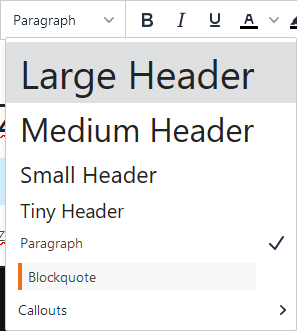
Using German seems to be unrelated. After changing the language to English, the error still occurs:
grafik

@cdrfun commented on GitHub (Mar 23, 2022): Using German seems to be unrelated. After changing the language to English, the error still occurs: ![grafik](https://user-images.githubusercontent.com/146877/159647545-62b62c74-6a44-4381-8f78-c725814bbe55.png)
Author
Owner

@ssddanbrown commented on GitHub (Mar 23, 2022):

Hi @cdrfun,
Both of these options are still present, please see #3310.

@ssddanbrown commented on GitHub (Mar 23, 2022): Hi @cdrfun, Both of these options are still present, please see #3310.
Author
Owner

@cdrfun commented on GitHub (Mar 23, 2022):

Hey, thanks for pointing me into the right direction!

@cdrfun commented on GitHub (Mar 23, 2022): Hey, thanks for pointing me into the right direction!
Author
Owner

@sprklinginfo commented on GitHub (Jun 3, 2022):

I was about to post for this issue too as I just updated to v22.04.2 today. but I found out that my custom them for code block doesn't work anymore. I followed the instruction "Changing Code Block Themes" and here is my code:

<link href = "https://cdnjs.cloudflare.com/ajax/libs/codemirror/5.61.0/theme/material-palenight.min.css"
rel = "stylesheet" / >
<script > window.codeTheme = 'material-palenight'; </script>

but now all code blocks are using a light white theme... any tips on how to fix this? Thanks

@sprklinginfo commented on GitHub (Jun 3, 2022): I was about to post for this issue too as I just updated to v22.04.2 today. but I found out that my custom them for code block doesn't work anymore. I followed the instruction "[Changing Code Block Themes](https://www.bookstackapp.com/docs/admin/visual-customisation/)" and here is my code: ``` <link href = "https://cdnjs.cloudflare.com/ajax/libs/codemirror/5.61.0/theme/material-palenight.min.css" rel = "stylesheet" / > <script > window.codeTheme = 'material-palenight'; </script> ``` but now all code blocks are using a light white theme... any tips on how to fix this? Thanks
Sign in to join this conversation.
1 Participants
Notifications
Due Date
No due date set.
Dependencies

No dependencies set.

Reference: starred/BookStack#2722