SAML2 authentication "Error on parseRemoteXML" #2716

Closed
opened 2026-02-05 04:54:20 +03:00 by OVERLORD · 5 comments
Owner

Originally created by @Tuphal on GitHub (Mar 21, 2022).

Describe the Bug

in v22.02 saml2 config was working without issue.

I updated to v22.02.3 and now I get following error:
Error on parseRemoteXML. Error parsing metadata. DOMDocument::loadXML(): Start tag expected, '<' not found in Entity, line: 1

grafik

Steps to Reproduce

  1. use bookstack v22.02
  2. config SAML2 as described in:
    https://www.bookstackapp.com/docs/admin/saml2-auth/
    and
    https://goauthentik.io/integrations/services/bookstack/
  3. update to v22.02.3

Expected Behaviour

login working like previously

Screenshots or Additional Context

Docker variables:
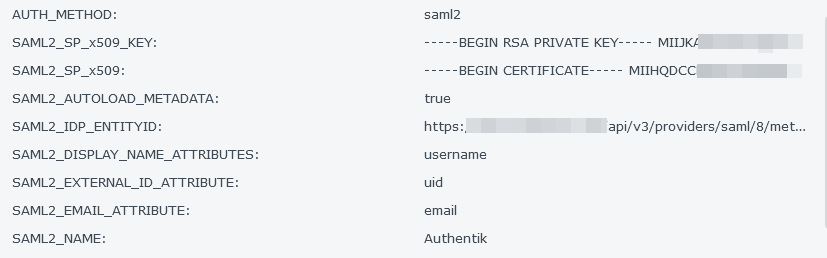
grafik

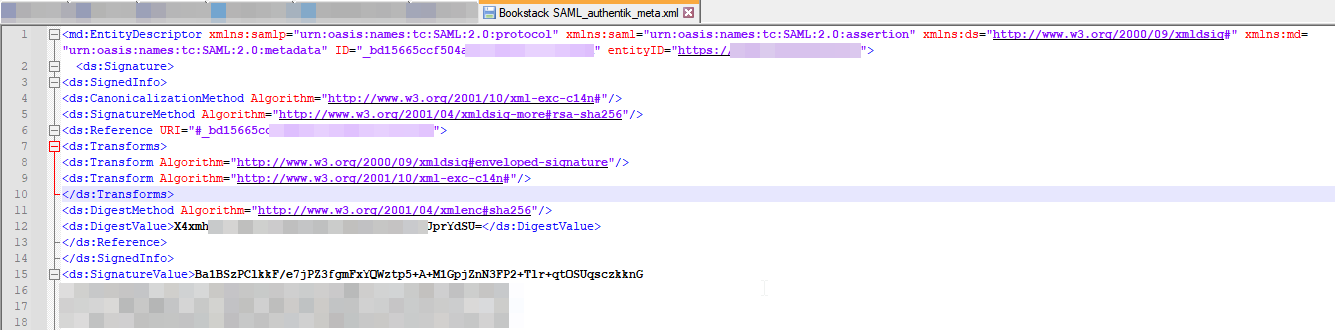
xml file from authentik:
grafik

Browser Details

Firefox 98.0

Exact BookStack Version

v22.02.3

PHP Version

7.4.26

Hosting Environment

Docker on Synology

Originally created by @Tuphal on GitHub (Mar 21, 2022). ### Describe the Bug in v22.02 saml2 config was working without issue. I updated to v22.02.3 and now I get following error: `Error on parseRemoteXML. Error parsing metadata. DOMDocument::loadXML(): Start tag expected, '<' not found in Entity, line: 1` ![grafik](https://user-images.githubusercontent.com/42291781/159234152-08bfc4c7-1ae5-4c4e-a33d-bb0bd99e88e1.png) ### Steps to Reproduce 1. use bookstack v22.02 2. config SAML2 as described in: https://www.bookstackapp.com/docs/admin/saml2-auth/ and https://goauthentik.io/integrations/services/bookstack/ 3. update to v22.02.3 ### Expected Behaviour login working like previously ### Screenshots or Additional Context Docker variables: ![grafik](https://user-images.githubusercontent.com/42291781/159233843-86b81c9b-7226-4f32-9536-789bacb8162c.png) xml file from authentik: ![grafik](https://user-images.githubusercontent.com/42291781/159234038-5bd2a1d7-2722-4f81-abcb-da27ea06a72d.png) ### Browser Details Firefox 98.0 ### Exact BookStack Version v22.02.3 ### PHP Version 7.4.26 ### Hosting Environment Docker on Synology
OVERLORD added the 🐛 Bug label 2026-02-05 04:54:20 +03:00
Author
Owner

@ssddanbrown commented on GitHub (Mar 21, 2022):

Hi @Tuphal,
I wouldn't have expected any changes in SAML functionality in these versions, everything mostly remained the same in that regard.

Are you able to navigate to your SAML2_IDP_ENTITYID URL in an incognito/private browser window successfully? And does that return pretty much the same XML as shown in your notepad++ screenshot?

@ssddanbrown commented on GitHub (Mar 21, 2022): Hi @Tuphal, I wouldn't have expected any changes in SAML functionality in these versions, everything mostly remained the same in that regard. Are you able to navigate to your `SAML2_IDP_ENTITYID` URL in an incognito/private browser window successfully? And does that return pretty much the same XML as shown in your notepad++ screenshot?
Author
Owner

@Tuphal commented on GitHub (Mar 21, 2022):

Hi @ssddanbrown,

the XML in notepad++ above is the one I downloaded from the SAML2_IDP_ENTITYID URL:

<md:EntityDescriptor xmlns:samlp="urn:oasis:names:tc:SAML:2.0:protocol" xmlns:saml="urn:oasis:names:tc:SAML:2.0:assertion" xmlns:ds="http://www.w3.org/2000/09/xmldsig#" xmlns:md="urn:oasis:names:tc:SAML:2.0:metadata" ID="_8de4cc...ID..." entityID="https://...ADDRESS...">
  <ds:Signature>
<ds:SignedInfo>
<ds:CanonicalizationMethod Algorithm="http://www.w3.org/2001/10/xml-exc-c14n#"/>
<ds:SignatureMethod Algorithm="http://www.w3.org/2001/04/xmldsig-more#rsa-sha256"/>
<ds:Reference URI="#_8de4cc....URI....">
<ds:Transforms>
<ds:Transform Algorithm="http://www.w3.org/2000/09/xmldsig#enveloped-signature"/>
<ds:Transform Algorithm="http://www.w3.org/2001/10/xml-exc-c14n#"/>
</ds:Transforms>
<ds:DigestMethod Algorithm="http://www.w3.org/2001/04/xmlenc#sha256"/>
<ds:DigestValue>mA2WfS....VALUE....</ds:DigestValue>
</ds:Reference>
</ds:SignedInfo>
<ds:SignatureValue>YaQcTxk...SIGN...</ds:SignatureValue>
<ds:KeyInfo>
<ds:X509Data>
<ds:X509Certificate>MIIHQDCC...CERT...</ds:X509Certificate>
</ds:X509Data>
</ds:KeyInfo>
</ds:Signature>
  <md:IDPSSODescriptor protocolSupportEnumeration="urn:oasis:names:tc:SAML:2.0:protocol">
    <md:KeyDescriptor use="signing">
      <ds:KeyInfo>
        <ds:X509Data>
          <ds:X509Certificate>MIIHQDCC...CERT...</ds:X509Certificate>
        </ds:X509Data>
      </ds:KeyInfo>
    </md:KeyDescriptor>
    <md:NameIDFormat>urn:oasis:names:tc:SAML:1.1:nameid-format:emailAddress</md:NameIDFormat>
    <md:NameIDFormat>urn:oasis:names:tc:SAML:2.0:nameid-format:persistent</md:NameIDFormat>
    <md:NameIDFormat>urn:oasis:names:tc:SAML:2.0:nameid-format:X509SubjectName</md:NameIDFormat>
    <md:NameIDFormat>urn:oasis:names:tc:SAML:2.0:nameid-format:transient</md:NameIDFormat>
    <md:SingleSignOnService Binding="urn:oasis:names:tc:SAML:2.0:bindings:HTTP-Redirect" Location="https://...ADDRESS../application/saml/bookstack/sso/binding/redirect/"/>
    <md:SingleSignOnService Binding="urn:oasis:names:tc:SAML:2.0:bindings:HTTP-POST" Location="https://...ADDRESS../application/saml/bookstack/sso/binding/post/"/>
  </md:IDPSSODescriptor>
</md:EntityDescriptor>

Sorry, I need to correct my statement above:
I updated from
Linuxserver.io version:- v21.12.5-ls179 Build-date:- 2022-02-10T17:01:21+01:00
to
Linuxserver.io version:- v22.02.3-ls7 Build-date:- 2022-03-17T11:04:05-05:00
But I can see no realated changes in the changelog

@Tuphal commented on GitHub (Mar 21, 2022): Hi @ssddanbrown, the XML in notepad++ above is the one I downloaded from the `SAML2_IDP_ENTITYID` URL: ``` <md:EntityDescriptor xmlns:samlp="urn:oasis:names:tc:SAML:2.0:protocol" xmlns:saml="urn:oasis:names:tc:SAML:2.0:assertion" xmlns:ds="http://www.w3.org/2000/09/xmldsig#" xmlns:md="urn:oasis:names:tc:SAML:2.0:metadata" ID="_8de4cc...ID..." entityID="https://...ADDRESS..."> <ds:Signature> <ds:SignedInfo> <ds:CanonicalizationMethod Algorithm="http://www.w3.org/2001/10/xml-exc-c14n#"/> <ds:SignatureMethod Algorithm="http://www.w3.org/2001/04/xmldsig-more#rsa-sha256"/> <ds:Reference URI="#_8de4cc....URI...."> <ds:Transforms> <ds:Transform Algorithm="http://www.w3.org/2000/09/xmldsig#enveloped-signature"/> <ds:Transform Algorithm="http://www.w3.org/2001/10/xml-exc-c14n#"/> </ds:Transforms> <ds:DigestMethod Algorithm="http://www.w3.org/2001/04/xmlenc#sha256"/> <ds:DigestValue>mA2WfS....VALUE....</ds:DigestValue> </ds:Reference> </ds:SignedInfo> <ds:SignatureValue>YaQcTxk...SIGN...</ds:SignatureValue> <ds:KeyInfo> <ds:X509Data> <ds:X509Certificate>MIIHQDCC...CERT...</ds:X509Certificate> </ds:X509Data> </ds:KeyInfo> </ds:Signature> <md:IDPSSODescriptor protocolSupportEnumeration="urn:oasis:names:tc:SAML:2.0:protocol"> <md:KeyDescriptor use="signing"> <ds:KeyInfo> <ds:X509Data> <ds:X509Certificate>MIIHQDCC...CERT...</ds:X509Certificate> </ds:X509Data> </ds:KeyInfo> </md:KeyDescriptor> <md:NameIDFormat>urn:oasis:names:tc:SAML:1.1:nameid-format:emailAddress</md:NameIDFormat> <md:NameIDFormat>urn:oasis:names:tc:SAML:2.0:nameid-format:persistent</md:NameIDFormat> <md:NameIDFormat>urn:oasis:names:tc:SAML:2.0:nameid-format:X509SubjectName</md:NameIDFormat> <md:NameIDFormat>urn:oasis:names:tc:SAML:2.0:nameid-format:transient</md:NameIDFormat> <md:SingleSignOnService Binding="urn:oasis:names:tc:SAML:2.0:bindings:HTTP-Redirect" Location="https://...ADDRESS../application/saml/bookstack/sso/binding/redirect/"/> <md:SingleSignOnService Binding="urn:oasis:names:tc:SAML:2.0:bindings:HTTP-POST" Location="https://...ADDRESS../application/saml/bookstack/sso/binding/post/"/> </md:IDPSSODescriptor> </md:EntityDescriptor> ``` Sorry, I need to correct my statement above: I updated from `Linuxserver.io version:- v21.12.5-ls179 Build-date:- 2022-02-10T17:01:21+01:00` to `Linuxserver.io version:- v22.02.3-ls7 Build-date:- 2022-03-17T11:04:05-05:00` But I can see no realated changes in the changelog
Author
Owner

@Tuphal commented on GitHub (Mar 21, 2022):

I tried to locate the issue.
If I provide the downloaded XML file through my file.example.com site, I only get a Authentication failed message:

DE: Anmeldung mit Authentik fehlgeschlagen. System konnte keine erfolgreiche Autorisierung bereitstellen
EN: Login with Authentik failed. System could not provide successful authorization

grafik

Therefore it seems, that it is no file parsing fault.

Edit:
The SAML2_IDP_ENTITYID URL is no direct xml-path:
https://auth.example.com/api/v3/providers/saml/8/metadata/?download

@Tuphal commented on GitHub (Mar 21, 2022): I tried to locate the issue. If I provide the downloaded XML file through my file.example.com site, I only get a Authentication failed message: ``` DE: Anmeldung mit Authentik fehlgeschlagen. System konnte keine erfolgreiche Autorisierung bereitstellen EN: Login with Authentik failed. System could not provide successful authorization ``` ![grafik](https://user-images.githubusercontent.com/42291781/159250407-56bd8c6b-8732-4f12-8eeb-17f162e1339b.png) Therefore it seems, that it is no file parsing fault. Edit: The `SAML2_IDP_ENTITYID` URL is no direct xml-path: `https://auth.example.com/api/v3/providers/saml/8/metadata/?download`
Author
Owner

@ssddanbrown commented on GitHub (Mar 21, 2022):

I've just tested this in my dev environment using goauthentik/server:2022.3.2 and the latest release version of BookStack.

My bookstack instance could auto-load my metadata direct from the Authentik server container via the download link (http://localhost:8083/api/v3/providers/saml/2/metadata/?download). Not sure why this is failing for you, could possibly have issues like the one experienced if any proxies or layers in-between are altering headers/encoding/content.

I was able to login okay after set-up.

The error shown can arise from a variety of failure points along the auth journey. Make sure your SAML provider in Authentik has the "Service Provider Binding" set to "Post". You will receive the shown error if that is set to "Redirect".

@ssddanbrown commented on GitHub (Mar 21, 2022): I've just tested this in my dev environment using `goauthentik/server:2022.3.2` and the latest release version of BookStack. My bookstack instance could auto-load my metadata direct from the Authentik server container via the download link (`http://localhost:8083/api/v3/providers/saml/2/metadata/?download`). Not sure why this is failing for you, could possibly have issues like the one experienced if any proxies or layers in-between are altering headers/encoding/content. I was able to login okay after set-up. The error shown can arise from a variety of failure points along the auth journey. Make sure your SAML provider in Authentik has the "Service Provider Binding" set to "Post". You will receive the shown error if that is set to "Redirect".
Author
Owner

@Tuphal commented on GitHub (Mar 21, 2022):

I'm still tinkering around and could determine the issue:
It is caused by the reverse nginx proxy for my auth.example.com:
This line broke it: proxy_set_header Accept-Encoding gzip;

With Firefox I could download the XML file from SAML2_IDP_ENTITYID without issue.
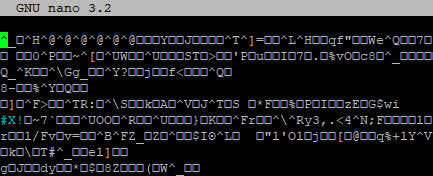
On my RasPi with wget or cURL I only got zipped(?) values:
grafik

After removing the line above, I could load the file on Linux without issue and could log into.

Thank you very much for the help and fast response.

@Tuphal commented on GitHub (Mar 21, 2022): I'm still tinkering around and could determine the issue: It is caused by the reverse nginx proxy for my auth.example.com: This line broke it: ` proxy_set_header Accept-Encoding gzip;` With Firefox I could download the XML file from `SAML2_IDP_ENTITYID` without issue. On my RasPi with wget or cURL I only got zipped(?) values: ![grafik](https://user-images.githubusercontent.com/42291781/159256204-66173ff6-d205-4c8c-ae1d-a5322b6c839f.png) After removing the line above, I could load the file on Linux without issue and could log into. Thank you very much for the help and fast response.
Sign in to join this conversation.
1 Participants
Notifications
Due Date
No due date set.
Dependencies

No dependencies set.

Reference: starred/BookStack#2716