[Solved] Editor: Code Block / Inline Code formatting missing #2692

Closed
opened 2026-02-05 04:49:23 +03:00 by OVERLORD · 5 comments
Owner

Originally created by @SimpelMe on GitHub (Mar 3, 2022).

Describe the Bug

When I want to write a code block or inline code I do miss both formatting options in the pull down menu.

Steps to Reproduce

Create new page. Click on arrow right to "Paragraph". Look all options inside.

Expected Behaviour

Should see there

  • Code Block
  • Inline Code

Screenshots or Additional Context

Not seeing both:
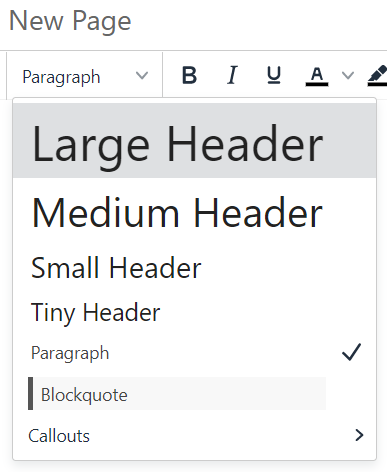
BS_Editor_Code-Block-missing

  • Both can be invoked by key commands
  • Bug didn't appear on BookStack v21.12.5 I used before.

Browser Details

Google Chrome 98.0.4758.102 on Windows 10

Exact BookStack Version

BookStack v22.02.2

PHP Version

7.4.25 cli

Hosting Environment

  • 5.10.27-gentoo
  • no proxy
Originally created by @SimpelMe on GitHub (Mar 3, 2022). ### Describe the Bug When I want to write a code block or inline code I do miss both formatting options in the pull down menu. ### Steps to Reproduce Create new page. Click on arrow right to "Paragraph". Look all options inside. ### Expected Behaviour Should see there - Code Block - Inline Code ### Screenshots or Additional Context Not seeing both: ![BS_Editor_Code-Block-missing](https://user-images.githubusercontent.com/31295375/156644781-5352af84-0d8a-44e8-a6d9-74dcea0769aa.PNG) - Both can be invoked by key commands - Bug didn't appear on BookStack v21.12.5 I used before. ### Browser Details Google Chrome 98.0.4758.102 on Windows 10 ### Exact BookStack Version BookStack v22.02.2 ### PHP Version 7.4.25 cli ### Hosting Environment - 5.10.27-gentoo - no proxy
OVERLORD added the 🐛 Bug label 2026-02-05 04:49:23 +03:00
Author
Owner

@ssddanbrown commented on GitHub (Mar 4, 2022):

Hi @SimpelMe,
Both of these options have moved as of v22.02.
Inline code formatting is now in the overlfow menu of the same section as other inline formats (Where bold is located).
Code blocks can be found in the overflow menu of the "Insert" elemens (Where links, tables, images etc.. are located).

@ssddanbrown commented on GitHub (Mar 4, 2022): Hi @SimpelMe, Both of these options have moved as of v22.02. Inline code formatting is now in the overlfow menu of the same section as other inline formats (Where bold is located). Code blocks can be found in the overflow menu of the "Insert" elemens (Where links, tables, images etc.. are located).
Author
Owner

@SimpelMe commented on GitHub (Mar 4, 2022):

Now I found it. Thanks.
I close the issue.

@SimpelMe commented on GitHub (Mar 4, 2022): Now I found it. Thanks. I close the issue.
Author
Owner

@andreapx commented on GitHub (Apr 10, 2024):

@ssddanbrown sorry for necroposting, but I just see the inline code, not the block code:
10-04-2024_14-43-38_1_Editing_Page_Container_su_Docker__BookStack_—_Mozi

@andreapx commented on GitHub (Apr 10, 2024): @ssddanbrown sorry for necroposting, but I just see the inline code, not the block code: ![10-04-2024_14-43-38_1_Editing_Page_Container_su_Docker__BookStack_—_Mozi](https://github.com/BookStackApp/BookStack/assets/13846728/368cc5f5-1501-4f51-96d0-9bb6233af719)
Author
Owner

@ssddanbrown commented on GitHub (Apr 10, 2024):

@andreapx It's in the insert/block section alongside tables/images (since it's own block/content type, rather than a formatting option of text within its own block type):

image

@ssddanbrown commented on GitHub (Apr 10, 2024): @andreapx It's in the insert/block section alongside tables/images (since it's own block/content type, rather than a formatting option of text within its own block type): ![image](https://github.com/BookStackApp/BookStack/assets/8343178/4eaeba0b-51f5-4674-8152-fe8bc2a3eda9)
Author
Owner

@andreapx commented on GitHub (Apr 10, 2024):

@andreapx It's in the insert/block section alongside tables/images (since it's own block/content type, rather than a formatting option of text within its own block type):

Damn...sorry!
Thanks!

@andreapx commented on GitHub (Apr 10, 2024): > @andreapx It's in the insert/block section alongside tables/images (since it's own block/content type, rather than a formatting option of text within its own block type): Damn...sorry! Thanks!
Sign in to join this conversation.
1 Participants
Notifications
Due Date
No due date set.
Dependencies

No dependencies set.

Reference: starred/BookStack#2692